
1. Introduction
This manual provides essential information for the safe and effective operation of your SENLAN LED Par Panel Stage Light, model RS-30. Please read this manual thoroughly before installation and use, and retain it for future reference. This device is designed for stage lighting applications, offering versatile color mixing and control options.
2. Safety Information
- Always connect the device to a grounded power outlet.
- Ensure the power supply voltage matches the device's requirements (90V-240V/50-60Hz).
- Do not open the housing; there are no user-serviceable parts inside. Refer all servicing to qualified personnel.
- Avoid direct eye exposure to the light source, as it can cause eye damage.
- Keep the device away from moisture, water, and high temperatures.
- Ensure adequate ventilation around the unit to prevent overheating.
- Mount the device securely to prevent accidental falls.
3. Product Overview
The SENLAN LED Par Panel Stage Light RS-30 is a versatile lighting fixture featuring a combination of RGB and white LEDs, designed for various stage and event lighting needs. It offers multiple control modes and effects.
Key Features:
- Light Source: 280pcs x 0.5W 5050 SMD RGB 3-in-1 LEDs + 56pcs x 0.5W SMD5050 white LEDs.
- Cooling System: Intelligent fan for temperature monitoring and cooling, operating only when necessary to maintain quiet performance.
- DMX Modes: 5 different DMX modes, allowing control over 16 individual light sections (parties). Each party consists of either 35 RGB LEDs or 14 white LEDs, enabling complex effects.
- Versatile Functionality: Can operate as a strobe light or a standard par light, with over 75 different running effects.
- Manual Color Control: Allows manual adjustment of individual RGB color shades from 0-255, similar to a DMX controller.
- Power Supply: 90V-240V/50-60Hz with a 1A fuse.
- Wattage: 50W.
- Construction: Durable plastic housing with acrylic, ABS, and aluminum components.
Product Components:
The light unit includes a power cable and this user manual.

Figure 3.1: Front view of the SENLAN LED Par Panel Stage Light, displaying various colors.
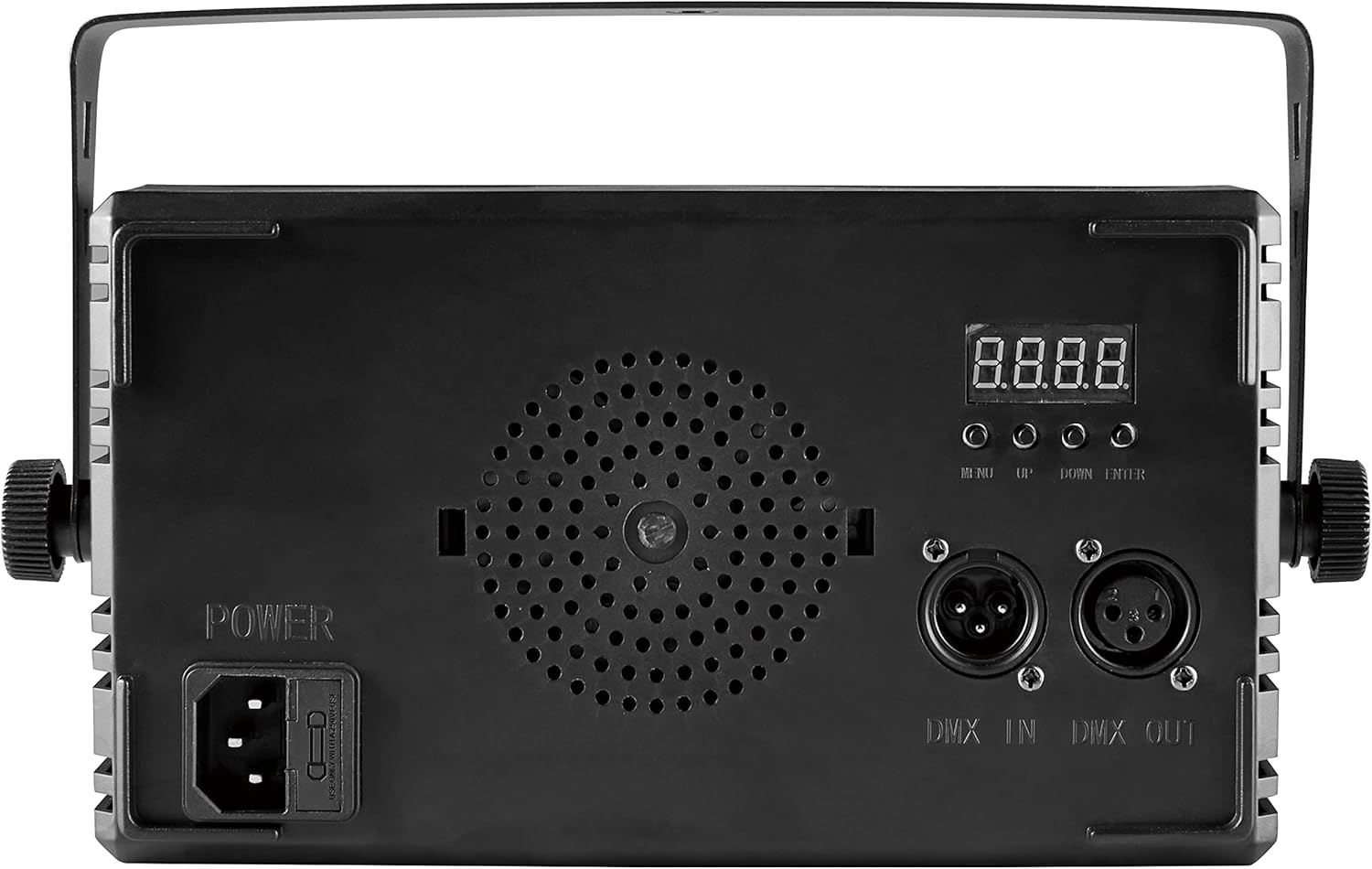
Figure 3.2: Rear panel of the SENLAN LED Par Panel Stage Light, detailing power input, DMX connections, and control interface.
4. Setup
4.1 Mounting
The SENLAN LED Par Panel Stage Light is designed for rack mounting. Ensure the mounting surface or structure is capable of safely supporting the weight of the fixture (approximately 1 pound or 0.65 kg) and any additional equipment. Use appropriate clamps or hardware for secure installation.
4.2 Power Connection
- Connect the provided power cable to the power input on the rear of the unit.
- Plug the other end of the power cable into a compatible grounded electrical outlet (90V-240V/50-60Hz).
4.3 DMX Connection (Optional)
For DMX control, connect a DMX controller to the DMX IN port using a standard 3-pin DMX cable. For daisy-chaining multiple units, connect the DMX OUT of the first unit to the DMX IN of the next unit.
5. Operating Modes
The SENLAN LED Par Panel Stage Light offers four primary control modes:
5.1 DMX512 Control
This mode allows external control via a DMX controller. The unit supports 5 different DMX modes, enabling precise control over individual light sections and effects. Common DMX channel assignments include:
- Channel 1: Effect selection
- Channel 2: Effect mode
- Channel 3: Effect speed
- Channel 4: Overall intensity level
- Channel 5: Red intensity
- Channel 6: Green intensity
- Channel 7: Blue intensity
- Channel 8: White intensity
Refer to your DMX controller's manual for specific programming instructions. The unit's display and buttons (MENU, UP, DOWN, ENTER) on the rear panel are used to set the DMX address and select DMX modes.
5.2 Automatic Operation
In automatic mode, the light cycles through its pre-programmed internal effects without external input. This mode is suitable for continuous, dynamic lighting displays.

Figure 5.1: The light operating in an automatic blue color sequence.
5.3 Sound-Activated Mode
The built-in microphone allows the light to react to ambient sound, synchronizing its effects with music or other audio. This mode is ideal for parties and events where dynamic lighting is desired.
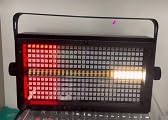
Figure 5.2: The light displaying a red pattern, potentially in response to sound.
5.4 Master/Slave Mode
Connect multiple RS-30 units via DMX cables. Set one unit as the 'Master' and the others as 'Slave' units. The slave units will then mirror the effects and settings of the master unit, allowing for synchronized lighting across multiple fixtures without a dedicated DMX controller.

Figure 5.3: Two units operating in a synchronized colorful display.

Figure 5.4: Two units operating in a synchronized white light display.
6. Maintenance
- Cleaning: Regularly clean the exterior of the unit with a soft, dry cloth. Do not use abrasive cleaners or solvents.
- Ventilation: Ensure the cooling fan and ventilation openings are free from dust and obstructions. The intelligent fan will activate as needed to prevent overheating.
- Inspection: Periodically check power cables and DMX connections for any signs of wear or damage. Replace any damaged cables immediately.
- Storage: When not in use, store the light in a dry, dust-free environment.
7. Troubleshooting
- No Power: Check the power cable connection, the wall outlet, and the 1A fuse located near the power input. Replace the fuse if blown.
- No Light Output: Verify power connection. If using DMX, ensure the DMX address is correctly set and the DMX signal is present. Check the selected operating mode.
- Incorrect DMX Control: Confirm the DMX address on the unit matches the address set on your controller. Ensure DMX cables are correctly connected (IN to OUT).
- Rattling Sounds: If internal components are rattling, discontinue use and contact customer support. This may indicate loose parts requiring professional inspection.
- Overheating: Ensure the fan and vents are clear. If the unit frequently overheats, reduce ambient temperature or ensure proper airflow. The intelligent fan should manage internal temperatures.
8. Specifications
| Feature | Specification |
|---|---|
| Model Number | RS-30 |
| Light Source | 280pcs x 0.5W 5050 SMD RGB 3-in-1 LED + 56pcs x 0.5W SMD5050 White LED |
| Total Number of Light Sources | 336 |
| Wattage | 50W |
| Voltage | 90V-240V / 50-60Hz |
| Amperage | 1A (Fuse) |
| Control Modes | DMX512, Automatic, Sound-Activated, Master/Slave |
| DMX Modes | 5 |
| Material | Acrylic, Acrylonitrile Butadiene Styrene (ABS), Aluminum |
| Finish Type | Plastic |
| Product Dimensions (L x W x H) | 10.6" x 2.76" x 7" (26.9cm x 7cm x 17.8cm) |
| Item Weight | 1 pound (0.65 kg) |
| Mounting Type | Rack Mount |
| Included Components | Power cable, User manual |
9. Warranty and Support
Specific warranty details for the SENLAN LED Par Panel Stage Light RS-30 are typically provided at the point of purchase or by the manufacturer. Please retain your proof of purchase for any warranty claims. For technical support or inquiries regarding your product, please contact the seller or the manufacturer, SEBOA, directly.