1. Install Adjustable Foot Pads
Attach the adjustable foot pads to the base of the desk frame components. These pads help stabilize the desk on uneven surfaces.
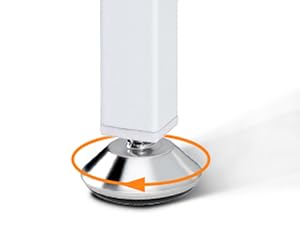
Image: Attaching the adjustable foot pads to the base of the desk legs.

Model: B01011227 | Brand: ODK
This manual provides detailed instructions for the assembly, operation, and maintenance of your ODK L-Shaped Desk. Please read this manual carefully before beginning assembly or use to ensure proper setup and safe operation.
Please verify that all components listed below are present and undamaged before proceeding with assembly. Refer to the included parts list for detailed identification.

Image: All components of the ODK L-Shaped Desk laid out for inspection.
The assembly process typically takes about 1.5 to 2 hours. Follow the steps carefully, referring to the diagrams and video for guidance.
Video: Detailed installation guide for the ODK Corner Desk with USB Charging Port.
Attach the adjustable foot pads to the base of the desk frame components. These pads help stabilize the desk on uneven surfaces.
Image: Attaching the adjustable foot pads to the base of the desk legs.
Connect the main frame components as shown in the assembly video. Pay attention to the orientation of parts and screw holes.

Image: The L-shaped desk frame, illustrating the assembled structure.
Install the bottom shelf into the designated area of the desk frame. This shelf is designed to hold a PC tower or provide additional storage.
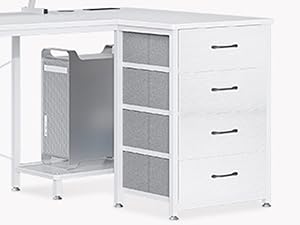
Image: The lower shelf, ideal for a PC tower or other items.
Carefully place the desktop panels onto the assembled desk frame. Ensure all screw holes align and secure the panels firmly.

Image: The desk with desktop panels installed, showing the overall structure.
Assemble and install the monitor shelf onto the desktop. This elevated shelf helps improve ergonomic posture by raising your monitors to eye level.

Image: User demonstrating proper ergonomic posture with the monitor shelf.
Insert the cable grommet into its hole and then install the integrated power strip into its designated slot on the desktop. Secure it firmly.

Image: Integrated power strip with two AC outlets and two USB ports.
Expand the fabric side pocket and attach it to the designated hanging points on the desk frame. This provides convenient additional storage.
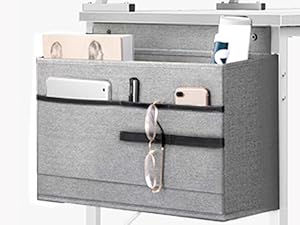
Image: The fabric storage pocket attached to the side of the desk.
Expand each fabric drawer, insert its bottom shelf, and attach the handle. Once assembled, slide the four drawers into their respective slots in the desk frame.

Image: View of the four fabric drawers and the side storage pocket.
Your ODK L-Shaped Desk is now fully assembled!
Image: The completed ODK L-Shaped Desk, ready for use.
The ODK L-shaped computer desk features a convenient charging solution with 2 power outlets and 2 USB charging ports. Easily charge your smartphone, gaming console, or Bluetooth devices while working or gaming.
Image: Integrated power strip with two AC outlets and two USB ports.
Video: Demonstration of the ODK White Corner Desk's USB charging port and socket features.
The ODK L-shaped desk is equipped with 4 drawers and an additional storage bag, providing ample under-desk storage. Organize your books, work files, and small office items to make your work and study more efficient.
Image: View of the four fabric drawers and the side storage pocket.
With a main table size of 160 x 80 x 84.7 cm, the ODK corner desk with drawers fits perfectly into any room corner. This modern, minimalist piece of furniture will not only meet your needs but also serve as a decorative element in bedrooms, living rooms, offices, workplaces, dormitories, game rooms, and children's rooms.

Image: Dimensional diagram of the L-shaped desk.
The corner desk with storage is made of high-quality, scratch-resistant, and waterproof MDF board combined with a sturdy metal frame. The integrated monitor stand provides space for 2 monitors and allows for individual height adjustment. This promotes an ergonomic working environment and helps prevent neck and back pain.
Image: User demonstrating proper ergonomic posture with the monitor shelf.
| Feature | Detail |
|---|---|
| Brand | ODK |
| Model Number | B01011227 |
| Color | White |
| Product Dimensions | 80 x 160 x 84.7 cm (Depth x Width x Height) |
| Material | Engineered Wood |
| Item Weight | 18.7 Kilograms |
| Special Features | Integrated USB Port, Integrated Monitor Stand, Reversible |
| Room Type | Bedroom, Office, Living Room |
| Recommended Uses | Gaming |
| Mounting Type | Floor Mount |
| Power Outlets | 2 AC Sockets (220-250V/16A) |
| USB Ports | 2 USB Ports (5V-2A) |
| Power Cable Length | 200 CM |
ODK provides reliable customer support for your L-shaped desk. If you have any questions or concerns regarding assembly, parts, or product functionality, please do not hesitate to contact our customer service team. We are committed to providing assistance and ensuring your satisfaction.
For support, please refer to the contact information provided with your purchase or visit the official ODK store on Amazon: ODK Store.
Ask about setup, troubleshooting, compatibility, parts, safety, or missing instructions. Manuals+ will review the question and use this page’s manual context to help answer it.


