
Product Overview
The ODK L-Shaped Corner Desk is designed to maximize your workspace with its ergonomic L-shape, integrated power solutions, and extensive storage options. It is ideal for home offices, gaming setups, and study areas.

Key Features
- Integrated Power Ports: Equipped with 2 power outlets and 2 USB charging ports for convenient device charging.
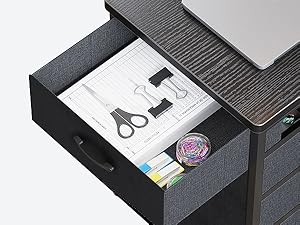
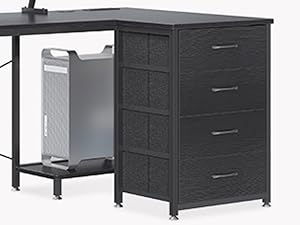
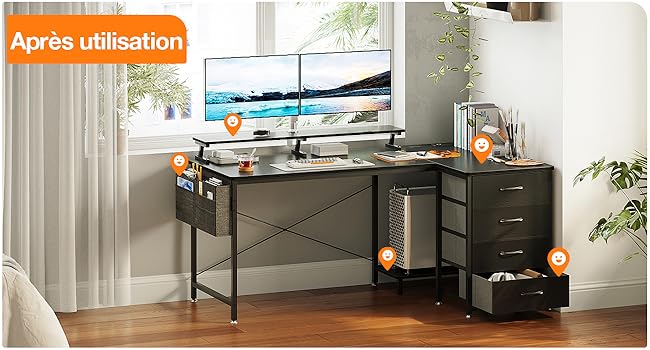
- Ample Storage: Features 4 fabric drawers and a storage bag, providing significant space for books, files, and office supplies.
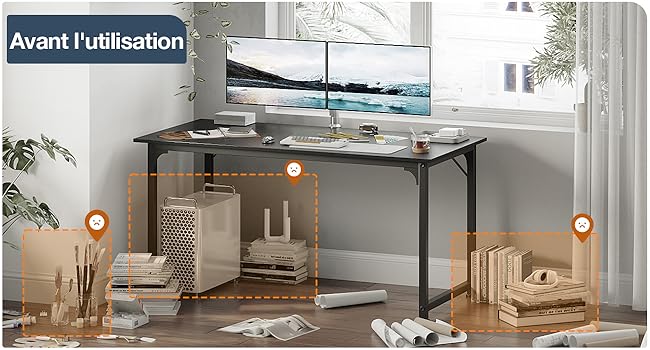
- L-Shaped Design: Optimizes corner space, measuring 160 x 80 x 84.7cm, suitable for various room layouts.
- Ergonomic Monitor Stand: Reduces strain on the back and neck, promoting better posture during long work sessions.
- Durable Construction: Made from high-quality MDF board and a sturdy metal frame, ensuring scratch resistance, water resistance, and stability.
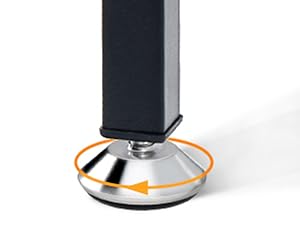
- Adjustable Feet: Ensures stability on uneven floors.
- Reversible Configuration: The desk can be assembled with the storage unit on either the left or right side to suit your space.
Setup Guide
Before you begin assembly, please ensure all components are present and undamaged. It is recommended to assemble the desk with two people.
Unpacking
Carefully remove all parts from the packaging. Lay them out on a clean, soft surface to prevent scratches.
Assembly Instructions
The ODK L-Shaped Corner Desk comes with clear, detailed instructions and numbered parts to facilitate easy assembly. Follow the step-by-step guide provided in the packaging.
Key steps include:
- Assemble the main desk frame.
- Attach the desktop panels.
- Install the monitor stand.
- Assemble and insert the fabric drawers into the storage unit.
- Attach the side storage bag.
- Adjust the leveling feet for stability.

Operating Instructions
Using the Integrated Power Outlets and USB Ports
The desk features a built-in power strip with 2 AC outlets (220-250V/16A) and 2 USB ports (5V/2A) for convenient charging of your electronic devices. Simply plug your devices into the available ports.

Utilizing Storage Features
The four fabric drawers provide ample space for organizing documents, stationery, and other office essentials. The side storage bag is perfect for quick access items like books, tablets, or headphones.
Ergonomic Monitor Stand
The elevated monitor stand helps position your screen at an optimal eye level, reducing neck and back strain. Ensure your monitor is placed centrally on the stand for best ergonomic benefits.

Maintenance and Care
Cleaning
Wipe the desk surface with a soft, damp cloth. Avoid using harsh chemicals or abrasive cleaners, as they may damage the finish. For the fabric drawers, spot clean with a mild detergent if necessary.
General Care
Regularly check all screws and fasteners to ensure they remain tight. Avoid placing extremely hot or cold items directly on the desk surface without protection. Keep the desk away from direct sunlight and excessive moisture.
Troubleshooting
Common Issues and Solutions
| Problem | Possible Cause | Solution |
|---|---|---|
| Desk is wobbly. | Uneven floor; loose screws. | Adjust the leveling feet at the bottom of the desk legs. Tighten all assembly screws. |
| Power outlets/USB ports not working. | Power cable not fully plugged in; circuit breaker tripped. | Ensure the desk's power cable is securely plugged into a wall outlet. Check your home's circuit breaker. |
| Drawers do not slide smoothly. | Improper assembly; overloaded drawers. | Verify that the drawer frames are assembled correctly. Do not overload drawers beyond their capacity. |
Product Specifications
| Feature | Detail |
|---|---|
| Brand | ODK |
| Model Number | USBSNKFZ |
| Color | Black |
| Dimensions (L x W x H) | 160 x 80 x 84.7 cm (63 x 31.5 x 33.3 inches) |
| Weight | 18.7 Kilograms (41.2 lbs) |
| Material | Engineered Wood, Alloy Steel Frame |
| Special Features | Integrated USB Port, Reversible, Monitor Stand |
| Power Outlets | 2 AC Outlets (220-250V/16A) |
| USB Ports | 2 USB Ports (5V/2A) |
| Power Cable Length | 200 cm |
Warranty and Customer Support
ODK is committed to providing reliable products and excellent customer support. For any questions regarding your ODK L-Shaped Corner Desk, including assembly, parts, or operational issues, please do not hesitate to contact our customer service team.
Please refer to your purchase documentation for specific warranty details and contact information. We are always here to provide you with support and assistance.


