
1. Product Overview
The ODK Reversible L-Shaped Gaming Desk is designed for versatility and functionality, suitable for both gaming and home office environments. It features integrated LED lighting, convenient USB charging ports, and power outlets. The desk also includes four storage drawers and a monitor stand to enhance organization and ergonomics.

Image 1.1: The ODK L-Shaped Gaming Desk in a typical setup, highlighting its LED lighting and spacious design.
2. Safety Warnings
- It is recommended to carefully follow the assembly instructions provided and regularly check the stability of the desk.
- Do not exceed the maximum recommended load capacity to avoid any risk of tipping or damage to the desk.
- When using the desk, ensure it is properly adjusted to provide an ergonomic and comfortable sitting position.
- Keep all electrical components away from liquids.
- Ensure all cables are routed safely to prevent tripping hazards.
3. Setup and Assembly
Assembly of the ODK L-Shaped Gaming Desk is required. Please follow the detailed step-by-step instructions included in the product packaging. All necessary tools, such as a wrench and screwdriver, are provided.
- Unpack Components: Carefully remove all parts from the packaging. Verify that all components listed in the instruction manual are present and undamaged.
- Identify Parts: All pieces are labeled with letters and numbers for easy identification.
- Assemble Frame: Begin by assembling the metal frame components according to the diagrams. Ensure all screws are finger-tightened initially.
- Attach Desktop Panels: Secure the desktop panels to the frame. Note that the L-shape is reversible, allowing you to configure the longer side to either the left or right based on your room layout.
- Install Drawers and Monitor Stand: Follow the instructions to install the four storage drawers and the elevated monitor stand.
- Connect Electrical Components: Install the LED strip and the integrated power strip. Connect the LED strip to its power source and plug the desk's main power cord into a wall outlet.
- Final Tightening: Once all parts are in place, securely tighten all screws and bolts. Ensure the desk is stable and level.
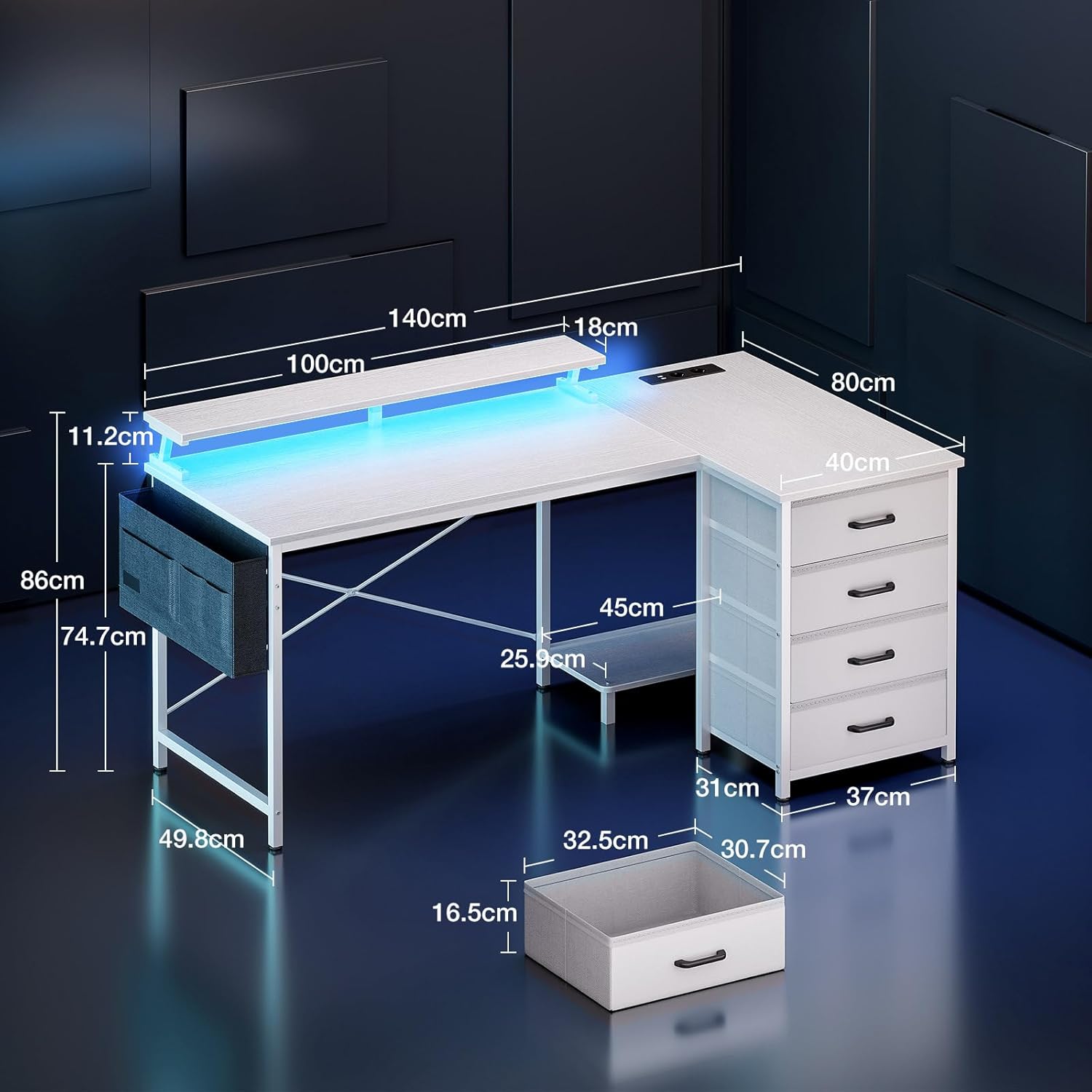
Image 3.1: Desk dimensions for planning your setup space.

Image 3.2: Illustration of flexible PC tower placement options.
4. Operating Instructions
4.1 LED Lighting
The integrated LED strip offers customizable lighting to enhance your environment. Once connected to power, use the control switch to manage the lighting effects.
- Static Colors: Choose from 10 different static color options.
- Brightness Levels: Adjust the intensity with 6 brightness levels.
- Dynamic Modes: Select from 10 dynamic lighting modes for various effects.
- Memory Function: The LED system retains your last selected setting when powered off and on.
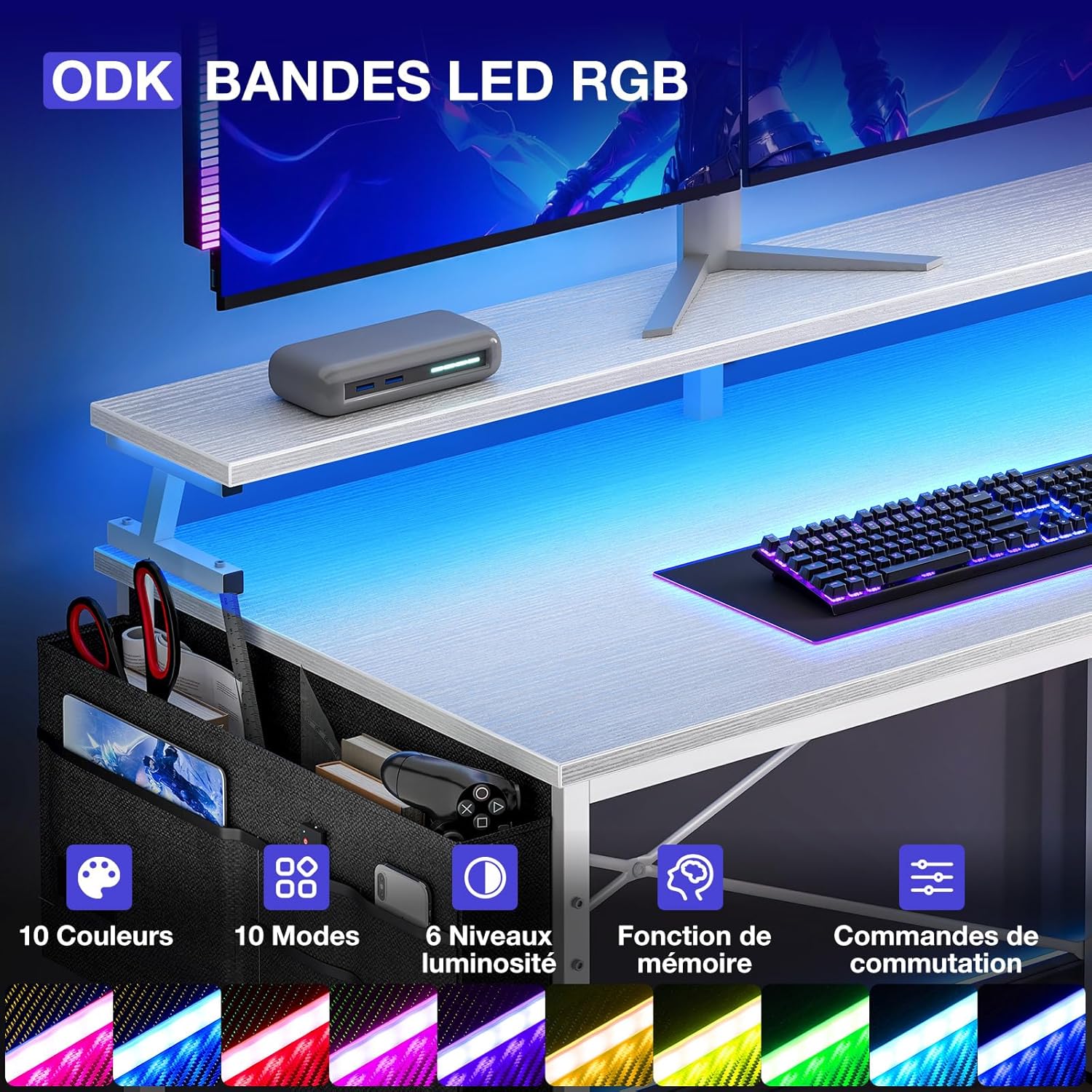
Image 4.1: Detail of the LED strip and its control interface.
4.2 Integrated Power Outlets and USB Ports
The desk is equipped with a built-in power strip for convenient access to power and charging.
- AC Outlets: Two (2) 220-250V/16A AC outlets are available for powering devices such as monitors, computers, or lamps.
- USB Ports: Two (2) 5V-2A USB ports are provided for charging smartphones, tablets, gaming controllers, and other USB-powered devices.

Image 4.2: The integrated power strip for charging and powering devices.
4.3 Storage Features
The desk includes multiple storage options to keep your workspace tidy.
- Four Drawers: Utilize the four drawers for storing documents, office supplies, or personal items.
- Storage Bag: An additional storage bag is provided for smaller accessories, keeping them within easy reach.
- Monitor Stand: The elevated monitor stand provides space underneath for keyboards, mice, or other peripherals when not in use.

Image 4.3: The four storage drawers for efficient organization.
5. Maintenance
- Cleaning: Wipe all surfaces with a soft, damp cloth. Avoid using abrasive cleaners or harsh chemicals that could damage the finish.
- Stability Check: Periodically inspect all screws and bolts. Re-tighten any loose fasteners to ensure the desk remains stable and secure.
- Electrical Components: Ensure the power cord and LED connections are free from damage. Do not attempt to repair electrical components yourself; contact qualified personnel if issues arise.
6. Troubleshooting
- LED Lights Not Working:
- Check if the LED strip is properly connected to its power source.
- Verify that the desk's main power cord is securely plugged into a functional wall outlet.
- Ensure the LED control switch is not set to 'off' or minimum brightness.
- Power Outlets/USB Ports Not Functioning:
- Confirm the desk's main power cord is securely plugged into a live wall outlet.
- Test the wall outlet with another device to ensure it is working.
- Check for any tripped circuit breakers in your home or office.
- Desk Wobbles or Feels Unstable:
- Re-tighten all assembly screws and bolts.
- Ensure the desk is placed on a flat, level surface.
- Missing Parts Upon Delivery:
- If any parts are missing or damaged upon unboxing, please contact ODK customer support immediately for assistance.
7. Specifications
| Brand | ODK |
| Model Number | SNKLFZDE-01 |
| Color | White |
| Material | Engineered Wood |
| Dimensions (L x W x H) | 140 cm x 80 cm x 84.7 cm |
| Weight | 21.5 Kilograms |
| Integrated AC Outlets | 2 (220-250V/16A) |
| Integrated USB Ports | 2 (5V-2A) |
| Special Features | Reversible L-shape, LED Lighting, Integrated USB/Power, Monitor Stand, 4 Storage Drawers |
8. Warranty and Support
For warranty information, product support, or to order replacement parts, please refer to the documentation included with your purchase or visit the official ODK website. If you encounter any issues not covered in this manual, please contact ODK customer service for assistance.


