
1. Introduction
This user manual provides essential information for the safe and efficient installation, operation, and maintenance of your LEYEYDOJX FULLTECH UF-12A11 Cabinet Cooling Fan. Please read this manual thoroughly before using the product and retain it for future reference.
The FULLTECH UF-12A11 is a high-performance AC cooling fan designed for various cabinet and industrial applications, ensuring optimal temperature regulation for sensitive equipment.
2. Safety Information
Always observe the following safety precautions to prevent injury or damage to the product and connected equipment:
- Electrical Hazard: Ensure the power supply is disconnected before installation, maintenance, or any handling of the fan. This fan operates on AC 115V.
- Proper Installation: Install the fan in a well-ventilated area, ensuring proper airflow. Do not obstruct the fan blades.
- Qualified Personnel: Installation and wiring should be performed by qualified personnel familiar with electrical systems and safety standards.
- Environmental Conditions: Do not expose the fan to excessive moisture, dust, or extreme temperatures outside its operating range.
- Moving Parts: Keep fingers and other objects away from the fan blades during operation to prevent injury.
3. Product Overview
The LEYEYDOJX FULLTECH UF-12A11 is a 120x120x38mm cabinet cooling fan featuring a 2-pin power connector and operating at 115V AC. It is designed for reliable and efficient cooling in various industrial and electronic enclosures.
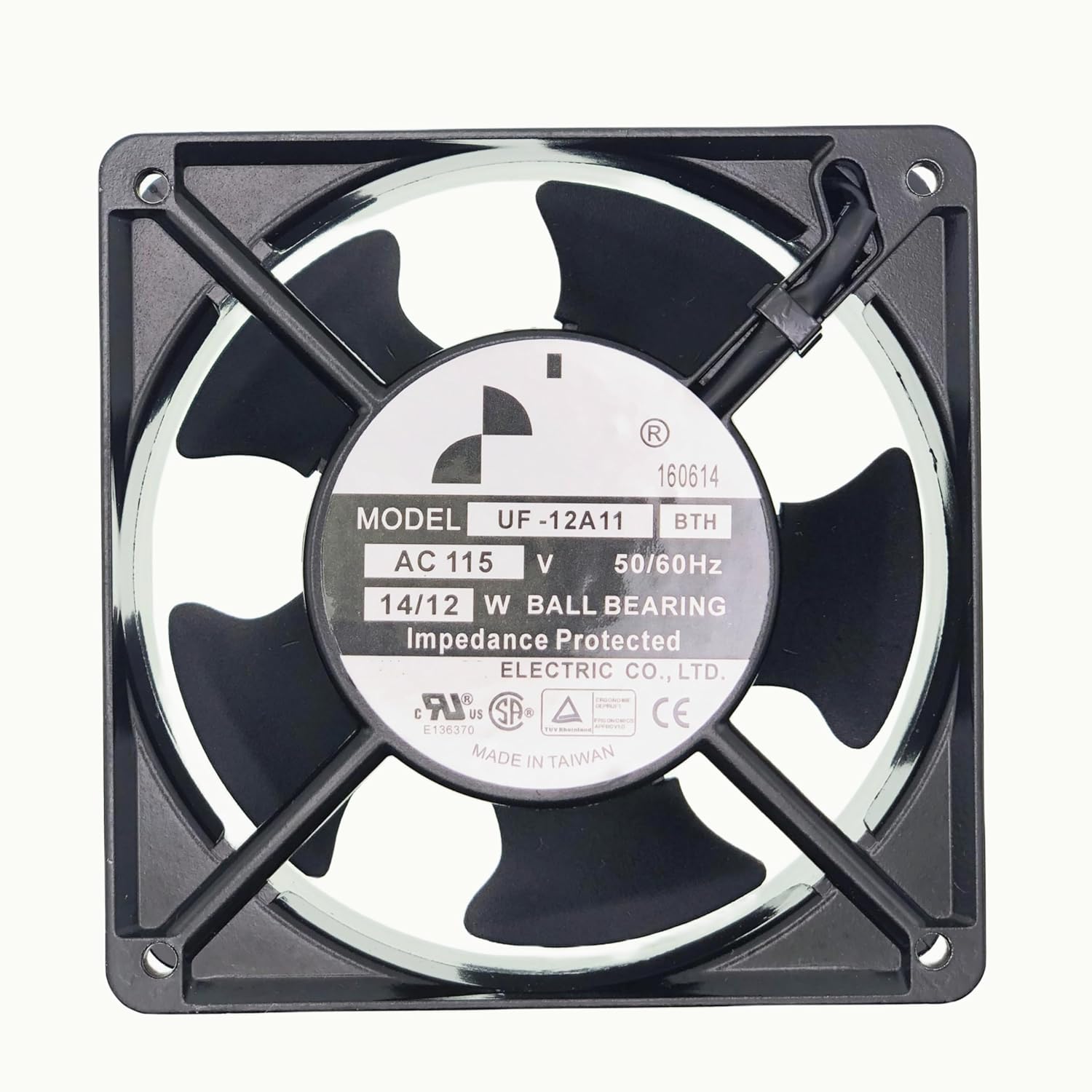
Figure 3.1: Front view of the FULLTECH UF-12A11 fan, displaying key specifications on its label.

Figure 3.2: Dimensions of the FULLTECH UF-12A11 fan (120x120x38mm or 4.8" x 4.8" x 1.5").
Key Features:
- Model: FULLTECH UF-12A11 BTH
- Voltage: AC 115V
- Power: 14/12W
- Size: 120x120x38mm (4.8" x 4.8" x 1.5")
- Connector: 2-Pin
- Bearing Type: Ball Bearing
- Impedance Protected
4. Setup and Installation
Follow these steps for proper installation of the cooling fan:
- Power Disconnection: Before beginning installation, ensure that the power supply to the cabinet or equipment is completely disconnected and locked out.
- Mounting Location: Select a suitable mounting location within the cabinet that allows for optimal airflow and heat dissipation. Ensure there is sufficient space around the fan for air intake and exhaust. Observe the airflow direction indicated on the fan frame (usually an arrow).
- Mounting the Fan: Secure the fan to the cabinet using appropriate screws or fasteners through the mounting holes on the fan frame. Ensure the fan is firmly attached to prevent vibration and noise.
- Electrical Connection: Connect the 2-pin power connector of the fan to the designated AC 115V power source within the cabinet. Ensure correct polarity if applicable, though AC fans typically do not have strict polarity requirements for basic operation. Verify all connections are secure.
- Final Check: Double-check all connections and ensure no wires are obstructing the fan blades or airflow.
- Power Restoration: Once installation is complete and verified, restore power to the cabinet.

Figure 4.1: Side view of the fan, illustrating mounting points and overall structure.
5. Operating Instructions
The LEYEYDOJX FULLTECH UF-12A11 fan is designed for continuous operation once properly installed and powered. No user intervention is typically required during operation.
- Power On: After installation, apply AC 115V power to the fan. The fan should start rotating immediately.
- Monitor Operation: Periodically check the fan for proper rotation and airflow. Listen for any unusual noises, which could indicate an issue.
- Airflow Direction: Ensure the fan is moving air in the intended direction (intake or exhaust) for your specific cooling setup.
6. Maintenance
Regular maintenance helps ensure the longevity and optimal performance of your cooling fan.
- Power Disconnection: Always disconnect power before performing any maintenance.
- Cleaning: Periodically inspect the fan blades and grille for dust accumulation. Use a soft brush or compressed air to gently remove dust. Do not use liquids or abrasive cleaners.
- Inspection: Check for any signs of wear, damage to the blades, or loose connections. Ensure the fan rotates freely without obstruction.
- Lubrication: This fan uses ball bearings and typically does not require user lubrication. Do not attempt to lubricate the bearings unless specifically instructed by the manufacturer.
7. Troubleshooting
If you encounter issues with your cooling fan, refer to the following troubleshooting guide:
| Problem | Possible Cause | Solution |
|---|---|---|
| Fan does not start | No power supply, incorrect wiring, damaged fan. | Check power connection and voltage. Verify wiring. If still not working, the fan may be faulty and require replacement. |
| Fan is noisy or vibrating | Loose mounting, obstructed blades, worn bearings. | Ensure fan is securely mounted. Remove any obstructions. If noise persists, bearings may be worn; consider replacement. |
| Insufficient airflow | Blocked intake/exhaust, fan rotating in wrong direction, dust accumulation. | Clear obstructions. Verify airflow direction. Clean fan blades and grille. |
If the problem persists after attempting these solutions, please contact customer support.
8. Specifications
Detailed technical specifications for the LEYEYDOJX FULLTECH UF-12A11 Cooling Fan:
| Specification | Value |
|---|---|
| Model | UF-12A11 BTH |
| Brand | LEYEYDOJX (Compatible with FULLTECH) |
| Voltage | AC 115V |
| Wattage | 14/12W |
| Size (Dimensions) | 120x120x38mm (4.8"L x 1.5"W x 4.8"H) |
| Power Connector Type | 2-Pin |
| Bearing Type | Ball Bearing |
| Cooling Method | Air |
| Noise Level | 45 Decibels |
| Maximum Rotational Speed | 3800 RPM |
| Material | Metal, Plastic |
| Compatible Devices | Inverter (and other cabinet/industrial applications) |
9. Warranty and Support
Warranty: This product comes with a 12-month warranty from the date of purchase, covering manufacturing defects.
Additionally, we offer an unlimited return and refund service within 90 days of purchase. Please retain your proof of purchase for warranty claims.
Customer Support: If you have any questions, require technical assistance, or need to make a warranty claim, please contact our customer support team. We aim to respond to inquiries within 24 hours on working days.
For support, please refer to the contact information provided by your retailer or on the product packaging.