
ZTE ZTE CYMBAL 2 Z2335ca
ZTE CYMBAL 2 Z2335ca User Manual
Model: Z2335ca
Brand: ZTE
Introduction
This manual provides essential information for the safe and efficient operation of your ZTE CYMBAL 2 Z2335ca flip phone. Please read it thoroughly before using the device.
Setup
1. Unboxing
Carefully remove all components from the packaging. Ensure the following items are present:
- ZTE CYMBAL 2 Z2335ca Flip Phone
- Battery
- Power Adapter
2. Installing the Battery
Locate the battery compartment on the back of the phone. Gently remove the back cover. Align the battery contacts with the terminals inside the compartment and press down until it clicks into place. Replace the back cover.

Image: ZTE CYMBAL 2 Z2335ca flip phone in closed position, displaying the external screen with time and signal indicators, and the camera lens.
3. Charging the Phone
Connect the power adapter to the charging port on the phone. Plug the adapter into a wall outlet. The battery indicator on the screen will show charging status. Fully charge the phone before first use.
4. Inserting the SIM Card
(If applicable) Open the battery compartment. Locate the SIM card slot. Insert your SIM card with the gold contacts facing down and the notched corner aligned correctly.
Operating Instructions
1. Powering On/Off
To power on, press and hold the Power/End Call button until the screen lights up. To power off, press and hold the Power/End Call button, then select "Power off" from the options.
2. Making Calls
Open the flip. Use the keypad to dial the desired number. Press the Call button (green) to initiate the call. To end a call, press the End Call button (red).
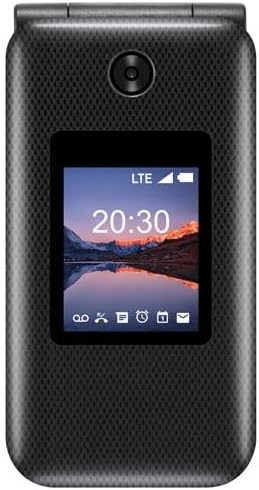
Image: ZTE CYMBAL 2 Z2335ca flip phone in open position, revealing the internal display and the full numeric keypad with navigation buttons.
3. Receiving Calls
When the phone rings, open the flip or press the Call button to answer.
4. Sending and Receiving Messages
Navigate to the "Messages" menu. Select "New Message" to compose. Enter the recipient's number and type your message using the keypad. Press "Send".
5. Navigation
Use the directional pad and center select button to navigate through menus and select options.
Maintenance
1. Cleaning
Use a soft, dry cloth to clean the phone's exterior. Avoid using liquid cleaners or abrasive materials.
2. Battery Care
To prolong battery life, avoid exposing the phone to extreme temperatures. Do not leave the phone charging for extended periods after it is fully charged.
3. Storage
Store the phone in a cool, dry place when not in use.
Troubleshooting
| Problem | Solution |
|---|---|
| Phone does not power on | Ensure the battery is correctly installed and charged. Connect the charger and try again. |
| Cannot make or receive calls | Check SIM card installation. Verify network signal strength. Contact your service provider if issues persist. |
| Poor audio quality | Ensure the speaker and microphone are not obstructed. Adjust volume settings. |
Specifications
- Model: ZTE CYMBAL 2 Z2335ca
- Brand: ZTE
- Operating System: FunTouch OS 10
- RAM: 4 GB
- Digital Storage Capacity: 4 GB
- Processor Type: Snapdragon
- Processor Speed: 2.1 GHz
- Display Type: LCD
- Battery Type: Lithium Ion
- Cellular Technology: 4G
- Connectivity: Bluetooth, Wi-Fi
- Form Factor: Foldable Case
- Color: Black
Warranty and Support
For warranty information and technical support, please refer to the documentation provided with your purchase or visit the official ZTE website.
Online resources may be available at the ZTE Official Store on Amazon.
Related documentsZTE CYMBAL 2 Z2335ca

Ask a question about this manual
Ask about setup, troubleshooting, compatibility, parts, safety, or missing instructions. Manuals+ will review the question and use this page’s manual context to help answer it.