
RYOBI PCL600B
RYOBI 18V ONE+ Compact Bluetooth Radio Instruction Manual
Model: PCL600B
1. Introduction
This manual provides essential information for the safe operation, setup, and maintenance of your RYOBI 18V ONE+ Compact Bluetooth Radio. Please read this manual thoroughly before using the product and retain it for future reference.
The RYOBI 18V ONE+ Compact Bluetooth Radio is designed to provide a cutting-edge audio experience on and off the jobsite with 4X greater sound clarity through a powerful 15W speaker. It supports both BLUETOOTH and FM radio modes, offering over 175 ft. of BLUETOOTH connection range and over 32 hours of continuous runtime. It also features a 2.1A USB port for charging electronic devices.
2. Safety Information
Always observe basic safety precautions when using electrical appliances to reduce the risk of fire, electric shock, and personal injury.
- Read all instructions: Before operating the radio, read and understand all safety warnings and instructions.
- Battery Safety: Use only RYOBI 18V ONE+ batteries. Do not expose batteries or the radio to water or extreme temperatures.
- Proper Placement: Place the radio on a stable, flat surface to prevent it from falling.
- Avoid Overheating: Do not block ventilation openings. Ensure adequate airflow around the unit.
- Cleaning: Disconnect the battery before cleaning. Use a soft, damp cloth. Do not use harsh chemicals.
- Service: Do not attempt to service the radio yourself. Refer all servicing to qualified service personnel.
3. Package Contents
Verify that all items listed below are included in your package:
- RYOBI 18V ONE+ Compact Bluetooth Radio (Model: PCL600B)
- Operator's Manual
Note: Battery and charger are sold separately.
4. Key Features
- Enhanced Sound Clarity: 4X greater sound clarity for an improved listening experience.
- Powerful Speaker: Equipped with a 3-inch, 15W speaker for rich and robust audio.
- Dual Listening Modes: Supports both BLUETOOTH and FM radio modes.
- Extended Bluetooth Range: Over 175 ft. of BLUETOOTH connection range.
- Long Runtime: Provides over 32 hours of continuous runtime on a compatible RYOBI 18V ONE+ battery.
- Fast USB Charging: Features a 2.1A USB port for 2X faster charging of electronic devices.
5. Setup
5.1. Installing the Battery
The RYOBI 18V ONE+ Compact Bluetooth Radio operates on a RYOBI 18V ONE+ battery (sold separately).
- Ensure the radio is turned off.
- Locate the battery port on the back of the radio.
- Align the battery with the battery port and slide it in until it clicks securely into place.
- To remove the battery, press the release latches on the battery and slide it out.

Figure 1: Rear view of the radio, illustrating the battery insertion slot.
6. Operating Instructions
6.1. Powering On/Off
Press the Power Button (usually marked with a power symbol) located on the top panel to turn the radio on or off.
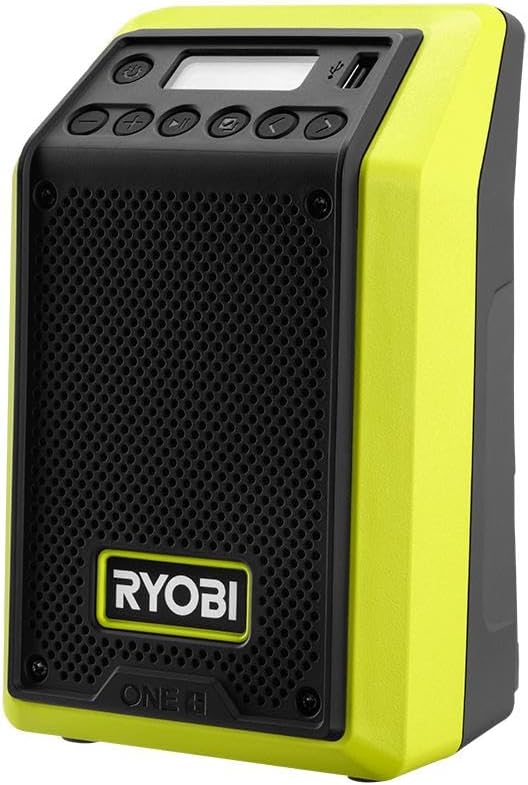
Figure 2: Front and top view of the radio, highlighting the control panel and speaker grille.
6.2. Bluetooth Mode
- Turn on the radio.
- Press the Mode Button (often labeled with 'M' or a Bluetooth symbol) until "BLUETOOTH" or a similar indicator appears on the display.
- On your Bluetooth-enabled device (smartphone, tablet, laptop), enable Bluetooth and search for available devices.
- Select "RYOBI RADIO" or "PCL600B" from the list of devices.
- Once paired, the radio will emit a confirmation sound, and you can begin streaming audio.
- Use the volume controls on the radio or your connected device to adjust the sound level.
6.3. FM Radio Mode
- Turn on the radio.
- Press the Mode Button until "FM" or the radio frequency appears on the display.
- Use the Tune Up/Down Buttons (often marked with arrows) to manually tune to a desired station.
- Press and hold the Tune Up/Down Buttons to automatically scan for the next available station.
- For best reception, ensure the radio is placed in an open area away from obstructions.
6.4. USB Charging
The radio features a 2.1A USB port for charging compatible electronic devices.
- Connect your device's USB charging cable to the USB port on the radio.
- Ensure the radio is powered on and has a charged battery inserted.
- Your device should begin charging automatically.

Figure 3: The RYOBI radio being held by a user, demonstrating its compact and portable design.
7. Maintenance
7.1. Cleaning
- Always remove the battery before cleaning.
- Wipe the exterior of the radio with a soft, damp cloth.
- Do not use abrasive cleaners, solvents, or strong detergents, as these may damage the plastic components.
- Keep the speaker grille free of dust and debris.
7.2. Storage
- Store the radio in a cool, dry place, away from direct sunlight and extreme temperatures.
- If storing for extended periods, remove the battery.
8. Troubleshooting
| Problem | Possible Cause | Solution |
|---|---|---|
| Radio does not turn on. | Battery not inserted correctly or battery is discharged. | Ensure battery is fully seated. Charge or replace battery. |
| No sound or low volume. | Volume too low; device not connected (Bluetooth); poor FM reception. | Increase volume. Re-pair Bluetooth device. Adjust radio position or antenna for FM. |
| Bluetooth device won't pair. | Radio not in pairing mode; device too far; interference. | Ensure radio is in Bluetooth mode. Move device closer. Turn off other Bluetooth devices. |
| Poor FM reception. | Weak signal; obstructions; interference. | Relocate radio to an open area. Extend antenna if applicable. |
| USB charging not working. | Radio not powered on; battery low; incompatible device/cable. | Ensure radio is on and battery is charged. Try a different USB cable or device. |
9. Specifications
| Feature | Detail |
|---|---|
| Model Number | PCL600B |
| Input Voltage | 18 Volts (DC) |
| Speaker Output Power | 15 Watts |
| Speaker Size | 3 Inches |
| Connectivity Technology | Bluetooth, FM Radio |
| Bluetooth Range | Over 175 Feet |
| Battery Life (Approx.) | 32 Hours (with compatible RYOBI 18V ONE+ battery) |
| USB Charging Port | 2.1A |
| Product Dimensions (D x W x H) | 6"D x 6"W x 8"H |
| Item Weight | 2.4 Pounds |
| Color | Green |
| Manufacturer | RYOBI |
10. Warranty and Support
This RYOBI product comes with a Limited Warranty. For specific warranty details, please refer to the warranty card included with your purchase or visit the official RYOBI website.
For technical support, replacement parts, or service inquiries, please contact RYOBI customer service. Contact information can typically be found on the manufacturer's website or on the product packaging.
Manufacturer: RYOBI
Related documentsPCL600B


Ask a question about this manual
Ask about setup, troubleshooting, compatibility, parts, safety, or missing instructions. Manuals+ will review the question and use this page’s manual context to help answer it.