Introduction
This manual provides comprehensive instructions for the OhO Smart Camera Glasses, Model 628F. These polarized sunglasses are designed for outdoor sports and activities, featuring a built-in Full HD 1080P camera and 32GB internal memory for hands-free video recording and photo capture. Please read this manual thoroughly before using your device to ensure proper operation and longevity.
Product Overview
The OhO Smart Camera Glasses combine stylish polarized sunglasses with advanced camera technology, allowing you to capture your experiences from a first-person perspective. Key features include a durable, impact-resistant frame and lenses, IP66 water protection, and simple one-button operation.

Figure 1: Front view of the OhO Smart Camera Glasses, showing the integrated camera lens and included clear lenses.

Figure 2: A user wearing the OhO Smart Camera Glasses, demonstrating their appearance during use.

Figure 3: Side profile of a user wearing the OhO Smart Camera Glasses, highlighting the sleek design.

Figure 4: A user adjusting the OhO Smart Camera Glasses, showing the fit and form factor.

Figure 5: The glasses feature built-in memory, with the 32GB version capable of storing approximately 5 hours of video content.

Figure 6: The glasses can be charged on the go using a power bank via the included USB cable, allowing for extended recording time.
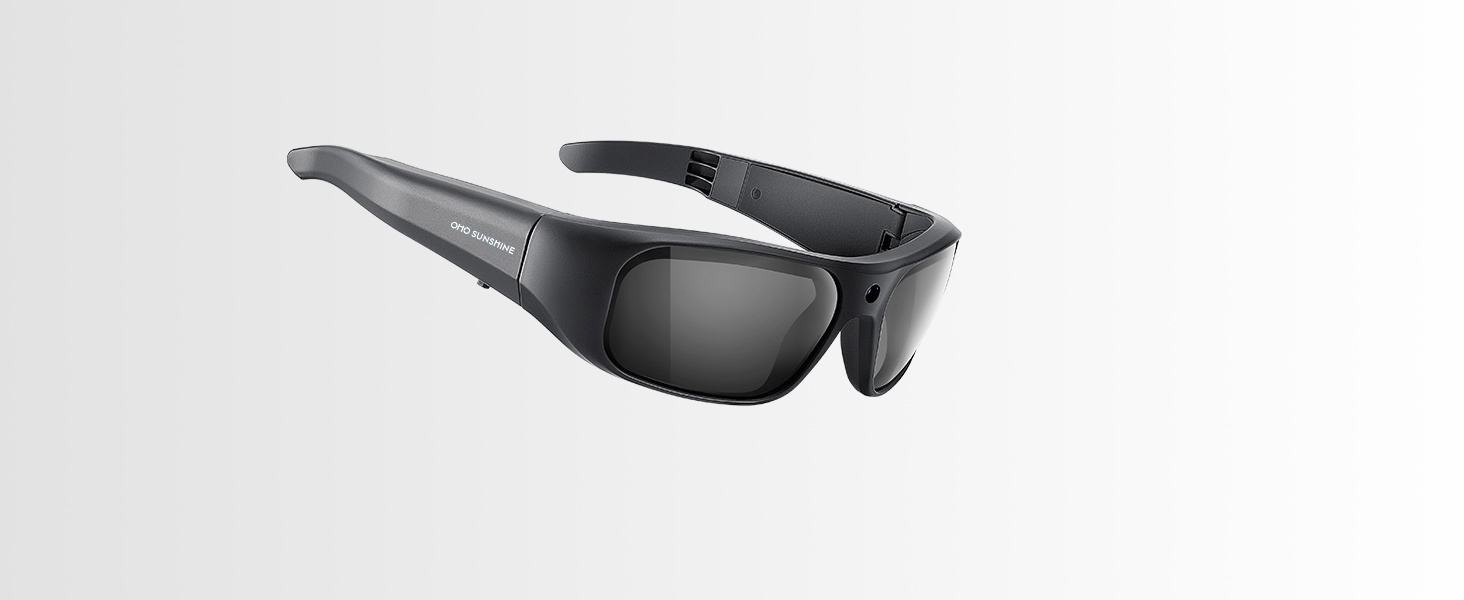
Figure 7: The IP66 water protection makes these glasses suitable for various water sports and activities.
Setup
- Initial Charging: Before first use, fully charge the OhO Smart Camera Glasses. Connect the included USB cable to the charging port on the glasses and the other end to a USB power adapter or computer. The LED indicator will show charging status. A full charge provides approximately 60 minutes of recording time.
- Connecting to Computer: To access recorded files or adjust settings, connect the glasses to a computer using the provided USB cable. The glasses will appear as a removable storage device.
- Setting Configuration: The glasses allow for configuration of settings such as vibration alerts, image resolution, and video resolution. This is typically done by connecting the glasses to a computer and accessing a configuration file or utility. Refer to the specific instructions provided with your device for detailed steps on modifying these settings.
Operating Instructions
The OhO Smart Camera Glasses feature a simple one-button operation for ease of use.
- Power On/Off: Press and hold the power button (typically located on the side frame) for a few seconds until you feel a vibration and see the LED indicator light up. Repeat the process to power off the device.
- Start/Stop Video Recording: Once powered on, a single short press of the power button will initiate video recording. You will feel a vibration and the LED will indicate recording is active. Press the button again to stop recording.
- Capture Photo: While in standby mode or during video recording, a quick double-press of the power button will capture a still photograph. A vibration will confirm the photo has been taken.
- Vibration Alerts: The glasses provide vibration feedback for various actions, including powering on/off, starting/stopping recording, and capturing photos. This tactile feedback confirms successful command execution.
All recorded videos and photos are saved to the built-in 32GB memory. To view content, connect the glasses to a computer or a TV using the included USB cable.
Maintenance
- Cleaning Lenses and Frame: Use a soft, lint-free cloth to clean the lenses and frame. For stubborn smudges, a small amount of lens cleaning solution can be applied to the cloth, not directly to the lenses. Avoid abrasive materials or harsh chemicals.
- Water Exposure: While the glasses are IP66 water protected, it is recommended to rinse them with fresh water after exposure to saltwater or chlorinated water, then dry thoroughly with a soft cloth. Do not submerge the glasses beyond their rated protection.
- Battery Care: To prolong battery life, avoid fully discharging the battery frequently. Store the glasses in a cool, dry place when not in use. If storing for extended periods, charge the battery to approximately 50% every few months.
- Storage: Store the glasses in their protective case to prevent scratches and damage when not in use.
Troubleshooting
| Problem | Possible Cause | Solution |
|---|---|---|
| Device does not power on. | Low or no battery charge. | Charge the glasses fully using the provided USB cable. |
| Cannot record video/take photos. | Memory full or device not in correct mode. | Connect to a computer to offload files and free up memory. Ensure the device is powered on and not in a transfer mode. |
| Video footage is shaky or blurry. | Rapid head movements; lack of image stabilization. | Minimize sudden head movements during recording. The glasses do not feature built-in image stabilization. |
| Settings revert to default after connecting to PC. | Configuration file not saved correctly or software issue. | Ensure proper saving of configuration files. If issues persist, consult the manufacturer's support. |
| Excessive vibration during operation. | Normal operational feedback. | Vibration alerts are a normal feature to confirm actions. This is not an indication of a fault. |
Specifications
| Feature | Detail |
|---|---|
| Model Number | 628F |
| Video Resolution | Full HD 1080P |
| Memory | 32GB Built-in |
| Battery Life | Approximately 60 minutes of continuous recording |
| Water Protection | IP66 Level |
| Lens Type | Polarized, 100% UV400 Protection, US Safety Lens Standard ANSI/ISEA Z87.1-2015 Impact Resistant |
| Connectivity | USB |
| Operating System Compatibility | iOS, Android (for file transfer/access, not direct app control) |
| Product Dimensions | 6.59 x 6.11 x 1.81 inches |
| Item Weight | 1.38 ounces (39 Grams) |
| Included Accessories | USB cable, additional clear lenses |
Warranty and Support
For warranty information, technical support, or service inquiries, please refer to the documentation included with your purchase or contact OhO sunshine customer service directly. Keep your proof of purchase for warranty claims.
Manufacturer: OhO sunshine


