1. Product Overview
The Shark HP102 Air Purifier is designed to provide powerful, quiet purification for spaces up to 500 square feet. It features Nanoseal HEPA filtration, capturing 99.98% of large, small, and micro-sized particles, including dust, smoke, pollutants, pet dander, and allergens. The Clean Sense IQ technology automatically tracks and adjusts purification based on real-time air quality, while the Odor Lock feature helps neutralize household odors.

Figure 1: The Shark HP102 Air Purifier provides quiet purification, ideal for bedrooms.
2. Setup
- Unboxing: Carefully remove the air purifier from its packaging. Ensure all components are present: the main unit and the Nanoseal HEPA filter.
- Filter Installation: The main Nanoseal HEPA filter is typically pre-installed but may require removal of protective packaging. Refer to the Maintenance section for detailed filter access instructions.
- Placement: Place the air purifier on a flat, stable surface in the desired room. Ensure there is adequate space around the unit for proper airflow. Avoid placing it directly against walls or furniture.
- Power Connection: Plug the power cord into a standard electrical outlet.
3. Operating Instructions
3.1 Power On/Off
Press the power button (U) on the control panel to turn the unit On or Off.
3.2 Clean Sense IQ and Air Quality Display
The Clean Sense IQ system continuously monitors your air quality and displays the percentage of clean air on the front panel. The display color indicates air quality status:
- Blue (Good): 85-100% clean air.
- Orange (Fair): 70-84% clean air.
- Red (Poor): 0-69% clean air.
You can toggle through different air quality views (PM1, PM2.5, PM10) by pressing the information button (i) on the control panel.
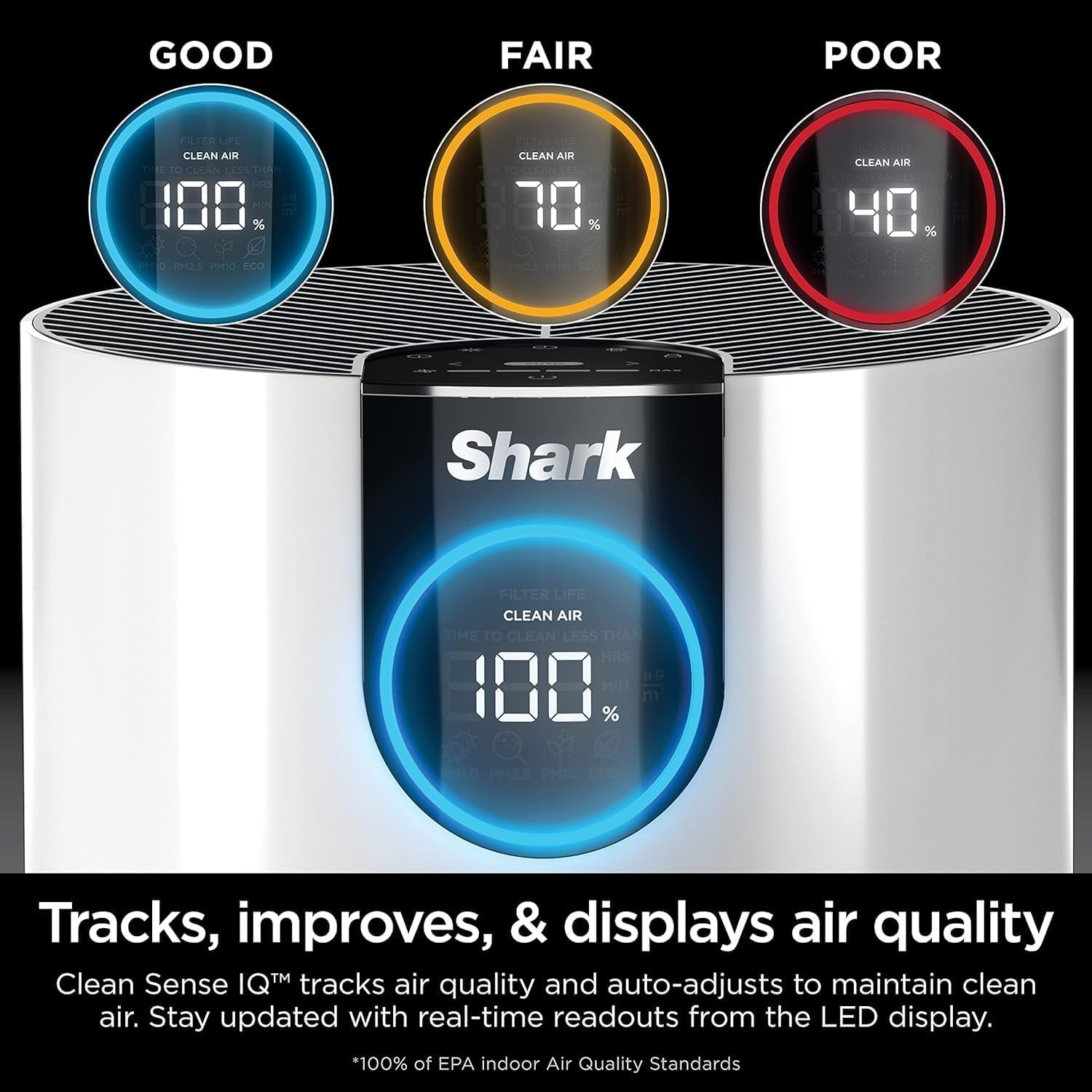
Figure 2: Clean Sense IQ display showing real-time air quality and particle levels.
3.3 Fan Speed Adjustment
In Auto Mode, the fan speed automatically adjusts based on detected air quality. To manually adjust the fan speed, press the fan icon (☴) and use the arrow buttons (< and >) to select your desired speed (1-4 bars). The fan speed will increase when air quality decreases and return to a lower speed once the air is clean.
3.4 Odor Neutralizer
The unit features an Odor Neutralizer technology. To activate or adjust the intensity, locate the dial on the top of the unit and rotate it to your preferred setting.

Figure 3: The air purifier offers all-day odor protection, suitable for areas like laundry rooms.
3.5 Timer Function
To set a timer for operation, press the timer button (◷) and use the arrow buttons to select the desired duration (e.g., 1-12 hours). The unit will automatically turn off after the set time.
3.6 Display Brightness and Control Lock
- Display Brightness: Press the light bulb icon (☀) to adjust the brightness of the display. This is useful for bedrooms or nurseries.
- Control Lock: To prevent accidental changes to settings, press and hold the lock icon (🔒) for 3 seconds to activate or deactivate the control lock.
4. Maintenance
4.1 Filter Life Indicator
The control panel displays the remaining filter life as a percentage. It is recommended to replace the Nanoseal HEPA filter every 6-12 months, depending on continuous use and air quality conditions. Genuine Shark filters (HE1FKPRO) are recommended for optimal performance.
4.2 Cleaning Dust Filters
The unit features debris defense filters on the sides. These can be easily removed, vacuumed, or wiped clean every couple of weeks to maintain efficiency.
Video 1: A helpful tip for maintaining your Shark HP100 series Air Purifier upon arrival, focusing on filter care.
5. Troubleshooting
- Poor Air Quality Reading: If the unit consistently shows poor air quality despite running, ensure the filters are clean and properly installed. Check for any strong odor sources nearby.
- Fan Not Operating: Verify the unit is plugged in and powered on. Check if the control lock is activated. If in Auto Mode, the fan may be running at a low speed if air quality is good.
- Unusual Noises: Ensure the unit is on a stable surface and nothing is obstructing the fan or air intake/outtake. Check filters for proper seating.
6. Specifications
| Feature | Detail |
|---|---|
| Model Number | HP102 |
| Product Dimensions | 0.79"D x 0.79"W x 0.79"H |
| Item Weight | 5.85 Pounds |
| Power Source | Electric |
| Coverage Area | Up to 500 sq. ft. (based on 1 air change per hour) |
| Filter Type | Nanoseal HEPA (captures 99.98% of particles) |
| Air Quality Sensor | Clean Sense IQ (tracks PM1, PM2.5, PM10) |
| Odor Control | Odor Neutralizer Technology |
Video 2: A visual guide to the dimensions of the Shark HP102 Air Purifier system.
7. Warranty and Support
For warranty information, product registration, or technical support, please refer to the documentation included with your purchase or visit the official SharkNinja website. Contact customer service for assistance with any issues not covered in this manual.


