
Boquaw P90
Boquaw P90 Smart Watch User Manual
Model: P90
1. Introduction
This user manual provides detailed instructions for the Boquaw P90 Smart Watch. It covers essential information regarding product setup, operation, maintenance, and troubleshooting to ensure optimal use of your device. The Boquaw P90 Smart Watch is designed to assist with fitness tracking, health monitoring, and smart communication features.

Image 1.1: Boquaw P90 Smart Watch displaying time, heart rate, steps, and calories, shown with both mesh and silicone bands.
2. What's in the Box
Verify that all items are present in the product packaging:
- Boquaw P90 Smart Watch (1 unit)
- Black Stainless Steel Watch Band (1 unit)
- Black Silicone Watch Band (1 unit)
- User Manual (1 unit)
- Magnetic Charger (1 unit)
3. Setup
3.1 Charging the Device
Before initial use, fully charge the smart watch. Connect the magnetic charger to the charging contacts on the back of the watch and plug the USB end into a power adapter (not included) or a computer's USB port. The watch display will indicate charging status.
3.2 Connecting the Smart Watch to Your Phone
The Boquaw P90 Smart Watch connects via the "GloryFit" application. Follow these steps:
- Turn on the Bluetooth function on your mobile phone.
- Open the "Google Play Store" (for Android) or the "App Store" (for iOS).
- Search for and download the "GloryFit" application.
- Open the "GloryFit" app, navigate to "Device" or "Profile", then select "Add Device" or "Please connect device".
- The app will search for nearby devices. Select "P90" from the list to bind it.
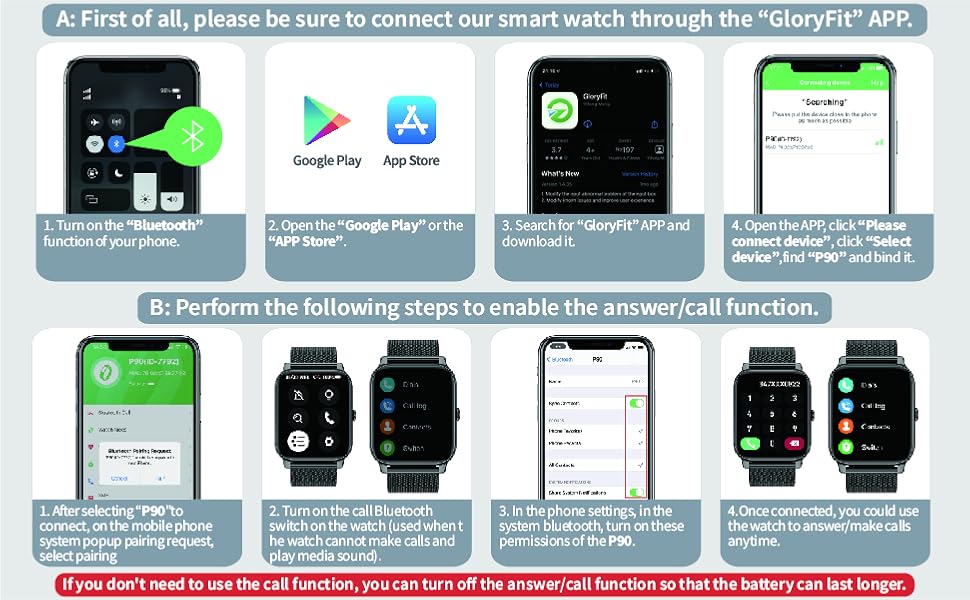
Image 3.1: Visual guide for connecting the Boquaw P90 Smart Watch to your smartphone using the GloryFit app, showing Bluetooth activation, app download, and device selection.
3.3 Enabling Bluetooth Call Function
To use the call answering and making features, perform the following additional steps after connecting the watch:
- After selecting "P90" to connect in the GloryFit app, a pairing request will appear on your phone's system. Confirm the pairing.
- On the watch, locate and activate the Bluetooth call switch. This is necessary for the watch to make calls and play media audio.
- In your phone's Bluetooth settings, ensure that the necessary permissions for "P90" (e.g., contact access, call audio) are enabled.
- Once connected and permissions are granted, you can use the watch to answer or make calls.
Note: If the call function is not required, you can disable it to conserve battery life.
4. Operating Instructions
4.1 Basic Navigation
The Boquaw P90 Smart Watch features a 1.85-inch HD full touch screen. Swipe left, right, up, or down to navigate through menus and functions. Tap to select items. The side button typically serves as a power button or a return-to-home screen button.
4.2 Bluetooth Call and Message Notifications
Once connected to your smartphone via Bluetooth, the watch can receive and display notifications for calls, SMS, and various social media applications (e.g., WhatsApp, Facebook, Twitter, Instagram). You can answer or make calls directly from the watch using its built-in microphone and speaker.

Image 4.1: The smart watch screen showing an incoming call with caller ID and various app notification icons.

Image 4.2: Illustration of the smart watch's Bluetooth call and message notification capabilities, including dialing, call records, and app alerts.
4.3 Health Monitoring
The watch is equipped with optical sensors for continuous health data monitoring:
- Heart Rate Monitor: Tracks real-time heart rate, resting heart rate, and heart rate zones throughout the day.
- Blood Oxygen (SpO2) Monitor: Measures blood oxygen saturation levels.
- Sleep Monitor: Automatically records sleep status (deep sleep, light sleep, awake time) and provides a comprehensive sleep quality analysis.
- Breath Training: Guides users through breathing exercises for relaxation.
- Female Menstrual Cycle Record: Allows for tracking and reminders related to menstrual cycles.

Image 4.3: The smart watch interface showing sleep duration, deep sleep, light sleep, and health metrics like heart rate and blood oxygen during exercise.

Image 4.4: Visual representation of the smart watch's continuous monitoring for heart rate, blood oxygen, breath training, and sleep patterns.
4.4 Sports Modes and Activity Tracking
The watch supports over 112 sports modes to track various physical activities. It accurately records steps, distance, calories burned, and exercise duration. After your workout, review detailed data on the watch or in the GloryFit app to analyze performance and adjust your fitness plan.

Image 4.5: A person cycling while wearing the smart watch, which displays various sports modes and activity data like calories, steps, distance, and heart rate.

Image 4.6: Icons representing over 112 sports modes, with the watch displaying detailed exercise data including steps, distance, calories, heart rate, and sleep.
4.5 Customizing Watch Faces
The GloryFit app offers over 200 built-in watch faces. You can also personalize your watch face by uploading your own photos from your phone, such as pictures of family or pets.

Image 4.7: The smart watch showcasing a variety of digital and analog watch faces, including options for custom photo backgrounds.

Image 4.8: A visual demonstrating the custom dial feature, where a user can select a personal photo to be displayed as the watch face background.
4.6 Other Functions
The Boquaw P90 Smart Watch includes several additional practical features:
- Music Control: Control music playback (play, pause, skip tracks, adjust volume) on your connected phone.
- Camera Control: Remotely trigger your phone's camera shutter for taking photos.
- Weather Information: View current weather conditions and forecasts.
- Alarm Clock: Set multiple alarms.
- Stopwatch & Timer: Basic timekeeping functions.
- Sedentary Reminder: Alerts you to move after periods of inactivity.
- Find Phone: Helps locate your paired smartphone.

Image 4.9: The smart watch showing screens for weather updates, remote camera control, and music playback controls.

Image 4.10: A collage illustrating the smart watch's diverse functions such as camera remote, alarm clock, music control, weather display, and reminders to move.
5. Maintenance
5.1 Water Resistance (IPX8)
The Boquaw P90 Smart Watch is IPX8 waterproof, meaning it is resistant to immersion in water under certain conditions. It is suitable for daily activities such as washing hands, sweating, and exposure to rain. However, it is not recommended for hot showers, saunas, or diving, as steam and high water pressure can compromise the seal.

Image 5.1: The smart watch displaying blood oxygen levels and an illustration of its IPX8 waterproof capability with water splashing.

Image 5.2: A close-up image highlighting the IP68 waterproof rating of the smart watch, with water droplets visible.
5.2 Cleaning and Care
Regularly clean your watch and bands to prevent skin irritation and maintain functionality. Use a soft, damp cloth to wipe the screen and watch body. For the bands, follow specific cleaning instructions based on the material (silicone or stainless steel mesh). Avoid using harsh chemicals or abrasive materials.
5.3 Battery Life
The watch is equipped with a lithium polymer battery. A full charge typically provides 7-15 days of use, depending on feature usage. Frequent use of Bluetooth calling, continuous health monitoring, and screen brightness can reduce battery life. Recharge the watch when the battery indicator is low.
6. Troubleshooting
- Watch not turning on: Ensure the watch is fully charged. Connect it to the magnetic charger and allow it to charge for at least 30 minutes before attempting to power it on.
- Unable to connect to the app:
- Verify Bluetooth is enabled on your phone.
- Ensure the GloryFit app is installed and updated.
- Restart both your phone and the watch.
- Check if the watch is already paired with another device. Disconnect if necessary.
- Grant all necessary permissions to the GloryFit app in your phone's settings.
- Call function not working:
- Confirm the watch is successfully paired for both data and call functions (refer to Section 3.3).
- Check phone's Bluetooth settings to ensure call audio is enabled for the watch.
- Ensure the watch's Bluetooth call switch is activated.
- Inaccurate health data: Ensure the watch is worn snugly on your wrist, not too tight or too loose. Clean the sensor area regularly. Avoid excessive movement during measurements.
- Notifications not appearing:
- Check app notification settings within the GloryFit app.
- Ensure your phone's notification permissions are granted to the GloryFit app.
- Verify that your phone is not in 'Do Not Disturb' mode.
7. Specifications
| Feature | Specification |
|---|---|
| Model Number | P90 |
| Brand | Boquaw |
| Screen Size | 1.85 Inches |
| Operating System | Android and iOS compatible |
| Connectivity Technology | Bluetooth |
| Water Resistance | IPX8 |
| Battery Type | Lithium Polymer (1 included) |
| Item Weight | 3.52 ounces |
| Package Dimensions | 10.67 x 3.46 x 0.67 inches |
| GPS | Via Smartphone |
8. Warranty and Support
For warranty information or technical support, please refer to the documentation provided with your purchase or contact the manufacturer directly. Keep your purchase receipt as proof of purchase.
Ask a question about this manual
Ask about setup, troubleshooting, compatibility, parts, safety, or missing instructions. Manuals+ will review the question and use this page’s manual context to help answer it.