
1. Introduction
The Boquaw P90 Smart Watch is a versatile and feature-rich wearable device designed to enhance your daily life and fitness journey. It offers comprehensive health tracking, multiple sports modes, Bluetooth calling capabilities, and smart notifications, all accessible through an intuitive touch screen interface and a dedicated mobile application.
2. What's in the Box
- Smart watch x 1
- Black Stainless Steel watch band x 1
- Black Silicone watch band x 1
- User manual x 1
- Magnetic charger x 1
3. Setup Guide
Follow these steps to connect your Boquaw P90 Smart Watch to your smartphone and enable all features:
A. App Connection (GloryFit APP)
- Turn on the Bluetooth function on your phone.
- Open the "Google Play" Store (for Android) or the "APP Store" (for iOS).
- Search for "GloryFit" APP and download it.
- Open the GloryFit APP, click "Please connect device", then "Select device", find "P90" in the list, and bind it.
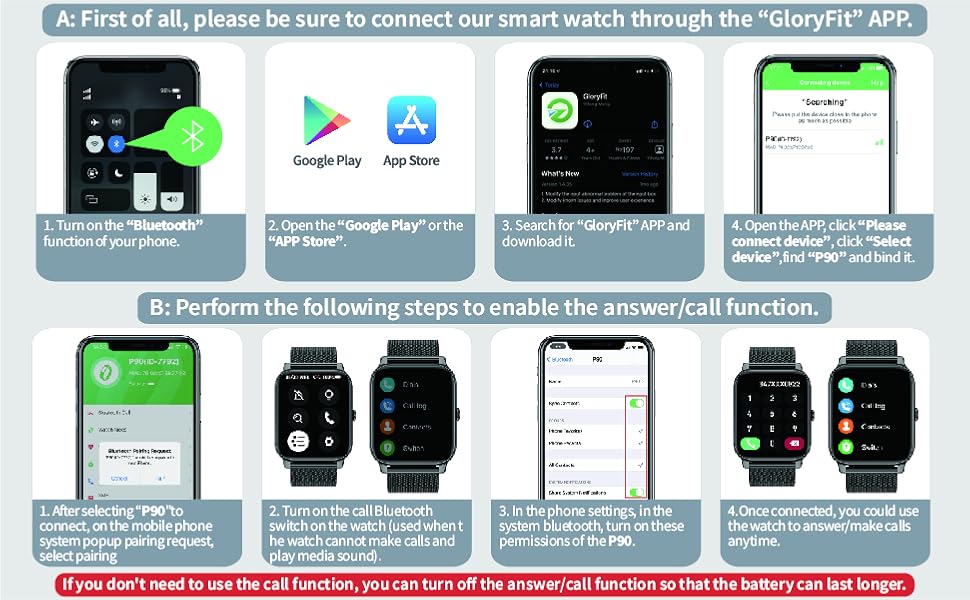
Image: Step-by-step guide for connecting the P90 Smart Watch to the GloryFit mobile application.
B. Enabling Answer/Call Function
- After selecting "P90" to connect, accept the mobile phone system pop-up pairing request.
- Turn on the call Bluetooth switch on the watch. This is necessary for making calls and playing media sound through the watch.
- In your phone's Bluetooth settings, ensure all necessary permissions for the "P90" device are enabled.
- Once connected, you can use the watch to answer or make calls anytime.
Note: If you do not wish to use the call function, you can turn off the answer/call function to conserve battery life.
4. Operating Instructions
4.1. Bluetooth Call & Message Reminder
The P90 Smart Watch allows you to make and answer calls directly from your wrist, thanks to its built-in speaker and microphone. It also provides real-time notifications for calls, SMS, and various social media apps (WhatsApp, Facebook, Twitter, Instagram, LinkedIn, etc.), ensuring you never miss important updates.

Image: Visual representation of the smartwatch's Bluetooth call and message notification capabilities.
Video: A detailed overview of the P90 Bluetooth Smartwatch, demonstrating its features and functionality for Android and iPhone users.
4.2. Health Monitoring
The P90 Smart Watch is equipped with advanced optical sensors for continuous health monitoring. It accurately tracks:
- Heart Rate: 24-hour continuous monitoring to help you understand your heart health.
- Blood Oxygen (SpO2): Real-time tracking of blood oxygen saturation levels.
- Sleep Monitoring: Automatically monitors sleep status (deep sleep, light sleep, awakening) and provides a comprehensive sleep quality analysis.
- Female Menstrual Cycle Record: Conveniently record and receive reminders for menstrual cycles.

Image: Illustrations of the smartwatch's sleep tracking and health monitoring functions, including heart rate and blood oxygen.
4.3. Sports Modes & Activity Tracking
The watch supports over 112 multi-sport modes (walking, running, cycling, basketball, etc.), accurately tracking steps, distance, calories burned, and pace. After exercise, you can review detailed data on the watch or in the GloryFit app to analyze your performance and adjust your fitness plan.

Image: The smartwatch interface displaying a selection of its 112+ sports modes and detailed activity tracking data.
4.4. Watch Face Customization
Personalize your watch with over 200 built-in watch faces available in the GloryFit app. You can also upload your own photos to create custom watch faces, making your device uniquely yours.

Image: A collage of different watch faces available for the 1.85" HD touch screen, highlighting customization options.
4.5. Other Practical Functions
The Boquaw P90 Smart Watch includes a variety of convenient features:
- Camera Control: Remotely control your phone's camera shutter.
- Music Control: Play, pause, switch songs, and adjust volume directly from the watch.
- Weather Information: Check real-time weather updates for your location.
- Alarm Clock: Set multiple alarms to help you stay on schedule.
- Stopwatch & Timer: Built-in tools for precise timing.
- Sedentary Reminder: Vibrates to remind you to move after long periods of inactivity.
- Find Phone: Locate your misplaced phone by triggering an alarm from your watch.
- Voice Assistant: Access your phone's voice assistant (e.g., Google Assistant) directly from the watch.

Image: Visuals demonstrating the smartwatch's camera control, music playback, and weather display features.
5. Maintenance
The Boquaw P90 Smart Watch is IPX8 waterproof, making it suitable for daily activities such as washing hands, sweating, and light rain. However, it is not recommended for hot showers, saunas, or diving, as steam and hot water can damage the device. To ensure longevity, keep the watch clean and dry, especially after exposure to water or sweat.

Image: The smartwatch is shown with water splashing, indicating its IPX8 waterproof capability for everyday use.
6. Troubleshooting
- Watch not connecting to app: Ensure Bluetooth is enabled on both devices. Restart the watch and your phone. Make sure the GloryFit app has all necessary permissions.
- Call function not working: Verify that the call Bluetooth switch is turned on in the watch settings and that phone permissions are granted to the P90 in your phone's Bluetooth settings.
- Notifications not appearing: Check app notification settings within the GloryFit app and ensure your phone's system notifications are enabled for the GloryFit app.
- Inaccurate health data: Ensure the watch is worn snugly on your wrist. Avoid excessive movement during measurements.
- Short battery life: Reduce screen brightness, disable unnecessary notifications, and turn off continuous health monitoring if not needed.
7. Specifications
| Feature | Detail |
|---|---|
| Model Name | P90 |
| Brand | Boquaw |
| Screen Size | 1.85 Inches |
| Shape | Square |
| Battery Cell Composition | Lithium Polymer |
| Wireless Communication Standard | Bluetooth |
| Operating System | Android and iOS compatible |
| Water Resistance | IPX8 |
| Item Weight | 5.3 ounces |
| Manufacturer | Boquaw |
| Country of Origin | China |
8. Warranty and Support
For warranty information and customer support, please refer to the contact details provided with your purchase or visit the official Boquaw website. Keep your proof of purchase for any warranty claims.