
Introduction
The Yuposl 4L 5G WiFi Automatic Pet Feeder is designed to provide convenient and reliable feeding for your cats and small to medium-sized dogs. This device features remote control via a smartphone application, scheduled feeding options, voice recording, and a two-way power supply for uninterrupted operation. Its anti-jamming design and multi-seal structure ensure food freshness and consistent delivery. Please read this manual thoroughly before use to ensure proper setup and operation.
Setup
1. Unpacking and Component Check
Carefully remove all components from the packaging. Ensure you have the main feeder unit, stainless steel bowl, Type-C power adapter, and the lid. Inspect all parts for any damage.

Image: Overview of the Yuposl Automatic Pet Feeder and its components.
2. Power Supply Connection
Connect the Type-C power adapter to the feeder and plug it into a wall outlet. For power outage protection, you may also insert three D-size alkaline batteries (not included) into the battery compartment at the bottom of the unit. The feeder will automatically switch to battery power if the main power is interrupted.
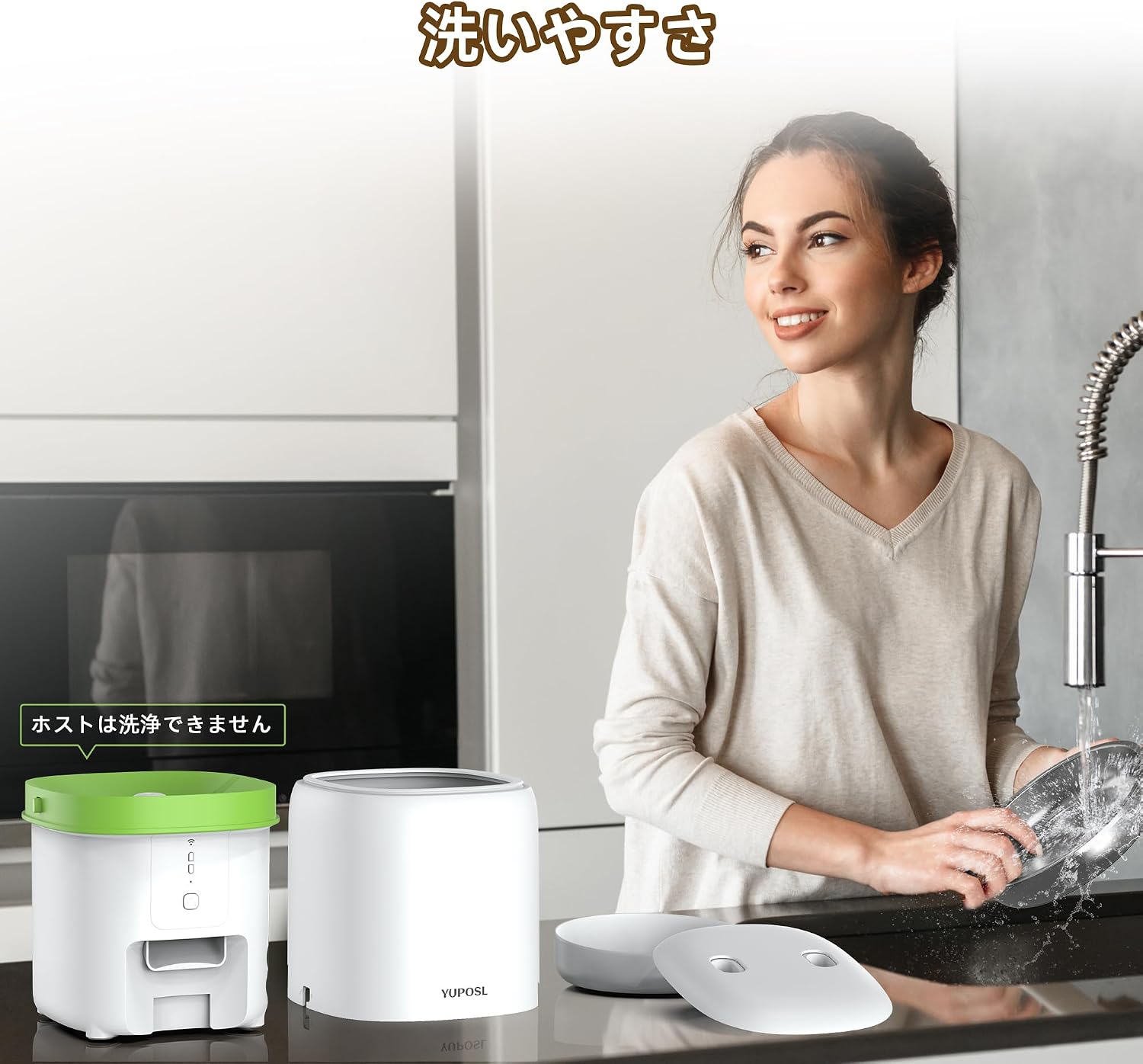
Image: Illustrates the Type-C power adapter connection and battery compartment for the 2-way power supply.
3. App Installation and WiFi Connection
- Download the designated smartphone application from your device's app store.
- Open the app and follow the on-screen instructions to create an account or log in.
- Add a new device in the app. The feeder supports both 5GHz and 2.4GHz WiFi networks.
- Press and hold the reset button on the feeder for 3 seconds until the WiFi indicator light flashes, indicating pairing mode.
- Follow the app's prompts to connect the feeder to your home WiFi network. Once connected, the WiFi indicator light will turn solid white.

Image: Steps for connecting the feeder to a WiFi network using the smartphone app.

Image: Screenshot of the app interface showing device connection status.
4. Filling the Food Hopper
Open the lid of the feeder and pour dry pet food into the hopper. Ensure the food size is between 2mm and 15mm to prevent jamming. Close the lid securely to maintain food freshness.

Image: Demonstrates how to fill the food hopper with dry pet food.
Operating Instructions
1. Scheduling Feeds via App
Use the smartphone app to set up a feeding schedule. You can program up to 15 meals per day, with each meal consisting of 1 to 16 portions. The app allows you to customize meal times and portion sizes according to your pet's needs. You can also view a history of dispensed meals.
2. Manual Feeding
To dispense food manually, press the feed button on the feeder. Each press will dispense one portion. You can also initiate manual feeding through the app.

Image: Close-up of the feeder's control panel, showing the WiFi indicator, reset button, recording button, and feed button.
3. Voice Recording
Record a voice message (up to 10 seconds) to call your pet at meal times. Press and hold the recording button on the feeder to start recording. The recorded message will play up to 5 times when food is dispensed.
4. Multi-Pet Households
For households with multiple pets, consider using multiple feeders. Place them with sufficient distance between each to prevent food competition. Each feeder can be independently programmed for specific pets, ensuring they receive their appropriate meals.
Maintenance
1. Cleaning the Stainless Steel Bowl
The stainless steel bowl is removable and washable. Clean it regularly with water and mild detergent. Rinse thoroughly and dry completely before placing it back on the feeder.

Image: A woman cleaning the removable stainless steel bowl of the pet feeder.
2. Cleaning the Main Unit
Important: The main unit of the feeder is not washable. If the main unit becomes dirty, wipe it with a damp towel. Do not immerse it in water or use abrasive cleaners.
3. Ensuring Food Freshness
The feeder's lid features a reinforced seal and a desiccant compartment to keep food fresh. Replace the desiccant regularly (approximately every 1-2 months) to maintain optimal freshness. Ensure the lid is securely closed after refilling the food hopper.
Troubleshooting
1. Food Not Dispensing / Jamming
- Check if the food size is within the recommended range (2-15mm). Larger or irregularly shaped kibble may cause jams.
- Ensure the food hopper is not overfilled, which can impede the dispensing mechanism.
- The feeder has an automatic reverse and rotation mechanism to clear minor jams. If a jam persists, manually clear the food path.
- Verify that the feeder is powered correctly (AC adapter or fresh batteries).

Image: Diagram illustrating the internal anti-jamming mechanism and recommended food sizes (2-15mm).
2. WiFi Connection Issues
- Ensure your router supports 5GHz or 2.4GHz WiFi and that the feeder is within range.
- Check your WiFi password for accuracy.
- Restart your router and the pet feeder.
- If the issue persists, try resetting the feeder by holding the reset button for 3 seconds and re-pairing it with the app.
3. App Notifications Not Received
- Ensure your smartphone has an active internet connection.
- Check your app settings to ensure notifications are enabled.
- Verify your phone's system settings allow notifications from the app.
Specifications
| Brand | Yuposl |
| Model Number | YPF03 |
| Capacity | 4 Liters |
| Dimensions (L x W x H) | 17.5 cm x 19.5 cm x 24 cm |
| Weight | 1.47 Kilograms |
| Material | ABS, Stainless Steel |
| Connectivity | Wi-Fi (5GHz or 2.4GHz) |
| Power Supply | Type-C Adapter (included), 3 x D-size Alkaline Batteries (not included) |
| Recommended Food Size | 2-15 mm |
| Target Species | Cats, Small to Medium Dogs |
| Color | Cloud White |
Warranty Information
This Yuposl Automatic Pet Feeder comes with a 1-year manufacturer's warranty from the date of purchase. This warranty covers defects in materials and workmanship under normal use. It does not cover damage caused by misuse, accidents, unauthorized modifications, or improper maintenance. Please retain your proof of purchase for warranty claims.
Customer Support
If you encounter any issues or have questions regarding your Yuposl Automatic Pet Feeder, please refer to the troubleshooting section of this manual. For further assistance, contact Yuposl customer support through the contact information provided on the product packaging or the official Yuposl website. Please have your model number (YPF03) and purchase details ready when contacting support.


