
1. Introduction
This instruction manual provides essential information for the safe and effective operation, maintenance, and troubleshooting of your Ingco RGH9528 Rotary Hammer. Please read this manual thoroughly before using the tool and retain it for future reference. Proper understanding and adherence to these instructions will ensure optimal performance and extend the lifespan of your device.
2. Safety Instructions
Always observe basic safety precautions to reduce the risk of fire, electric shock, and personal injury when operating power tools.
- Work Area Safety: Keep the work area clean and well-lit. Cluttered or dark areas invite accidents. Do not operate power tools in explosive atmospheres, such as in the presence of flammable liquids, gases, or dust.
- Electrical Safety: Power tool plugs must match the outlet. Never modify the plug in any way. Avoid body contact with earthed or grounded surfaces such as pipes, radiators, ranges, and refrigerators.
- Personal Safety: Always wear eye protection. Use hearing protection when operating the tool for extended periods. Dress properly; do not wear loose clothing or jewelry. Keep hair, clothing, and gloves away from moving parts.
- Tool Use and Care: Do not force the power tool. Use the correct power tool for your application. Disconnect the plug from the power source before making any adjustments, changing accessories, or storing power tools.
- Maintenance: Have your power tool serviced by a qualified repair person using only identical replacement parts. This will ensure that the safety of the power tool is maintained.
3. Product Overview
The Ingco RGH9528 is a powerful 950W rotary hammer designed for punching and crushing tasks. It features multiple functions for versatility in various applications.

Figure 1: Ingco RGH9528 Rotary Hammer in its carrying case, showcasing the tool and its included accessories such as the auxiliary handle, depth gauge, and various bits.
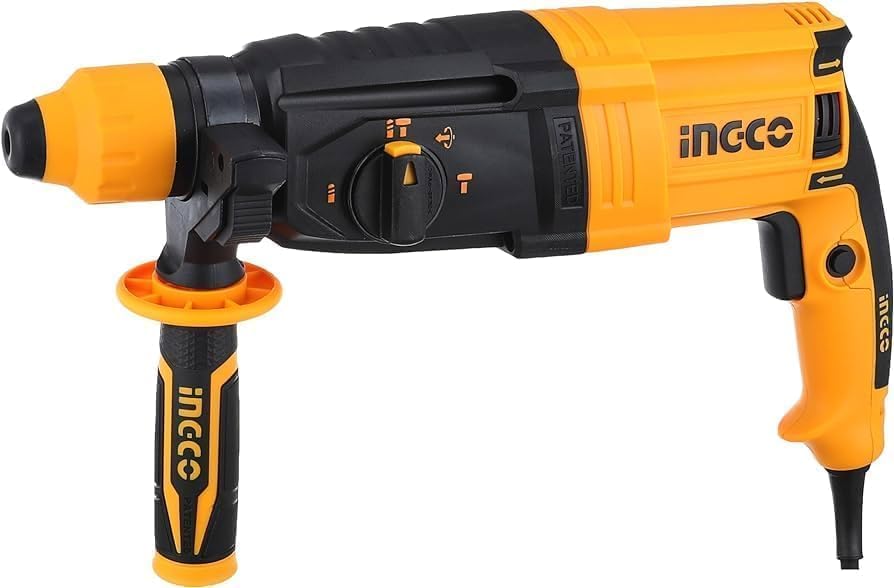
Figure 2: A detailed side view of the Ingco RGH9528 Rotary Hammer, illustrating the main handle, auxiliary handle attachment point, mode selector, and chuck.
Key Components:
- Main Handle: Ergonomically designed for comfortable grip and control.
- Auxiliary Handle: Provides additional stability and control during operation.
- Chuck: For securely holding drill bits and chisels.
- Mode Selector: Allows switching between drilling, hammer drilling, and chiseling functions.
- Trigger Switch: Activates the tool.
- Depth Gauge: Used to set the desired drilling depth.
4. Setup
Follow these steps to prepare your rotary hammer for use:
- Unpacking: Carefully remove the tool and all accessories from the packaging. Inspect for any damage.
- Attaching the Auxiliary Handle: Loosen the auxiliary handle clamp. Slide the handle onto the tool's neck and rotate it to a comfortable working position. Tighten the clamp securely.
- Installing the Depth Gauge: Insert the depth gauge into the hole on the auxiliary handle clamp. Adjust it to the desired drilling depth and secure it.
- Inserting Drill Bits/Chisels: Pull back the chuck collar, insert the SDS-Plus bit into the chuck until it clicks into place. Release the collar. Pull on the bit to ensure it is securely locked.
5. Operating Instructions
The Ingco RGH9528 offers multiple operating modes:
5.1. Drilling Mode (Rotation Only)
Use this mode for drilling in wood, metal, or plastic without hammering action.
- Set the mode selector to the drilling symbol (usually a drill bit icon).
- Ensure the correct drill bit for the material is installed.
- Hold the tool firmly with both hands.
- Press the trigger switch to start drilling.
5.2. Hammer Drilling Mode (Rotation with Hammering)
This mode is for drilling in masonry, concrete, and stone.
- Set the mode selector to the hammer drilling symbol (usually a drill bit and hammer icon).
- Install an SDS-Plus masonry drill bit.
- Hold the tool firmly and apply moderate pressure.
- Press the trigger switch. The hammering action will engage automatically.
5.3. Chiseling Mode (Hammering Only)
Use this mode for light chiseling, chipping, or breaking tasks in masonry or concrete.
- Set the mode selector to the chiseling symbol (usually a hammer icon).
- Install an SDS-Plus chisel bit.
- Position the chisel at the desired angle.
- Hold the tool firmly and press the trigger switch.
6. Maintenance
Regular maintenance ensures the longevity and safe operation of your Ingco RGH9528 Rotary Hammer.
- Cleaning: After each use, clean the tool with a soft, damp cloth. Do not use harsh chemicals or abrasive cleaners. Keep ventilation openings clear of dust and debris.
- Lubrication: Periodically apply a small amount of grease to the SDS-Plus chuck end of the drill bits/chisels to ensure smooth insertion and removal, and to reduce wear.
- Storage: Store the tool in a dry, secure place, out of reach of children. If possible, store it in its original carrying case.
- Carbon Brushes: The carbon brushes may require periodic inspection and replacement. This should ideally be performed by a qualified service technician.
7. Troubleshooting
Refer to the table below for common issues and their potential solutions.
| Problem | Possible Cause | Solution |
|---|---|---|
| Tool does not start | No power supply; Faulty power cord/plug; Trigger switch fault | Check power outlet and connections; Inspect power cord for damage; Contact service center |
| Reduced drilling/hammering power | Worn drill bit/chisel; Worn carbon brushes; Internal mechanical issue | Replace bit/chisel; Have carbon brushes inspected/replaced; Contact service center |
| Excessive vibration/noise | Loose components; Damaged internal parts | Stop use immediately; Contact service center |
| Bit not locking in chuck | Chuck collar not fully pulled back; Debris in chuck; Damaged chuck | Ensure collar is fully pulled back; Clean chuck; Contact service center for chuck replacement |
8. Specifications
Technical specifications for the Ingco RGH9528 Rotary Hammer:
| Feature | Specification |
|---|---|
| Brand | Ingco |
| Model | RGH9528 |
| Power Source Type | Electric |
| Power (Wattage) | 950W |
| Item Weight | 15 g (Note: This weight seems unusually low for a rotary hammer and may refer to packaging or a component. Actual tool weight will be significantly higher.) |
| Product Dimensions | 10 x 20 x 37 cm |
| Included Components | 1 (Refers to the main unit, accessories may be separate) |
| Batteries Required? | No |
9. Warranty and Support
For warranty information, service, or technical support, please refer to the warranty card included with your product or contact your authorized Ingco dealer. Keep your purchase receipt as proof of purchase for any warranty claims.


