
1. Introduction
This manual provides detailed instructions for the Riversong Motive 5T Bluetooth Calling Smart Watch. It covers essential information regarding product features, setup, operation, maintenance, troubleshooting, and technical specifications. Please read this manual thoroughly to ensure proper use and to maximize the functionality of your device.

Image 1: The Riversong Motive 5T Smart Watch, showcasing its display and strap design.
2. Product Overview
The Riversong Motive 5T is a feature-rich smart watch designed for daily wear, offering a blend of durability, connectivity, and health monitoring capabilities.
- Display: Features a 2.1-inch touch screen with a resolution of 240x282 pixels, providing clear visuals and responsive interaction.
- Durability: Constructed from metal, 2.5D tempered glass, and IML materials. It boasts an IP68 water-resistant rating, offering protection against dust and water immersion up to 1.5 meters for 30 minutes.
- Connectivity: Equipped with Bluetooth 5.3 for stable and efficient connection to your smartphone, enabling seamless call and message notifications.
- Battery: A 250mAh battery provides approximately 5-7 days of typical usage time on a single charge.
- Fitness Tracking: Comprehensive health monitoring includes step counting, distance traveled, calories burned, 24-hour heart rate tracking, sleep analysis, and support for over 50 sports modes.
- Customization: Personalize your watch with a variety of customizable watch faces to match your style.
- Other Features: Integrated JL7012 chipset and an AI voice assistant enhance functionality and user interaction.
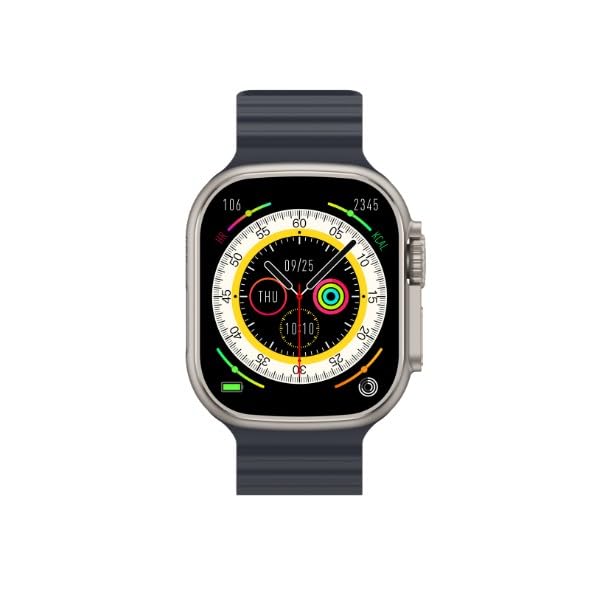
Image 2: Close-up of the Motive 5T's 2.1-inch display, showing a watch face with time and health metrics.
3. Setup Instructions
3.1 Charging the Device
- Connect the magnetic charging cable to the charging contacts on the back of the watch.
- Plug the USB end of the cable into a standard USB power adapter (5V/1A recommended) or a computer's USB port.
- The watch display will show a charging indicator. Ensure the watch is fully charged before first use. A full charge typically takes about 2 hours.
3.2 Powering On/Off
- Power On: Press and hold the side button for a few seconds until the Riversong logo appears.
- Power Off: From the watch face, swipe down to access quick settings, or navigate to 'Settings' > 'System' > 'Power Off'. Confirm your selection. Alternatively, press and hold the side button until the power off option appears.
3.3 App Installation and Pairing
- Scan the QR code provided in the watch packaging or search for the official Riversong companion app on your smartphone's app store (e.g., Google Play Store or Apple App Store).
- Download and install the app.
- Open the app and follow the on-screen instructions to create an account or log in.
- Enable Bluetooth on your smartphone.
- In the app, select 'Add Device' or 'Pair Device' and choose 'Motive 5T' from the list of available devices.
- Confirm the pairing request on both your smartphone and the watch.
- Once paired, the watch will synchronize data with the app, and you can customize settings and view detailed health information.
4. Operating Instructions
4.1 Basic Navigation
- Swipe Up: Access notifications.
- Swipe Down: Access quick settings (e.g., brightness, DND, battery saver).
- Swipe Left/Right: Cycle through widgets (e.g., heart rate, activity, weather).
- Tap: Select an item or open an application.
- Press Side Button: Return to the watch face or open the app menu.
4.2 Bluetooth Calling
Once your Motive 5T is successfully paired with your smartphone via Bluetooth 5.3, you can make and receive calls directly from your wrist.
- Making a Call: Access the 'Dialer' or 'Contacts' app on your watch. You can dial a number or select a contact to initiate a call.
- Receiving a Call: When a call comes in, the watch will display the caller ID. You can answer or reject the call directly from the watch screen.
- Notifications: The watch will display incoming message notifications from your paired smartphone.
4.3 Fitness Tracking Usage
The Motive 5T continuously monitors various health metrics.
- Activity Tracking: Steps, distance, and calories are automatically recorded throughout the day. View summaries on the watch or detailed reports in the companion app.
- Heart Rate Monitoring: The watch provides 24-hour heart rate monitoring. Access the heart rate widget or app to view real-time data and historical trends.
- Sleep Monitoring: Wear the watch to bed for automatic sleep tracking. The app will provide insights into your sleep patterns (deep sleep, light sleep, awake time).
- Sports Modes: Select from over 50 sports modes (e.g., running, cycling, swimming) to track specific workout data, including duration, calories, and heart rate zones.

Image 3: The back of the Motive 5T, highlighting the optical health sensors used for heart rate and other measurements.

Image 4: The watch display presenting various health metrics such as heart rate, blood oxygen, and activity rings.
4.4 AI Voice Assistant
The integrated AI voice assistant allows for hands-free control and quick access to information.
- Activation: Typically activated by a specific gesture (e.g., long press of a button) or by tapping the voice assistant icon on the screen. Refer to the watch interface for the exact method.
- Commands: Once activated, speak your command clearly. Examples include "What's the weather?", "Set a timer for 5 minutes," or "Call [Contact Name]."
4.5 Smart Temperature Detection
The Motive 5T can monitor your wrist skin temperature.
- Accessing Temperature Data: Navigate to the temperature widget or app on your watch to view current readings and historical data.
- Ambient Temperature: For ambient temperature readings, remove the watch from your wrist and place it in the desired environment.
4.6 Digital Crown Usage
The digital crown on the side of the watch provides an intuitive way to navigate menus and content.
- Rotate: Rotate the crown to scroll through lists, adjust volume, or zoom in/out on certain screens.
- Press: Press the crown to return to the watch face or open the app menu.

Image 5: Side view of the Motive 5T, illustrating the digital crown and side button for navigation and control.
5. Maintenance
- Cleaning: Regularly clean the watch and strap with a soft, damp cloth. Avoid using harsh chemicals or abrasive materials. Ensure the charging contacts are clean and dry.
- Water Resistance: The watch is IP68 water-resistant, suitable for daily use and shallow water activities. However, it is not recommended for hot showers, saunas, or diving, as steam and high pressure can compromise the seals. Dry the watch thoroughly after exposure to water.
- Charging: Use only the provided charging cable. Avoid exposing the watch to extreme temperatures during charging.
- Storage: When not in use for extended periods, store the watch in a cool, dry place. Charge it periodically to maintain battery health.
6. Troubleshooting
- Watch does not power on:
- Ensure the watch is fully charged. Connect it to the charger and wait a few minutes before attempting to power it on again.
- Unable to pair with smartphone:
- Ensure Bluetooth is enabled on your smartphone and the watch.
- Make sure the watch is within the Bluetooth range of your phone.
- Restart both the watch and your smartphone.
- Clear the Bluetooth cache on your phone (if applicable) and try pairing again.
- Ensure the companion app is installed and running.
- Inaccurate health data readings:
- Ensure the watch is worn snugly on your wrist, but not too tight.
- Clean the sensors on the back of the watch.
- Avoid excessive movement during measurements.
- Environmental factors and individual physiology can affect accuracy.
- Short battery life:
- Reduce screen brightness.
- Disable unnecessary notifications.
- Limit continuous heart rate monitoring if not required.
- Ensure the watch is fully charged.
7. Specifications
| Feature | Detail |
|---|---|
| Model Number | MOTIVE5T-SW506 |
| Display Size | 2.1 Inches |
| Display Resolution | 240x282 pixels |
| Connectivity | Bluetooth 5.3 |
| Battery Capacity | 250mAh |
| Typical Usage Time | 5-7 days |
| Water Resistance | IP68 |
| Materials | Metal, 2.5D Tempered Glass, IML |
| Special Features | Touchscreen, AI Voice Assistant, Heart Rate Monitor, Sleep Monitor, Blood Oxygen Monitor, Temperature Detection, 50+ Sports Modes |
| Chipset | JL7012 |
8. Warranty and Support
8.1 Manufacturer's Warranty
The Riversong Motive 5T Smart Watch comes with a 1 Year Limited Warranty from the manufacturer. This warranty covers defects in materials and workmanship under normal use. Please retain your proof of purchase for warranty claims.
The warranty does not cover damage caused by misuse, accidents, unauthorized modifications, or failure to follow the instructions in this manual.
8.2 Customer Support
For technical assistance, warranty claims, or further inquiries, please contact Riversong customer support through their official website or the contact information provided with your product packaging.