
esbeecables 3-in-1 OTG
esbeecables USB C SD TF Memory Card Reader User Manual
Model: 3-in-1 OTG
Introduction
This manual provides comprehensive instructions for the esbeecables USB C SD TF Memory Card Reader (3-in-1 OTG model). It covers setup, operation, maintenance, and troubleshooting to ensure optimal performance and longevity of your device. This versatile adapter is designed for fast data transfer between memory cards and USB-C enabled devices such as iPhones, iPads, and other smartphones and laptops.
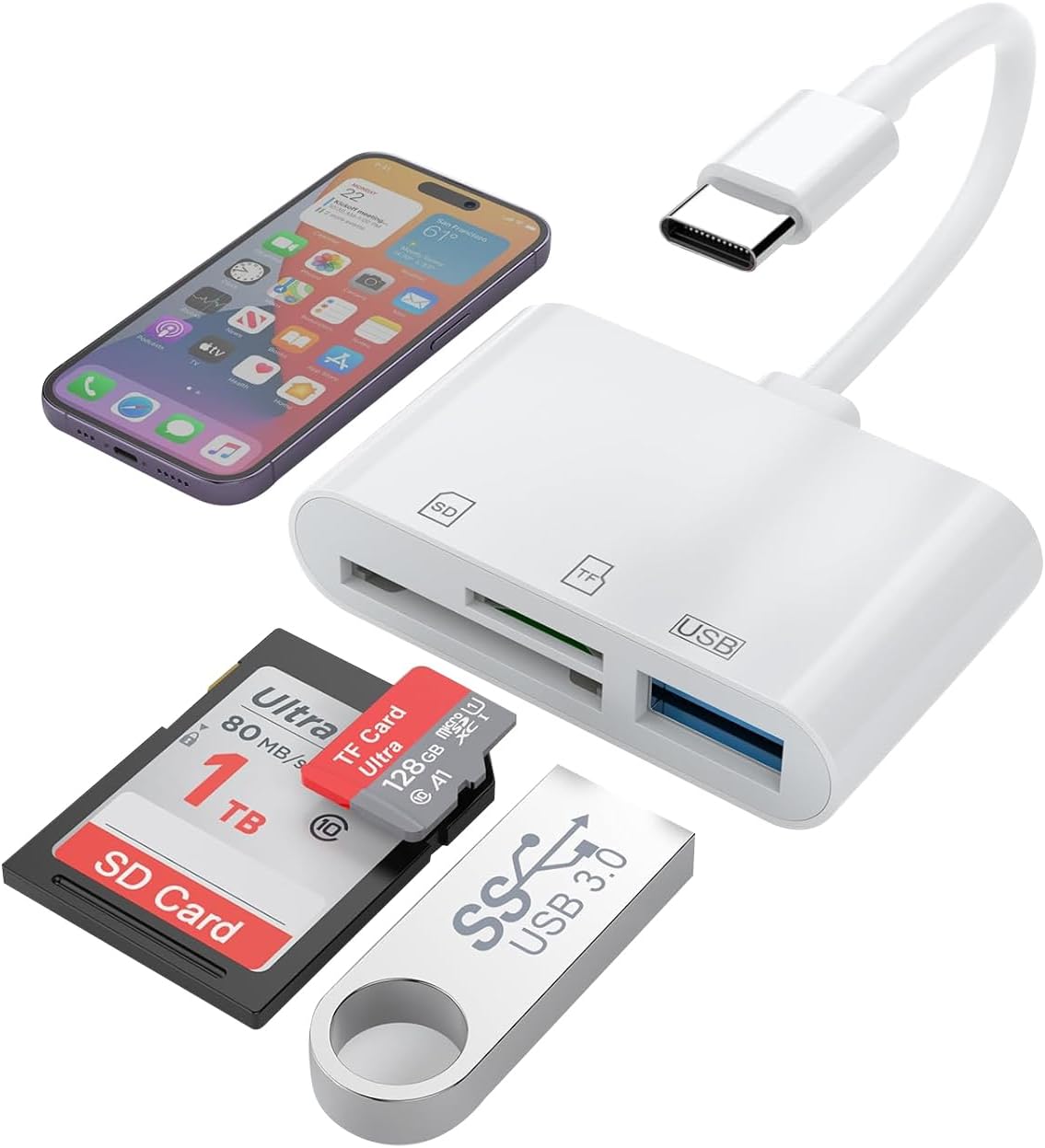
Image: The esbeecables 3-in-1 OTG USB C SD TF Memory Card Reader, showcasing its compact design and compatibility with various storage media and devices.
Product Features
The esbeecables 3-in-1 OTG USB C SD TF Memory Card Reader offers multiple functionalities for efficient data management:
- Multipurpose Use: Designed for data transfer with USB C 3.1 ports, compatible with USB C smartphones, laptops, and tablets. Facilitates easy transfer of photos and files from TF and SD card slots to USB C devices. Note: This card reader can only read one card (either SD or TF) at a time. The USB 3.0 port can work simultaneously with either an SD or TF card.
- Quick Sharing Tool: Effortlessly copy photos and videos from camera memory cards to your phone or iPad for real-time sharing. Features dual card slots for SD and Micro SD cards and supports capacities up to 1TB for reviewing, backing up, and archiving files.
- USB 3.0 Port: Compatible with various USB devices including digital cameras, SLRs, USB flash drives, keyboards, and mice. Built with a powerful USB 3.0 chip, ensuring fast and secure transfers at 5Gbps (10 times faster than USB 2.0).
- Plug and Play: Modern USB C connector allows direct transfer of photos and videos from cameras to USB-C devices. Compatible with iPhones, MacBooks, iPads, Surfaces, Dells, and Galaxys. Supports SD, Micro SD, SDHC, SDXC, TF Card, UHS-I, UHS-II, and more.
- HD Three-Way Transfer: Offers blistering-fast transfer speeds for raw photos, 4K videos, and other large files, saving significant time.

Image: The card reader in various usage scenarios, demonstrating its versatility for mobile phone data access, photography, and file sharing.
Setup and Installation
The esbeecables USB C SD TF Memory Card Reader is designed for plug-and-play functionality, requiring no additional drivers for most compatible operating systems.
System Requirements:
- iOS Devices: Requires iOS 12.0 or above. Please check your device's system information and upgrade if necessary.
- Android Devices: Must support OTG (On-The-Go) function. Ensure your SD/TF card is formatted to FAT32 before use.
- Other Operating Systems: Supports Windows, Mac OS, and Chrome OS.
Connecting the Device:
- Identify the USB-C port on your device (iPhone 15 series, iPad, MacBook, etc.).
- Insert the USB-C connector of the card reader firmly into your device's USB-C port. Ensure it is fully inserted for proper connection.
- The device is plug-and-play; your operating system should automatically recognize it.

Image: A detailed view of the card reader's ports, indicating the Micro SD slot, SD slot, and USB female port.
Operating Instructions
Reading and Transferring Files (iOS/iPadOS):
For iPhone 15/16 series and iPads with USB-C connectors:
- Insert your SD or TF card into the corresponding slot on the card reader.
- Connect the card reader to your iPhone or iPad's USB-C port.
- Open the built-in 'Files' app on your iOS/iPadOS device.
- Navigate to 'NoName' or 'Untitled' (this is the name of your memory card) under the 'Locations' section.
- Select the files you wish to transfer from the SD card.
- Move or copy the selected files to your desired location on your iPhone or iPad.
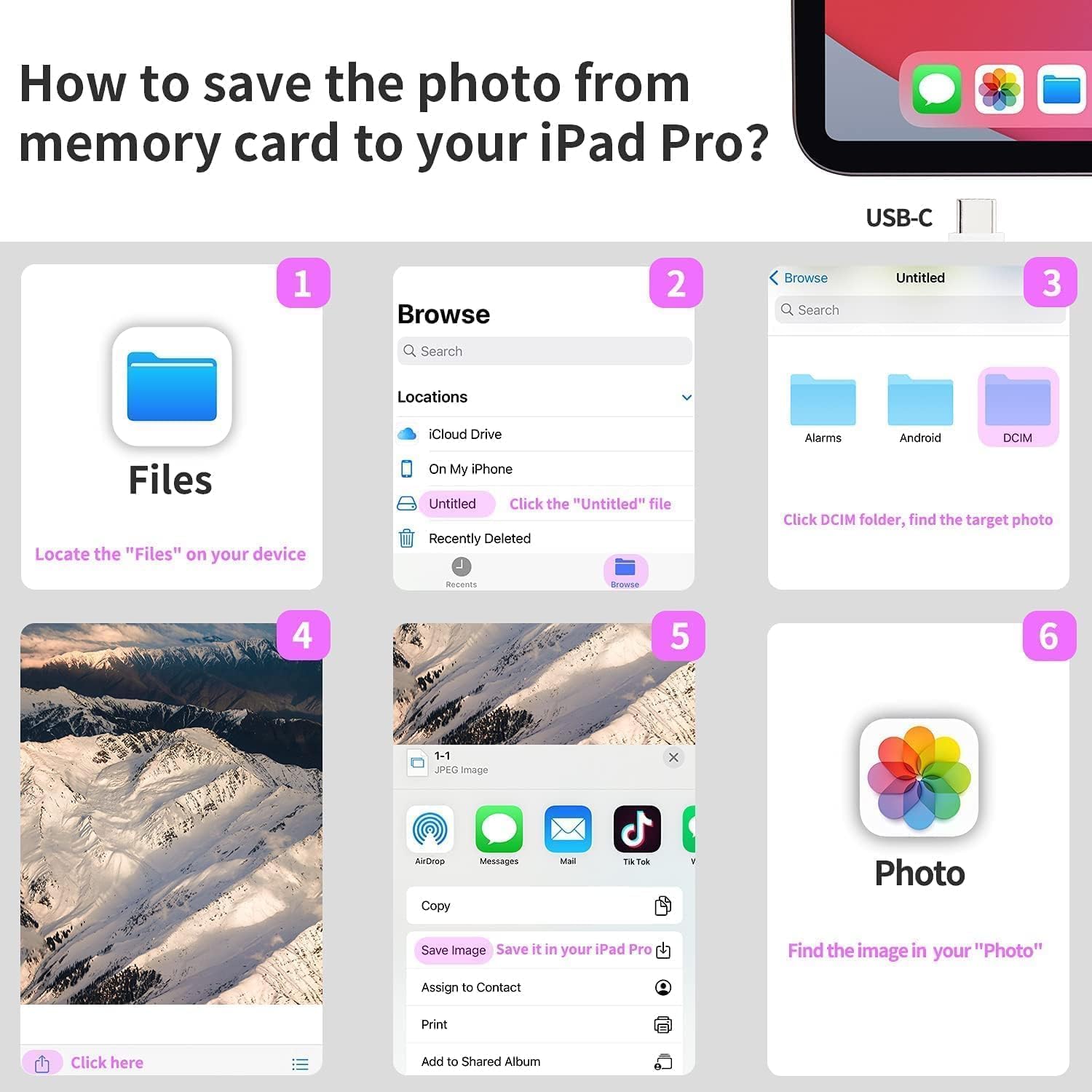
Image: Visual guide demonstrating the process of transferring photos from a memory card to an iPad Pro using the native Files application.
Using the USB 3.0 Port:
The integrated USB 3.0 port allows connection of various USB devices:
- Connect USB flash drives, digital cameras, SLRs, keyboards, mice, or external hard drives.
- The USB 3.0 port supports data transfer speeds up to 5Gbps.
- This port can operate simultaneously with either an SD or TF card inserted in their respective slots.

Image: The card reader connected to an iPad Pro, demonstrating its capability to connect external peripherals like a keyboard and mouse for enhanced productivity.

Image: Depiction of the card reader's multiple uses, showing connections to laptops, tablets, and smartphones for various USB devices.
Maintenance and Care
- Cleaning: Use a soft, dry cloth to clean the exterior of the card reader. Avoid using liquid cleaners or solvents.
- Storage: Store the device in a cool, dry place away from direct sunlight and extreme temperatures.
- Handling: Handle the card reader gently. Avoid dropping it or subjecting it to strong impacts.
- Port Protection: Keep the USB-C connector and card slots free from dust and debris. Consider using protective caps if available.
Troubleshooting
| Problem | Possible Cause | Solution |
|---|---|---|
| Device not recognized. | Incomplete connection, incompatible OS version, or phone case interference. | Ensure the USB-C connector is fully inserted. Verify your iOS version is 12.0 or above. For Android, confirm OTG function is enabled. Try removing your phone case if it obstructs the connection. |
| Cannot read SD/TF card. | Incorrect card insertion, unsupported card format (for Android), or attempting to read both SD and TF simultaneously. | Ensure the card is inserted correctly into the designated slot. For Android, format the card to FAT32. Remember, only one card (SD or TF) can be read at a time, though the USB 3.0 port can be used concurrently. |
| Slow transfer speeds. | Using a USB 2.0 port or cable, or issues with the memory card itself. | Ensure you are connected to a USB 3.0 compatible port on your device. Use high-speed memory cards for optimal performance. |
| Files app not showing card (iOS/iPadOS). | Card not properly mounted or app issue. | Reconnect the card reader. Close and reopen the 'Files' app. Restart your device if the issue persists. |
Specifications
- Model: 3-in-1 OTG
- Brand: esbeecables
- Connectivity Technology: USB Type C
- Media Type Support: CompactFlash, SD Card, SDHC, SDXC, UHS-I, microSD
- Special Feature: Plug & Play
- Color: White
- Item Weight: 0.634 ounces
- Package Dimensions: 6.42 x 4.17 x 0.98 inches
- Operating System Compatibility: iOS 12.0+, Android (OTG enabled), Windows, Mac OS, Chrome OS, Linux
- Transfer Speed: Up to 5Gbps (USB 3.0)

Image: An exploded view illustrating the different slots (Micro SD, USB, SD) and the types of cards and devices compatible with each.
Warranty and Support
esbeecables provides the following assurances for your product:
- Money-Back Guarantee: 90-days money-back guarantee.
- Warranty: 2-years Warranty.
- Customer Service: 24 hours after-sale service is available for any questions or concerns. Please feel free to contact us.
For further assistance, please refer to the contact information provided with your purchase or visit the official esbeecables store on Amazon: esbeecables Store
Ask a question about this manual
Ask about setup, troubleshooting, compatibility, parts, safety, or missing instructions. Manuals+ will review the question and use this page’s manual context to help answer it.