
1. Introduction
The KEMOVE K98SE Mechanical Gaming Keyboard is designed for efficiency and comfort, featuring a compact 96% layout with 98 keys. It offers a superior typing and gaming experience with pre-lubed mechanical switches, vibrant LED backlighting, and customizable software support. This manual provides detailed instructions to help you set up, operate, and maintain your keyboard.

Figure 1: KEMOVE K98SE Mechanical Gaming Keyboard
2. What's in the Box
Upon unboxing your KEMOVE K98SE Mechanical Gaming Keyboard, please ensure all the following items are present:
- KEMOVE K98SE Mechanical Keyboard x 1
- USB Type-C Cable x 1
- Keycap Puller x 1
- User Manual x 1
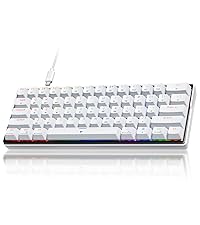
Figure 2: Box Contents
3. Setup
3.1 Connecting the Keyboard
Connect the provided USB Type-C cable to the port on the keyboard and the other end to an available USB port on your computer. The keyboard is plug-and-play and should be recognized automatically by your operating system.

Figure 3: USB-C Connection
3.2 Adjusting Keyboard Height
The K98SE features a two-stage kickstand, allowing you to adjust the keyboard's angle for optimal comfort. Gently pull out the kickstands located on the underside of the keyboard to your preferred height.

Figure 4: Two-Stage Kickstand
4. Operating Instructions
4.1 Keyboard Layout
The K98SE utilizes a compact 96% layout with 98 keys, designed to maximize space efficiency while retaining essential keys including the F-row, number pad, and navigation keys. This arrangement is practical for various tasks, reducing the possibility of accidental touches.

Figure 5: 96% Keyboard Layout
4.2 Mechanical Switches
The K98SE is equipped with pre-lubed mechanical switches, ensuring a smooth and responsive typing experience. The Brown Switch variant offers a balanced feel with gentle tactile feedback and no pronounced 'click' sound, making it suitable for users who desire feedback without excessive noise.

Figure 6: Pre-lubed Brown Switch
Other switch types available for KEMOVE keyboards include:
- Red Switch: Linear, quiet sound, fast action with minimal resistance, ideal for gaming.
- Blue Switch: Clicky, medium resistance, audible click sound, crisp tactile feedback, suitable for typists.

Figure 7: Pre-lubed Red Switch

Figure 8: Pre-lubed Blue Switch
4.3 Backlight Features
The K98SE LED backlit keyboard offers 15 distinct lighting effects with adjustable brightness and speed. The integrated side light strip enhances the visual experience. Please note that the light color is fixed to blue and cannot be changed.

Figure 9: Ice Blue Backlight
4.4 Software Support
The K98SE wired keyboard software provides extensive customization options, including key mappings, macro settings, and backlight configurations. It supports up to five distinct profiles to cater to diverse user needs. Currently, the software is compatible only with Windows operating systems.

Figure 10: Software Support Interface
4.5 Key Functions and Comfort
The keyboard features double-shot keycaps for durability and clear legends. Full-key anti-ghosting ensures all your keystrokes are registered accurately, providing a seamless gaming and typing experience. The design incorporates double sound dampening foam (3.5mm high-density sandwich silent EVA and 4mm high-density silent foam) to reduce noise and provide a smoother key feel.

Figure 11: Built-in Double Sound-absorbing Layer
4.6 Product Feature Video
Video 1: K98SE Product Features Introduction. This video provides a visual overview of the keyboard's key features, including its 98-key configuration, ABS two-color injection keycaps, customized Kailh mechanical red switches, two-stage foot support, ice blue backlight with fifteen lighting modes, and sound-dampening materials. It demonstrates the keyboard's design and functionality.
5. Maintenance
To ensure the longevity and optimal performance of your KEMOVE K98SE keyboard, follow these maintenance guidelines:
- Cleaning: Regularly wipe the keycaps and keyboard surface with a soft, dry, lint-free cloth. For deeper cleaning, you may use a slightly damp cloth with mild soap, ensuring no liquid enters the keyboard.
- Keycap Removal: Use the included keycap puller to safely remove keycaps for cleaning or replacement. Gently pull straight up to avoid damaging the switch stem.
- Switch Replacement: If you have a hot-swappable version and wish to replace switches, use a switch puller (not included, but often comes with replacement switches) to carefully remove them. Ensure proper alignment when inserting new switches to prevent bending pins.
- Avoid Liquids: Keep liquids away from the keyboard to prevent damage to internal components.
- Storage: When not in use for extended periods, store the keyboard in a dry, dust-free environment.
6. Troubleshooting
If you encounter any issues with your KEMOVE K98SE keyboard, please refer to the following common troubleshooting steps:
- Keyboard Not Responding: Ensure the USB-C cable is securely connected to both the keyboard and your computer. Try connecting to a different USB port or a different computer to rule out port or system issues.
- Keys Not Registering: Check if any debris is lodged under the keycap. If the issue persists for a specific key, and you have a hot-swappable version, consider replacing the switch for that key.
- Backlight Issues: Verify that the backlight is enabled and brightness is adjusted using the keyboard's function keys (refer to the included quick guide for specific key combinations).
- Software Not Working (Windows): Ensure you have downloaded the correct software version from the official KEMOVE website. Run the software as an administrator.
- Compatibility: The keyboard is compatible with Windows 11/10/8/7/XP and Mac OS. For Vista and Linux, it is primarily suitable for typing and office use, and full functionality (like software customization) may not be available.
If these steps do not resolve your issue, please contact KEMOVE customer support for further assistance.
7. Specifications
| Feature | Detail |
|---|---|
| Product Dimensions | 15.4 x 5.6 x 1.4 inches |
| Item Weight | 2.92 pounds |
| Manufacturer | KEMOVE |
| ASIN | B0CM5R6PX9 |
| Country of Origin | China |
| Item model number | Tan Switch |
| Brand | KEMOVE |
| Compatible Devices | PC |
| Connectivity Technology | USB-C |
| Keyboard Description | Mechanical |
| Recommended Uses For Product | Gaming |
| Special Feature | Backlit |
| Color | Brown |
| Number of Keys | 98 |
| Style | Modern |
| Included Components | USB Cable |
8. Warranty and Support
KEMOVE is committed to providing high-quality products and excellent after-sales service. For any product-related inquiries, technical support, or warranty claims, please refer to the contact information provided in your product packaging or visit the official KEMOVE website. Please retain your proof of purchase for warranty purposes.


