Introduction
This manual provides essential information for the safe and effective operation, assembly, and maintenance of your Kidzone Smart Bumper Car. Please read all instructions carefully before use and retain this manual for future reference.
Safety Information
WARNING: The vehicle must be OFF and cannot be operated when charging. Fully charge the battery for 8-12 hours, but not more than 20 hours. Damage to the battery may occur if it is completely drained. Charge the battery at least once a month even if not operating the vehicle to maximize battery life.
This electric bumper car is designed with safety in mind, featuring adjustable 5-point seat belts, anti-flat tires, and a cushioned rubber bumper to reduce impact. A slow start safety feature ensures smooth and controlled acceleration. The product complies with ASTM/CPSIA/CPSC/CA Prop 65/FCC safety regulations. Always supervise children during operation.
Proposition 65 Warning: This product may contain chemicals known to the State of California to cause cancer and birth defects or other reproductive harm.
What's in the Box
- Ride on Car
- Charger
- Remote Control
- Manual
- DIY Stickers (letters, numbers, ice cream, stars)
- Racing Flag
Setup and Assembly
The Kidzone Smart Bumper Car comes partially assembled. Follow these steps for initial setup:
- Battery Connection: The battery may come detached for shipping. You will need a Phillips head screwdriver to unscrew the seat, connect the battery, and then re-secure the seat. Ensure all connections are firm.
- Remote Control Batteries: The remote control requires 2 AAA batteries (not included). Use a small Phillips head screwdriver to open the battery compartment on the back of the remote and insert the batteries.
- Backrest Assembly: The backrest may need to be popped into place. Be mindful of the wire connection for the lights on one side. Ensure the wire is pushed through the designated hole to prevent obstruction when closing.
- Charging: Before first use, fully charge the bumper car for 8-12 hours. The charging port is located on the control panel.
- DIY Stickers: Personalize your bumper car with the included DIY stickers.

The bumper car comes with sheets of letter, number, and fun icon stickers (like ice cream and stars) to allow children to customize their ride.
Operating Instructions
The control panel is located on the seat base. It features a power button, mode selection, speed settings, light controls, and a battery indicator.

This image displays the main features of the bumper car, including the 5-point harness, accelerated speed setting, Bluetooth speaker, and 360-degree spinning capability. The control panel is clearly visible for operation.
- Power On/Off: Press the large red power button on the control panel to turn the vehicle on or off.
- Driving Modes:
- Joystick Input Mode: For children to drive independently using the two joysticks. Select "JOYSTICK" on the control panel.
- 2.4G Remote Control Mode: For parental supervision and control. Select "REMOTE" on the control panel. The remote allows steering, forward/backward movement, and emergency stop (P button).
- APP Control Mode: Control the bumper car via the free Kidzone APP on iOS or Android devices. This mode allows control over direction, speed, lights, and music.
- Speed Settings: Use the "FAST" or "SLOW" buttons on the control panel to adjust the driving speed (0.75 - 1.3 mph).
- Lights:
- Upper Lights: Press the "UPPER LIGHT" button to cycle through different light colors and patterns on the backrest.
- Lower Lights: Press the "LOWER LIGHT" button to cycle through different light colors and patterns on the bumper.
- Bluetooth Connectivity: The bumper car features Bluetooth to play music or audio files. Ensure Bluetooth is enabled on the control panel and connect your device.
- 360-Degree Spin: The bumper car is designed for 360-degree spins, offering an engaging play experience.
This video demonstrates the various control options of the Kidzone Smart Bumper Car, including the physical control panel, remote control, and the Kidzone mobile application. It highlights how to switch between joystick and remote modes, adjust speed, and activate the upper and lower LED lights. The video also shows the charging port and battery indicator.

This image illustrates the interactive features of the Kidzone APP, including tutorials, challenges, free play, and missions. It also shows the car controller interface within the app and options for customizing user accounts and earning points.
Charging the Battery
The bumper car includes a 12V rechargeable battery and a charger. An 8-12 hour charge provides approximately 40 minutes of playtime. A fully charged battery should not be charged for more than 20 hours to prevent damage. The battery indicator on the control panel shows the current charge level.
To charge, ensure the vehicle is OFF. Plug the charger into the designated port on the control panel and into a power outlet. The indicator light on the charger will show charging status (e.g., red for charging, green for fully charged).
Maintenance
- Battery Care: Charge the battery at least once a month, even if not operating the vehicle, to maximize its lifespan. Avoid completely draining the battery.
- Cleaning: Wipe the bumper car with a damp cloth. Avoid using harsh chemicals or abrasive cleaners.
- Storage: Store the bumper car in a dry, cool place away from direct sunlight when not in use.
- Inspection: Regularly check for any loose parts, damaged wires, or worn components. Contact customer support if any issues are found.
Troubleshooting
| Problem | Possible Cause | Solution |
|---|---|---|
| Vehicle does not turn on. | Battery is not connected or is drained. | Ensure battery is properly connected. Charge the battery for 8-12 hours. |
| Vehicle does not move. | Incorrect driving mode selected (e.g., remote mode selected but child is using joysticks). Low battery. | Verify the correct driving mode is selected on the control panel. Check battery level and charge if necessary. |
| Charger light is green but vehicle doesn't charge. | Faulty charger or charging port. | Ensure the charger is fully inserted. Try a different outlet. If problem persists, contact customer support for a replacement charger. |
| Lights are not working. | Lights are turned off or a connection issue. | Press the "UPPER LIGHT" or "LOWER LIGHT" buttons to activate. Check for loose wire connections if recently assembled. |
Specifications
- Product Dimensions: 22.4"D x 22.4"W x 20.3"H
- Item Weight: 12.4 pounds
- Recommended Age: 18 months - 6 years
- Weight Capacity: 66 lbs
- Battery: 12V Rechargeable Lead-acid battery
- Motors: Two 15W motors
- Speed: 0.75 - 1.3 mph (2-speeds)
- Features: APP Control, Remote Control, LED Lights, Bluetooth, 360° Spin, DIY Stickers, 5-point seat belts, Cushioned rubber bumper.
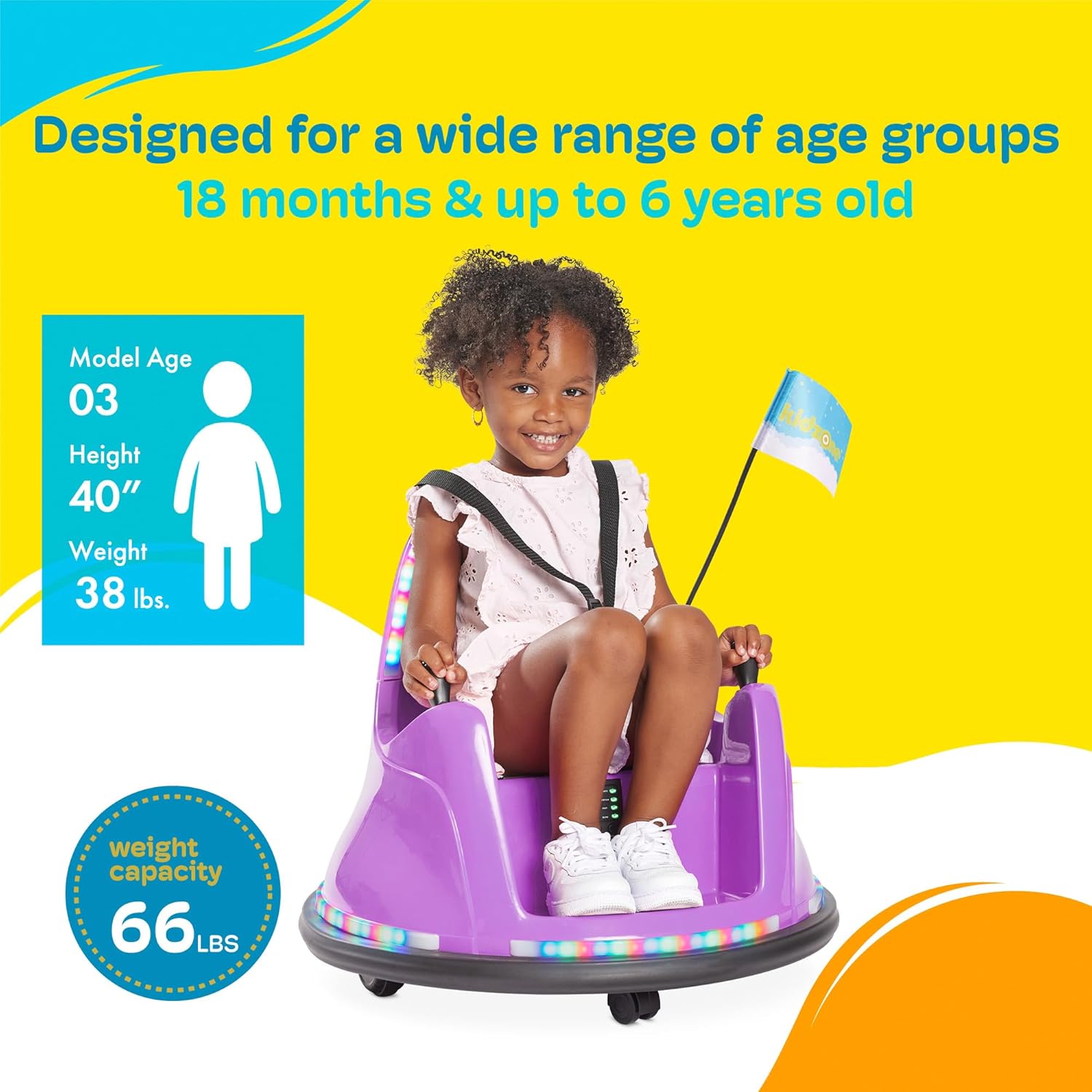
This graphic indicates the Kidzone Smart Bumper Car is designed for children aged 18 months up to 6 years old, with a maximum weight capacity of 66 lbs.