
Introduction
This manual provides essential instructions for the safe and efficient operation, maintenance, and troubleshooting of your cozytrikes GTX L 60 Off-Road Electric Mobility Scooter. Please read this manual thoroughly before operating the scooter to ensure proper use and to prevent injury or damage.
Important Safety Information
- Always wear appropriate safety gear, including a helmet, when operating the scooter.
- Do not exceed the maximum weight capacity of 550 pounds.
- Operate the scooter at a safe speed, especially on uneven terrain or in crowded areas.
- Ensure all components are securely fastened before each use.
- Avoid operating the scooter under the influence of alcohol or medication that may impair judgment.
- Always use the electric-assist brake system for controlled stopping.
Setup and Initial Preparation
1. Unboxing and Inspection
Carefully remove all components from the packaging. Inspect the scooter for any signs of damage that may have occurred during shipping. Report any damage to your dealer immediately.
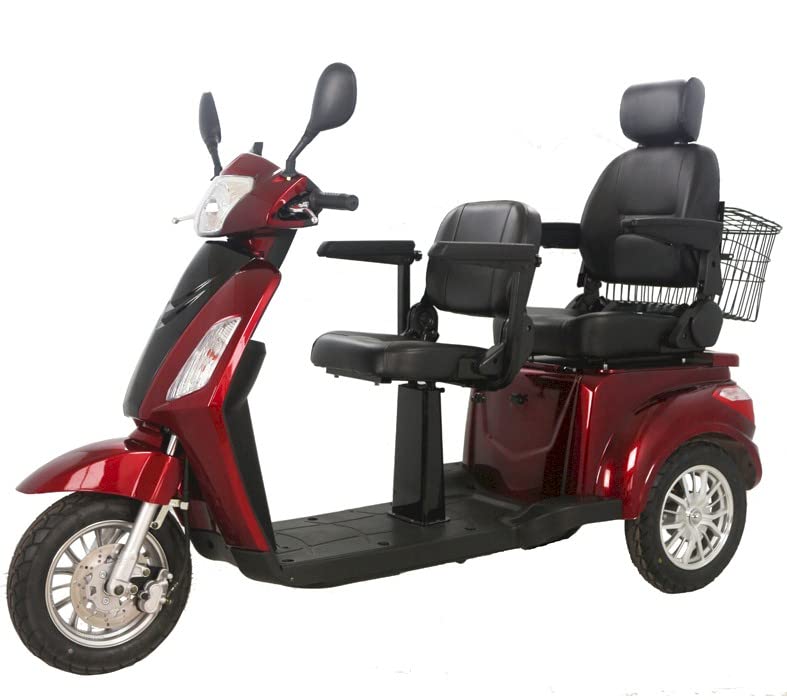
Image: The GTX L 60 scooter, highlighting its overall structure and seating arrangement.
2. Battery Installation and Initial Charging
The GTX L 60 uses five 20 Amp-Hr 12 Volt Lead acid maintenance-free batteries, or Lithium batteries. Ensure batteries are correctly installed according to the diagram provided in the separate battery guide. Fully charge the batteries before the first use. The charging port is typically located near the battery compartment.
- Connect the charger to the scooter's charging port.
- Plug the charger into a standard wall outlet.
- Allow the batteries to charge until the indicator light on the charger signals a full charge (refer to charger manual for specific indicators).
3. Adjusting Seat, Backrest, and Armrest
The scooter features adjustable components for user comfort.
- Adjustable backrest and armrest: Use the levers located on the side of the seat to customize the angle and position for an ergonomic seating position.
- Adjustable seat: The seat can be moved back and forth to accommodate different leg lengths, providing ample legroom. Locate the adjustment lever beneath the seat.
Video: Demonstration of the seat rotation and adjustment features, showing how to customize seating for comfort and accessibility.
Operating Instructions
1. Instrument Panel Overview
The instrument panel displays crucial information for operation:
- Speed Indicator: Shows current operating speed.
- Battery Charge Indicator: Displays remaining battery life.
- Lights: Controls for headlights and taillights.
- Turn Signals: Indicators for left and right turns.
- Speed Adjustment: Dial or buttons to set desired maximum speed.
2. Starting and Driving
- Turn the key to the "ON" position.
- Adjust the speed setting to a comfortable level.
- Gently engage the throttle control (typically a lever or twist grip) to begin moving.
- Steer using the handlebars.
- To stop, release the throttle and apply the electric-assist brake system.
Video: A visual overview of the mobility scooter's exterior and key features, demonstrating its design and components.
3. Using the Rear Basket
The spacious rear basket is designed for carrying personal belongings or shopping items. Ensure items are securely placed and do not exceed the basket's weight limit to maintain scooter stability.
Maintenance
1. Battery Care
- Always charge batteries fully after each use.
- Avoid completely draining the batteries, as this can reduce their lifespan.
- Store the scooter in a cool, dry place when not in use, and ensure batteries are charged periodically if stored for extended periods.
2. Cleaning
Clean the scooter regularly with a damp cloth and mild detergent. Avoid using abrasive cleaners or high-pressure water sprays, which can damage electrical components.
3. General Inspection
Periodically check the following:
- Tire pressure and condition.
- Tightness of all nuts and bolts.
- Functionality of brakes, lights, and turn signals.
- Condition of electrical cables and connections.
Troubleshooting
| Problem | Possible Cause | Solution |
|---|---|---|
| Scooter does not power on. | Battery discharged; loose battery connection; faulty fuse. | Charge batteries; check battery terminals; inspect and replace fuse if necessary. |
| Reduced range or power. | Undercharged batteries; aging batteries; low tire pressure. | Ensure full charge; consider battery replacement; check and inflate tires. |
| Brakes not responding effectively. | Brake system issue; worn brake pads. | Inspect brake system; contact service for repair or replacement. |
If you encounter issues not listed here or if solutions do not resolve the problem, please contact customer support.
Specifications
| Feature | Detail |
|---|---|
| Model Number | Gtx-L-60 Double Seat Scooter |
| Product Dimensions | 86 x 29 x 41 inches |
| Maximum Weight Recommendation | 550 Pounds |
| Maximum Speed | 20 Miles per Hour |
| Power Source | Battery Powered |
| Batteries | Five 20 Amp-Hr 12 Volt Lead acid maintenance free batteries, or Lithium batteries. |
| Brake Style | Electric-assist brake system |
| Handle Type | Push Handles |
| Brand Name | cozytrikes |
| Manufacturer | Mobility4less |
Warranty and Support
Warranty Information
The cozytrikes GTX L 60 Off-Road Electric Mobility Scooter comes with a Three Year Warranty. This warranty covers manufacturing defects under normal use. For specific terms and conditions, please refer to the warranty card included with your product or contact customer support.
The return policy allows for a refund/replacement within 30 days of purchase, subject to conditions.
Customer Support
For technical assistance, warranty claims, or spare parts, please contact Mobility4less customer support. Contact details can typically be found on the manufacturer's website or on your purchase documentation.