
1. Introduction
Thank you for choosing the GreenForest Folding Desk. This manual provides essential information for the safe and efficient use of your new desk. Designed for versatility and space-saving, this 31.5-inch desk is ideal for various environments, including home offices, studies, and small living spaces. It features a no-assembly design, allowing for quick setup and easy storage.
2. Safety Information
- Do not forcefully fold or unfold the desk to avoid damage to the mechanism or injury.
- Keep the desk away from direct heat sources, open flames, and excessive moisture to prevent material degradation and potential hazards.
- Ensure the desk is placed on a stable, level surface before use to prevent tipping.
- Do not exceed the maximum weight recommendation of 90 kilograms (approximately 198 lbs) on the desktop.
- Keep fingers clear of folding mechanisms during setup and folding to prevent pinching.
3. Product Overview
The GreenForest Folding Desk is a compact and functional furniture piece. Its design emphasizes ease of use and portability.
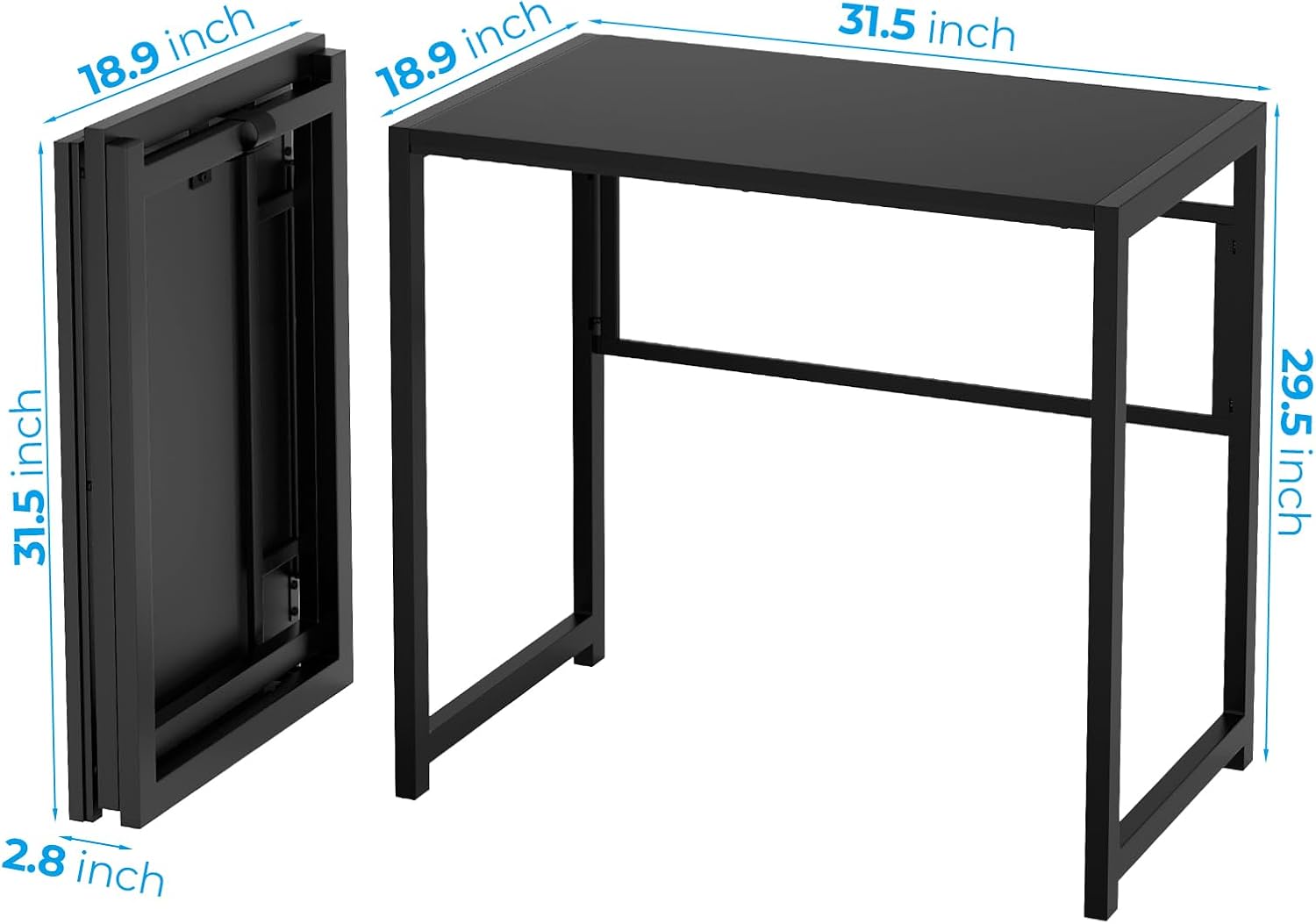
- Dimensions (Unfolded): 31.5" (W) x 18.9" (D) x 29.5" (H)
- Folded Width: Approximately 2.8 inches
- Weight: Approximately 7 Kilograms (15.4 lbs)
- Material: Engineered Wood (Top), Metal (Base)
- Color: Black
- Features: No assembly required, foldable design, space-saving, multifunctional.
4. Setup
This desk requires no assembly. Simply unfold it for immediate use.
- Unfold the Legs: Gently pull the left and right leg frames outwards from the folded position.
- Secure the Support Bar: Locate the support bar and align the screw on the bar with the designated slot on the desk frame. Insert the screw into the slot to secure the desk in its open position.
- Flip and Use: Once the support bar is secured, carefully flip the desk upright. Ensure all legs are stable on the floor before placing items on the desktop.

5. Operating Instructions
5.1 Using the Desk
Once unfolded and stable, the GreenForest Folding Desk is ready for use as a computer desk, writing desk, study table, or for other activities. Its compact size makes it suitable for various tasks in limited spaces.

5.2 Folding for Storage
To fold the desk for storage, reverse the setup process:
- Clear all items from the desktop.
- Carefully flip the desk upside down.
- Disengage the screw from the slot on the support bar.
- Fold the leg frames inwards until the desk is flat and compact.
The folded desk is thin and lightweight, allowing for convenient storage behind doors, under sofas, or under beds.

6. Maintenance
To maintain the appearance and longevity of your GreenForest Folding Desk:
- Wipe the desktop and metal frame with a dry, soft cloth regularly to remove dust and debris.
- For spills, wipe immediately with a slightly damp cloth and then dry thoroughly. Avoid abrasive cleaners or harsh chemicals.
- Periodically check all connections and the folding mechanism to ensure they are secure and functioning correctly.
7. Troubleshooting
If you encounter issues with your GreenForest Folding Desk, consider the following:
- Desk is wobbly: Ensure the desk is on a flat, even surface. Check that the support bar screw is fully engaged in its slot.
- Difficulty folding/unfolding: Do not force the mechanism. Ensure no obstructions are present. The support bar screw must be fully disengaged before folding.
- Surface damage: Minor scratches can sometimes be touched up with furniture repair pens matching the desk's color. For significant damage, contact customer support.
8. Specifications
| Feature | Specification |
|---|---|
| Brand | GreenForest |
| Model Number | Noir |
| Product Dimensions (D x W x H) | 18.9"D x 31.5"W x 29.5"H |
| Color | Black |
| Style | Modern |
| Base Material | Metal |
| Top Material Type | Engineered Wood |
| Special Feature | Multifunctional, Foldable |
| Required Assembly | No |
| Maximum Weight Recommendation | 90 Kilograms |
| Item Weight | 7 Kilograms |
| Product Care Instructions | Wipe with Dry Cloth |
9. Warranty and Support
GreenForest products are manufactured to high-quality standards. For information regarding warranty coverage or technical support, please refer to the product packaging or contact GreenForest customer service directly. Keep your purchase receipt for any warranty claims.
