Introduction
Thank you for choosing the Acteck VIRTUOS Fitt MK770 Wireless Keyboard and Mouse Kit. This kit provides an ergonomic and efficient solution for your computing needs, featuring a full-size keyboard and a vertical mouse, both with wireless 2.4 MHz connectivity via a single USB dongle. Both devices are rechargeable, offering convenience and environmental benefits. This manual will guide you through the setup, operation, and maintenance of your new peripheral kit.
Package Contents
Please verify that all items are present in your package:
- Acteck VIRTUOS Fitt MK770 Ergonomic Wireless Keyboard
- Acteck VIRTUOS Fitt Vertical Wireless Mouse
- 2.4 MHz USB Receiver Dongle
- USB-C Charging Cable (for both devices)
- User Manual (this document)

Image: The Acteck VIRTUOS Fitt MK770 ergonomic wireless keyboard and vertical mouse, as included in the kit.
Setup
- Charge the Devices: Before first use, it is recommended to fully charge both the keyboard and the mouse. Connect the included USB-C charging cable to the charging port on each device and to a USB power source (e.g., computer USB port, USB wall adapter). An indicator light will typically show charging status and turn off or change color when fully charged.
- Insert the USB Receiver: Locate the 2.4 MHz USB receiver dongle. Plug this dongle into an available USB port on your computer. Your operating system (Windows or macOS) should automatically detect and install the necessary drivers.
- Power On: Turn on the keyboard and mouse using their respective power switches. The power switch for the keyboard is usually located on the top edge, and for the mouse, it is typically on the bottom.
- Connection: The keyboard and mouse should automatically connect to your computer via the USB receiver. If they do not connect immediately, ensure the devices are charged and the receiver is securely plugged in.

Image: Diagram illustrating the 2.4 MHz connectivity and compatibility with Windows and macOS operating systems for the Acteck VIRTUOS Fitt MK770 kit.
Operating Instructions
Keyboard Usage
- Typing: The keyboard features 118 keys, including a full numeric keypad and function keys.
- Multimedia Keys: The keyboard includes dedicated multimedia keys for quick access to functions like volume control, play/pause, and more. These are typically accessed via the 'Fn' key in combination with the F-keys (F1-F12). Refer to the keycap legends for specific functions.
- Ergonomic Design: The split and contoured design, along with the integrated wrist rest, is intended to promote a more natural hand and wrist posture, reducing strain during extended use.

Image: The Acteck VIRTUOS Fitt MK770 keyboard highlighting its membrane key type, 10 multimedia keys, and rechargeable battery feature.
Mouse Usage
- Vertical Design: The vertical orientation of the mouse is designed to reduce forearm pronation, promoting a more neutral wrist and hand position.
- DPI Adjustment: The mouse features adjustable DPI (Dots Per Inch) settings, allowing you to change cursor sensitivity. This is typically done via a dedicated DPI button, often located near the scroll wheel. The sensitivity can be adjusted up to 2400 DPI.
- Optical Sensor: The mouse uses an optical sensor for precise tracking on various surfaces.
- Scroll Wheel: Use the scroll wheel for precise and fast navigation through documents and web pages.
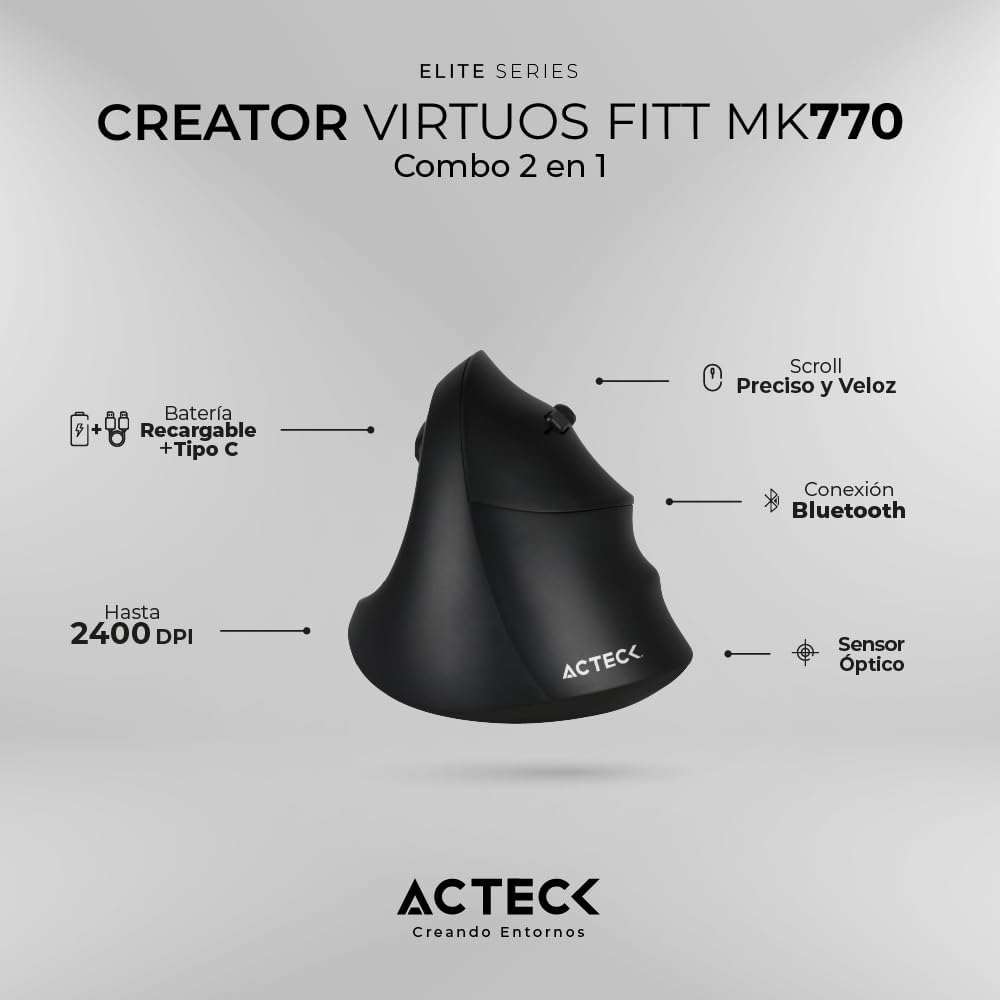
Image: The Acteck VIRTUOS Fitt MK770 vertical mouse, highlighting its rechargeable battery with Type C port, precise and fast scroll, and optical sensor, with adjustable DPI up to 2400.
General Operation
- Wireless Range: The kit operates wirelessly within a range of up to 10 meters (approximately 33 feet) from the USB receiver. Performance may vary depending on environmental factors and obstacles.
- Battery Life: The rechargeable batteries provide extended usage. Battery life will vary based on usage patterns. Recharge when the low battery indicator appears or when performance degrades.
Maintenance
- Cleaning: Use a soft, dry, lint-free cloth to clean the surfaces of the keyboard and mouse. For stubborn dirt, a slightly damp cloth can be used, ensuring no liquid enters the device. Avoid harsh chemicals or abrasive cleaners.
- Battery Care: To prolong battery life, avoid fully discharging the devices frequently. Recharge them when the low battery indicator is active. If storing the devices for an extended period, charge them to about 50% and store in a cool, dry place.
- Storage: When not in use, store the keyboard and mouse in a clean, dry environment away from extreme temperatures and direct sunlight.
Troubleshooting
- No Connection/Unresponsive Devices:
- Ensure both the keyboard and mouse are powered on.
- Verify that the USB receiver dongle is securely plugged into a working USB port on your computer. Try a different USB port.
- Check the battery level of both devices. Recharge them if necessary.
- Move the devices closer to the USB receiver to rule out range issues.
- Restart your computer.
- Input Lag or Intermittent Connection:
- Ensure there are no large metal objects or other wireless devices (like Wi-Fi routers, cordless phones) operating too close to the receiver or the devices, as these can cause interference.
- Reduce the distance between the devices and the USB receiver.
- Check battery levels.
- Mouse Cursor Jumps or is Inaccurate:
- Clean the optical sensor on the bottom of the mouse.
- Use the mouse on a clean, non-reflective, and uniform surface (e.g., a mouse pad).
- Adjust the DPI setting to a lower sensitivity if the cursor is too erratic.
- Keyboard Keys Not Working:
- Ensure the keyboard is charged and connected.
- Check for any debris under the non-functioning key.
Specifications
| Brand | Acteck |
| Model | VIRTUOS Fitt MK770 |
| Connectivity | 2.4 MHz Wireless (via USB Dongle) |
| Compatibility | Windows, macOS |
| Keyboard Keys | 118 (Full-size with multimedia keys) |
| Mouse DPI | Adjustable up to 2400 DPI |
| Battery Type | Rechargeable 3.7 Vc.c. 700 mAh |
| Wireless Range | Up to 10 meters (33 feet) |
| Color | Black |
| Dimensions (Kit) | 48.5 x 24.3 x 4.8 cm |
| Weight (Kit) | 1.2 kg |
| Special Features | Ergonomic design, Rechargeable batteries |
Warranty and Support
For information regarding warranty coverage, technical support, or service, please refer to the warranty card included with your product or visit the official Acteck website. You may also contact your retailer for assistance.