
1. Introduction
Thank you for choosing the VOLFVERT 12V-2500W Pure Sine Wave Power Inverter. This device is designed to convert 12V DC battery power into stable 110V/120V AC electricity, suitable for powering a wide range of electronic devices and appliances. Its pure sine wave output ensures compatibility with sensitive electronics, while multiple protection features guarantee safe and reliable operation. Please read this manual thoroughly before installation and use to ensure proper function and safety.
2. Product Features
- Advanced Pure Sine Wave Technology: Delivers 2500W continuous power and 5000W peak power, converting 12V DC to 110V/120V AC. High conversion efficiency (>90%) and low no-load loss optimize energy usage.
- Versatile Power Outlets: Equipped with three AC outlets (each providing up to 2200W max), two 2.4A USB ports, and one Type-C port, accommodating various devices simultaneously.
- Wireless Remote Control: Allows convenient operation of the inverter from a distance.
- Clear LCD Display: Provides real-time information and warning indications, enabling users to identify operational status and protection alerts easily.
- Enhanced Durability and Cooling: Features intelligent temperature control, a built-in ultra-silent thermo-activated cooling fan, and aviation-grade aluminum housing for efficient heat dissipation and extended inverter life.
- Comprehensive Safety Protections: Includes safeguards against over-heating, short circuits, under-voltage, over-voltage, over-load, and reverse connection. Sound alerts and automatic restart functions ensure continuous safe operation.
3. What's in the Box
The package for your VOLFVERT 12V-2500W Pure Sine Wave Power Inverter includes the following items:
- 1x VOLFVERT 2500W Pure Sine Wave Inverter
- 1x User Manual
- 2x Battery Cables (1x Red for positive, 1x Black for negative)
- 1x Wireless Remote Controller
- 4x Spare Fuses
- 1x Wrench
- 1x Earth Wire
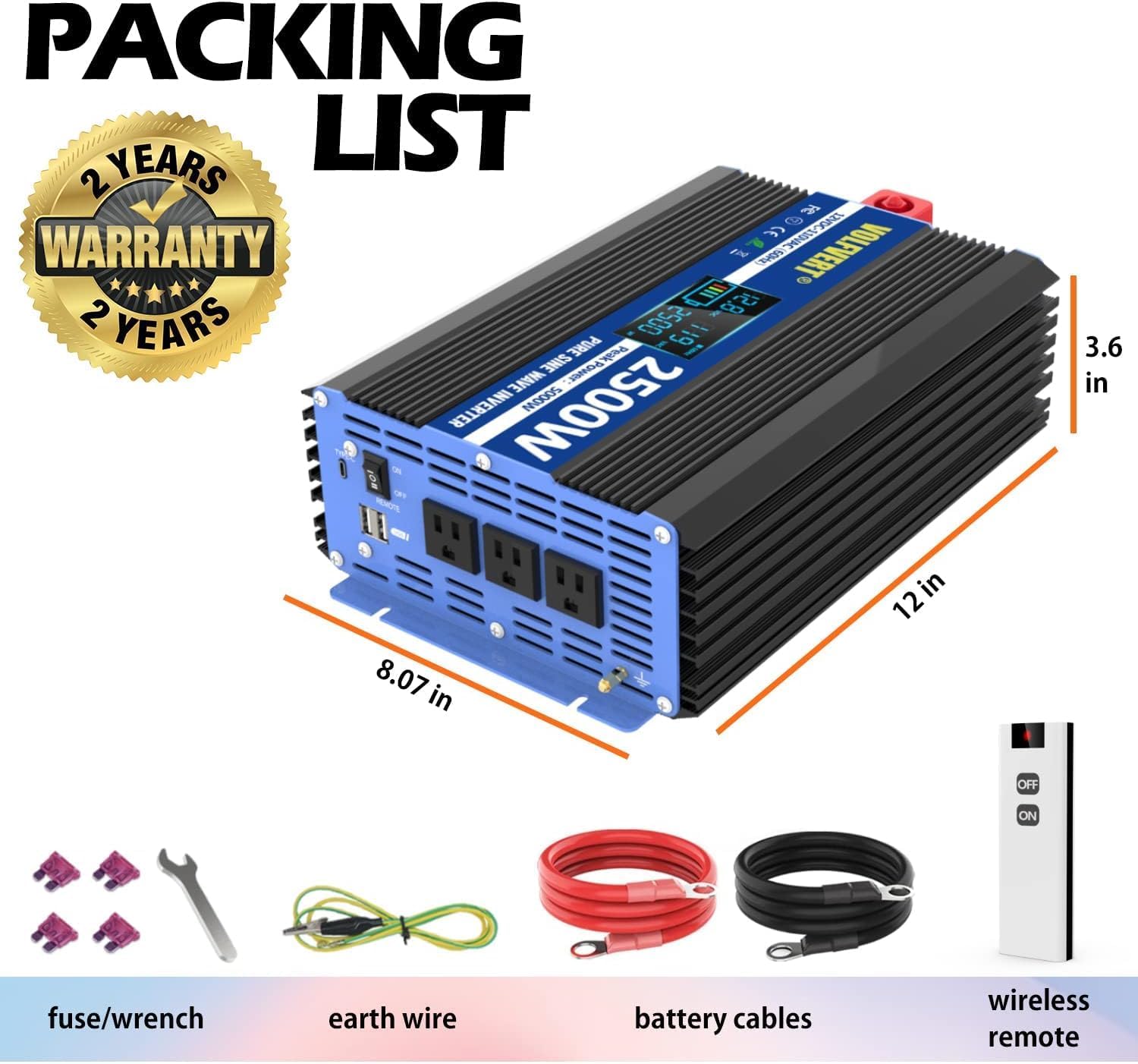
Image: Detailed view of the VOLFVERT 2500W Pure Sine Wave Power Inverter and its included accessories, such as battery cables, wireless remote, fuses, wrench, and earth wire.
4. Safety Information
Please observe the following safety precautions to prevent injury and damage to the inverter or connected devices:
- Ventilation: Ensure adequate ventilation around the inverter. Do not block cooling vents.
- Environment: Install the inverter in a dry, cool, and well-ventilated area, away from direct sunlight, heat sources, flammable materials, and moisture.
- Voltage Compatibility: Connect the inverter only to a 12V DC power source. Connecting to a different voltage (e.g., 24V or 48V) will damage the inverter.
- Polarity: Always connect the battery cables with correct polarity (Red to Positive, Black to Negative). Reverse polarity will cause severe damage.
- Grounding: Properly ground the inverter using the provided earth wire to prevent electrical shock.
- Load Capacity: Do not exceed the inverter's continuous power rating (2500W) or peak power rating (5000W). Overloading can cause damage and trigger protection features.
- Maintenance: Regularly check all connections for tightness and inspect cables for damage.
- Children: Keep the inverter out of reach of children.
5. Setup
Follow these steps for safe and proper installation of your power inverter:
- Choose a Location: Select a secure, dry, cool, and well-ventilated location for the inverter. Ensure there is sufficient space around the unit for airflow.
- Connect Battery Cables:
- Connect the red battery cable to the positive (+) terminal of the inverter and then to the positive (+) terminal of your 12V DC battery.
- Connect the black battery cable to the negative (-) terminal of the inverter and then to the negative (-) terminal of your 12V DC battery.
- Ensure all connections are tight and secure to prevent arcing and overheating.
- Grounding: Connect the provided earth wire from the inverter's grounding terminal to a proper earth ground (e.g., vehicle chassis, ground rod).
- Remote Control (Optional): If using the wired remote control, plug its cable into the designated 'REMOTE' port on the inverter. For the wireless remote, ensure the insulating paper is removed from the battery compartment before use.

Image: Overview of the inverter's main components and connection points.
6. Operating Instructions
To operate your VOLFVERT 12V-2500W Pure Sine Wave Power Inverter:
- Power On: After ensuring all connections are secure, press the ON/OFF switch on the inverter or the wireless remote control to turn on the unit. The LCD display will illuminate.
- Monitor LCD Display: The LCD display provides critical information:
- Input Voltage (VDC): Shows the current DC voltage from your battery.
- Output Voltage (VAC): Displays the AC output voltage (110V/120V).
- Load Wattage (W): Indicates the power consumption of connected devices.
- Battery Output Level: Visual representation of battery charge.
- Frequency (Hz): Shows the AC output frequency (60Hz).
- Warning Indicators: Alerts for under-voltage, over-voltage, overload, short-circuit, and over-temperature.
- Connect Devices: Plug your AC appliances into the three AC outlets. For USB-powered devices, use the dual USB ports or the Type-C port. Ensure the total power consumption does not exceed 2500W.
- Power Off: When finished, first disconnect all appliances from the inverter, then press the ON/OFF switch on the inverter or remote to turn off the unit.

Image: The LCD display provides clear indications of operational status and warnings.
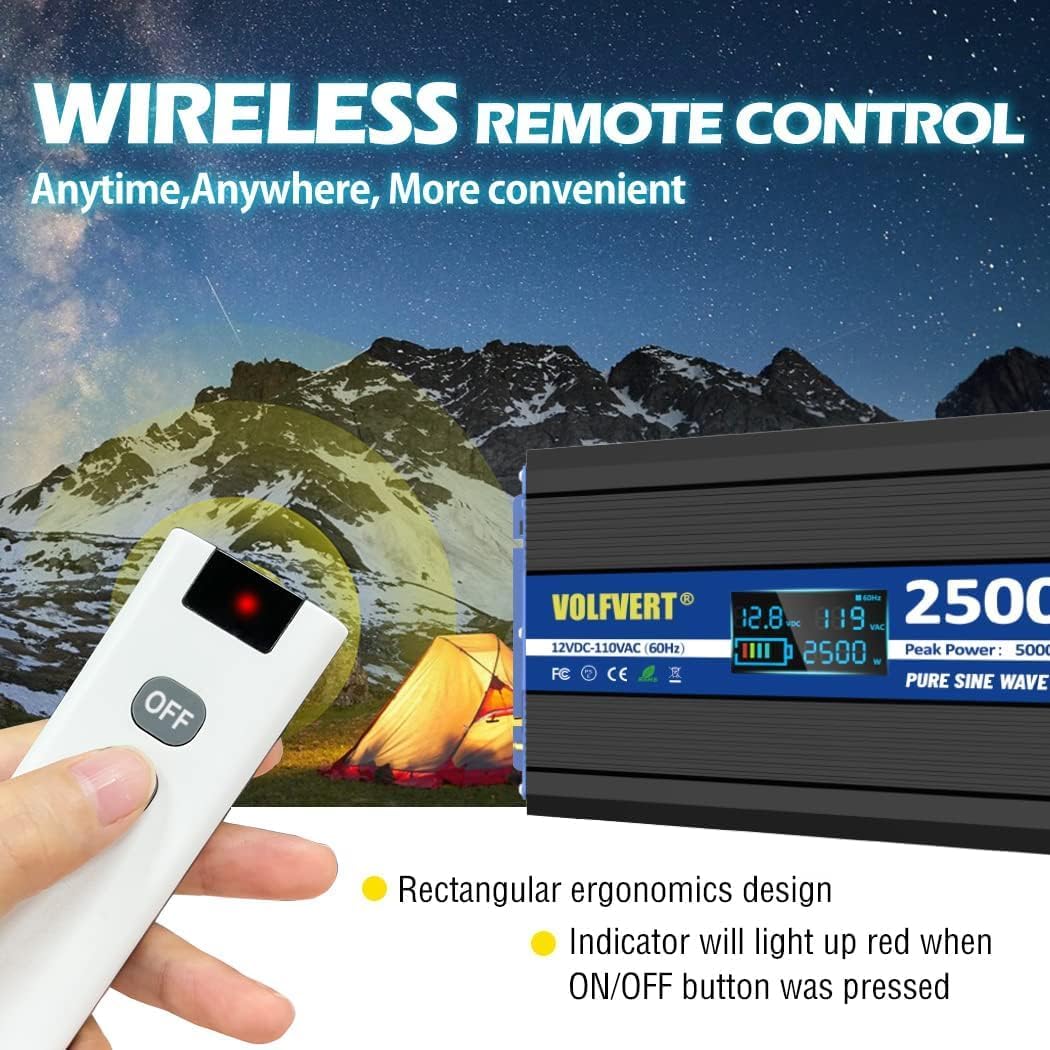
Image: The wireless remote control offers convenient operation.
7. Maintenance
Regular maintenance ensures the longevity and optimal performance of your inverter:
- Cleaning: Keep the inverter clean and free from dust and debris. Use a dry cloth to wipe the exterior. Do not use liquid cleaners.
- Ventilation: Ensure cooling vents are unobstructed. Periodically check for dust buildup in the fan area and clean if necessary.
- Connections: Regularly inspect battery cable connections for tightness and corrosion. Tighten any loose connections and clean corroded terminals.
- Storage: If storing the inverter for an extended period, disconnect it from the battery and store it in a cool, dry place.
8. Troubleshooting
If you encounter issues with your inverter, refer to the LCD display warnings and the following common troubleshooting steps:
| Problem | Possible Cause | Solution |
|---|---|---|
| Inverter does not turn on | Loose battery connections Low battery voltage Blown fuse Incorrect polarity | Check and tighten battery connections Charge or replace battery Check and replace fuses (use spare fuses) Verify correct positive/negative connections |
| No AC output | Inverter in protection mode (overload, over-temp, etc.) Faulty appliance | Check LCD for warning codes; reduce load or allow to cool Test with a different appliance |
| Overload warning | Connected load exceeds 2500W | Disconnect some appliances to reduce total wattage |
| Over-temperature warning | Poor ventilation Excessive ambient temperature Prolonged high load | Ensure clear airflow around inverter Move inverter to a cooler location Reduce load and allow to cool |
| Under-voltage warning | Battery voltage too low | Charge or replace battery |
| Over-voltage warning | Input voltage too high | Check battery charging system; ensure input is 12V DC |
9. Specifications
Detailed technical specifications for the VOLFVERT 12V-2500W Pure Sine Wave Power Inverter:
- Model Name: 2500W
- Continuous Power: 2500 Watts
- Peak Power: 5000 Watts
- Input Voltage: 12V DC
- Output Voltage: 110V / 120V AC
- Output Frequency: 60Hz
- Output Waveform: Pure Sine Wave
- Conversion Efficiency: >90%
- AC Outlets: 3 (each max 2200W)
- USB Ports: 2 x 2.4A
- Type-C Port: 1
- Cooling: Intelligent Temperature Control Fan
- Protection Features: Over-Heating, Short Circuit, Under-Voltage, Over-Voltage, Over-Load, Reverse Connect
- Item Weight: 10.65 pounds
- Package Dimensions: 15.79 x 10.31 x 6.54 inches
- Recommended Uses: Boat, Camping, Home, Laptop, RV, Small electronics, Tablet, Travel

Image: Key features of the Pure Sine Wave Technology and robust construction.
10. Warranty and Support
VOLFVERT offers a 24-month warranty for this Pure Sine Wave Power Inverter. This warranty covers manufacturing defects and ensures your product performs as expected under normal use conditions.
For any questions, technical assistance, or warranty claims, please contact VOLFVERT customer service via email. Our dedicated support team is available 24/7 to assist you.
Please refer to the contact information provided with your purchase or on the official VOLFVERT website for the most up-to-date support details.


