
TROND TROND 15 FT 12 AC Surge Protector Power Strip
TROND Long Extension Cord & Surge Protector User Manual
Model: 15 FT 12 AC
Introduction
The TROND Long Extension Cord and Surge Protector is designed to provide extensive power distribution and protection for your electronic devices. This unit features a comprehensive set of outlets and USB ports, a durable long cord, and advanced safety mechanisms, making it suitable for various environments including homes, offices, and workshops.
Please read this manual thoroughly before using the product to ensure safe and optimal operation.
Safety Information
To prevent fire, electric shock, or injury, always follow basic safety precautions when using this product:
- Do not exceed the maximum power rating of 1875W (125V~15A).
- Do not use in wet environments or near water.
- Do not disassemble or modify the unit.
- Keep out of reach of children.
- Ensure the plug is fully inserted into the wall outlet.
- This power strip is equipped with 4000 Joules surge protection and is made of UL94 V-0 flame-retardant material for enhanced safety.
- The unit provides protection against overload, short circuit, and voltage fluctuations.

Figure 1: Multi-Safety Protection Features
This image highlights the comprehensive safety features built into the TROND power strip, including protection against surges, grounding issues, fire, short circuits, overloads, over-currents, over-voltages, and over-temperatures, ensuring the safety of connected devices and the user.
Product Features

Figure 2: TROND Power Strip Overview
This image provides a full view of the TROND power strip, showcasing its sleek black design, the arrangement of its 12 AC outlets, and the integrated USB-A and USB-C ports at one end. The attached 15-foot power cord with its flat plug is also visible, emphasizing the product's design for versatile placement.
- 12 Widely-Spaced AC Outlets: Designed with ample space and different orientations to accommodate large power adapters and odd-shaped plugs without blocking adjacent outlets.

Figure 3: Spacious Outlet Layout
This image highlights the intelligent design of the TROND power strip's outlets, showcasing the generous spacing and varied orientation that allows users to plug in multiple large adapters or 'wall warts' without obstructing neighboring outlets. This feature maximizes the usability of all 12 AC outlets.
- Integrated USB Charging: Features 3 USB-A ports (5V/2.4A Max each) and 1 USB-C port (5V/3A Max), allowing you to charge up to 4 USB-powered devices directly.
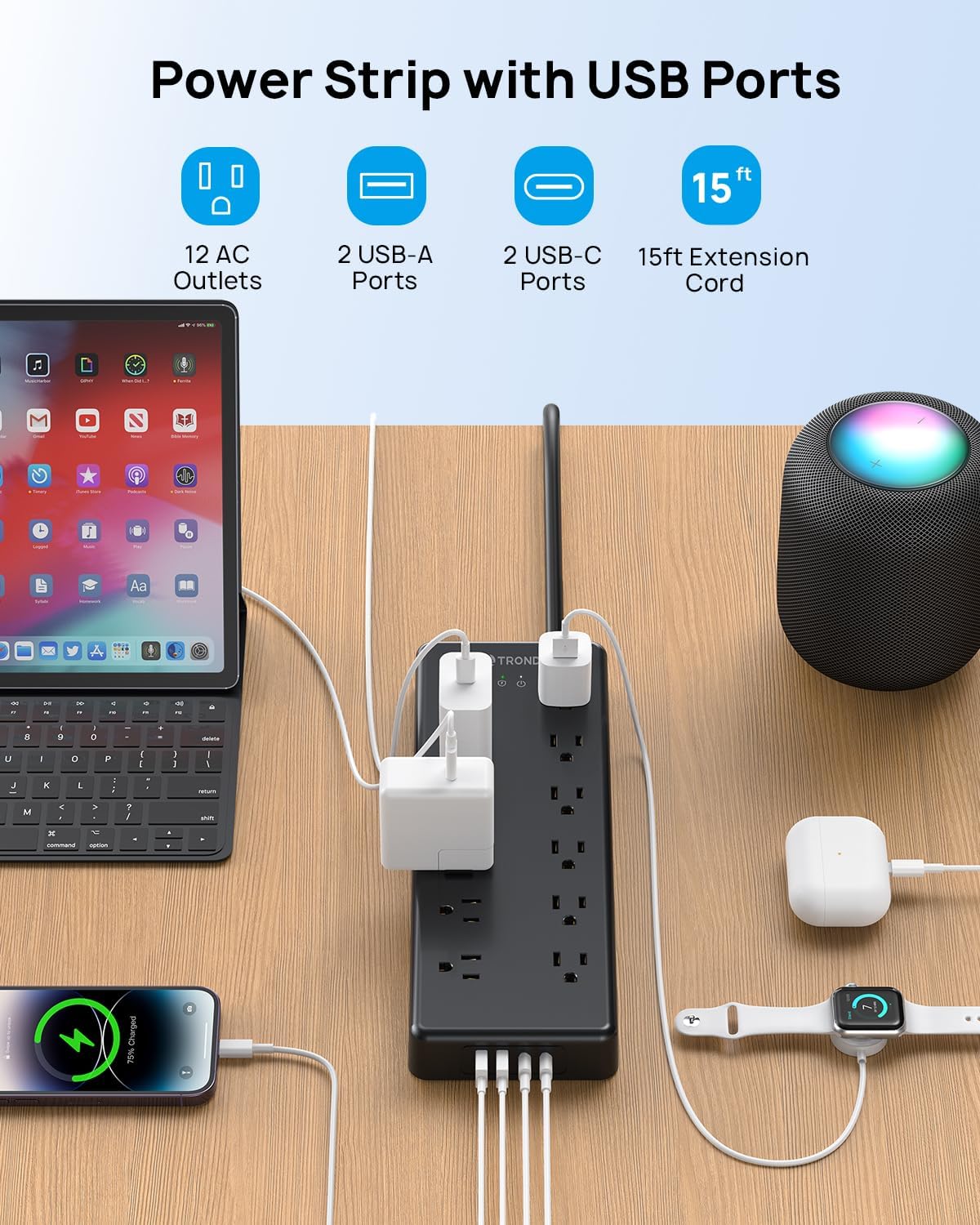
Figure 4: Power Strip with USB Ports in Use
This image demonstrates the TROND power strip in an active setup, with various devices such as a laptop, smartphone, and smartwatch connected and charging via its AC outlets and USB ports. It visually confirms the product's capability to power and charge multiple devices simultaneously, highlighting the convenience of its integrated USB charging functionality.
- 15 FT Flat Power Cord: The durable 14AWG pure copper extension cord measures 15 feet, providing extended reach. The 0.55-inch flat plug and 45-degree angled design allow for discreet placement behind furniture and ensure the second wall outlet remains accessible.

Figure 5: Flat Wall Plug Design
This image focuses on the innovative 0.55-inch flat wall plug of the TROND power strip, demonstrating how its slim profile and 45-degree angled design allow it to fit snugly behind furniture without protruding. This design ensures that the power strip can be used in tight spaces while keeping the wall outlet neat and accessible.

Figure 6: 15ft Extension Cord Reach
This image illustrates the practical benefit of the TROND power strip's 15-foot extension cord, showing it extending comfortably from a wall outlet to a coffee table where devices are being charged. The visual emphasizes the long reach and flexibility provided by the heavy-duty 14AWG cord, making it suitable for various room layouts.
- 4000 Joules Surge Protection: Provides robust protection for your connected devices against power surges and voltage spikes.

Figure 7: 4000 Joules Surge Protection
This image provides a conceptual transparent view of the TROND power strip, visually emphasizing its internal surge protection circuitry. A lightning bolt icon and the "4000 Joules" rating are prominently displayed, illustrating the product's capability to safeguard electronic devices from damaging power disturbances and voltage fluctuations.
- Desk and Wall Mountable: Equipped with 4 non-slip rubber feet for stable desktop placement and 2 mounting holes on the reverse side for secure wall or under-desk installation.

Figure 8: Mountable Power Strip
This image illustrates the versatility of the TROND power strip's mounting options. It clearly shows the four rubber feet for stable desktop use and the two mounting holes on the back, along with a visual example of the power strip securely mounted under a desk, demonstrating its space-saving potential and adaptability to various setups.
Setup
- Unpack: Carefully remove the TROND power strip from its packaging.
- Placement: Choose a suitable location for the power strip. Consider the length of the 15-foot cord and the proximity to your devices. The flat plug design allows for placement behind furniture.
- Mounting (Optional): If wall-mounting or under-desk mounting is desired, use appropriate screws (not included) with the two mounting holes on the back of the unit. Ensure the mounting surface is secure.
- Connect to Power: Plug the power strip's flat plug into a standard 3-prong 125V AC wall outlet.
- Power On: Press the ON/OFF switch located on the power strip to activate it. The indicator light will illuminate.
Operating Instructions
- Connecting Devices: Insert the power cords of your electronic devices into any of the 12 AC outlets. The wide spacing accommodates larger adapters.
- USB Charging: Connect your USB-powered devices (smartphones, tablets, smartwatches, etc.) to the USB-A or USB-C ports using their respective charging cables.
- Surge Protection: The power strip continuously monitors for power surges and will automatically protect connected devices up to 4000 Joules. In the event of an extreme surge, the surge protector may sacrifice itself to protect your equipment.
- Overload Protection: If the total power draw of connected devices exceeds 1875W (15A), the built-in circuit breaker will trip to prevent overload. If this occurs, unplug some devices, then press the reset button (usually combined with the ON/OFF switch) to restore power.
- Power Indicator: A small LED indicator light on the power strip confirms that the unit is receiving power and the surge protection is active.
Maintenance
- Cleaning: Disconnect the power strip from the wall outlet before cleaning. Use a dry, soft cloth to wipe the surface. Do not use liquid cleaners or aerosols.
- Inspection: Periodically inspect the power cord and the unit for any signs of damage, such as frayed wires or cracked casing. If damage is found, discontinue use and contact customer support.
- Storage: When not in use for extended periods, store the power strip in a cool, dry place away from direct sunlight and moisture.
Troubleshooting
| Problem | Possible Cause | Solution |
|---|---|---|
| No power to outlets/USB ports. |
|
|
| Devices not charging via USB. |
|
|
| Surge protection indicator light is off. |
|
|
Specifications
- Brand: TROND
- Model: 15 FT 12 AC
- AC Outlets: 12
- USB-A Ports: 3 (5V/2.4A Max per port)
- USB-C Port: 1 (5V/3A Max)
- Max. Power Rating: 1875W (125V~15A)
- Surge Protection: 4000 Joules
- Cord Length: 15 Feet (14AWG pure copper)
- Plug Type: Flat, 45° Angled
- Material: UL94 V-0 Flame-Retardant
- Mounting: Wall-mountable (2 holes), Desk placement (4 rubber feet)
- Color: Black
- Dimensions: Approximately 13.43 x 7.8 x 2.32 inches (Package Dimensions)
- Item Weight: 2.66 pounds
Warranty and Support
TROND products are designed for reliability and performance. For warranty information, technical support, or any questions regarding your TROND Long Extension Cord and Surge Protector, please contact TROND Official customer service.
You can typically find contact information on the TROND official website or through your purchase platform.
Online Support: Visit the TROND Official Store on Amazon for FAQs and support resources.
Ask a question about this manual
Ask about setup, troubleshooting, compatibility, parts, safety, or missing instructions. Manuals+ will review the question and use this page’s manual context to help answer it.