
Raddy 298890349
Raddy R3 Indoor Outdoor Wireless Remote Sensor
User Manual
Model: 298890349
Introduction
Thank you for choosing the Raddy R3 Indoor Outdoor Wireless Remote Sensor. This sensor is designed to provide accurate temperature and humidity readings for your home weather station, including compatible models like WF-55C PRO, DT6, and WM6. This manual provides detailed instructions for setup, operation, and maintenance to ensure optimal performance of your device.
Safety Information
- Do not expose the sensor to extreme temperatures, direct sunlight for prolonged periods, or heavy rain.
- Avoid placing the sensor near sources of strong electromagnetic interference.
- Do not disassemble or modify the sensor. This will void the warranty and may cause damage.
- Keep batteries out of reach of children. Dispose of used batteries responsibly according to local regulations.
- Ensure the battery compartment is securely closed after battery installation to prevent moisture ingress.
Package Contents
Please check the package for the following items:
- Raddy R3 Wireless Remote Sensor
- User Manual (this document)
Note: 2 AA batteries are required for operation and are not included in the package.
Product Overview

Figure 1: Front view of the Raddy R3 Wireless Remote Sensor, showing the display screen with temperature and humidity readings, and the Raddy logo.

Figure 2: Back view of the Raddy R3 Wireless Remote Sensor, showing the keyhole mounting slots and the battery compartment cover.

Figure 3: Raddy R3 Wireless Remote Sensor with the battery compartment open, revealing slots for two AA batteries and a C/F/TX switch.
The Raddy R3 sensor features a clear LCD display showing current temperature and humidity. The back of the unit includes a battery compartment and mounting options. Inside the battery compartment, you will find switches for temperature unit selection (Celsius/Fahrenheit) and transmission.
Setup
1. Battery Installation
- Locate the battery compartment on the back of the sensor (refer to Figure 2).
- Carefully slide down the battery cover to open it.
- Insert two (2) AA batteries, ensuring correct polarity (+ and -).
- Before closing the cover, select your desired temperature unit (Celsius or Fahrenheit) using the C/F switch inside the compartment.
- Close the battery cover securely.
2. Pairing with Weather Station
The Raddy R3 sensor is designed to automatically pair with compatible Raddy weather stations (WF-55C PRO, DT6, WM6). Follow these steps:
- Ensure your Raddy weather station is powered on and in pairing mode (refer to your weather station's manual for specific instructions).
- After installing batteries in the R3 sensor, it will automatically begin transmitting data. The weather station should detect the signal within a few minutes.
- If pairing does not occur automatically, press the 'TX' button inside the battery compartment to manually send a signal.
- Verify that the outdoor temperature and humidity readings appear on your weather station's display.
3. Sensor Placement Guidelines
Proper placement of the remote sensor is crucial for accurate readings and optimal wireless transmission. Consider the following:

Figure 4: Guidelines for correct usage and placement of the remote sensor, illustrating proper orientation, protection from elements, distance from interference, and height from the ground.
- Orientation: Always mount the sensor upright. Avoid laying it down horizontally, as this can affect sensor accuracy and water drainage.
- Protection from Elements: Place the sensor in a location covered by shade with good air circulation. Avoid direct exposure to sunlight or heavy rain, which can lead to inaccurate temperature readings and potential damage.
- Interference: Keep the sensor far from interfering sources such as large metal objects, electrical appliances, or thick walls that can block the wireless signal.
- Height: For outdoor placement, position the sensor at least 1.2 meters (approximately 4 feet) from the ground to ensure accurate ambient temperature readings and prevent ground heat interference.
- Range: Ensure the sensor is within the effective wireless range of your main weather station. Obstacles like walls and floors can reduce this range.

Figure 5: Example of the Raddy R3 Wireless Remote Sensor mounted on an indoor wall, demonstrating typical placement.
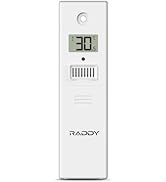
Figure 6: The Raddy R3 sensor shown in various suitable environments, including a living room, nursery, outdoor patio, office, greenhouse, and wine cellar, highlighting its versatility.
Operation
Once the Raddy R3 sensor is set up and paired with your weather station, it will continuously monitor and transmit temperature and humidity data. The sensor's small LCD display provides a direct reading of the current conditions at its location.
- Display: The LCD screen on the sensor shows the current temperature (in Celsius or Fahrenheit, depending on your selection) and relative humidity percentage.
- Transmission: The sensor automatically transmits data to your main weather station at regular intervals.
- Channel Selection: If you are using multiple R3 sensors with a compatible weather station, ensure each sensor is set to a different channel (1, 2, or 3) using the switch inside the battery compartment. This prevents signal interference between sensors.
Maintenance
- Cleaning: Wipe the sensor's exterior with a soft, damp cloth. Do not use abrasive cleaners or solvents.
- Battery Replacement: When the battery indicator on the sensor's display or your weather station shows low battery, replace both AA batteries promptly. Always replace with fresh, high-quality batteries.
- Environmental Check: Periodically check the sensor's placement to ensure it remains protected from direct elements and is not obstructed by new objects that could interfere with its signal.
Troubleshooting
| Problem | Possible Cause | Solution |
|---|---|---|
| No outdoor reading on weather station. |
|
|
| Inaccurate temperature/humidity readings. |
|
|
| Difficulty opening battery cover. |
|
|
Specifications
| Feature | Detail |
|---|---|
| Model Number | 298890349 |
| Brand | Raddy |
| Power Source | Battery Powered (2 AA batteries required) |
| Connectivity Technology | 433 MHz or 868 MHz Wireless |
| Specific Uses For Product | Humidity, Temperature Monitoring |
| Color | White |
| Package Dimensions | 4.25 x 2.48 x 1.65 inches |
| Item Weight | 11.29 ounces |
| Manufacturer | Raddy |
Warranty and Support
For warranty information and technical support, please contact Raddy customer service. You can find more information and contact details on the official Raddy website or through your point of purchase.
Manufacturer: Raddy
Official Website: www.iraddy.com
Support Email: support@iraddy.com
For additional resources, you may also refer to the official PDF user manual available online: Raddy R3 User Manual (PDF)
Related documents298890349

Ask a question about this manual
Ask about setup, troubleshooting, compatibility, parts, safety, or missing instructions. Manuals+ will review the question and use this page’s manual context to help answer it.