
1. Introduction
This manual provides detailed instructions for the installation, operation, and maintenance of your Frico BXERCIRDIMHA Infrared Digital Remote Control. This remote is designed to control compatible electric towel dryers, such as Frico Orchidées (ORC) and NEOMITIS models, equipped with an infrared receiver. Please read this manual thoroughly before using the device to ensure safe and efficient operation.
2. Product Overview
The Frico BXERCIRDIMHA is a compact, white digital remote control featuring a clear display and intuitive buttons for managing your electric towel dryer's functions. Its ergonomic design and backlit keys ensure ease of use.
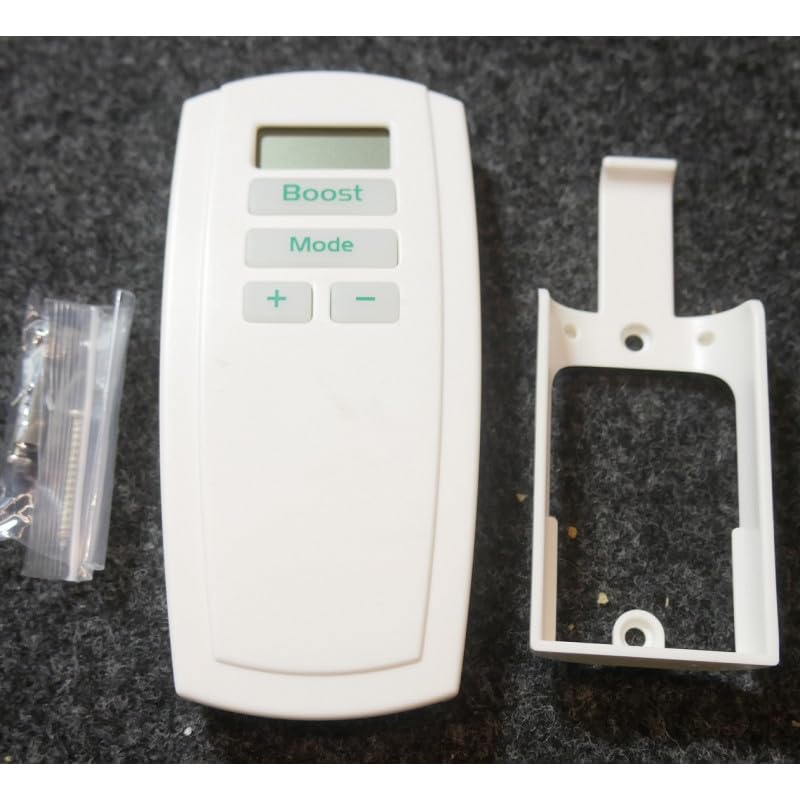
Figure 1: Frico BXERCIRDIMHA infrared digital remote control transmitting a signal. This image shows the Frico BXERCIRDIMHA remote control, a white handheld device with a digital display showing '21.0' and three buttons labeled 'Boost', 'Mode', and '+' / '-'. Red wavy lines above the remote indicate an infrared signal being transmitted.
2.1. Controls and Display

Figure 2: Diagram of Frico BXERCIRDIMHA remote control with labeled buttons and display. This diagram illustrates the Frico BXERCIRDIMHA remote control, highlighting its features: the digital display for ambient temperature, the 'Boost' button for activation/deactivation, the 'Mode' button for selecting Auto, Comfort, Eco, or Frost-protection modes, and the '+' and '-' buttons for temperature adjustment.
- Digital Display: Shows the measured ambient temperature in the room.
- Boost Button: Activates or deactivates the Boost function for rapid heating.
- Mode Button: Cycles through available operating modes: Auto, Comfort, Eco, and Frost-protection (Hors-gel).
- '+' and '-' Buttons: Adjusts the desired temperature setting.
3. Setup
3.1. Battery Installation
- Locate the battery compartment cover on the back of the remote control.
- Slide or unclip the cover to open the compartment.
- Insert two (2) LR06 (AA) batteries, ensuring correct polarity (+/-) as indicated inside the compartment.
- Replace the battery compartment cover securely.
Note: Two LR06 batteries are included with your remote control.
3.2. Wall Mount Installation
The remote control comes with a wall mount for convenient storage and accessibility.
- Choose a suitable location on a wall, away from direct heat sources or drafts, at an appropriate height for easy access.
- Use the provided screws or adhesive (if applicable) to securely attach the wall mount to the chosen surface.
- Place the remote control into the wall mount.
3.3. Initial Use and Compatibility
Ensure your electric towel dryer is equipped with an infrared receiver. The Frico BXERCIRDIMHA remote control operates by sending infrared signals directly to the towel dryer. No complex pairing procedure is typically required. Simply point the remote control towards the towel dryer's receiver within a reasonable range and without obstructions.
4. Operating Instructions
The remote control is designed for simple, one-touch function operation.
4.1. Adjusting Temperature
- Press the '+' button to increase the desired temperature setting.
- Press the '-' button to decrease the desired temperature setting.
- The digital display will show the current ambient temperature. When adjusting, it may briefly show the target temperature.
4.2. Selecting Operating Mode
Press the Mode button repeatedly to cycle through the available operating modes:
- Auto: Automatic operation based on programmed settings (if applicable to the towel dryer).
- Comfort: Maintains a comfortable temperature.
- Eco: Energy-saving mode, typically a lower temperature setting.
- Hors-gel (Frost-protection): Maintains a minimum temperature to prevent freezing.
4.3. Using the Boost Function
Press the Boost button to activate or deactivate the rapid heating function. This function provides a temporary increase in heating output, useful for quickly warming the room or drying towels.
5. Maintenance
5.1. Cleaning
To clean the remote control, gently wipe the surface with a soft, dry cloth. Do not use abrasive cleaners, solvents, or excessive moisture, as these can damage the device.
5.2. Battery Replacement
When the display becomes dim or the remote control's response is sluggish, it is time to replace the batteries. Follow the steps outlined in Section 3.1 for battery installation. Always replace both LR06 (AA) batteries simultaneously with new ones.
Dispose of used batteries responsibly according to local regulations.
6. Troubleshooting
| Problem | Possible Cause | Solution |
|---|---|---|
| Remote control not responding. |
|
|
| Display is dim or blank. | Low batteries. | Replace batteries (2xLR06). |
| Towel dryer not responding to commands. |
|
|
7. Specifications
- Model: BXERCIRDIMHA
- Manufacturer Reference: FRI42208
- Dimensions (approx.): 130mm (Height) x 62mm (Width) x 28mm (Depth)
- Power Supply: 2 x LR06 (AA) batteries
- Compatibility: Electric towel dryers with infrared receiver, including Frico Orchidées (ORC) and NEOMITIS models.
- Features: Digital temperature display, backlit keys, Boost function, Mode selection (Auto, Comfort, Eco, Frost-protection), wall mount included.
8. Warranty and Support
For information regarding warranty coverage, technical support, or spare parts, please refer to the documentation provided with your purchase or contact your retailer or the official Frico website. Specific warranty terms may vary by region and retailer.