
Introduction
This manual provides comprehensive instructions for the GOUYESHO RC311FUI1 replacement remote control. It is designed for compatibility with various Thomson TCL 4K Smart TV models. Please read this manual carefully to ensure proper setup, operation, and maintenance of your new remote control.
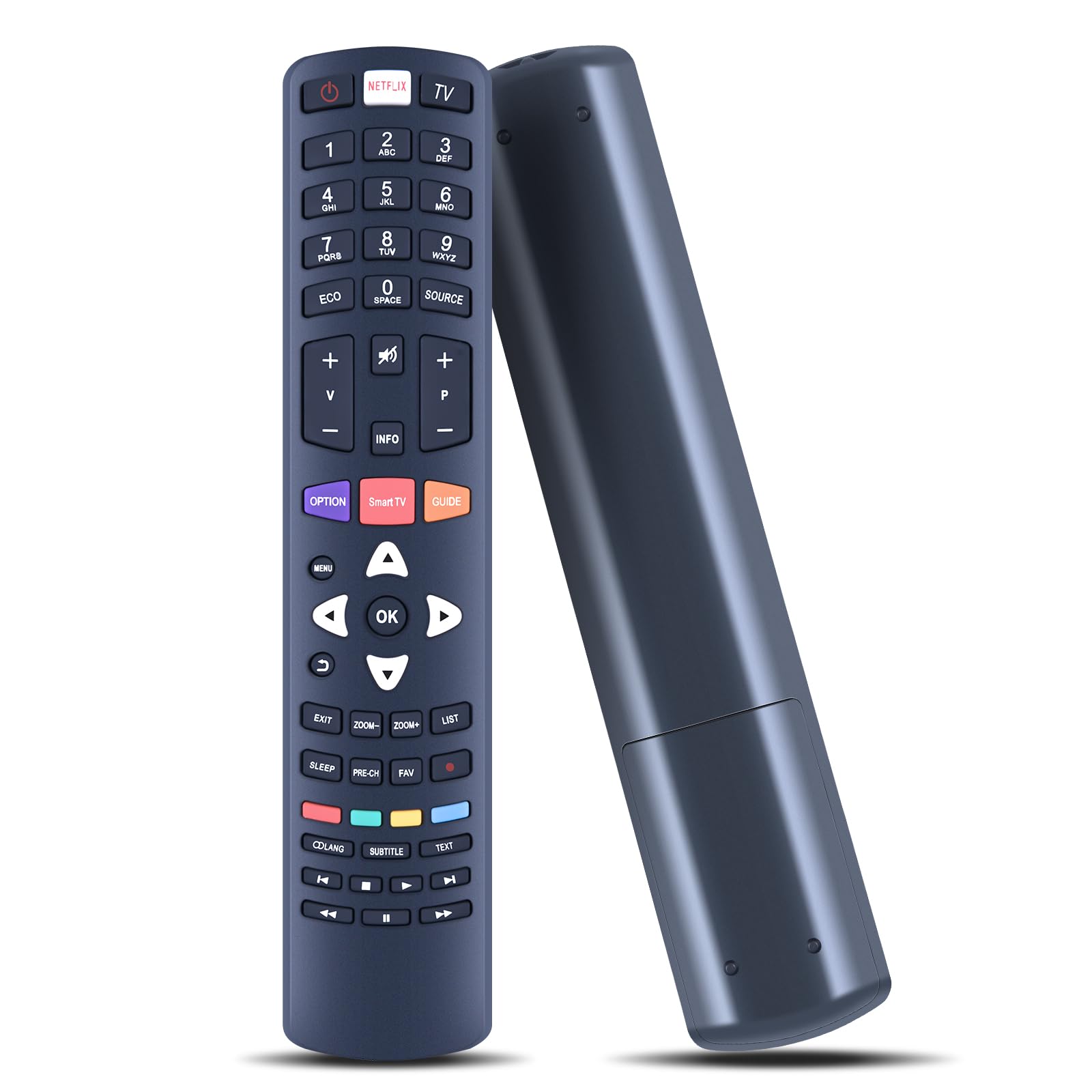
The GOUYESHO RC311FUI1 remote control, designed for ease of use and durability, shown alongside a compatible 4K Smart TV.
Setup
Battery Installation
- Open the battery compartment cover located on the back of the remote control.
- Insert two (2) AA batteries, ensuring that the positive (+) and negative (-) terminals align correctly with the markings inside the compartment. (Note: Batteries are not included.)
- Close the battery compartment cover securely.
Initial Use and Compatibility
This remote control is designed for immediate use without requiring any programming or pairing. Once the batteries are correctly installed, it is ready to operate compatible Thomson TCL 4K Smart TVs.
Compatible TV Models include: U50S7806S, U55C6916, U55S6806S, U55S7906, U58S7806S, 50UB6406, U49C6916, U50S6906, U50S7906, U55S6006, U55S6906, U55S8866S, U65S7906.

The remote control functions immediately after battery insertion, requiring no complex setup.
Operating Instructions
Basic Functions
- Power Button: Located at the top, this button turns your TV on or off.
- Netflix / TV Buttons: Dedicated buttons for direct access to Netflix and standard TV functions.
- Numeric Keypad (0-9): Use these buttons for direct channel input.
- Volume Up/Down (+/-): Adjusts the audio volume level.
- Channel Up/Down (P+/-): Changes TV channels sequentially.
- Mute Button: Toggles the TV sound on or off.
- Navigation Pad (Up, Down, Left, Right, OK): Used to navigate through menus and confirm selections.
- Back/Exit Buttons: Returns to the previous screen or exits current menus.
- Smart TV / Guide / Option Buttons: Provides access to specific Smart TV features, the program guide, or additional options.
Operating Range
The remote control utilizes infrared technology to provide a strong and precise signal. It operates effectively at distances of up to 10 meters (approximately 33 feet) from your television.

Experience precise control from a distance, thanks to the remote's strong infrared signal.
Maintenance
Cleaning
To clean the remote control, gently wipe it with a soft, dry cloth. Avoid using liquid cleaners, solvents, or abrasive materials, as these can damage the surface or internal components.
Battery Replacement
Replace the batteries when the remote's response becomes sluggish, or it ceases to function. Always replace both batteries simultaneously with new AA alkaline batteries. Do not mix old and new batteries, or different types of batteries.
Troubleshooting
Remote Not Responding
- Check Batteries: Ensure that the batteries are inserted correctly with the positive (+) and negative (-) terminals aligned as indicated.
- Replace Batteries: If the batteries are old or depleted, replace them with a fresh pair of AA alkaline batteries.
- Clear Obstructions: Make sure there are no objects blocking the line of sight between the remote control and the TV's infrared receiver.
- Point Correctly: Ensure the remote control is pointed directly at the TV's infrared sensor.
Limited Operating Range
- Fresh Batteries: Ensure the batteries are new and fully charged. Weak batteries can reduce the remote's effective range.
- Reduce Distance: Try operating the remote closer to the TV.
- Remove Interference: Bright lights or other electronic devices can sometimes interfere with infrared signals. Try to minimize such interference.
Product Specifications
| Brand | GOUYESHO |
| Model | RC311FUI1 / NW092-DE-MBL |
| Connectivity Technology | Infrared |
| Maximum Range | 10 meters (33 feet) |
| Number of Buttons | 10 |
| Compatible Devices | Thomson TCL 4K Smart TVs |
| Power Source | 2 x AA Alkaline Batteries (not included) |
| Special Feature | Ergonomic design |
| Color | Black |
| Material | ABS Plastic |

Detailed dimensions of the remote control for reference.
Warranty and Support
Warranty Information
This GOUYESHO remote control comes with a 30-day warranty, offering free return or exchange in case of any manufacturing defects or performance issues. Please retain your proof of purchase for warranty claims.
Customer Support
Should you have any questions, require assistance with setup, or encounter any issues not covered in this manual, please do not hesitate to contact our professional technical support and customer service team. We are available to provide prompt and helpful solutions.