
1. Introduction
This manual provides essential information for the safe and effective installation, operation, and maintenance of your RWRAPS 63A Leakage Protection Circuit Breaker (Model TVPS1-63E). This device is designed to protect electrical circuits from overvoltage, undervoltage, overcurrent, and leakage current, ensuring the safety of your electrical system and connected appliances. Please read this manual thoroughly before use and retain it for future reference.
2. Safety Information
Always observe the following safety precautions to prevent injury, electric shock, fire, or damage to the device and connected equipment.
- Installation must be performed by a qualified electrician in accordance with local electrical codes and regulations.
- Ensure the main power supply is disconnected before installation, wiring, or maintenance.
- Do not operate the device if it is damaged or appears to be malfunctioning.
- Do not expose the device to water, moisture, or extreme temperatures.
- Verify all connections are secure and correct before restoring power.
- The device is designed for AC220V systems. Do not use with incompatible voltage supplies.
3. Product Features
The RWRAPS TVPS1-63E offers comprehensive protection and monitoring capabilities:
- Overvoltage Protection: Automatically disconnects power when voltage exceeds a set limit.
- Undervoltage Protection: Automatically disconnects power when voltage drops below a set limit.
- Overcurrent Protection: Disconnects power if current draw exceeds the configured maximum.
- Leakage Protection: Detects and protects against earth leakage currents.
- Real-time Display: Digital display shows current voltage and current values.
- Adjustable Parameters: Overvoltage, undervoltage, overcurrent, and leakage protection thresholds are adjustable.
- Automatic Reconnect: Automatically restores power once fault conditions return to normal.
- Fault Recovery Delay: Adjustable delay for power restoration after a fault.
- Power-on Delay: Adjustable delay for power-on sequence.
- Fault Query: Function to review past fault events.
- Factory Reset: Option to restore default settings.

Figure 3.1: Earth Leakage Protection. This device features internal 63A relays that cut off both Live (L) and Neutral (N) wires simultaneously for enhanced safety compared to single-wire protection.
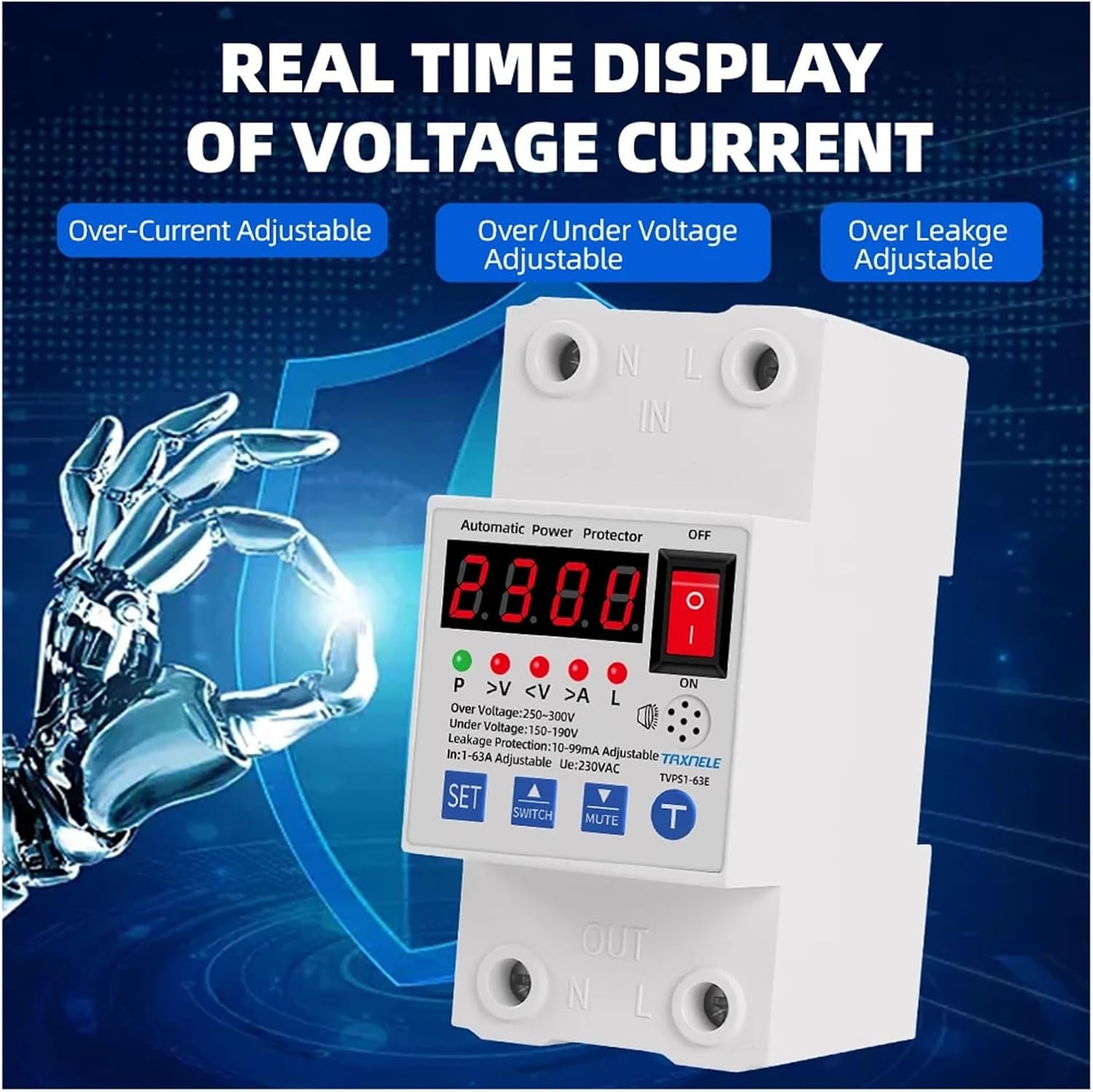
Figure 3.2: Real-time Display. The digital screen provides immediate feedback on voltage and current, with adjustable settings for overcurrent, over/under voltage, and over leakage protection.
4. Product Overview and Components
The RWRAPS TVPS1-63E features a clear digital display and intuitive controls for easy operation.

Figure 4.1: Front View of the RWRAPS TVPS1-63E. Shows the digital display, indicator lights, ON/OFF switch, and control buttons.
4.1. Control Panel and Indicators
- Digital Display: Shows real-time voltage, current, and parameter settings.
- Indicator Lights (P, >V,
- ON/OFF Switch: Manual power control for the device.
- SET Button: Enters parameter setting mode.
- SWITCH (Up Arrow) Button: Navigates through parameters and increases values.
- MUTE (Down Arrow) Button: Navigates through parameters and decreases values, also mutes alarm.
- T Button: Confirms settings or performs test functions.
4.2. Connection Terminals
- IN (N, L): Input terminals for neutral and live wires from the power source.
- OUT (N, L): Output terminals for neutral and live wires to the load.
5. Specifications
| Parameter | Value |
|---|---|
| Rated Voltage | AC220V ±10% 50Hz/60Hz |
| Power Consumption | <3W |
| Supply Voltage Range | AC 140V~320V |
| Leakage Protection Range | 10~99mA (Adjustable, Default 50mA) |
| Leakage Response Time | 0.1S |
| Overvoltage Range | AC250~300V (Adjustable, Default 275V) |
| Overvoltage Response Time | 0.1S |
| Low Voltage Range | AC140~200V (Adjustable, Default 170V) |
| Low Voltage Response Time | 0.1S |
| Overcurrent Range | 1~63A (Adjustable, Default 60A) |
| Overcurrent Response Time | 0.1S |
| Short-circuit Current | 31ln |
| Short-circuit Response Time | 0.1S |
| Item Weight | 1.76 pounds (approx. 0.8 kg) |
| Package Dimensions | 1.18 x 0.79 x 0.39 inches (approx. 30 x 20 x 10 mm) |

Figure 5.1: Device Dimensions. The diagram shows the approximate height of 96mm and width of 45mm for the main unit, and a depth of 35mm for the DIN rail mounting.
6. Installation Guide
Proper installation is crucial for the safe and effective operation of the device.
6.1. DIN Rail Mounting
The RWRAPS TVPS1-63E is designed for easy installation on a standard 35mm DIN rail.
- Ensure the DIN rail is securely mounted within an appropriate electrical enclosure.
- Align the device's mounting clip with the DIN rail.
- Press the device firmly onto the rail until it clicks into place.

Figure 6.1: DIN Rail Assembly. The device is designed for household use and can be easily mounted on a 35mm DIN rail.
6.2. Wiring Diagram
Follow the wiring diagram carefully. Incorrect wiring can lead to malfunction or hazards.
- Step 1: Disconnect the main power supply before starting any wiring.
- Step 2: Connect the incoming Neutral (N) wire from the power source to the 'N IN' terminal on the device.
- Step 3: Connect the incoming Live (L) wire from the power source to the 'L IN' terminal on the device.
- Step 4: Connect the outgoing Neutral (N) wire to the load to the 'N OUT' terminal on the device.
- Step 5: Connect the outgoing Live (L) wire to the load to the 'L OUT' terminal on the device.
- Step 6: Ensure all wire connections are tight and secure.
- Step 7: After verifying all connections, restore the main power supply.

Figure 6.2: Product Diagram and Wiring. This diagram illustrates how the Voltage Protector (RWRAPS TVPS1-63E) integrates with an AC Leakage Breaker and an Air Circuit Breaker in a typical electrical setup. Ensure correct L (Live) and N (Neutral) connections for both input and output.
7. Operating Instructions
7.1. Power On/Off
- To turn the device ON, push the red ON/OFF switch to the 'ON' position. The digital display will illuminate.
- To turn the device OFF, push the red ON/OFF switch to the 'OFF' position. The display will turn off, and power to the load will be disconnected.
7.2. Parameter Adjustment
The device allows adjustment of various protection parameters. Follow these general steps:
- Step 1: Press the SET button to enter parameter setting mode. The display will show the first adjustable parameter (e.g., overvoltage threshold).
- Step 2: Use the SWITCH (Up Arrow) and MUTE (Down Arrow) buttons to adjust the value of the currently displayed parameter.
- Step 3: Press the SET button again to move to the next parameter.
- Step 4: Repeat Steps 2 and 3 for all desired parameters (Overvoltage, Undervoltage, Overcurrent, Leakage, Response Times, Delay Times).
- Step 5: After adjusting all parameters, press the T button to save the settings and exit the setting mode. If no button is pressed for a period, the device may automatically exit setting mode without saving.
7.3. Automatic Reconnect
When a fault condition (overvoltage, undervoltage, overcurrent, or leakage) occurs, the device will automatically disconnect power. Once the fault condition returns to normal within the set delay time, the device will automatically reconnect the power supply to the load.
7.4. Fault Query and Factory Reset
- Fault Query: Refer to the device's on-screen menu (accessed via SET button) for options to view recent fault history.
- Factory Reset: A factory reset option is available within the setting menu. Use with caution as it will revert all custom settings to their default values.
8. Maintenance
The RWRAPS TVPS1-63E is designed for minimal maintenance. However, regular checks can ensure its longevity and reliable operation.
- Periodically inspect the device for any visible damage or signs of overheating.
- Ensure all wiring connections remain tight and free from corrosion.
- Keep the device clean and free from dust and debris. Use a dry, soft cloth for cleaning.
- Do not use abrasive cleaners or solvents.
- Test the leakage protection function periodically using the 'T' button if available, or as recommended by local regulations.
9. Troubleshooting
If you encounter issues with your RWRAPS TVPS1-63E, refer to the following common problems and solutions:
| Problem | Possible Cause | Solution |
|---|---|---|
| Device does not power on | No incoming power; Incorrect wiring; Device fault. | Check main power supply; Verify wiring connections; Contact a qualified electrician if device is faulty. |
| Power trips frequently | Overvoltage, undervoltage, overcurrent, or leakage fault detected; Sensitive settings. | Check connected appliances for faults; Adjust protection parameters if they are too sensitive (refer to Section 7.2). |
| Display shows error code | Specific fault condition. | Refer to the device's fault query function (Section 7.4) for details on the error code. Address the underlying electrical issue. |
| Device does not reconnect automatically | Fault condition persists; Automatic reconnect disabled; Delay time too long. | Ensure the fault condition has cleared; Check automatic reconnect settings; Adjust fault recovery delay time. |
If the problem persists after attempting these solutions, consult a qualified electrician.
10. Warranty and Support
Please note that the product information indicates 'No warranty' for this device. For technical support or further inquiries, please refer to the retailer or your point of purchase.