
1. Introduction
Welcome to the user manual for your ONN 75-inch Smart TV. This guide provides essential information for setting up, operating, maintaining, and troubleshooting your television. Your ONN TV features a stunning 4K UHD (2160P) resolution with HDR10+ for vibrant colors and incredible detail, powered by the intuitive Roku Smart TV platform. Enjoy seamless access to a vast library of streaming content and smart home integration.
2. Setup
2.1 Unboxing and Initial Inspection
Carefully remove the television and all accessories from the packaging. Inspect all components for any signs of damage. The package should include the ONN 75" Smart TV, a remote control, power cable, and TV stands (if applicable).

The product packaging for the ONN 75-inch Roku TV, indicating key features such as 4K resolution, HDR10, and Roku TV integration. This box contains your new television and its accessories.
2.2 Physical Installation
Your ONN 75" Smart TV measures approximately 65.9 inches (length) x 12.5 inches (width) x 40.6 inches (height) and weighs about 67 pounds. Ensure you have adequate space and support for installation.
- Stand Installation: If using the included stands, attach them securely to the designated slots at the bottom of the TV using the provided screws. Place the TV on a stable, level surface.
- Wall Mounting: If wall mounting, use a VESA-compatible wall mount (sold separately) that supports the TV's size and weight. Follow the wall mount manufacturer's instructions carefully.
2.3 Connecting Devices
The ONN 75" Smart TV offers a variety of connection ports for your external devices:
- HDMI: 3 HDMI ports for connecting Blu-ray players, game consoles, cable boxes, etc.
- Composite: 1 composite input for older devices.
- USB: 1 USB port for media playback from USB drives.
- LAN: 1 Ethernet port for wired internet connection.
- Coaxial/Cable: 1 coaxial/cable input for antenna or cable TV.
- Optical: 1 optical audio output for connecting to soundbars or home theater systems.
- Headphone: 1 headphone jack for private listening.
After connecting all desired devices, plug the power cable into the TV and then into a wall outlet.
3. Operating Your TV
3.1 Powering On and Initial Setup
Press the power button on the remote control or on the TV. The first time you power on the TV, it will guide you through the initial setup process, including network connection, channel scanning, and Roku account setup. Follow the on-screen instructions.
3.2 Roku Smart TV Features
Your ONN TV is powered by Roku, offering a seamless smart TV experience:
- Streaming Content: Wirelessly stream over 500,000 movies and TV episodes available across thousands of free or paid channels.
- Customizable Home Screen: Organize your favorite streaming channels and inputs on a personalized home screen for quick access.
- Roku Mobile App: Download the free Roku mobile app on your smartphone to use it as a remote control, browse channels, or use voice control.
- Smart Home Ready: The TV works with popular smart home ecosystems including Apple Home, Amazon Alexa, and Google Home for integrated control.
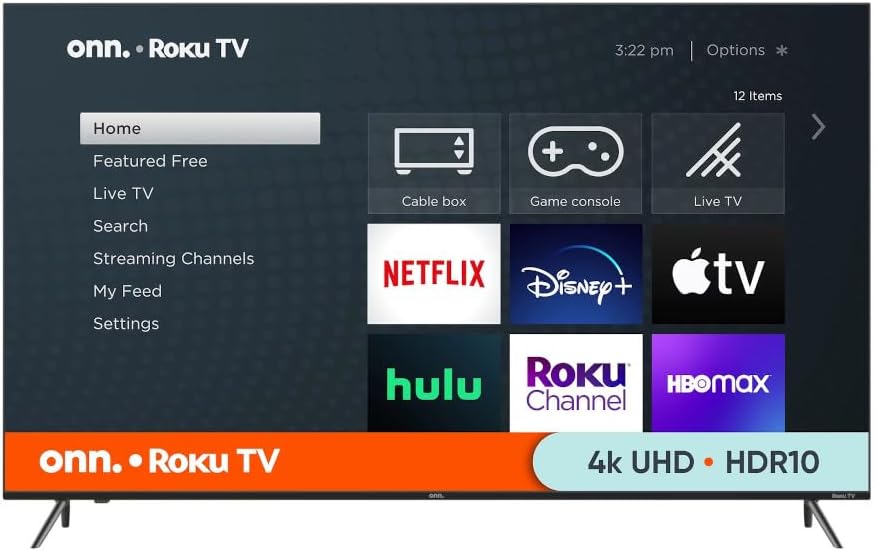
This image illustrates the intuitive home screen of your ONN Roku TV, providing quick access to a wide array of streaming services and input options. The interface allows for easy navigation and customization of your favorite channels and apps.
3.3 Input Selection
To switch between connected devices (e.g., HDMI 1, Cable TV, USB), use the 'Input' or 'Source' button on your remote control. The Roku home screen also displays your connected inputs for easy selection.
3.4 Picture and Sound Settings
Access the TV's settings menu to adjust picture modes (e.g., Standard, Movie, Vivid), brightness, contrast, color, and sound settings (e.g., Bass, Treble, Sound Mode). These settings can be customized to your viewing preferences.

A view of the ONN 75-inch Smart TV, showcasing its sleek, frameless design and the vivid display capabilities. The slim bezels provide an immersive viewing experience.
4. Maintenance
Proper maintenance ensures the longevity and optimal performance of your TV.
- Cleaning the Screen: Gently wipe the screen with a soft, lint-free cloth. For stubborn marks, slightly dampen the cloth with water or a screen-cleaning solution specifically designed for electronics. Do not spray liquid directly onto the screen.
- Cleaning the Body: Use a soft, dry cloth to wipe the TV's frame and back.
- Power Management: Unplug the TV from the power outlet during lightning storms or when it will be left unattended for long periods.
- Ventilation: Ensure adequate ventilation around the TV to prevent overheating. Do not block the ventilation openings.
5. Troubleshooting
If you encounter issues with your TV, refer to the following common solutions:
- No Power: Ensure the power cable is securely plugged into both the TV and a working wall outlet. Try a different outlet.
- No Picture/Sound: Check that the correct input source is selected. Verify all cables are securely connected. For external devices, ensure they are powered on.
- No Internet Connection: For Wi-Fi, check your router and network settings. For wired connection, ensure the Ethernet cable is properly connected. Try restarting your router and TV.
- Remote Control Not Working: Replace the batteries in the remote. Ensure there are no obstructions between the remote and the TV's IR sensor.
- Picture Quality Issues: Adjust picture settings (brightness, contrast, sharpness). Ensure the content source is high quality (e.g., 4K content for 4K display).
- Sound Distortion: Check audio settings. If connected to an external sound system, check its connections and settings.
If the problem persists, try performing a factory reset (refer to the TV's on-screen settings menu for this option). Note that a factory reset will erase all personalized settings.
6. Specifications
| Feature | Specification |
|---|---|
| Brand | ONN |
| Model | 100044717 |
| Screen Size | 75 Inches |
| Display Technology | LED |
| Resolution | 4K (2160p) |
| Refresh Rate | 60 Hz |
| Aspect Ratio | 16:9 |
| Product Dimensions (D x W x H) | 65.9" x 12.5" x 40.6" |
| Item Weight | 67 pounds |
| Connectivity Technology | Wireless (Roku Smart TV) |
| Special Features | Works with Apple Home, Amazon Alexa, and Google Home |
| Inputs | 3 HDMI, 1 Composite, 1 USB, 1 LAN, 1 Coaxial/Cable |
| Outputs | 1 Optical, 1 Headphone |
7. Warranty and Support
This ONN TV is a renewed product and comes with a 90-day easy returns policy. For any product-related inquiries, technical assistance, or warranty claims, please contact customer support through the retailer where you purchased the product. Keep your purchase receipt for reference.
For additional support, you may also refer to the official Roku support website for common questions related to the Roku TV platform.


