
1. Introduction
Thank you for choosing the IINE L871 Wireless Pro Controller. This controller is designed for a versatile gaming experience across multiple platforms, including PC, Nintendo Switch, Steam, Android tablets and phones, and iOS devices. It features advanced Hall Effect joysticks and triggers for precision, a motion sensor, NFC functionality, customizable macro buttons, and immersive rumble feedback. Please read this manual carefully to ensure proper use and optimal performance of your controller.
2. Product Features
The IINE L871 controller integrates several key features to enhance your gaming:
- Hall Effect Joysticks and Triggers: Provides precise, drift-free control and extended lifespan.
- Multi-Platform Compatibility: Seamlessly switch between Nintendo Switch, PC, Steam, Android, and iOS.
- Wireless Connectivity: Bluetooth 5.0 for stable and low-latency connection up to 10 meters.
- NFC Functionality: Supports Amiibo scanning for compatible games.
- Motion Sensor: Built-in 6-axis gyroscope for motion control in supported games.
- Macro Buttons: Two programmable back buttons (MR, ML) for custom command sequences.
- Turbo Auto-Fire: Adjustable turbo function for rapid button presses.
- Rumble Feedback: Dual vibration motors for immersive haptic feedback.
- 3.5mm Headset Port: For audio output when connected via Type-C cable to a Nintendo Switch.
- Keylinker APP Support: Mobile application for advanced customization of button mapping, dead zones, sensitivity, and auto-fire rates.

Figure 2.1: Overview of the IINE L871 Wireless Pro Controller highlighting its main features including Hall Effect technology, NFC, and headset jack.
3. Setup and Pairing
The controller supports easy switching and pairing across various devices.
3.1. Device Switching
Locate the 'Easy-Switch Button' on the back of the controller. Use this switch to select the desired platform mode (NS for Nintendo Switch, Android, iOS, or PC) before pairing.
3.2. Pairing Instructions
- Select Mode: Use the Easy-Switch Button to select the appropriate mode for your device.
- Activate Pairing: Press and hold the 'Pairing Button' (usually a small button near the Easy-Switch) until the indicator lights begin to flash rapidly.
- Connect on Device:
- Nintendo Switch: Go to 'Controllers' > 'Change Grip/Order' on your Switch console.
- PC/Steam: Go to Bluetooth settings on your computer and select 'Add Bluetooth or other device'.
- Android/iOS: Go to Bluetooth settings on your mobile device and search for available devices.
- Confirm Connection: Select 'IINE L871' or similar name from the list of available Bluetooth devices. The indicator lights on the controller will become solid once connected.

Figure 3.1: Location of the Easy-Switch button for platform selection and the Pairing button for initiating Bluetooth connection.

Figure 3.2: The controller features Bluetooth 5.0 for strong pairing and enhanced adaptation, with a range of 10 meters without latency. A USB Bluetooth adaptor may be included for PC connections.
4. Operating Instructions
4.1. Turbo Auto-Fire
The Turbo function allows a button to be pressed repeatedly as long as it is held down. To activate or deactivate Turbo for a specific button, refer to the controller's specific button combinations or the Keylinker APP.
4.2. Macro Settings
The MR and ML back buttons can be programmed to execute a sequence of button presses. Consult the Keylinker APP or the controller's quick start guide for detailed instructions on recording and assigning macros.
4.3. Standard 3.5mm Headset Port
A 3.5mm audio jack is provided for connecting a headset. Note: This feature is typically functional only when the controller is wired connected to a Nintendo Switch console via a Type-C cable.

Figure 4.1: The 3.5mm headset port allows for audio output. Remember that for Switch, it typically requires a wired connection.
4.4. Keylinker Mobile APP
Download the 'Keylinker' mobile application to unlock advanced customization options for your controller. This app allows you to:
- Modify button mapping.
- Adjust dead zone settings for joysticks.
- Fine-tune sensitivity.
- Modify auto-fire rates.

Figure 4.2: The Keylinker APP provides a graphical interface for modifying various controller settings, including button assignments and joystick parameters.
5. Charging and Battery Life
The controller is equipped with a built-in rechargeable battery.
- Battery Capacity: 1000mAh
- Estimated Endurance: Up to 15 hours of gameplay on a full charge.
- Charging Time: Approximately 2-3 hours for a full charge.
Connect the controller to a power source using the provided USB Type-C cable. The indicator lights will show charging status and turn off or change color when fully charged.
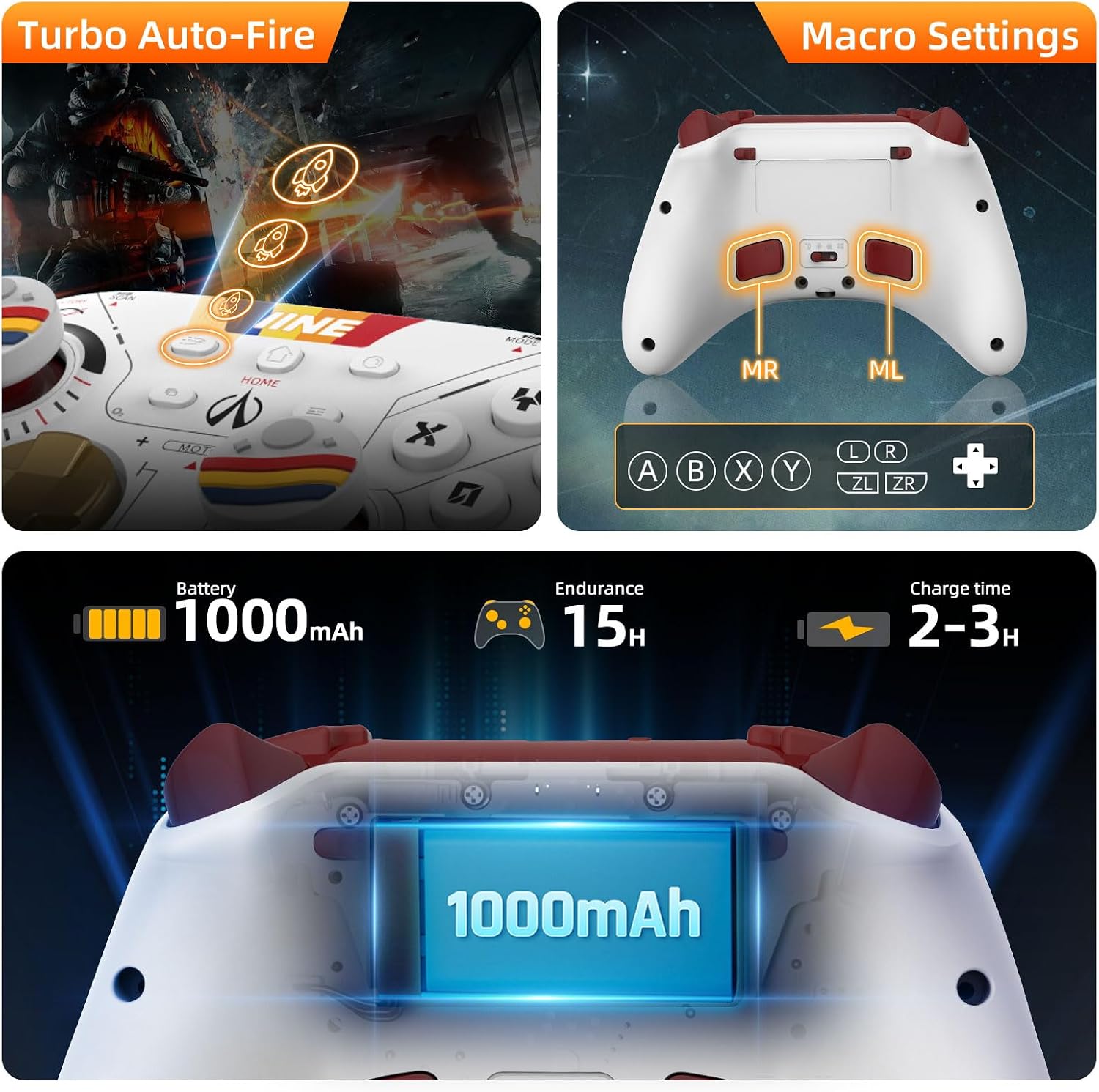
Figure 5.1: Visual representation of the controller's 1000mAh battery, 15-hour endurance, and 2-3 hour charge time, alongside Turbo and Macro button indicators.
6. Maintenance
To ensure the longevity and optimal performance of your controller, follow these maintenance guidelines:
- Cleaning: Use a soft, dry cloth to clean the controller. Avoid using harsh chemicals or abrasive materials.
- Storage: Store the controller in a cool, dry place away from direct sunlight and extreme temperatures.
- Avoid Drops: Protect the controller from physical shocks and drops, which can damage internal components.
- Charging: Do not overcharge the battery. Disconnect the charging cable once the battery is full.
7. Troubleshooting
If you encounter issues with your IINE L871 controller, refer to the following common solutions:
- Controller Not Connecting:
- Ensure the correct platform mode is selected using the Easy-Switch button.
- Make sure the controller is charged.
- Re-initiate pairing mode by holding the Pairing Button.
- Remove previous Bluetooth connections for the controller from your device and try pairing again.
- Input Lag or Disconnections:
- Ensure you are within the 10-meter Bluetooth range.
- Minimize interference from other wireless devices.
- Ensure the controller is fully charged.
- Buttons Not Responding:
- Check if the controller is properly connected.
- Reset the controller (refer to specific reset instructions if available, usually a small pinhole button).
- Update controller firmware via the Keylinker APP if available.
- Headset Port Not Working:
- Confirm the controller is connected to the Nintendo Switch via a Type-C cable.
- Ensure the headset is properly plugged in and functional.
8. Specifications
| Model Number | L871 |
| Connectivity | Bluetooth 5.0, USB Type-C |
| Battery Type | 1 Lithium Ion battery (included) |
| Battery Capacity | 1000mAh |
| Estimated Battery Life | Up to 15 hours |
| Charging Time | 2-3 hours |
| Dimensions (Packaging) | 18.01 x 17.5 x 6.71 cm |
| Weight (Packaging) | 408 g |
9. Warranty and Support
For warranty information and technical support, please refer to the documentation included with your purchase or contact IINE customer service through their official website or the retailer where the product was purchased. Please retain your proof of purchase for warranty claims.