
Hiwill HW210
Hiwill HW210 Soundbar with Subwoofer 2.1 Surround Sound System User Manual
Model: HW210
1. Introduction
Thank you for choosing the Hiwill HW210 Soundbar with Subwoofer. This 2.1 channel surround sound system is designed to enhance your audio experience for televisions, PCs, gaming consoles, and other compatible devices. This manual provides detailed instructions for setup, operation, and maintenance to ensure optimal performance and longevity of your product. Please read this manual thoroughly before use and retain it for future reference.

Image 1.1: The Hiwill HW210 Soundbar and Subwoofer system, shown with a television for illustrative purposes.
2. Safety Information
To reduce the risk of electric shock, fire, or damage to the unit, please observe the following safety precautions:
- Do not expose this appliance to rain or moisture.
- Do not place objects filled with liquids, such as vases, on the appliance.
- Ensure proper ventilation. Do not block any ventilation openings.
- Do not install near any heat sources such as radiators, heat registers, stoves, or other apparatus (including amplifiers) that produce heat.
- Protect the power cord from being walked on or pinched, particularly at plugs, convenience receptacles, and the point where they exit from the appliance.
- Only use attachments/accessories specified by the manufacturer.
- Unplug this appliance during lightning storms or when unused for long periods of time.
- Refer all servicing to qualified service personnel. Servicing is required when the apparatus has been damaged in any way, such as power-supply cord or plug is damaged, liquid has been spilled or objects have fallen into the apparatus, the apparatus has been exposed to rain or moisture, does not operate normally, or has been dropped.
3. Package Contents
Please check that all items are present and in good condition:
- Hiwill Soundbar
- Wired Subwoofer
- Remote Control
- Power Adapter
- Optical Cable (may vary by region)
- AUX Cable (may vary by region)
- Wall Mounting Kit (screws, anchors)
- User Manual (this document)
4. Product Overview
4.1 Soundbar Features
- Ultra-slim design (3.8 cm height)
- Integrated orbital aluminum diaphragm speakers
- Built-in HiFi and DSP technology for immersive 3D surround sound
- Maximum output power: 120 Watts
- Sound pressure level: 106 dB
- Bluetooth 5.3 for wireless streaming
- Multiple input options: HDMI ARC, Optical, AUX, USB
- 3 adjustable EQ modes: Game, Movie, Music
- Adjustable bass and treble levels
4.2 Subwoofer Features
- 9-liter capacity for deep, resonant bass
- Wired connection to the soundbar for stable audio transmission
4.3 Controls and Indicators
The soundbar features an integrated display and control buttons, typically located on the top or front panel. The remote control provides full functionality.
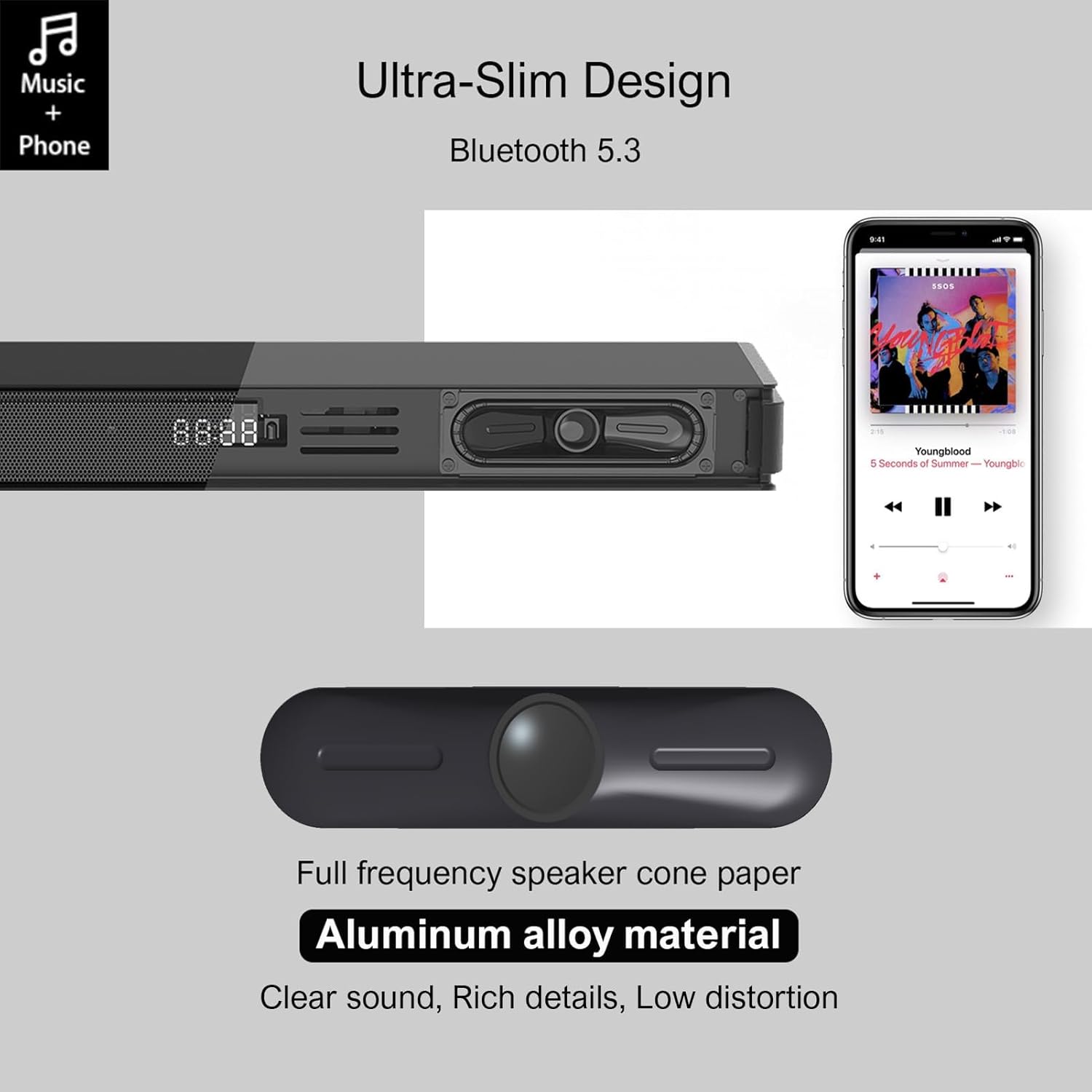
Image 4.1: Detail of the soundbar's ultra-slim design, showing the front display and integrated speakers.
4.4 Rear Panel Connections
The rear panel of the soundbar provides various ports for connecting to your audio sources and power.

Image 4.2: Rear view of the soundbar showing input ports: AUX, HDMI ARC, USB, Optical, Subwoofer Out, and DC In.
- AUX (3.5mm): For connecting devices with a 3.5mm audio output.
- ARC (HDMI): For connecting to a TV's HDMI ARC port. Supports CEC for unified control.
- USB: For playing audio files from a USB drive.
- OPTICAL: For connecting to a TV or other device with an optical audio output.
- SUB OUT: For connecting the wired subwoofer.
- DC IN: For connecting the power adapter.
5. Setup
5.1 Placement Options
The Hiwill HW210 soundbar offers flexible placement options to suit your home entertainment setup.

Image 5.1: Illustrates placing the soundbar on a tabletop in front of the TV or mounting it on the wall below the TV.
- Tabletop Placement: Place the soundbar on a stable, flat surface directly in front of your TV. Ensure it does not obstruct the TV's remote sensor.
- Wall Mounting: The soundbar can be mounted on the wall below your TV. Use the provided wall mounting kit and follow these steps:
- Mark the desired mounting positions on the wall, ensuring the soundbar is centered with your TV.
- Drill pilot holes at the marked positions.
- Insert wall anchors (if necessary for your wall type).
- Secure the mounting brackets (if separate) or the soundbar directly using screws.
- Subwoofer Placement: Place the subwoofer on the floor near the soundbar. Experiment with placement to find the best bass response for your room.
5.2 Connecting to Power
- Connect the power adapter to the DC IN port on the soundbar's rear panel.
- Plug the other end of the power adapter into a wall outlet.
- Connect the wired subwoofer cable to the SUB OUT port on the soundbar.
5.3 Connecting to Audio Sources
Choose one of the following connection methods based on your device:
- HDMI ARC (Recommended for TVs):
- Connect one end of an HDMI cable (not included) to the ARC port on the soundbar.
- Connect the other end to the HDMI ARC port on your TV.
- Ensure HDMI CEC is enabled in your TV's settings for unified control.
- Optical:
- Connect the optical cable (included) to the OPTICAL port on the soundbar.
- Connect the other end to the optical audio output port on your TV or other device.
- Ensure your TV's audio output is set to "PCM" if you experience no sound.
- AUX (3.5mm):
- Connect the 3.5mm AUX cable (included) to the AUX port on the soundbar.
- Connect the other end to the headphone jack or AUX output of your device.
- USB:
- Insert a USB flash drive containing audio files into the USB port on the soundbar.
6. Operating Instructions
6.1 Power On/Off
- Press the Power button on the soundbar or remote control to turn the unit on or off.
6.2 Selecting Input Source
- Press the Input button on the remote control or the soundbar to cycle through available input sources (ARC, OPT, AUX, USB, BT). The selected input will be displayed on the soundbar's screen.
6.3 Bluetooth Pairing
- Turn on the soundbar and select the "BT" input source. The soundbar will enter pairing mode, indicated by a flashing "BT" on the display.
- On your mobile device, enable Bluetooth and search for available devices.
- Select "Hiwill HW210" (or similar name) from the list of devices.
- Once paired, the soundbar will emit a confirmation tone, and "BT" will stop flashing.
- To disconnect, turn off Bluetooth on your device or select a different input source on the soundbar.
6.4 Volume Control
- Use the Volume Up (+) and Volume Down (-) buttons on the soundbar or remote control to adjust the master volume.
- Press the Mute button on the remote control to mute or unmute the sound.
6.5 EQ Modes and Tone Adjustment
The soundbar features three preset equalizer modes and adjustable bass/treble settings.

Image 6.1: Visual representation of the three equalizer modes: Game, Movie, and Music, optimized for different audio content.
- Press the EQ button on the remote control to cycle through the preset modes: Game, Movie, and Music.
- Use the Bass +/- buttons on the remote control to adjust the bass level.
- Use the Treble +/- buttons on the remote control to adjust the treble level.
7. Maintenance
- Cleaning: Use a soft, dry cloth to clean the surface of the soundbar and subwoofer. Do not use liquid cleaners or abrasive materials.
- Storage: If storing the unit for an extended period, unplug it from the power outlet and store it in a cool, dry place.
- Avoid Obstructions: Ensure that the speaker grilles and ventilation openings are not blocked by dust or other objects.
8. Troubleshooting
| Problem | Possible Cause | Solution |
|---|---|---|
| No power | Power cord not connected; Power outlet not active | Ensure power cord is securely connected; Try a different power outlet. |
| No sound | Incorrect input source selected; Volume too low; Cables not connected properly; TV audio output settings incorrect. | Select the correct input source; Increase volume; Check all audio cables are securely connected; For Optical/ARC, ensure TV audio output is set to PCM. |
| Bluetooth pairing fails | Soundbar not in pairing mode; Device too far; Interference. | Ensure soundbar is in BT mode and flashing; Move device closer; Turn off other Bluetooth devices. |
| Remote control not working | Batteries depleted; Obstruction between remote and soundbar. | Replace remote control batteries; Ensure clear line of sight to the soundbar's sensor. |
| Poor sound quality | Incorrect EQ mode; Source audio quality; Cable issues. | Adjust EQ modes and bass/treble settings; Try a different audio source; Check/replace audio cables. |
9. Specifications
| Model Name | Hiwill HW210 Soundbar |
| Speaker Type | Soundbar with Wired Subwoofer |
| Surround Sound Configuration | 2.1 Channel |
| Maximum Speaker Output Power | 120 Watts |
| Connectivity Technology | Bluetooth 5.3, HDMI ARC, AUX (3.5mm), USB, Optical |
| Audio Output Mode | Surround |
| Special Features | High-resolution audio support, 3 EQ modes, Adjustable Bass/Treble, Wall-mountable |
| Recommended Uses | TV, Gaming Consoles, Computers, Smartphones, Tablets, Music Players, DVD Players, Home Theater |
10. Warranty and Support
Hiwill products are designed and manufactured to the highest quality standards. For detailed warranty information, please refer to the warranty card included in your package or visit the official Hiwill website. If you encounter any issues or require technical assistance, please contact Hiwill customer support through the contact information provided on the product packaging or website.
Please have your model number (HW210) and purchase date ready when contacting support.
Related documentsHW210

Ask a question about this manual
Ask about setup, troubleshooting, compatibility, parts, safety, or missing instructions. Manuals+ will review the question and use this page’s manual context to help answer it.