
Introduction
Thank you for choosing the ODK 140cm L-Shaped Gaming Desk. This manual provides essential information for the safe and efficient assembly, operation, and maintenance of your new desk. Please read these instructions carefully before beginning assembly and retain them for future reference.
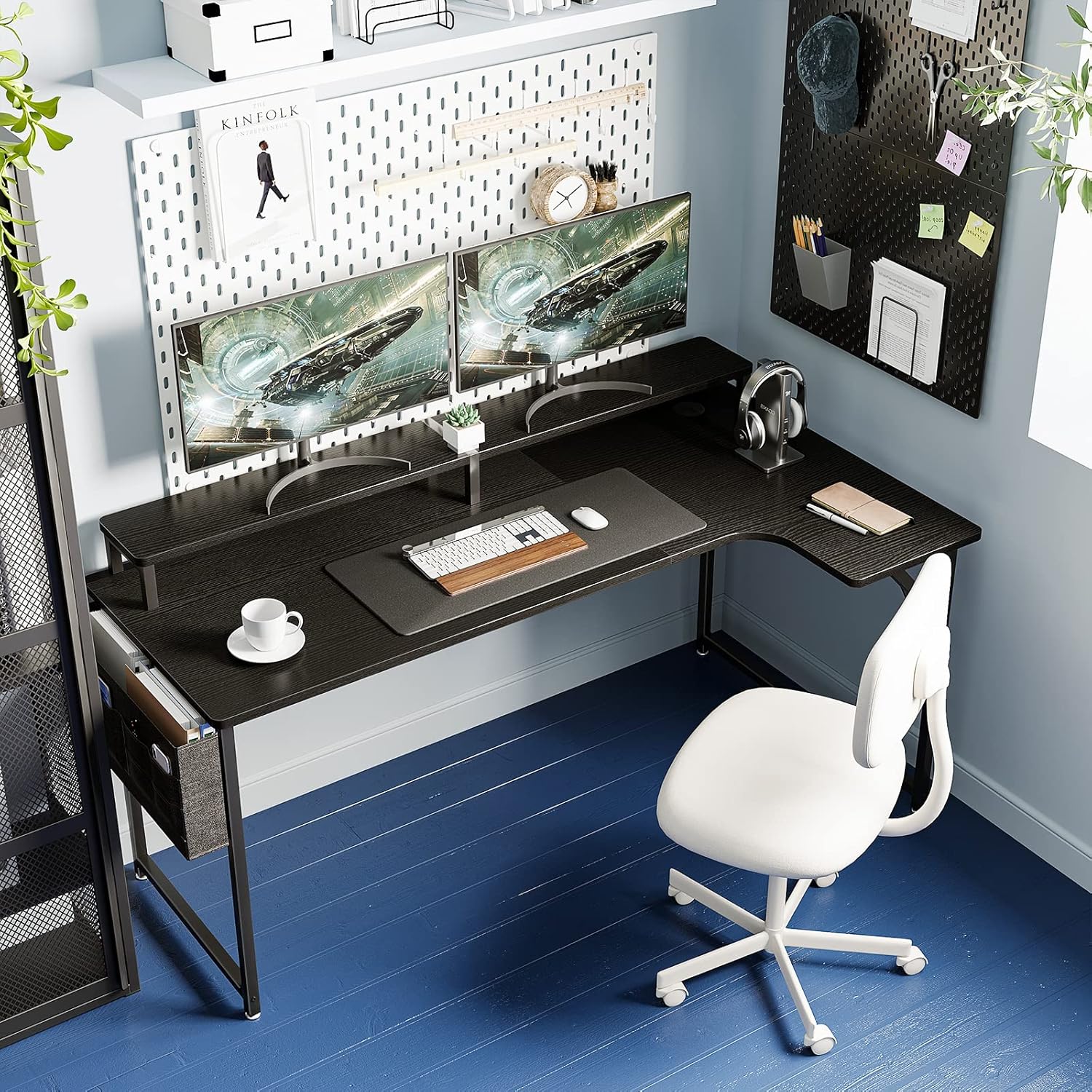
Image: The ODK L-shaped gaming desk set up with dual monitors, a keyboard, mouse, and a comfortable office chair, showcasing its spacious design.
Safety Information
- Always assemble the desk on a soft, clean surface to prevent scratches.
- Ensure all screws and fasteners are securely tightened before use. Periodically check and retighten as necessary.
- Do not overload the desk. Refer to the specifications for weight capacity.
- Keep small parts away from children during assembly to prevent choking hazards.
- Avoid placing hot items directly on the tabletop without protection.
Package Contents
Before assembly, verify that all components are present and undamaged. A Japanese assembly manual and necessary tools (e.g., wrench) are included.
- Desk Top Panels (2 sections)
- Monitor Stand Panels (2 sections)
- Steel Frame Components (Legs, support bars)
- Hardware Pack (Screws, bolts, dowels, adjustable feet)
- Fabric Storage Bag
- Assembly Tools (Wrench)
- Japanese Assembly Manual
Setup and Assembly Instructions
Assembly requires two people for ease and safety. Please follow the detailed steps provided in the included Japanese assembly manual. The main tabletop consists of two panels that connect to form the L-shape.
- Unpack and Identify Parts: Lay out all components on a clean, soft surface. Refer to the parts list in the manual to identify each piece.
- Assemble the Main Desk Frame: Connect the steel frame components according to the manual. Ensure all connections are stable.
- Attach Desk Top Panels: Carefully align and attach the two desk top panels to the frame. Note that these panels connect using wooden dowels and are secured from underneath with an iron frame. Do not overtighten screws.
- Assemble and Attach Monitor Stand: The monitor stand also consists of two panels. Connect them using the provided metal fittings. Exercise caution not to overtighten screws to prevent cracking. Secure the assembled monitor stand to the main desk top.
- Install Storage Bag: Attach the fabric storage bag to the designated area on the side of the desk.
- Adjust Leveling Feet: Once assembled, place the desk in its desired location. Adjust the leveling feet at the bottom of the legs to ensure the desk is stable and level on uneven floors.

Image: Detailed diagram illustrating the overall dimensions of the ODK L-shaped desk, including the main desk surface height, monitor stand height, and total width and depth.
Operating Instructions
L-Shaped Design for Enhanced Workspace
The L-shaped design maximizes corner space, allowing for simultaneous multi-tasking. The extended right side provides ample room for various activities, whether for home use or office work. The tabletop features rounded corners to minimize the risk of injury and prevent scratches, making it suitable for children's study areas.

Image: An aerial view of the ODK L-shaped desk, demonstrating how the extended section provides additional workspace for a laptop and other items, facilitating efficient multi-tasking.
Integrated Monitor Stand for Ergonomics
The elevated monitor stand raises your screen by approximately 11.5 cm, promoting a correct sitting posture. This reduces strain on your neck and shoulders, allowing for comfortable use even during long hours. The two-tier structure of the monitor stand also effectively increases your usable desktop area, boosting work efficiency.

Image: A visual comparison illustrating the ergonomic benefits of the monitor stand, showing how it helps achieve a better posture and reduces neck and shoulder strain during extended desk work.
Convenient Storage Bag
The included storage bag is designed to resist deformation even when holding heavy items. It offers ample space for documents, stationery, and other small items you want to keep within reach. This helps keep your desk tidy and organized, allowing you to quickly access what you need.

Image: A close-up view of the practical fabric storage bag attached to the desk, demonstrating its capacity to hold various items like documents, a smartphone, and eyeglasses, keeping them organized and accessible.
Cable Management
The desk includes a cable management grommet to help organize and route your computer and peripheral cables, keeping your workspace neat and clutter-free.

Image: A detailed view of the cable management grommet integrated into the desk surface, designed to help users keep their cables tidy and out of sight.
Maintenance
- Cleaning the Tabletop: The melamine tabletop material is easy to clean. Simply wipe away dirt or spills with a damp cloth. Avoid abrasive cleaners that may damage the surface.
- Frame Care: The high-strength steel frame is durable. Wipe with a dry or slightly damp cloth to remove dust.
- Regular Checks: Periodically inspect all screws and connections to ensure they remain tight. Retighten if any looseness is detected to maintain stability.
Troubleshooting
- Desk Wobbles: Ensure all assembly screws are tightened. Adjust the leveling feet at the bottom of the desk legs to compensate for uneven floor surfaces.
- Missing Parts or Initial Defects: If you encounter any initial defects or find that parts are missing upon delivery, please contact ODK customer support immediately for assistance.
- Monitor Stand Screws Cracking: When assembling the monitor stand, avoid overtightening the screws to prevent potential cracking of the panels.
Specifications
| Feature | Detail |
|---|---|
| Brand | ODK |
| Model Number | B0CLY5JHFM |
| Overall Dimensions (W x D x H) | 140 cm x 50/74 cm x 85.5 cm |
| Desk Surface Height | 74 cm |
| Monitor Stand Height Increase | Approx. 11.5 cm |
| Product Weight | 16.4 kg |
| Package Weight | 18.5 kg |
| Color | Black |
| Style | L-shaped |
| Material | Melamine tabletop, Steel frame |
| Finish Type | Powder coating (frame) |
| Special Features | Monitor stand, Storage bag, Cable management grommet, Adjustable feet |
| Recommended Use | Gaming, Computer Desk, Study Room |
Warranty and Support
ODK is committed to providing quality products. In the event of any initial defects or missing parts with your purchased product, please do not hesitate to contact our customer support team at any time. We are here to assist you with any issues or questions you may have regarding your ODK L-Shaped Gaming Desk.
For support, please refer to the contact information provided with your purchase documentation or visit the official ODK website.


