
Introduction
Thank you for choosing the Smof Open Ear Headphones with Micphone, Model LK02. These wireless air conduction Bluetooth headphones are designed to provide a comfortable and hygienic listening experience while keeping you aware of your surroundings. Featuring Bluetooth 5.1, aptX-HD, and a convenient mute function, they are ideal for online meetings, teaching, office work, home business, and driving. This manual provides detailed instructions on how to set up, operate, and maintain your headphones.

Figure 1: Smof Open Ear Headphones (Model LK02) and included carrying case.
Product Overview
The Smof LK02 headphones feature an open-ear design that rests outside your ear canal, allowing you to hear ambient sounds while enjoying your audio. This design promotes safety and hygiene. The headset is lightweight, weighing only 41g, and is constructed with skin-friendly soft silicone ear pads and a durable aluminum alloy back-hanging design for extended comfort.

Figure 2: The lightweight design of the Smof LK02 headphones, weighing approximately 41 grams, ensures comfort during prolonged use.
Key Features:
- Open-Ear Design: Allows awareness of surroundings and maintains ear hygiene.
- Bluetooth 5.1: Provides stable, fast, and low-power consumption connectivity with aptX-HD for high-quality audio.
- Noise Reduction Boom Microphone: Captures voice clearly and blocks ambient noise, enhancing communication efficiency.
- Long Battery Life: Up to 8 hours of talk time or 10 hours of listening time on a single charge.
- Easy Controls: Multifunction button for power, pairing, playback, calls, and voice assistant. Dedicated volume buttons.
- Mute Function: Dedicated button for quick microphone muting.
- Compatibility: Widely compatible with mobile phones, PCs, computers, laptops, tablets, and smartwatches.

Figure 3: The adjustable noise-canceling boom microphone effectively reduces background noise for clear communication.
Setup
Charging the Headphones:
- Locate the Type-C charging port on the headphones.
- Connect the provided Type-C USB charging cable to the headphones and the other end to a compatible USB power source (e.g., computer USB port, wall adapter).
- The LED indicator will show the charging status. A full charge typically takes approximately 2 hours.
- Once fully charged, the LED indicator will change (refer to the LED indicator section for specific light patterns).
A full charge provides up to 8 hours of talk time or 10 hours of listening time.

Figure 4: The Type-C charging port for quick and convenient charging.
Bluetooth Pairing:
- Ensure the headphones are turned off.
- Press and hold the Multifunction Button for 3-5 seconds until the LED indicator flashes red and blue alternately, indicating pairing mode.
- On your device (smartphone, computer, tablet), enable Bluetooth and search for available devices.
- Select "Smof LK02" (or similar name) from the list of found devices.
- Once connected, the LED indicator will typically show a solid blue light or flash slowly.
- The headphones will automatically attempt to reconnect to the last paired device when powered on.
Operating Instructions
Button Functions:

Figure 5: Overview of the headphone controls and their functions.
| Button/Action | Function |
|---|---|
| Multifunction Button (Long Press 3-5s) | Power ON/OFF, Enter Pairing Mode |
| Multifunction Button (Click Once) | Play/Pause Music, Answer/End Call |
| Multifunction Button (Double Click) | Activate Voice Assistant |
| Volume + Button (Click Once) | Increase Volume |
| Volume + Button (Double Click) | Next Song |
| Volume - Button (Click Once) | Decrease Volume |
| Volume - Button (Double Click) | Previous Song |
| Mute Switch | Mute/Unmute Microphone during calls |
Usage Scenarios:
The open-ear design and noise-canceling microphone make these headphones versatile for various activities:
- Online Meetings/Conferences: Clear audio and microphone for professional communication.
- Online Teaching/Learning: Facilitates clear interaction for educators and students.
- Office/Home Business: Ideal for calls and multitasking while staying aware of your environment.
- Driving: Allows you to hear traffic and surroundings for safety while taking calls or listening to navigation.

Figure 6: The Smof LK02 headphones are suitable for diverse environments and activities.
Maintenance
To ensure the longevity and optimal performance of your Smof Open Ear Headphones, please follow these maintenance guidelines:
- Cleaning: Use a soft, dry cloth to wipe the headphones. Do not use abrasive cleaners or immerse the headphones in water.
- Storage: Store the headphones in the provided pressure-resistant mini storage bag when not in use to protect them from dust and physical damage. Avoid storing in extreme temperatures.
- Charging: Only use the provided charging cable or a certified Type-C cable. Avoid overcharging the battery.
- Handling: Do not bend or twist the headset excessively, as this may damage the internal components or the aluminum alloy frame.
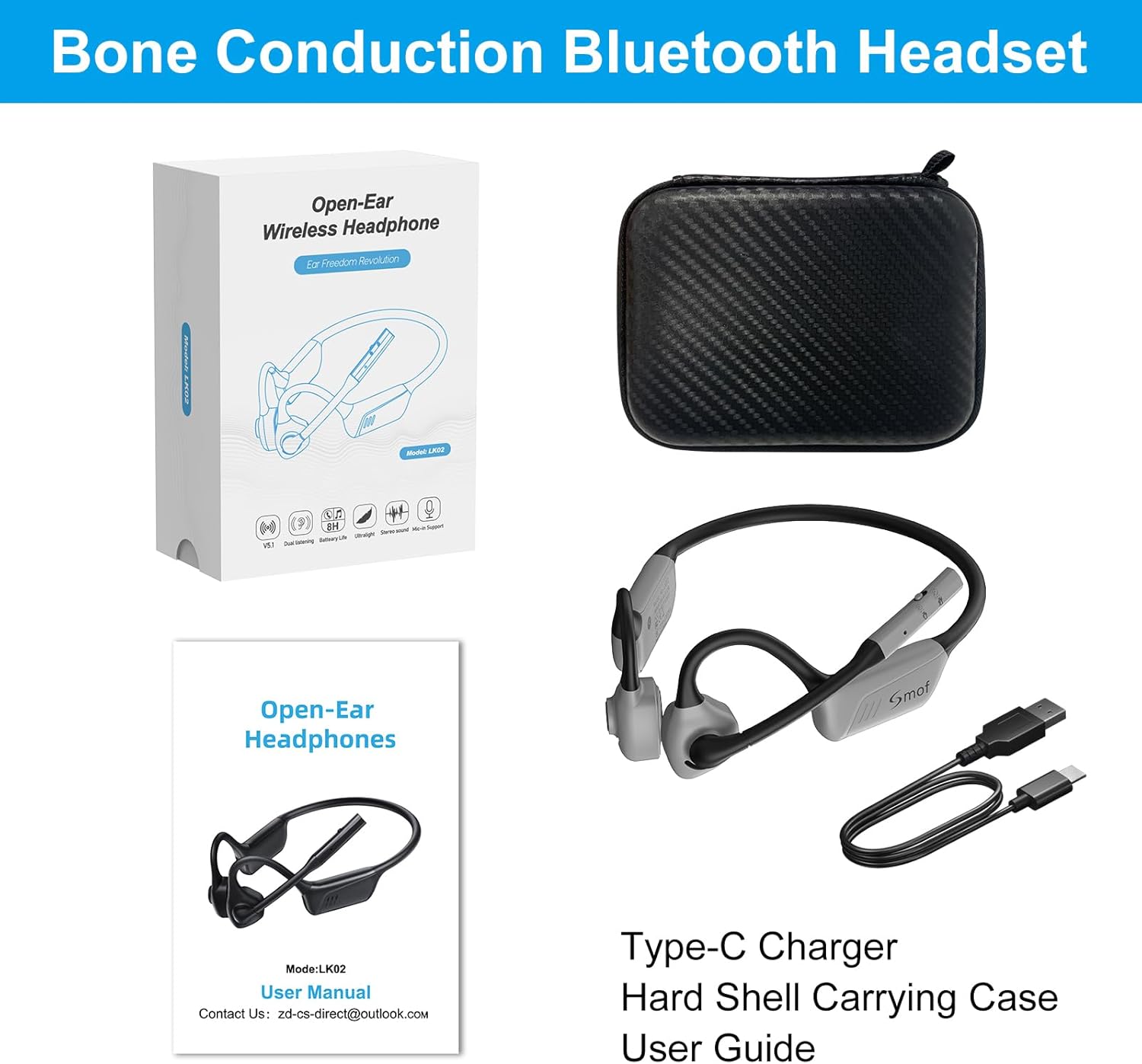
Figure 7: The included pressure-resistant mini storage bag helps protect your headphones during storage and travel.
Troubleshooting
If you encounter issues with your Smof Open Ear Headphones, please refer to the following common solutions:
| Problem | Possible Cause | Solution |
|---|---|---|
| Headphones do not power on. | Low battery. | Charge the headphones for at least 30 minutes. |
| Cannot pair with device. | Headphones not in pairing mode; Bluetooth off on device; device too far. | Ensure headphones are in pairing mode (flashing red/blue). Turn Bluetooth on your device. Move device closer to headphones (within 10 meters). |
| No sound or poor sound quality. | Volume too low; headphones not connected; interference. | Increase volume on headphones and device. Reconnect Bluetooth. Move away from other wireless devices. |
| Microphone not working. | Microphone muted; incorrect input device selected. | Check the mute switch on the microphone boom. Ensure Smof LK02 is selected as the input device in your computer/app settings. |
| Intermittent connection. | Distance from device; obstacles; low battery. | Reduce distance to device. Remove obstacles. Charge headphones. |
Specifications
| Feature | Detail |
|---|---|
| Model Name | LK02 |
| Connectivity Technology | Wireless (Bluetooth 5.1) |
| Wireless Communication Protocol | Bluetooth |
| Supported Profiles | HSP, HFP, AVRCP, A2DP, SBC, APTX, APTX_LL, APTX_HD |
| Ear Placement | Open Ear |
| Form Factor | Air Conduction |
| Material | Plastic |
| Item Weight | 40 Grams |
| Battery Life (Talk Time) | Up to 8 hours |
| Battery Life (Listening Time) | Up to 10 hours |
| Charging Time | Approx. 2 hours |
| Standby Time | Up to 40 hours |
| Frequency Range | 20Hz-20KHz |
| Water Resistance Level | Not Water Resistant |
| Control Method | Touch, Voice Control |
| Special Features | Foldable, Noise Reduction Boom Microphone, Mute Function |
| Included Components | User Manual, Type-C Charging Cable, Hard Shell Carrying Case |
Warranty and Support
Smof products are manufactured with high-quality standards. For any product-related inquiries, technical support, or warranty claims, please contact Smof customer service. Please refer to the contact information provided in your product packaging or on the official Smof website.
While specific warranty details are not provided in this manual, most electronic products come with a standard manufacturer's warranty covering defects in materials and workmanship for a limited period from the date of purchase. Please retain your proof of purchase for warranty service.
For further assistance, you may also refer to the contact information on the product's packaging or the included user manual. The manufacturer's contact email is often found there.
