
1. Introduction
This manual provides essential information for the installation and maintenance of the Tolxh N115132-01 replacement back shell. This component is designed as a compatible spare part for specific DeWalt angle grinder models, ensuring proper fit and function to protect the internal mechanisms of your tool. Please read these instructions carefully before proceeding with installation.
2. Product Overview
The Tolxh N115132-01 is a durable plastic back shell designed to replace the original housing on compatible DeWalt angle grinders. Its primary function is to enclose and protect the motor and other internal components from dust, debris, and impact, ensuring the longevity and safe operation of the power tool.
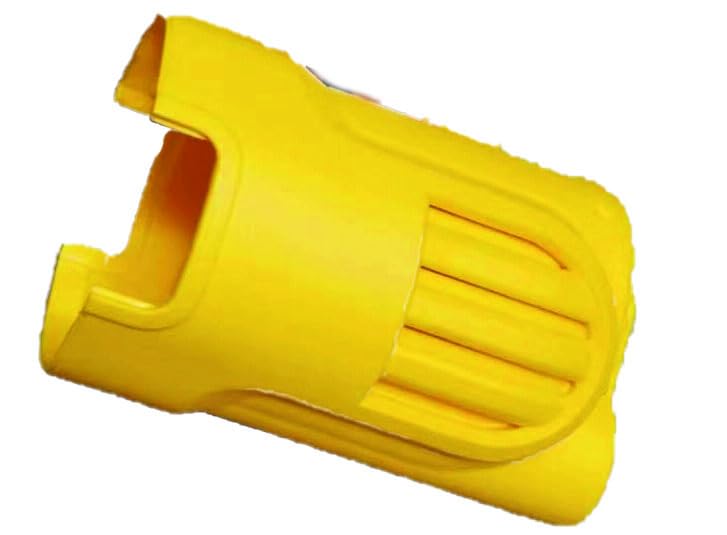
Figure 1: The yellow plastic replacement back shell, designed to house and protect the internal components of compatible DeWalt angle grinders.
Compatible Models:
- DeWalt DWE8200S
- DeWalt DWE8211S
- DeWalt DWE8201S
- DeWalt DWE886S
- DeWalt DWE8210S
3. Safety Information
Always prioritize safety when working with power tools and their components. Failure to follow these safety guidelines may result in injury or damage to the tool.
- Disconnect Power: Before attempting any installation or maintenance, ensure the power tool is unplugged from its power source to prevent accidental startup.
- Use Appropriate Tools: Utilize the correct screwdrivers and other tools for disassembly and reassembly to avoid stripping screws or damaging components.
- Inspect Components: Before installing the new back shell, inspect all internal components of the grinder for damage or wear. Replace any other worn parts as necessary.
- Professional Assistance: If you are unsure about any step of the installation process, consult a qualified technician or refer to the original tool's service manual.
- Secure Fasteners: Ensure all screws are tightened securely after installation to prevent the housing from separating during operation.
4. Setup and Installation
This section outlines the general steps for replacing the back shell. Specific disassembly and reassembly procedures may vary slightly depending on your exact DeWalt grinder model. Refer to your tool's original service manual for detailed instructions if available.
- Prepare the Work Area: Ensure a clean, well-lit workspace. Lay out a cloth or mat to prevent losing small parts.
- Disconnect Power: Unplug the DeWalt angle grinder from the power outlet.
- Remove Existing Back Shell: Locate and carefully remove all screws securing the existing back shell. Note the position and type of each screw for reassembly. Gently separate the old back shell from the tool's main body.
- Inspect Internal Components: With the old shell removed, visually inspect the motor, wiring, and other internal components for any signs of damage, loose connections, or excessive dust. Clean as necessary.
- Position New Back Shell: Carefully align the Tolxh N115132-01 replacement back shell with the tool's main body. Ensure all internal components, such as wires and switches, are correctly seated within the new housing and do not get pinched.
- Secure New Back Shell: Reinsert and tighten all screws that secure the back shell. Do not overtighten, as this can strip the threads or crack the plastic. Ensure a snug and secure fit.
- Functionality Check: After installation, perform a visual inspection to ensure the shell is properly closed and all parts are aligned. Briefly plug in the tool (observing all safety precautions) and test its basic function to confirm proper operation.
5. Operating
The back shell itself does not have operational controls. Its function is passive, providing structural integrity and protection for the internal electrical and mechanical components of the angle grinder. Once installed, the back shell allows the angle grinder to be operated as intended, providing a secure and protected housing for the user.
6. Maintenance
Proper maintenance of the back shell contributes to the overall longevity and safety of your power tool.
- Cleaning: Periodically wipe down the exterior of the back shell with a clean, damp cloth to remove dust and grime. Avoid using harsh chemicals or solvents that could damage the plastic.
- Inspection: Regularly inspect the back shell for cracks, chips, or other signs of damage. A compromised housing can expose internal components to hazards. If significant damage is found, replace the back shell promptly.
- Screw Tightness: Occasionally check the tightness of the screws securing the back shell. Vibrations during tool operation can sometimes cause screws to loosen over time.
7. Troubleshooting
If you encounter issues after installing the Tolxh N115132-01 back shell, consider the following:
- Improper Fit: If the back shell does not close properly or leaves gaps, ensure all internal components (wires, switches) are correctly seated and not obstructing the shell. Verify that the part number N115132-01 is indeed compatible with your specific DeWalt grinder model.
- Loose Screws: If the shell feels wobbly or separates, check that all screws are present and securely tightened.
- Tool Not Functioning: If the tool does not power on or operates incorrectly after installation, immediately unplug it. Re-open the housing and carefully check for pinched wires, disconnected terminals, or improperly seated components.
If problems persist, contact customer support for assistance.
8. Specifications
| Part Number | N115132-01 |
| Brand | Tolxh |
| Material | Plastic |
| Item Package Quantity | 1 |
| Compatible DeWalt Models | DWE8200S, DWE8211S, DWE8201S, DWE886S, DWE8210S |
9. Warranty and Support
Tolxh is committed to customer satisfaction. This product comes with a 1-year warranty and a 1-month money-back guarantee. If you are not satisfied with the product or encounter any issues, please contact us immediately. We are dedicated to providing a satisfactory solution.
If this product is not suitable for your model after receiving the goods or during the installation process, please contact us in time, and we will help you choose the correct accessories. If an error during installation causes damage to the product, please contact us for assistance to minimize your loss.
For any questions or concerns, please reach out to our customer support.