
1. Introduction and Overview
The ALLPOWERS R1500 LITE Portable Power Station is a versatile and robust power solution designed for various applications, from outdoor adventures and camping to home backup during power outages. This unit delivers a powerful 1600W AC output (3200W surge) and features a durable 1056Wh LiFePO4 battery, offering an extended lifespan of over 4000 charge cycles. Coupled with two ALLPOWERS SP027 100W foldable solar panels, it provides a reliable and renewable energy source.

Figure 1: ALLPOWERS R1500 LITE Power Station with included SP027 Solar Panels.
Key features include 1-hour fast charging via AC input, an Uninterruptible Power Supply (UPS) function for seamless power transition, and multiple output ports to charge up to 9 devices simultaneously. The included SP027 solar panels boast up to 22% efficiency, making solar recharging quick and effective.
2. Product Features and Components
The R1500 LITE is designed for convenience and durability. It features a clear display screen, multiple output ports, and integrated handles for easy portability.
2.1 Front Panel Overview
The front panel provides all necessary controls and indicators:
- LCD Display: Shows battery percentage, input/output wattage, remaining runtime, and various status indicators.
- DC Output Section: Includes 2 USB-A (18W) ports and 2 USB-C (100W) ports for charging smaller devices and laptops.
- 12V DC Output: A 12V 10A cigarette lighter port for compatible devices.
- AC Output Ports: Four standard AC 1600W (3200W surge) outlets with protective covers.
- Wireless Charging Pads: Two 15W wireless charging pads located on the top surface for compatible smartphones and accessories.

Figure 2: Front panel of the R1500 LITE, highlighting various ports and the display.
2.2 Rear and Side Panels
The rear and side panels house additional connections and ventilation:
- AC Charging Input: Standard 3-prong AC input (100-120V 15A Max) for fast wall charging.
- Solar/Car Input: Dedicated port (12-95V 13A Max) for connecting solar panels or car chargers.
- Expand Battery Ports: Two ports (Port 01, Port 02) for connecting additional battery packs (sold separately) to expand capacity.
- Ventilation Grilles: Located on the sides and rear to ensure proper airflow and cooling during operation.

Figure 3: Rear panel showing AC and solar input ports.
2.3 SP027 Foldable Solar Panels
The included 100W SP027 solar panels are highly efficient and portable:
- High Efficiency: Up to 22% conversion efficiency.
- Foldable Design: Compact folded size (20x25.6x1.2 inches) and lightweight (7.9 lbs) for easy transport.
- Durable: Rated IP67 for water resistance, suitable for outdoor use in various weather conditions.

Figure 4: SP027 Foldable Solar Panel.
3. Setup
Before first use, ensure the power station is fully charged. This can be done via AC wall outlet or solar panels.
3.1 Initial Charging (AC Wall Outlet)
- Open the protective flap on the rear panel covering the AC input port.
- Connect the provided AC charging cable to the AC input port on the power station.
- Plug the other end of the AC charging cable into a standard wall outlet (100-120V).
- The LCD display will show the input wattage and battery percentage increasing as it charges. The R1500 LITE supports 1-hour fast charging.
3.2 Solar Panel Setup and Charging
- Unfold the SP027 solar panels and position them in direct sunlight for maximum efficiency. Adjust the kickstands to optimize the angle towards the sun.
- Connect the provided solar charging cable to the solar input port on the rear panel of the R1500 LITE.
- Connect the other end of the solar charging cable to the SP027 solar panel.
- The LCD display will show the input wattage from the solar panels. Charging time will vary based on sunlight intensity.

Figure 5: Diagram showing how to connect solar panels to the power station.
4. Operating
The R1500 LITE offers various output options and operating modes.
4.1 Turning On/Off Output Ports
Each output section (DC, AC) can be independently turned on or off to conserve power:
- DC Output (USB-A, USB-C, 12V): Press the DC output button (located below the USB ports) for 3 seconds to toggle power on/off. A green light indicates it's active.
- AC Output: Press the AC output button (located above the AC outlets) for 3 seconds to toggle power on/off. A green light indicates it's active.
4.2 Charging Modes
The R1500 LITE supports different charging modes for flexibility:
- Fast Mode: Utilizes 1200W AC input for rapid charging (approx. 50 mins for 0-80%).
- Standard Mode: Uses 1000W AC input.
- Mute Mode: Uses 400W AC input for quiet charging, ideal for overnight or sensitive environments.
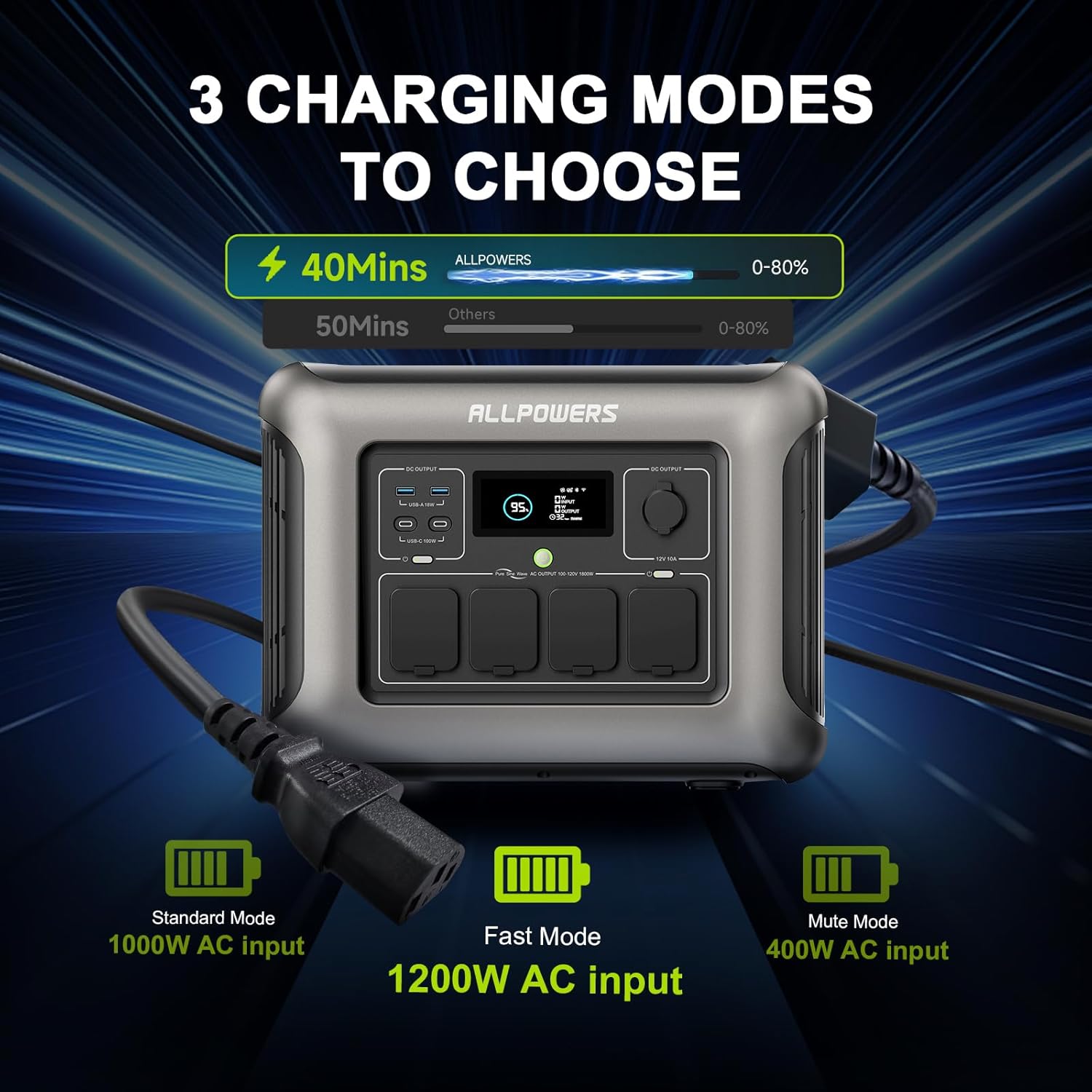
Figure 6: Illustration of the three charging modes.
4.3 Uninterruptible Power Supply (UPS) Function
The UPS function allows the R1500 LITE to act as a backup power source for connected devices. When plugged into a wall outlet, it passes power directly to devices while keeping its battery charged. In case of a power outage, it automatically switches to battery power within 15ms, ensuring uninterrupted operation for sensitive electronics like computers or medical equipment.

Figure 7: UPS function illustrating seamless power transition.
4.4 App Control (Fingertip Control)
The ALLPOWERS R1500 LITE can be controlled remotely via a dedicated smartphone application. This allows you to monitor battery status, switch charging modes, turn outputs on/off, and manage other settings directly from your phone.

Figure 8: Control the power station via the ALLPOWERS smartphone app.
5. Maintenance
Proper maintenance ensures the longevity and optimal performance of your ALLPOWERS R1500 LITE Power Station.
- Storage: Store the unit in a cool, dry place away from direct sunlight and extreme temperatures. Ensure all port covers are closed to prevent dust and moisture ingress.
- Charging: For long-term storage, it is recommended to charge the battery to 50-80% every 3-6 months to maintain battery health.
- Cleaning: Use a dry, soft cloth to clean the exterior of the unit. Do not use liquid cleaners or immerse the unit in water.
- Battery Lifespan: The LiFePO4 battery is designed for 4000+ charge cycles, offering a lifespan exceeding 10 years under normal use.
6. Troubleshooting
If you encounter issues with your ALLPOWERS R1500 LITE, try the following common troubleshooting steps:
- Unit Not Turning On: Ensure the battery is charged. If completely depleted, connect to AC power for a few minutes before attempting to power on.
- No Output from Ports: Check if the specific output section (DC or AC) is turned on (indicated by a green light). Ensure the device you are trying to power is within the unit's wattage limits.
- Slow Charging: Verify that the correct charging mode is selected (Fast, Standard, Mute). For solar charging, ensure panels are in direct sunlight and properly angled.
- Overload Protection: If an overload occurs, the unit may shut down. Disconnect the overloaded device and restart the power station. Refer to the display for specific error codes.
- Fan Noise: The internal cooling fans will activate during high power output or charging to prevent overheating. This is normal operation.
7. Specifications
| Specification | Value |
|---|---|
| Brand | ALLPOWERS |
| Model Name | R1500 BUNDLE |
| Wattage | 1600 watts (3200W Surge) |
| Battery Type | LiFePO4 |
| Capacity | 1056Wh |
| Cycle Life | 4000+ cycles to 80% capacity |
| AC Output | 4 x 100-120V, 1600W (3200W Surge) |
| USB-A Output | 2 x 18W |
| USB-C Output | 2 x 100W |
| DC Output | 1 x 12V/10A (Cigarette Lighter) |
| AC Input | 1200W Max (100-120V) |
| Solar Input | 650W Max (12-95V) |
| Dimensions (L x W x H) | 16.25" x 12.28" x 10.43" |
| Item Weight | 36.8 Pounds |
| Included Components | ALLPOWERS R1500 LITE portable power station, AC charging cable, Solar charging cable, 2 PCS ALLPOWERS SP027 solar panel |
8. Warranty & Support
For warranty information and customer support, please refer to the documentation included in your product packaging or visit the official ALLPOWERS website. Support typically covers manufacturing defects and operational issues not caused by misuse.


