Introduction
This manual provides essential information for the safe operation, maintenance, and troubleshooting of your LUXURYTON X-1000 Electric Mobility Scooter. Please read this manual thoroughly before operating the scooter to ensure proper use and to maximize its lifespan.
The LUXURYTON X-1000 is designed for personal mobility, featuring a powerful 1500W motor, a maximum speed of 18 mph, and a range of up to 45 miles per charge. It includes an executive seat, digital dash, and comprehensive lighting for safety and comfort.
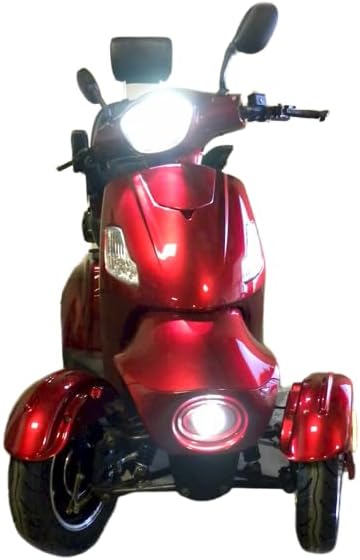
Figure 1: Front view of the LUXURYTON X-1000 Electric Mobility Scooter.
Safety Information
Important Safety Precautions:
- Always wear appropriate safety gear, including a helmet, when operating the scooter.
- Ensure the battery is fully charged before each use, especially for long trips.
- Do not exceed the maximum weight capacity of 450 lbs.
- Operate the scooter on stable, level surfaces. Avoid steep inclines or uneven terrain.
- Familiarize yourself with all controls, including the throttle, brakes, and lights, before riding.
- Always use turn signals when changing direction and ensure all lights are functional.
- Avoid operating the scooter in adverse weather conditions, such as heavy rain or snow.
- Keep hands and feet clear of moving parts.
- Store the scooter in a dry, secure location.
Setup and Initial Use
Unpacking and Assembly
Upon receiving your LUXURYTON X-1000, carefully unpack all components. Ensure all parts listed in the packing list are present. Minor assembly may be required, such as attaching the seat, mirrors, and any optional accessories like the roof or canopy (if purchased).
The scooter features factory-made holes for easy installation of roof and windshield holders, if applicable.
Battery Charging
Before first use, fully charge the scooter's battery. The powerful yet compact battery is easily accessible and lockable with a key to prevent theft. Connect the charger to a standard electrical outlet and then to the scooter's charging port. The charging indicator will show the charging status. Disconnect the charger once the battery is fully charged.
Note: Refer to the separate battery manual for detailed charging instructions and safety guidelines.
Operating Instructions
Controls Overview
The LUXURYTON X-1000 is equipped with an intuitive control system:
- Digital Dash: Provides essential information such as speed, battery level, and mileage.
- Motorcycle-style Twist Throttle: Located on the right handlebar for speed control.
- Gear Selector: Located on the right handlebar, alongside the hand brake and throttle speed controller. This may have a different shape depending on the model variant.
- Lights: Front and rear lights, brake lights, turn signals, LED rear light strip, and side reflector running lights are controlled via switches on the handlebars.
- Horn: Button located on the handlebar.
- Reverse Switch: Engages reverse gear.
Starting and Driving
- Insert the key into the ignition and turn it to the "ON" position.
- Ensure the gear selector is in the "Forward" position.
- Gently twist the throttle to accelerate. Release the throttle to decelerate.
- Use the hand brakes for stopping. Apply both brakes evenly for stable braking.
- To reverse, engage the reverse switch and gently apply the throttle. Be cautious when backing up, utilizing the rear camera for assistance.
Seat Adjustment
The executive seat is fully adjustable, featuring rear tilt and adjustable tilt-up armrests. Adjust the seat position for optimal comfort and control before operating the scooter.
Rear Camera
The integrated rear camera provides enhanced visibility when reversing or maneuvering in tight spaces. Monitor the display on the digital dash for the camera feed.

Figure 2: Side view of the LUXURYTON X-1000, highlighting the executive seat and rear storage.
Maintenance
Regular maintenance ensures the longevity and safe operation of your scooter.
Battery Care
- Charge the battery regularly, even if the scooter is not in frequent use, to maintain battery health.
- Avoid completely draining the battery before recharging.
- Store the battery in a cool, dry place.
- If storing the scooter for an extended period, charge the battery to approximately 50-70% and recharge every 1-2 months.
Tire Maintenance
The scooter is equipped with tubeless tires. Regularly check tire pressure and inspect for any signs of wear or damage. Maintain recommended tire pressure for optimal performance and safety.
General Cleaning
Clean the scooter regularly with a damp cloth and mild detergent. Avoid using high-pressure washers or abrasive cleaners, which can damage electrical components or finishes. Ensure all electrical connections remain dry.
Brake Inspection
Periodically inspect the brakes for proper function and wear. If you notice any decrease in braking performance, have the brakes inspected by a qualified technician.
Troubleshooting
This section addresses common issues you might encounter with your LUXURYTON X-1000 scooter.
| Problem | Possible Cause | Solution |
|---|---|---|
| Scooter does not power on. | Battery is discharged or not properly connected. Ignition key is not in "ON" position. | Check battery charge level and connections. Ensure key is fully turned to "ON". |
| Motor runs but scooter does not move. | Gear selector is in neutral or reverse (if not intended). Brake engaged. | Ensure gear selector is in "Forward". Release hand brake completely. |
| Reduced speed or range. | Low battery charge. Overloaded scooter. Tire pressure too low. | Fully charge battery. Reduce load. Check and adjust tire pressure. |
| Lights not working. | Light switch off. Blown fuse. Loose connection. | Check light switches. Inspect fuses (refer to wiring diagram). Check connections. |
If you encounter issues not listed here or if solutions do not resolve the problem, please contact customer support.
Specifications
| Feature | Detail |
|---|---|
| Model | LUXURYTON X-1000 (4 Four Wheels Electric Mobility Scooter) |
| Motor Power | 1500W |
| Maximum Speed | 18 mph |
| Range per Charge | Up to 45 miles |
| Weight Capacity | 450 lbs |
| Tires | Tubeless |
| Seat Type | Executive, Fully Adjustable, Rear Tilt & Adjustable Tilt-Up Armrest |
| Seat Dimensions | 18"x18"x28" (LxWxH) |
| Electronic Package | Digital Dash, Front & Rear Lights, Brake Lights, Turn Signals, LED Rear Light Strip & Side Reflector Running Lights |
| Rear Storage | Yes |
| Steering Height | 42" From Floor |
| Turning Radius | 73" |
| Product Dimensions | 63 x 28 x 42 inches |
| Product Weight | 360 Pounds |
| Material | Aluminum, Leather |
| Color | Red |

Figure 3: Dimensions of the LUXURYTON X-1000 Electric Mobility Scooter.
Warranty Information
Specific warranty details for the LUXURYTON X-1000 Electric Mobility Scooter are typically provided at the time of purchase or included in a separate warranty document. Please refer to your purchase documentation or contact the seller, MobilityLife, for comprehensive warranty terms and conditions.
Generally, warranties cover manufacturing defects under normal use. Damage resulting from misuse, accidents, or unauthorized modifications is typically not covered.
Customer Support
For technical assistance, parts, or service inquiries regarding your LUXURYTON X-1000 Electric Mobility Scooter, please contact the seller, MobilityLife.
You can typically find contact information on your purchase receipt or on the seller's page on Amazon. When contacting support, please have your product model (X-1000) and ASIN (B0CLX3D5ZP) readily available.
Seller: MobilityLife
ASIN: B0CLX3D5ZP


