
Auxbeam ZD000820-VE
Auxbeam V-Ultra Series 5-Inch Side Shooter LED Light Bar
Model: ZD000820-VE
Introduction
This manual provides detailed instructions for the installation, operation, and maintenance of your Auxbeam V-Ultra Series 5-Inch Side Shooter LED Light Bar. Designed for off-road use, this light bar features a dual-color system with amber Daytime Running Lights (DRL) and a powerful white spotlight, offering 270° wider illumination. Please read this manual thoroughly before installation and use to ensure proper function and safety.
Package Contents
- 2x Auxbeam V-Ultra Series 5-Inch LED Offroad Lights
- 2x Black Protective Light Covers
- 1x DT Wiring Harness
- 1x Installation Accessories Kit (mounting hardware)
- 1x Instruction Manual (this document)
- 1x Auxbeam Sticker
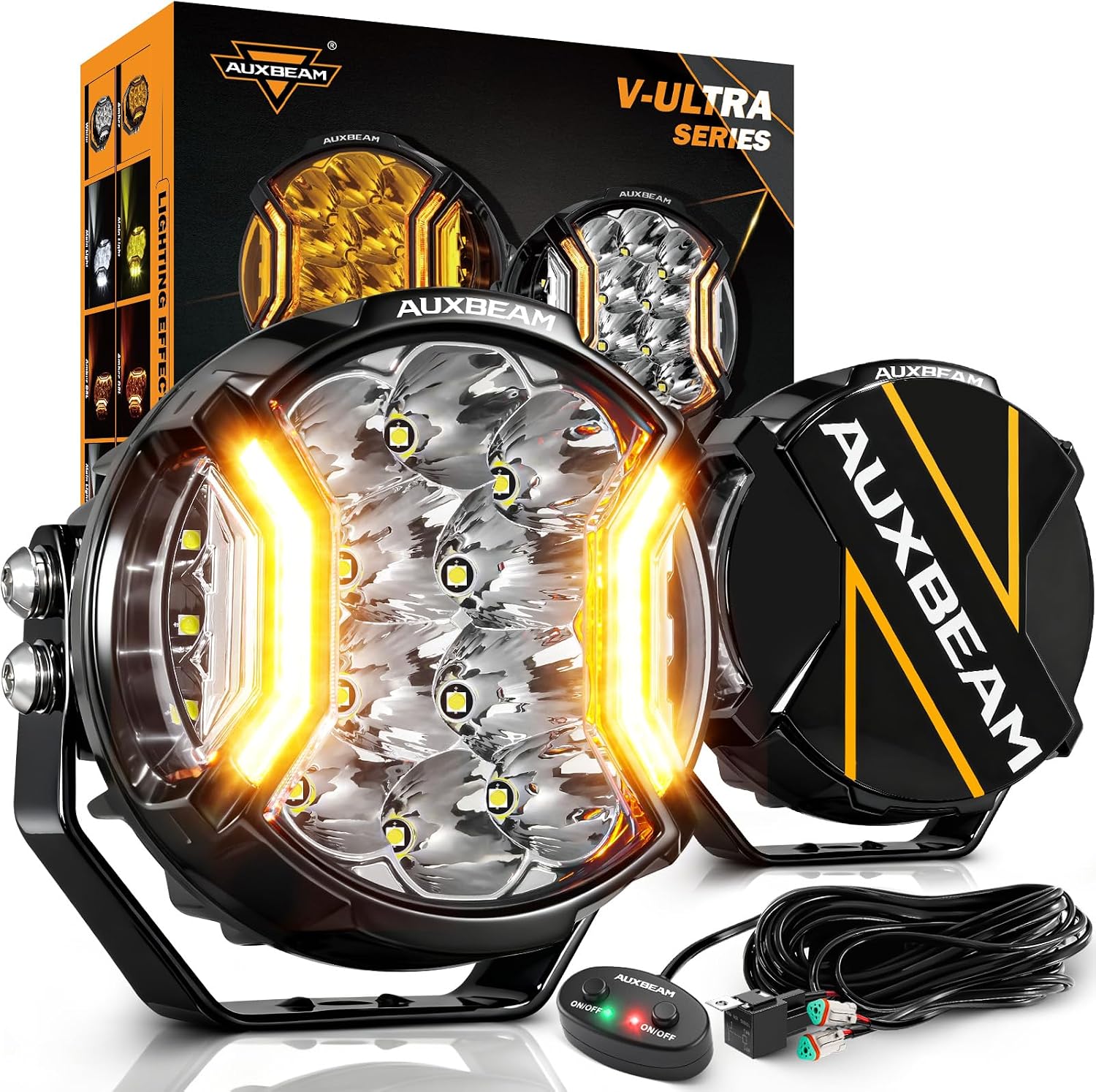
Image: The complete package contents, including two light pods, wiring harness, protective covers, and mounting hardware.
Specifications
| Brand | Auxbeam |
| Model Number | ZD000820-VE |
| Light Source Type | LED (P8 LED and 2835 SMD) |
| Wattage | 172 Watts (per pair) |
| Brightness | 20400 Lumens (per pair) |
| Voltage | 12 Volts |
| Color Temperature | 6500 Kelvin (White), 2000 Kelvin (Amber DRL) |
| Beam Patterns | Spotlight, Side Shooter, Amber DRL |
| Material | Aluminum, Polycarbonate (PC) |
| Waterproof Rating | IP68 |
| Dimensions | 5-inch round (approx. 13"L x 12"W x 5"H product dimensions) |
| Item Weight | 7.28 pounds (per pair) |

Image: Visual representation of the light's internal components, reflector design, and available lighting modes.
Setup and Installation
Proper installation is crucial for the performance and longevity of your Auxbeam V-Ultra Series LED Light Bar. It is recommended to have this product installed by a professional if you are unfamiliar with automotive electrical systems.
1. Mounting the Lights
- Choose a suitable mounting location on your vehicle (e.g., bumper, roof rack, A-pillar). Ensure the location provides a stable surface and does not obstruct vehicle functions or legal requirements.
- Attach the provided mounting brackets to the light bar using the included hardware.
- Securely fasten the light bars to your chosen mounting location. Adjust the angle as needed for optimal illumination.

Image: Examples of mounting locations for the light bars on different vehicles.
2. Wiring Connection
The light bar comes with a DT wiring harness for simplified connection. Follow the diagram below for standard installation.
- Connect the DT plugs from the light bars to the corresponding connectors on the wiring harness.
- Connect the wiring harness to your vehicle's power source (battery) and ground. The harness includes an automotive relay and fuse for protection.
- Install the included switch in a convenient location within your vehicle's cabin.
- For vehicles with pre-wired auxiliary switches, you may connect the red wire of the harness to your auxiliary switch and the yellow wire (for DRL) to a fused ignition source, then ground the system. Consult a professional for custom wiring.

Image: A detailed wiring diagram illustrating the connections for the light bar system.

Image: Close-up view of the plug-and-play DT connectors, highlighting the ease of connection.
Installation Video
Video: This video demonstrates the installation process of the Auxbeam V-Ultra Series 5-inch LED Pod Lights on a vehicle, including mounting and wiring steps.
Operating Instructions
The Auxbeam V-Ultra Series light bar offers multiple lighting modes controlled by the included switch.
- White Spotlight & Side Shooter: Press the "ON/OFF" button with the green indicator to activate the main white light, providing a powerful spot beam and wide side illumination.
- Amber Daytime Running Light (DRL): Press the "ON/OFF" button with the red indicator to activate the amber DRLs, enhancing visibility during the day.
- All Lights ON: Press both "ON/OFF" buttons simultaneously to activate both the white main light and the amber DRLs for maximum illumination.
Image: Illustration of the three functional lighting modes: Super Bright 6500K White Spot Light, Auxiliary Effect 2000K Amber DRL, and White & Amber Mixed Off-Road Lighting.
Operation Videos
Video: This video demonstrates the Auxbeam V-Ultra Side Shooter light bar with its Amber DRL function, showing how to switch between modes.
Video: A showcase of the Auxbeam V-Ultra Series 5-inch lights in white mode, demonstrating their brightness and beam pattern.
Maintenance
To ensure optimal performance and extend the lifespan of your Auxbeam V-Ultra Series LED Light Bar, follow these maintenance guidelines:
- Regular Cleaning: Clean the lenses and housing regularly with a soft cloth and mild soap to remove dirt, dust, and debris. Avoid abrasive cleaners that could scratch the lens.
- Inspect Wiring: Periodically check all wiring connections for signs of wear, corrosion, or loose connections. Secure any loose connections and replace damaged wiring immediately.
- Breather Valve: The light bar features a military breather valve designed to prevent moisture buildup. Ensure it remains clear of obstructions.
- Protective Covers: Use the included black protective covers when the lights are not in use, especially during storage or when driving on public roads where auxiliary lights may need to be covered.
- Heat Dissipation: The aluminum alloy housing with thick heat sinks is designed for efficient heat dissipation. Ensure adequate airflow around the light bar to prevent overheating.

Image: Visuals highlighting the IP68 waterproof rating and the optimized heat sink for durability and longevity.
Troubleshooting
If you encounter issues with your Auxbeam V-Ultra Series LED Light Bar, refer to the following common troubleshooting steps:
- Lights Not Turning On:
- Check all wiring connections for tightness and proper contact.
- Verify the fuse in the wiring harness is not blown. Replace if necessary.
- Ensure the vehicle's battery has sufficient power.
- Test the switch for proper functionality.
- Flickering Lights:
- Inspect wiring for loose connections or damaged insulation.
- Ensure the power source is stable and providing consistent voltage.
- The light bar has built-in anti-flicker and EMC technology; if flickering persists, consult customer support.
- Dim or Uneven Illumination:
- Clean the light bar lenses to remove any dirt or obstructions.
- Check for proper voltage supply to the light bar.
- Ensure the light bar is securely mounted and not vibrating.
- Moisture Inside Lens:
- While the product is IP68 rated, extreme temperature changes can sometimes cause minor condensation. This usually dissipates with use. If significant moisture persists, check the breather valve for blockages or contact customer support.
Warranty and Support
Auxbeam provides a 24-month guarantee for the V-Ultra Series LED Light Bar. For any product-related inquiries, technical assistance, or warranty claims, please contact Auxbeam customer support. Our team is available 24/7 to assist you.
Refer to the Auxbeam website or your purchase documentation for specific contact details and the full warranty policy.
Ask a question about this manual
Ask about setup, troubleshooting, compatibility, parts, safety, or missing instructions. Manuals+ will review the question and use this page’s manual context to help answer it.