
1. Product Overview
The GEEKERA 3-in-1 Foldable Wireless Charger is designed to simultaneously charge your Samsung Galaxy phone, Galaxy Watch, and Galaxy Buds. Its compact, foldable design makes it ideal for both home use and travel. The charger offers adjustable viewing angles for convenience.

Image: The GEEKERA 3-in-1 Foldable Wireless Charger in its upright position, charging a smartphone, smartwatch, and wireless earbuds.
2. Package Contents
Verify that all items are present in the package:
- 1 x GEEKERA 3-in-1 Charging Station
- 1 x 18W Power Adapter
- 1 x 3.3ft USB-C Cable
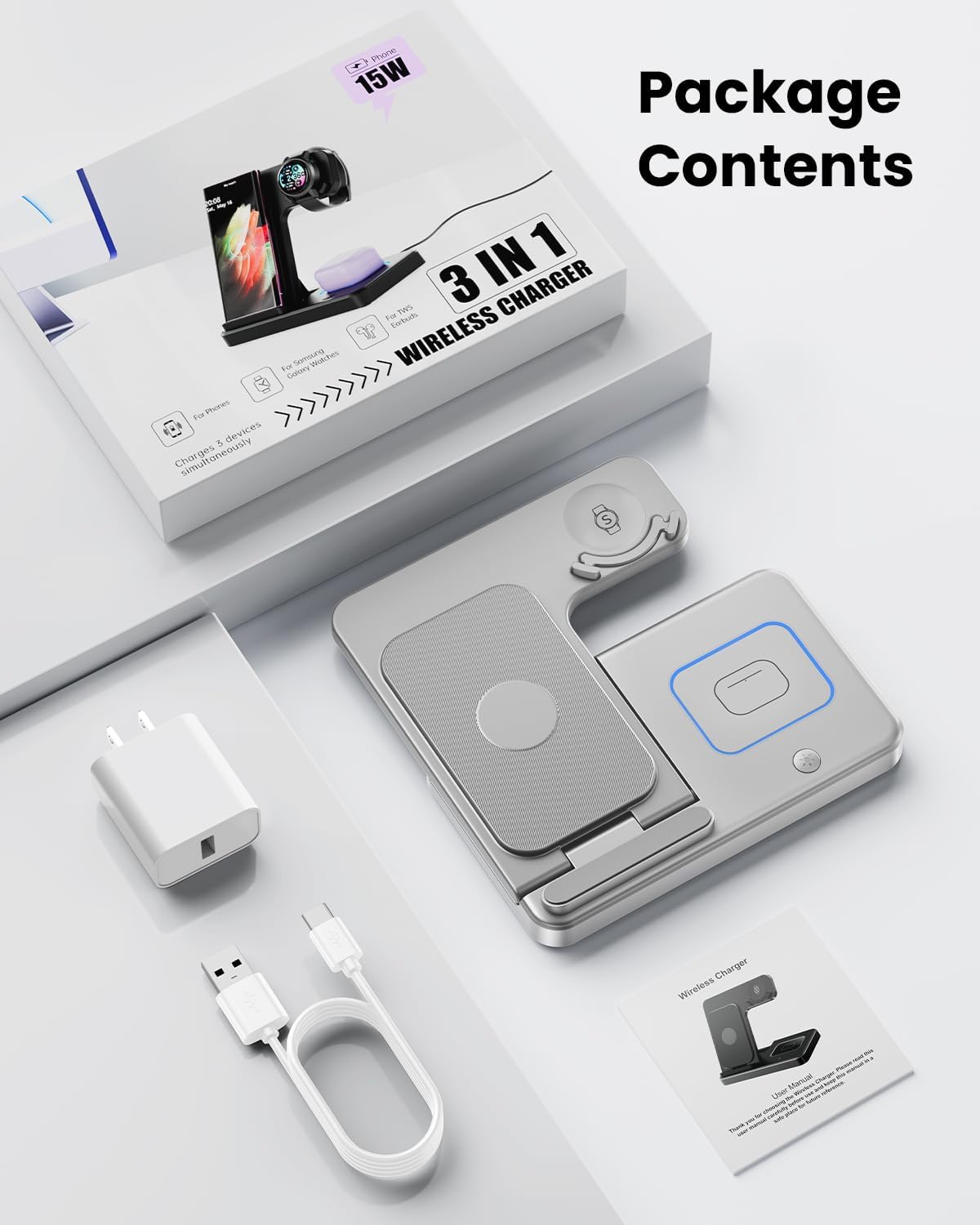
Image: All components included in the product package: the foldable charging station, an 18W power adapter, and a USB-C cable.
3. Setup Instructions
- Connect the Power Adapter: Plug the 18W power adapter into a wall outlet.
- Connect the USB-C Cable: Insert one end of the provided USB-C cable into the power adapter and the other end into the USB-C port on the back of the charging station.
- Place the Charger: Position the charging station on a stable, flat surface.
4. Operating Instructions
4.1 Charging Devices
- Smartphone Charging: Place your compatible Samsung Galaxy phone on the main charging pad. Ensure it is centered for optimal charging.
- Smartwatch Charging: Place your Samsung Galaxy Watch on the dedicated watch charging module. The unique tray design and non-slip silicone pads help secure the watch in place.
- Earbuds Charging: Place your compatible Samsung Galaxy Buds wireless charging case on the designated earbuds charging area.
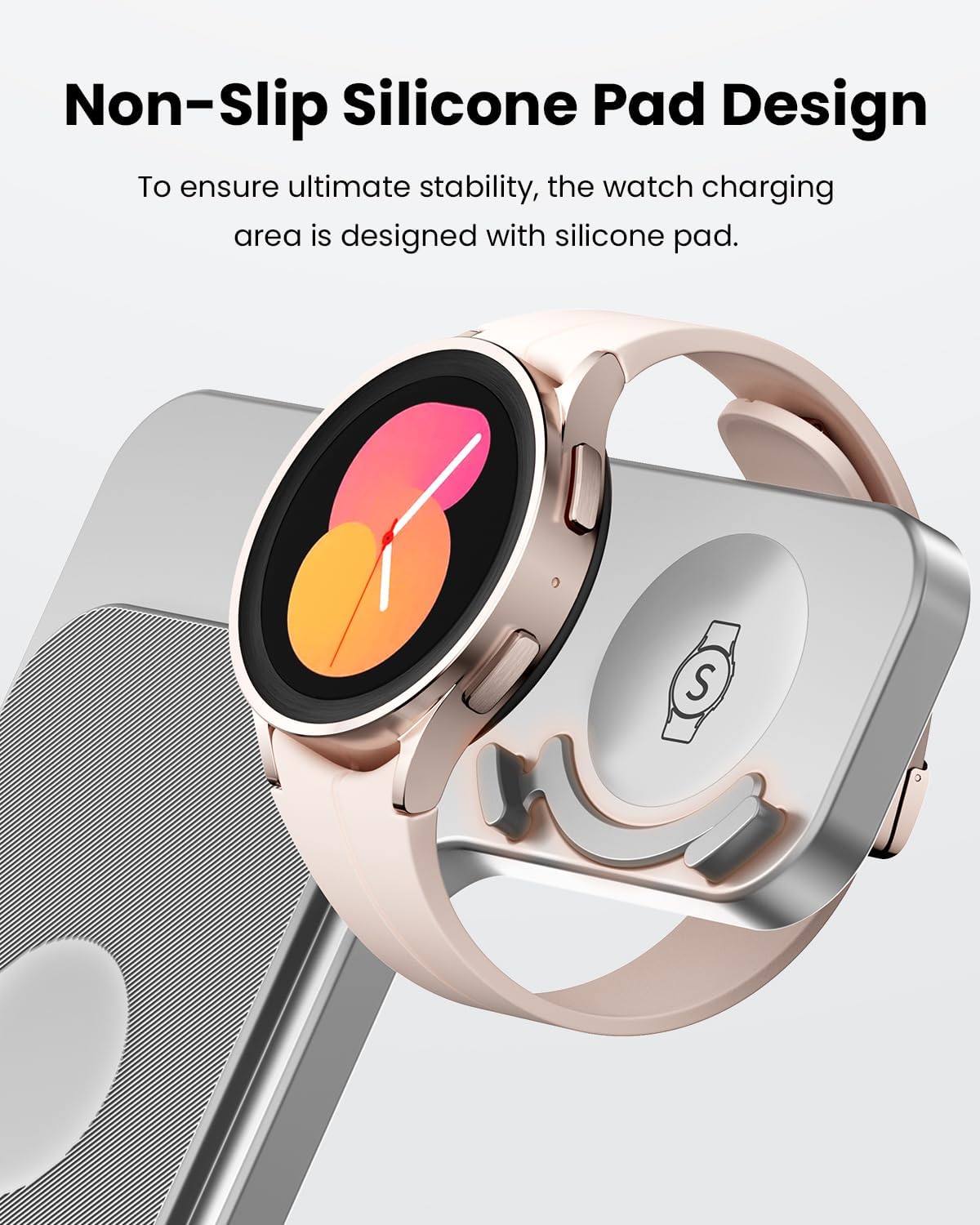
Image: A Samsung smartphone, smartwatch, and earbuds case simultaneously charging on the GEEKERA 3-in-1 station.
4.2 Adjustable Angles
The charging stand for your phone can be adjusted to 45 or 60-degree angles, providing flexible viewing options while charging.

Image: The charger demonstrating its foldable design and adjustable charging angles of 45 and 60 degrees.
4.3 LED Indicator Light Control
A touch-sensitive button is located on the charging station to control the LED indicator light. Press the button to turn the light on or off, which is useful for maintaining a dark environment, especially during sleep.

Image: The charger on a nightstand, illustrating the LED light can be turned off for an undisturbed sleep environment.
5. Compatibility
This charging station is designed for specific Samsung devices:
- Samsung Galaxy Phones: Galaxy S24 Ultra/S24+/S24/S23/S23+/S23 Ultra/S22/S22+/S22 Ultra/S21/S21+/S21 Ultra/S21 FE/S20/S20+/S20 Ultra/S20 FE/S10/S10+/S10e/S9/S9+/S8/S8+/S7/S7 Edge/Z Flip4/Flip3/Flip2/Flip/Note 20/Note 20 Ultra/Note 10/Note 10+/Note 9/Note 8.
- Samsung Galaxy Watches: Galaxy Watch6/ 6 Classic/ 5 Pro/5/ 4/ 4 Classic/ 3/ Active2/ Active. Note: This charger is only compatible with Samsung Watch Series and may not work with other brands.
- Samsung Galaxy Buds: Galaxy Buds live/ Buds plus/ Buds 2/ Buds Pro/ Buds 2 Pro Wireless Charging Case.

Image: A visual guide detailing the compatibility of the charger with various Samsung Galaxy phone models, watch series, and earbud models.
6. Safety Information
The GEEKERA 3-in-1 Wireless Charger incorporates multiple safety features to protect your devices and ensure safe charging:
- Temperature Control: Prevents overheating during charging.
- Over-Current Protection: Safeguards against excessive current flow.
- Over-Voltage Protection: Protects devices from voltage spikes.
- Foreign Object Detection (FOD): Detects metallic objects on the charging surface to prevent damage and ensure safety.
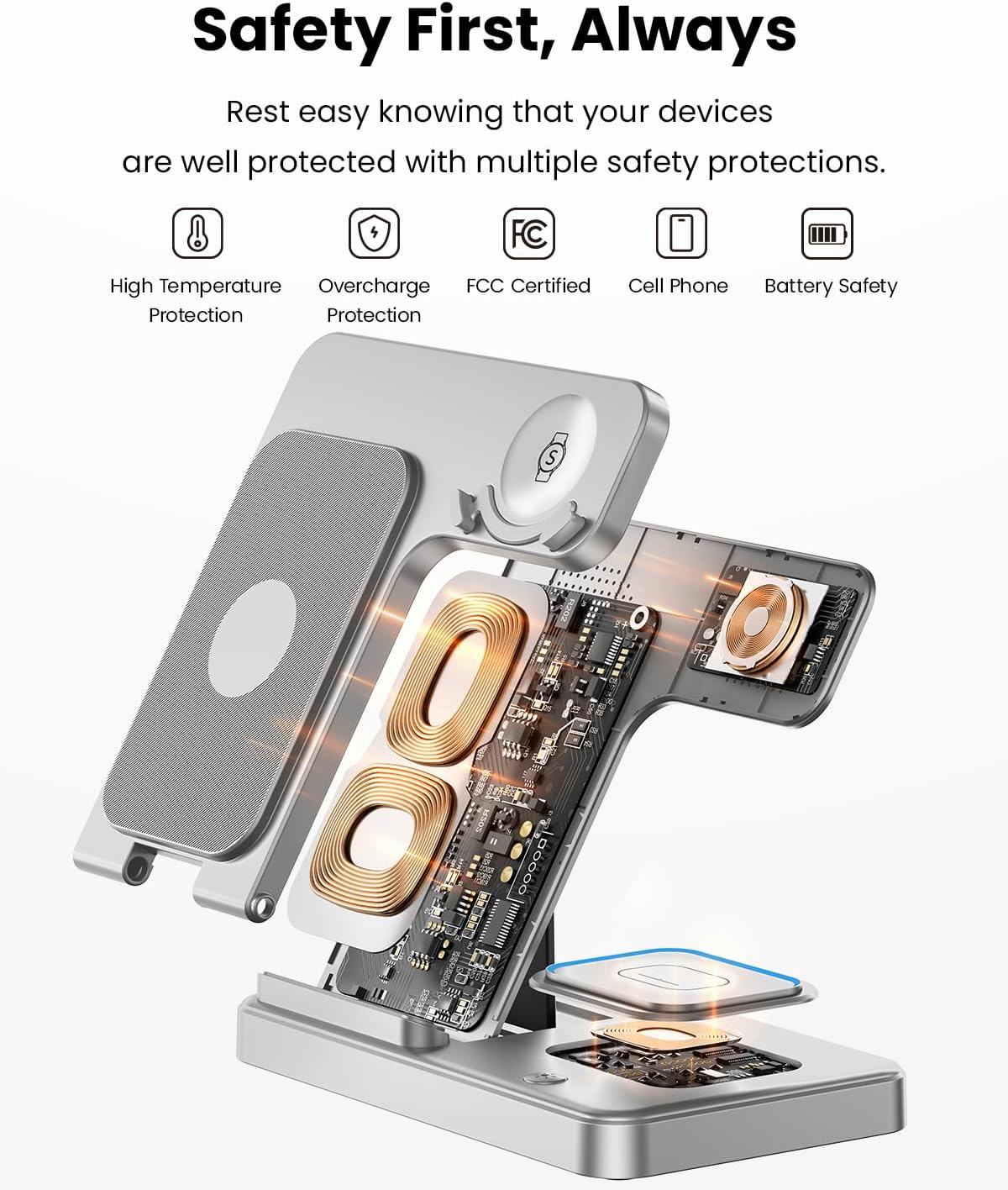
Image: An exploded view of the charger highlighting its internal components and various safety protections.
7. Maintenance
To ensure the longevity and optimal performance of your GEEKERA 3-in-1 Wireless Charger, follow these maintenance guidelines:
- Cleaning: Use a soft, dry cloth to wipe the surface of the charger. Do not use abrasive cleaners or solvents.
- Avoid Liquids: Keep the charger away from water and other liquids. If it comes into contact with liquid, disconnect it immediately and allow it to dry completely before reuse.
- Storage: When not in use, store the charger in a cool, dry place. Its foldable design allows for easy storage and portability.
- Cable Care: Avoid bending or crimping the USB-C cable excessively to prevent damage.
8. Troubleshooting
If you encounter issues with your GEEKERA 3-in-1 Wireless Charger, refer to the following common problems and solutions:
| Problem | Possible Cause | Solution |
|---|---|---|
| Device not charging | Loose cable connection, device not properly aligned, phone case too thick, foreign object on pad. | Ensure the power adapter and USB-C cable are securely connected. Reposition your device on the charging pad to ensure proper alignment. Remove thick phone cases. Remove any metallic objects from the charging surface. |
| Watch charging is unstable or not working | Watch not seated correctly, watch model incompatibility. | Ensure your Galaxy Watch is placed firmly on the dedicated watch charging module, utilizing the non-slip pads. Confirm your watch is a compatible Samsung Galaxy Watch model. |
| LED indicator light is always on/off or flickering | Light control button not pressed, temporary glitch. | Press the touch-sensitive button to toggle the LED light. If the issue persists, disconnect and reconnect the power cable. |
| Slow charging speed | Using a non-18W power adapter, multiple devices charging simultaneously. | Ensure you are using the provided 18W power adapter. Charging multiple devices simultaneously may slightly reduce individual charging speeds. |
9. Specifications
| Feature | Detail |
|---|---|
| Brand | GEEKERA |
| Model Number | GY-Z5G-3S |
| Connector Type | USB Type C |
| Input Voltage | 9 Volts |
| Wattage | 18 Watts |
| Special Features | 3-in-1 foldable and portable design, adjustable charging angles (45/60 degrees), sleep-friendly LED light control, multiple safety protections. |
| Included Components | 3-in-1 charging station, 18W adapter, 3.3ft USB-C cable |
10. Warranty and Support
GEEKERA is committed to providing high-quality products and customer satisfaction.
- 24-Month Warranty: Your GEEKERA 3-in-1 Wireless Charger is covered by a 24-month warranty from the date of purchase, protecting against manufacturing defects.
- 30-Day Return & Refund: Products are eligible for a return and refund within 30 days of purchase.
- Customer Service: For any inquiries, technical support, or warranty claims, please contact GEEKERA customer service. Refer to the product packaging or the official GEEKERA website for contact details.

Image: Visual representation of GEEKERA's customer support, return policy, and product warranty.
11. Product Video
Watch this official video for a visual guide on the GEEKERA 3-in-1 Wireless Charger's features and usage.
Video: An official product video showcasing the GEEKERA 3-in-1 Wireless Charger for Samsung devices, demonstrating its functionality and design.


