
Signify TF50-NW-G1-K-FL-8-BZ
Philips Stonco LED Slim Outdoor Floodlight Area Light User Manual
Model: TF50-NW-G1-K-FL-8-BZ
Brand: Signify
1. Product Overview
The Philips Stonco LED Slim Outdoor Floodlight is a high-performance, energy-efficient lighting solution designed for various outdoor applications. Its discreet and modern design makes it suitable for architectural and landscape lighting, security lighting, sign illumination, and general floodlighting.
This floodlight features a robust single-piece die-cast aluminum alloy housing that also functions as a heat sink, ensuring optimal thermal management for extended LED lifespan and consistent performance. It comes equipped with a versatile 2-in-1 mounting system, offering both a yoke bracket for flat surface installation and a 1/2-inch NPS knuckle mount for easy connection to electrical junction boxes. A 36-inch (1m) power cord is pre-assembled for convenience.
Key features include a 4000K color temperature for neutral white light, 48 watts of power delivering 5472 lumens, an IP65 rating for dust and water resistance, and vibration resistance for enhanced durability in outdoor environments. The light engine is ROHS compliant, utilizing a metal core substrate for superior heat transfer.

Image 1.1: Front view of the Philips Stonco LED Slim Outdoor Floodlight, showcasing its compact design and knuckle mount.
2. Setup and Installation
2.1 Safety Information
WARNING: Risk of electric shock. Installation should be performed by a qualified electrician in accordance with the National Electrical Code and local electrical codes. Disconnect power at the fuse or circuit breaker before installation or servicing. Ensure proper grounding to avoid electrical hazards.
- Always wear appropriate personal protective equipment (PPE) during installation.
- Verify that the supply voltage is compatible with the fixture's requirements (100-240V AC, 60Hz).
- Do not install if the product is damaged.
2.2 Unpacking and Contents
Carefully remove the floodlight from its packaging. Inspect the fixture for any signs of damage. Retain packaging materials for future transport or storage if needed.
Package Contents:
- Philips Stonco LED Slim Outdoor Floodlight (TF50-NW-G1-K-FL-8-BZ)
- Pre-assembled 36-inch (1m) power cord
- Integrated yoke bracket and 1/2-inch NPS knuckle mount
2.3 Mounting Options
The floodlight offers two primary mounting methods:
- Yoke Bracket Mounting: Ideal for flat surfaces such as walls, ceilings, or ground stakes.
- Secure the yoke bracket to the desired surface using appropriate fasteners (not included) through the pre-drilled holes.
- Adjust the angle of the floodlight by loosening the side screws on the yoke, tilting the fixture to the desired position, and then securely tightening the screws.
- 1/2-inch NPS Knuckle Mounting: Designed for direct attachment to standard electrical junction boxes or conduit fittings.
- Thread the 1/2-inch NPS knuckle mount into the compatible opening of the junction box or conduit.
- Ensure the fixture is securely tightened to prevent rotation.
- Adjust the floodlight's angle using the integrated swivel mechanism on the knuckle mount.

Image 2.1: Packaging view highlighting the versatile mounting options and compact design.
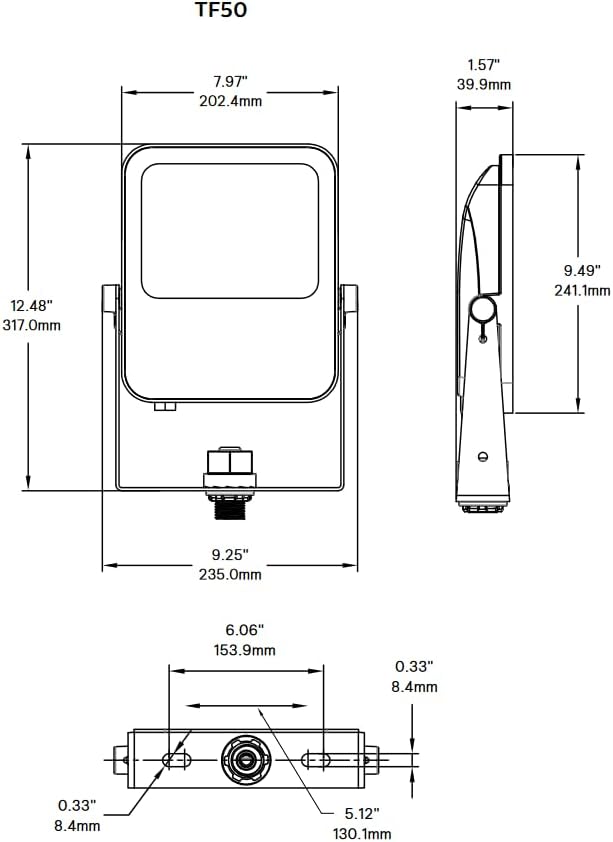
Image 2.2: Dimensional drawing of the TF50 floodlight, providing measurements for installation planning.
2.4 Electrical Connection
After mounting the fixture, proceed with the electrical wiring. Ensure power is OFF at the circuit breaker before making any connections.
- Connect the black wire from the floodlight's power cord to the live (hot) wire from the power supply.
- Connect the white wire from the floodlight's power cord to the neutral wire from the power supply.
- Connect the green (or bare copper) wire from the floodlight's power cord to the ground wire from the power supply.
- Use UL-listed wire connectors and ensure all connections are secure and properly insulated.
- Route the power cord to prevent pinching or damage.
3. Operating Instructions
Once properly installed and wired, the Philips Stonco LED Slim Outdoor Floodlight operates by simply applying power to the circuit. There are no user-adjustable controls on the fixture itself for basic operation.
- Power On/Off: Control the floodlight using an external switch, timer, or photocell connected to the circuit.
- Light Output: The fixture provides a consistent 4000K neutral white light with a brightness of 5472 lumens.
- Control Method: While the product specifications mention "App" as a control method, this typically refers to integration with smart home systems or external smart controllers, not a built-in app control for the fixture itself. Consult your smart system's manual for integration details if applicable.
4. Maintenance
The Philips Stonco LED Slim Outdoor Floodlight is designed for minimal maintenance due to its durable construction and long-life LED technology. However, periodic inspection and cleaning can help ensure optimal performance and longevity.
- Cleaning:
- Ensure power is disconnected before cleaning.
- Gently wipe the lens and housing with a soft, damp cloth to remove dirt, dust, or debris.
- Do not use abrasive cleaners, solvents, or high-pressure water sprays, as these can damage the finish or internal components.
- Inspection:
- Periodically check the mounting hardware to ensure it remains secure.
- Inspect the power cord for any signs of wear, fraying, or damage. If damage is found, discontinue use and have it replaced by a qualified professional.
- Verify that the fixture's seals (e.g., around the lens) are intact to maintain its IP65 rating.
5. Troubleshooting
If you experience issues with your Philips Stonco LED Slim Outdoor Floodlight, refer to the following common troubleshooting steps:
| Problem | Possible Cause | Solution |
|---|---|---|
| Light does not turn on. | No power to the fixture. Loose wiring connection. Faulty switch or circuit breaker. |
Check the circuit breaker and ensure it is ON. Verify all electrical connections are secure (ensure power is OFF first). Test the switch or circuit breaker; replace if faulty. |
| Light is dim or flickers. | Insufficient power supply. Loose wiring connection. Extreme environmental conditions. |
Ensure the voltage supply is within the specified range (100-240V AC). Check and secure all wiring connections. Ensure the operating temperature is within the product's specified range. |
| Fixture is physically damaged. | Impact or improper handling. | Discontinue use. Contact customer support for replacement options. Do not attempt to repair damaged components. |
If the problem persists after attempting these troubleshooting steps, or if you are unsure about any electrical procedures, contact a qualified electrician or Signify customer support for assistance.
6. Specifications
Detailed technical specifications for the Philips Stonco LED Slim Outdoor Floodlight (Model: TF50-NW-G1-K-FL-8-BZ):

Image 6.1: Product data sheet providing key performance metrics.
| Attribute | Value |
|---|---|
| Brand | Signify |
| Model Number | TF50-NW-G1-K-FL-8-BZ |
| Light Type | LED |
| Wattage | 48 watts |
| Lumen Output | 5472 lumens |
| Efficiency | 109.44 lumens per watt |
| Color Temperature (CCT) | 4000 Kelvin (Neutral White) |
| Color Rendering Index (CRI) | 82.2 |
| Voltage | 100-240 Volts AC |
| Frequency | 60 Hertz |
| Material | Bronze, Aluminum, Metal (Die-cast aluminum alloy housing) |
| Finish Type | Powdercoat Textured Bronze |
| Indoor/Outdoor Usage | Outdoor |
| IP Rating | IP65 (Dust tight and protected against water jets) |
| Mounting Options | Yoke Bracket, 1/2-inch NPS Knuckle Mount |
| Power Source | Corded Electric (36-inch pre-assembled cord) |
| Item Weight | 4 pounds |
| Country of Origin | USA |
| UPC | 783352025968 |
7. Warranty and Support
7.1 Limited Warranty
This Philips Stonco LED Slim Outdoor Floodlight is backed by a 5-year limited warranty. This warranty covers defects in materials and workmanship under normal use and service. Please retain your proof of purchase for warranty claims. For full warranty terms and conditions, refer to the documentation included with your product or visit the official Signify website.
7.2 Customer Support
For technical assistance, troubleshooting beyond this manual, or warranty inquiries, please contact Signify customer support. You can typically find contact information on the official Signify website or through your point of purchase.
Online Resources: For additional information, product updates, and FAQs, visit the official Signify website: www.signify.com
Related documentsTF50-NW-G1-K-FL-8-BZ


Ask a question about this manual
Ask about setup, troubleshooting, compatibility, parts, safety, or missing instructions. Manuals+ will review the question and use this page’s manual context to help answer it.