
Introduction
This user manual provides detailed instructions for the HILEO Open Ear Headphones, model hi73. Please read this manual thoroughly before using the product to ensure proper operation, optimal performance, and longevity of your device. Keep this manual for future reference.
Safety Information
- Do not disassemble, repair, or modify the product. This may cause fire, electronic breakdown, or complete product damage.
- Keep the product away from extreme temperatures (hot or cold), direct sunlight, and humidity.
- Avoid exposing the product to water or other liquids, despite its IPX5 rating, to prevent damage. Do not immerse the headphones in water.
- Use only the provided charging cable or a certified equivalent.
- Do not use the headphones at excessively high volumes for prolonged periods, as this may cause hearing damage.
- Be aware of your surroundings when using open-ear headphones, especially in traffic or other potentially hazardous environments.
Package Contents
Please check the package for the following items:
- HILEO Open Ear Headphones (hi73)
- USB-C Charging Cable
- User Manual
Product Overview
The HILEO Open Ear Headphones are designed for comfort and situational awareness, allowing you to enjoy audio while remaining connected to your environment. They feature advanced audio technologies and a durable, lightweight design.

Figure 1: HILEO Open Ear Headphones, showcasing the overall black design with the flexible neckband and ear hooks.
Key Features:
- Open-Ear Design: Allows for awareness of surroundings while listening to audio.
- Premium Audio Experience: Utilizes advanced open-air conduction technology for clear sound.
- Bluetooth 5.3: Provides stable and efficient wireless connectivity with a range of up to 10 meters.
- Noise-Cancelling Microphone: Features ACS noise-cancelling technology for clear calls.
- IPX5 Waterproof Rating: Resistant to sweat and light splashes, suitable for sports and outdoor activities.
- Long Battery Life: Up to 10 hours of music playback on a single charge.
- Lightweight and Ergonomic: Designed for comfortable, long-term wear.
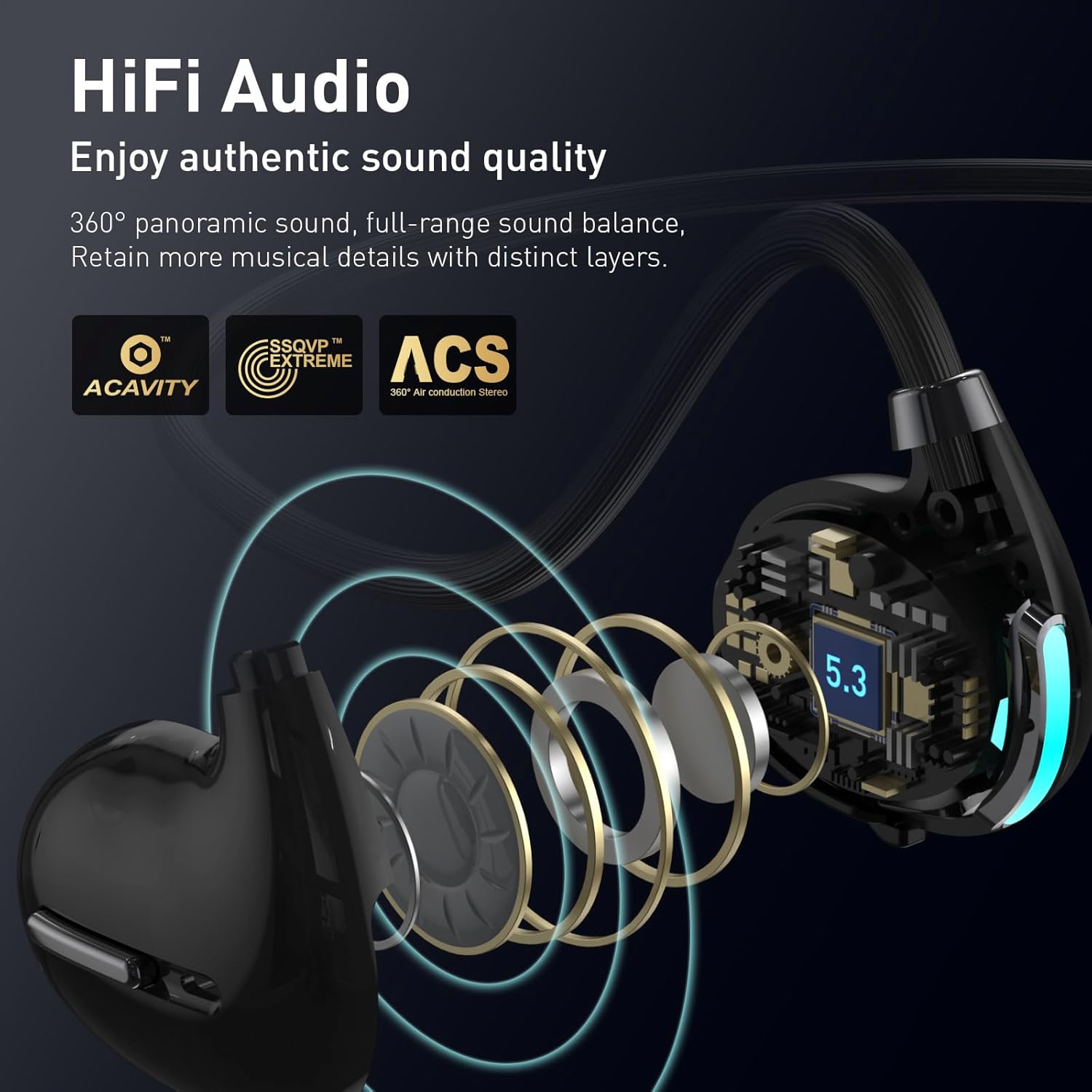
Figure 2: Illustration of the HiFi Audio technology, detailing the internal components that contribute to 360° panoramic sound and balanced audio output.
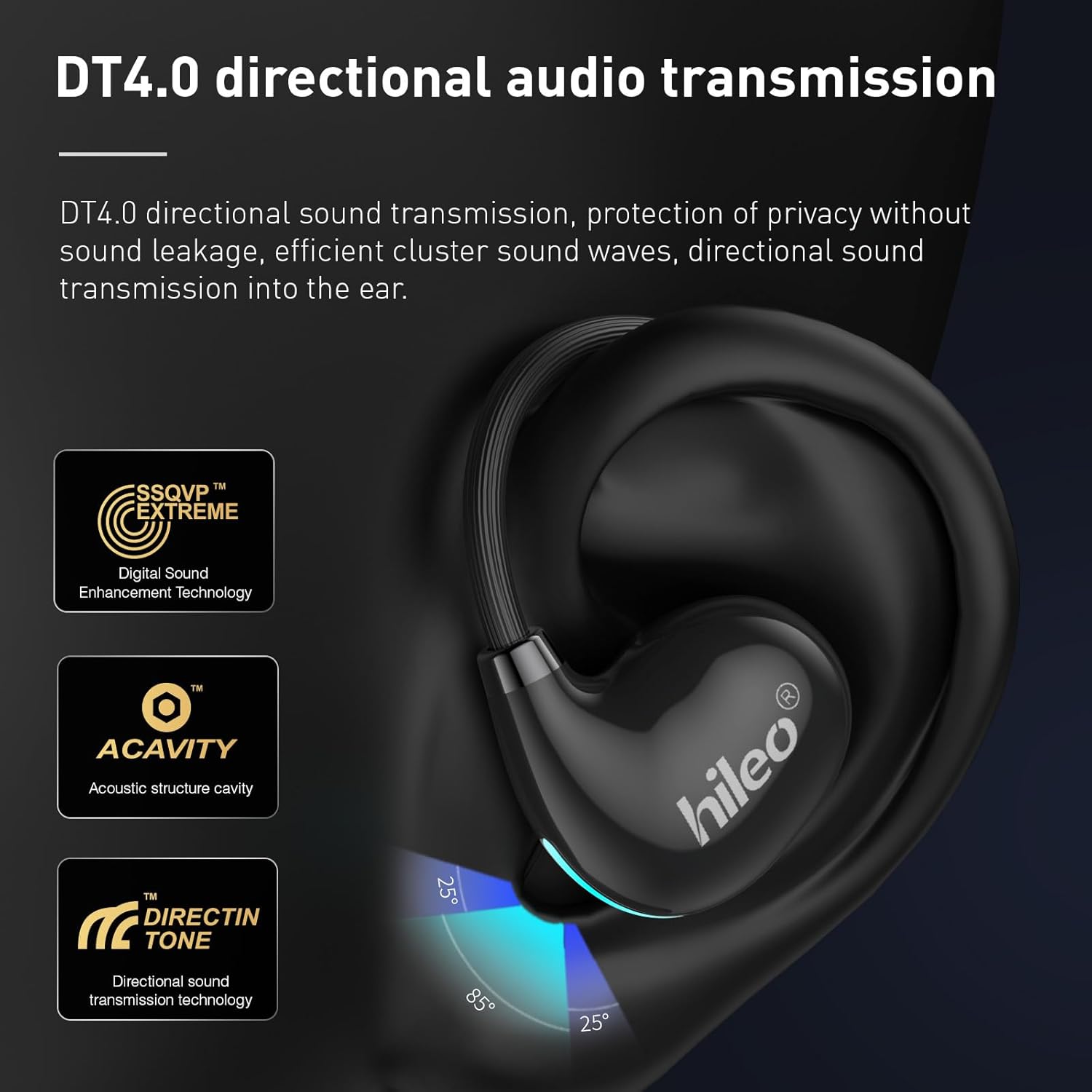
Figure 3: Visual representation of DT4.0 directional audio transmission, showing how sound is directed into the ear to minimize leakage and enhance privacy.

Figure 4: Diagram illustrating the effectiveness of ENC (Environmental Noise Cancellation) technology in reducing background noise during calls, ensuring clearer communication.

Figure 5: Close-up of the earbuds highlighting the LED breathing lights, which indicate status and add a visual element.
Getting Started
1. Charging the Headphones
Before first use, fully charge the headphones. A full charge takes approximately 1.5 hours.
- Connect the USB-C charging cable to the charging port on the headphones.
- Connect the other end of the cable to a USB power adapter (not included) or a computer's USB port.
- The LED indicator will show the charging status. Refer to the "LED Indicator" section for details.
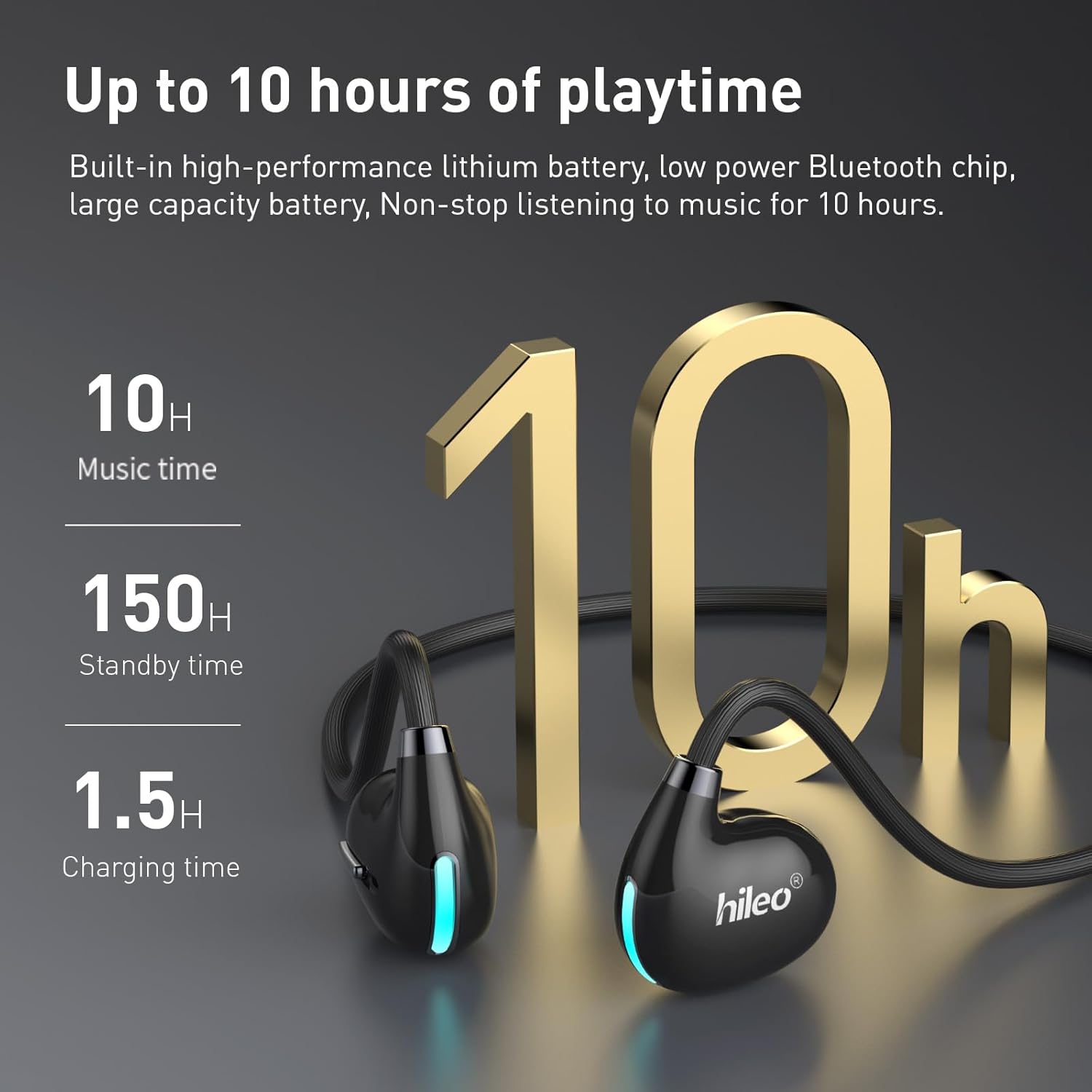
Figure 6: Graphic illustrating the battery performance: 10 hours of music time, 150 hours of standby time, and 1.5 hours for a full charge.
2. Pairing with a Device
To connect your HILEO Open Ear Headphones to a Bluetooth-enabled device (e.g., smartphone, tablet, computer):
- Ensure the headphones are powered off.
- Press and hold the Multi-Function Button (MFB) on the headphones for a few seconds until the LED indicator flashes rapidly (typically blue and red alternately), indicating pairing mode.
- On your device, enable Bluetooth and search for available devices.
- Select "HILEO hi73" (or similar name) from the list of found devices.
- Once connected, the LED indicator on the headphones will change (e.g., slow blue flash or off), and you may hear a confirmation tone.
The headphones will automatically attempt to reconnect to the last paired device when powered on, if it is within range (up to 10 meters).

Figure 7: Depiction of the Bluetooth 5.3 chip, highlighting its role in providing a stable, anti-interference, and low-power connection for audio and video transmission.
Operating Instructions
Power On/Off
- Power On: Press and hold the MFB for approximately 3 seconds until the LED indicator lights up and you hear a power-on prompt.
- Power Off: Press and hold the MFB for approximately 5 seconds until the LED indicator turns off and you hear a power-off prompt.
Music Playback
- Play/Pause: Short press the MFB once.
- Next Track: Double-press the MFB.
- Volume Up/Down: Use the volume controls on your connected device.
Call Management
- Answer Call: Short press the MFB once when an incoming call rings.
- End Call: Short press the MFB once during a call.
- Reject Call: Press and hold the MFB for 2 seconds when an incoming call rings.
Voice Assistant
- Activate Voice Assistant: Triple-press the MFB to activate your device's voice assistant (e.g., Siri, Google Assistant).
LED Indicator
- Power On: Blue light flashes once.
- Power Off: Red light flashes once.
- Pairing Mode: Blue and red lights flash alternately.
- Connected: Blue light flashes slowly or turns off (depending on model behavior).
- Charging: Red light flashes.
- Fully Charged: Blue light is solid.
- Breathing Light On/Off: Double-press the MFB to toggle the cool breath light on or off.
Care and Maintenance
- Cleaning: Wipe the headphones with a soft, dry, lint-free cloth. Do not use harsh chemicals or abrasive materials.
- Storage: Store the headphones in a cool, dry place away from direct sunlight and extreme temperatures.
- Water Resistance: The headphones have an IPX5 rating, meaning they are resistant to low-pressure water jets from any direction. They are sweat-proof and suitable for light rain, but should not be submerged in water or exposed to strong water streams. Ensure the charging port cover is securely closed when not charging.
- Battery Care: To preserve battery life, charge the headphones at least once every three months if not used regularly.
Troubleshooting
| Problem | Possible Cause | Solution |
|---|---|---|
| Headphones do not power on. | Low battery. | Charge the headphones fully. |
| Cannot pair with device. | Headphones not in pairing mode; device Bluetooth off; too far from device. | Ensure headphones are in pairing mode (flashing blue/red). Turn on Bluetooth on your device. Move headphones closer to the device (within 10m). Forget previous pairings on your device and try again. |
| No sound or low volume. | Volume too low on headphones or device; headphones not connected; audio source issue. | Increase volume on both headphones and connected device. Ensure headphones are properly paired. Check if the audio is playing from the correct source on your device. |
| Poor call quality. | Environmental noise; microphone obstruction; weak Bluetooth connection. | Move to a quieter environment. Ensure the microphone is not covered. Move closer to your connected device. |
| Charging indicator not working as expected. | Cable issue; power source issue; minor software glitch. | Try a different USB-C cable or power adapter. Ensure connections are secure. If the headphones still charge and function, this may be a minor display anomaly. |
Specifications
| Feature | Detail |
|---|---|
| Model Name | hi73 |
| Connectivity Technology | Wireless (Bluetooth) |
| Bluetooth Version | 5.3 |
| Bluetooth Range | Up to 10 meters (33 feet) |
| Ear Placement | Open Ear |
| Noise Control | Active Noise Cancellation (for mic) |
| Music Playback Time | Up to 10 hours |
| Talk Time | Up to 8 hours |
| Standby Time | Up to 150 hours |
| Charging Time | Approx. 1.5 hours |
| Charging Port | USB Type-C |
| Water Resistance Level | IPX5 |
| Control Type | Media Control, Call Control, Volume Control |
| Control Method | Touch, Voice |
| Item Weight | 0.1 Kilograms (3.52 ounces) |
| Product Dimensions | 6.49 x 1.25 x 0.42 inches |
| Material | Rubber |
| Included Components | User Manual |
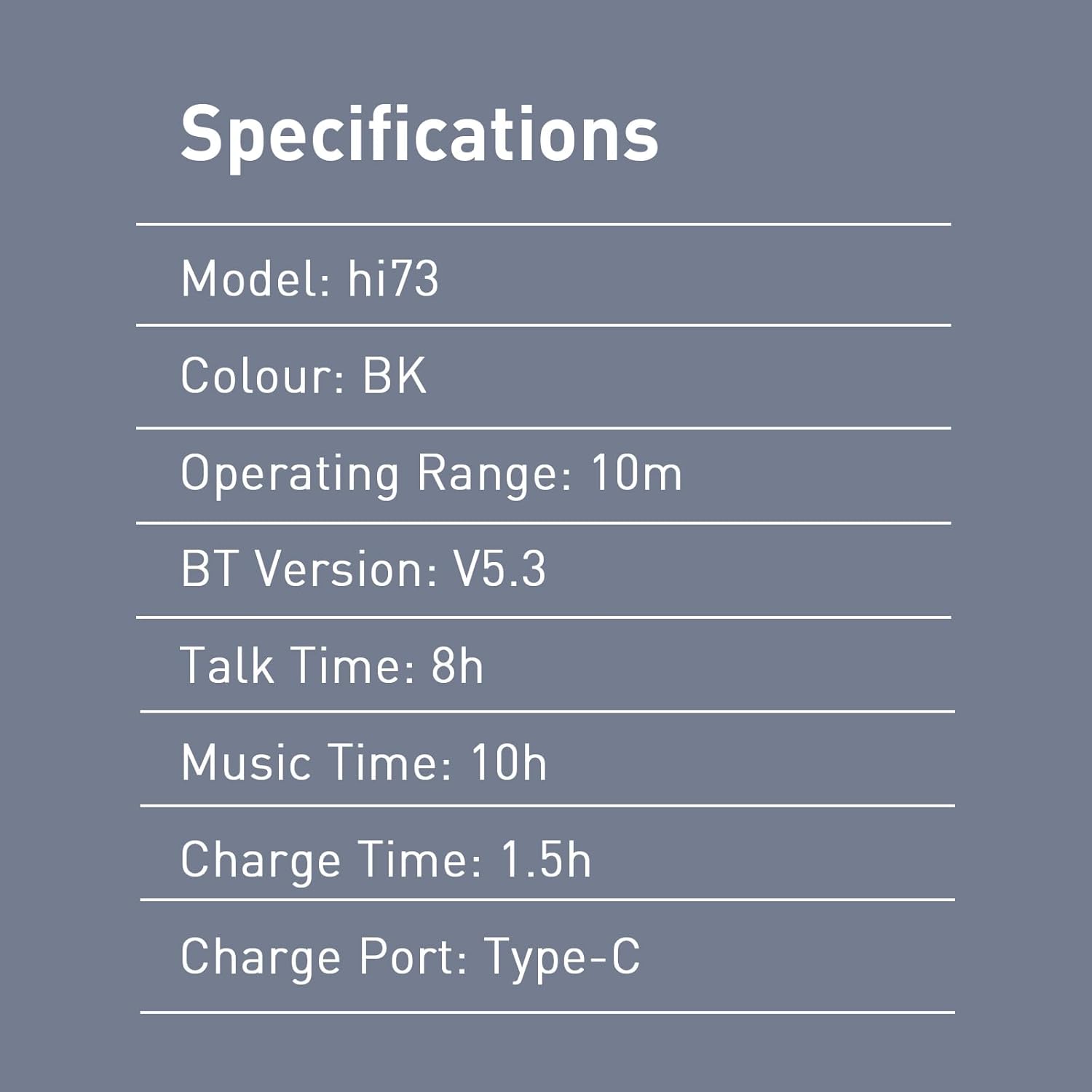
Figure 8: A summary table of the HILEO hi73 headphones' key specifications, including model, color, operating range, Bluetooth version, talk time, music time, charge time, and charge port type.
Warranty and Support
HILEO products are manufactured to the highest quality standards. For information regarding warranty coverage, technical support, or customer service, please refer to the warranty card included in your package or visit the official HILEO website.
For further assistance, you may contact HILEO customer support through the contact information provided on the product packaging or the official brand store.
Note: Product specifications and features are subject to change without prior notice.