
HILEO hi82-Black
HILEO Open Ear Headphones User Manual
Model: hi82-Black
1. Introduction
Thank you for choosing HILEO Open Ear Headphones. These innovative wireless earbuds are designed to provide a unique auditory experience, allowing you to enjoy high-quality sound while maintaining awareness of your surroundings. Featuring a comfortable clip-ear design, advanced Bluetooth 5.3 technology, and a durable, waterproof build, they are perfect for sports, work, and daily use.

Image 1.1: HILEO Open Ear Headphones and their charging case.
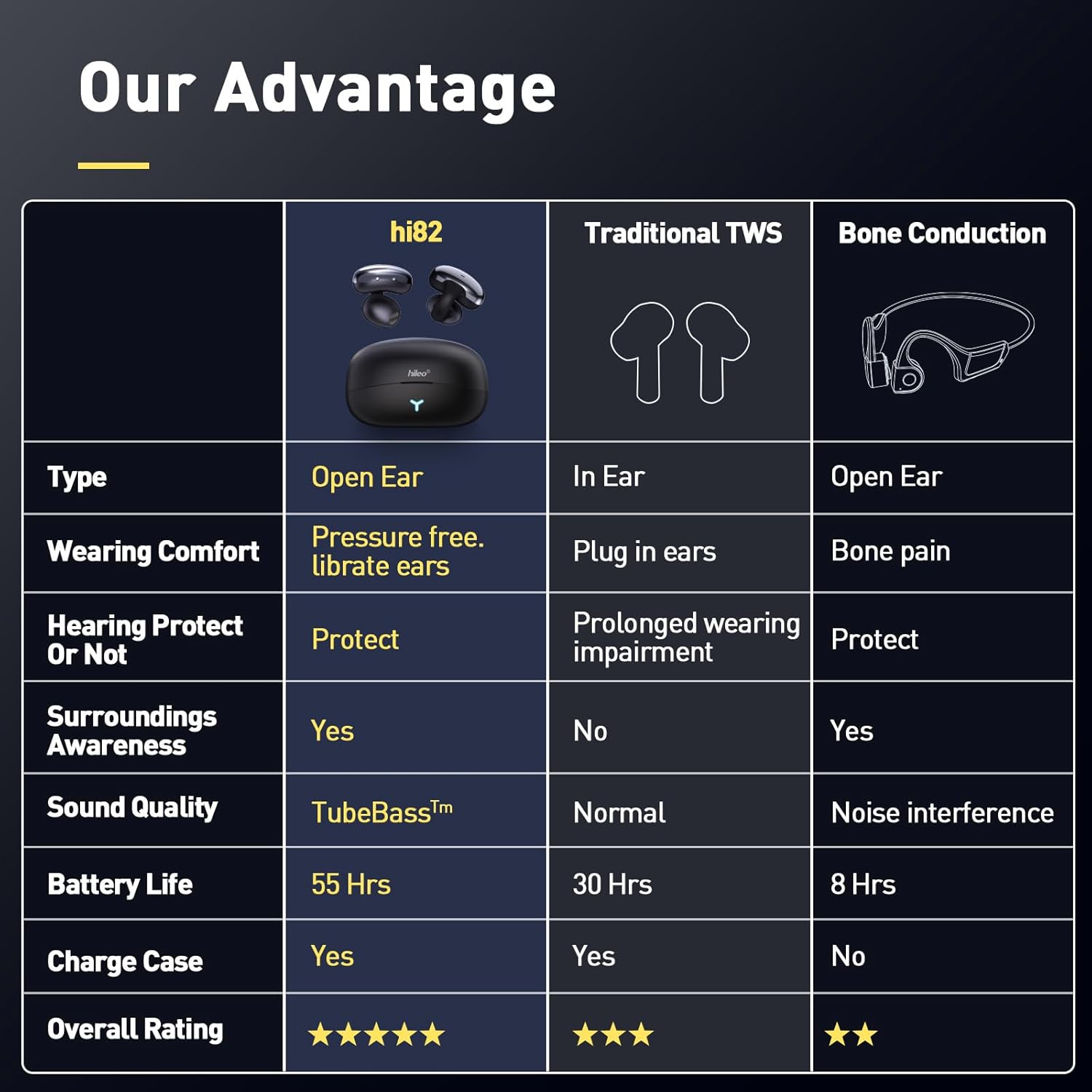
Image 1.2: Comparison highlighting the advantages of HILEO hi82 open-ear design, including pressure-free comfort and situational awareness.
2. What's in the Box
- Ear Clip Earbuds (2)
- Wireless Charging Case (1)
- User Manual (1)
- Type-C Charging Cable (1)
3. Setup
3.1 Charging the Earbuds and Case
Before first use, fully charge the earbuds and the charging case. Place the earbuds into the charging case. Connect the Type-C charging cable to the charging case and a power source. The LED display on the case indicates charging status. A full charge for the earbuds takes approximately 1 hour, and the charging case provides an additional 43 hours of playback, totaling 55 hours of combined battery life.

Image 3.1: Visual representation of the 55-hour total battery life provided by the earbuds and charging case.
3.2 Bluetooth Pairing
- Ensure the earbuds are charged and inside the charging case.
- Open the charging case. The earbuds will automatically enter pairing mode.
- On your device (smartphone, tablet, computer), go to Bluetooth settings and turn Bluetooth on.
- Search for available devices and select "HILEO hi82" from the list.
- Once connected, a voice prompt will confirm successful pairing.
The earbuds can be paired to two different devices simultaneously for convenient switching.
3.3 Wearing the Earbuds
The HILEO Open Ear Headphones feature an ergonomic ear-clip design for a secure and comfortable fit. Gently place the earbud over your ear, ensuring the clip rests comfortably behind your earlobe and the speaker is positioned near your ear canal. The lightweight and soft material ensures comfort even during extended wear.

Image 3.2: A user wearing the HILEO Open Ear Headphones, showcasing the ergonomic clip shape and comfortable fit.
4. Operating Instructions
4.1 Touch Controls
The HILEO Open Ear Headphones are equipped with intuitive touch controls for easy management of your audio and calls. The touch area is located on the outer surface of each earbud.
| Action | Control |
|---|---|
| Play/Pause Music | Single tap on either earbud |
| Answer/End Call | Single tap on either earbud |
| Next Track | Double tap on the right earbud |
| Previous Track | Double tap on the left earbud |
| Activate Voice Assistant | Triple tap on either earbud |

Image 4.1: A user demonstrating the one-handed control features of the earbuds.
4.2 Situational Awareness
The open-ear design and air conduction technology allow you to enjoy your audio while remaining fully aware of your surroundings. This feature is particularly beneficial for outdoor activities, ensuring safety by allowing you to hear traffic, announcements, or engage in conversations without removing your headphones.
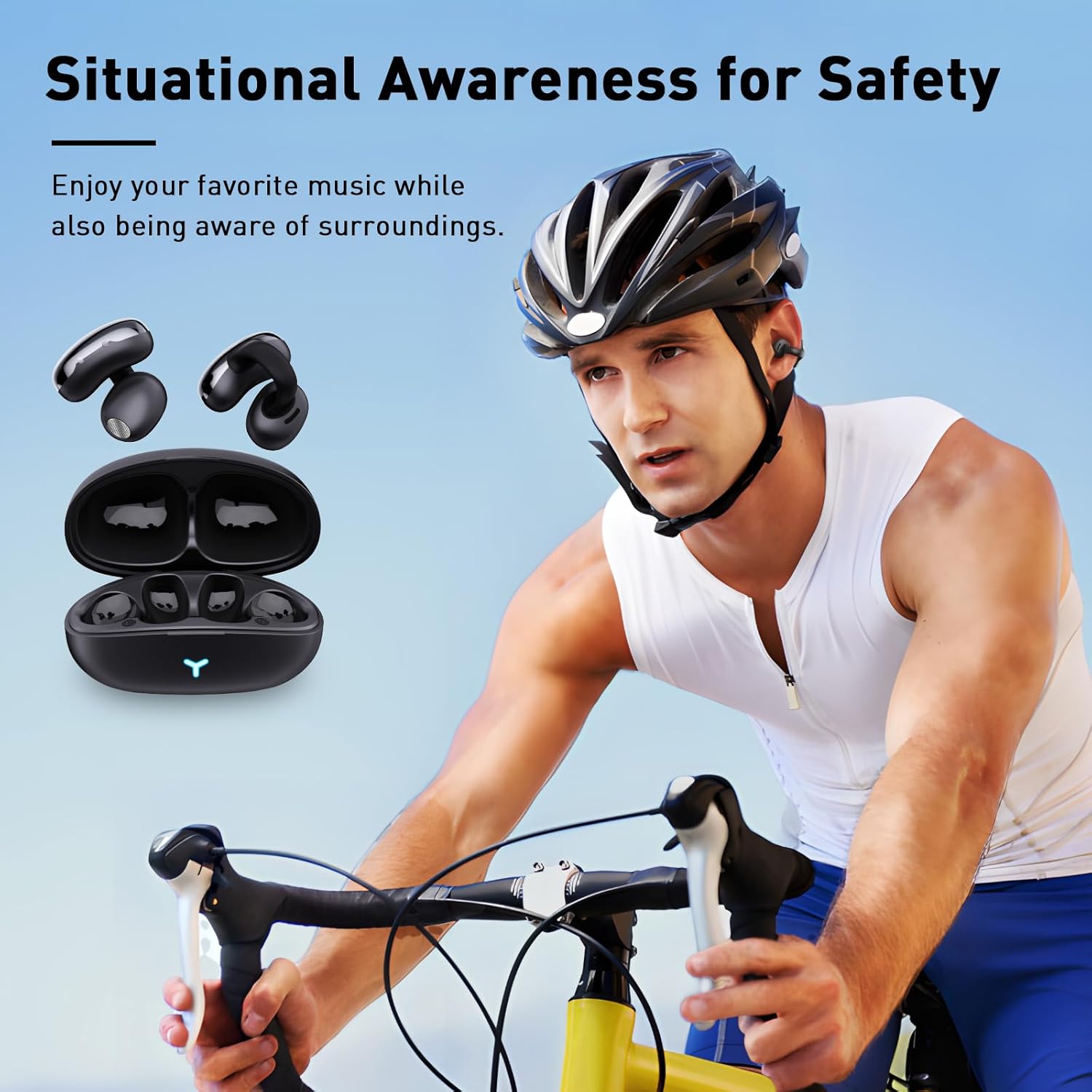
Image 4.2: A cyclist wearing the earbuds, highlighting the benefit of situational awareness for safety during outdoor activities.
4.3 Product Overview Video
Video 4.1: An official HILEO video showcasing the unique auditory experience provided by the hi82 headphones, including design, Bluetooth 5.3, noise cancellation, battery life, and sound quality.
5. Maintenance
To ensure the longevity and optimal performance of your HILEO Open Ear Headphones, follow these maintenance guidelines:
- Cleaning: Regularly wipe the earbuds and charging case with a soft, dry, lint-free cloth. Avoid using abrasive cleaners, solvents, or harsh chemicals.
- Water Resistance: The headphones are waterproof, making them suitable for various environments. However, avoid submerging them in water for extended periods or exposing them to high-pressure water jets. Ensure they are dry before placing them back in the charging case.
- Storage: When not in use, store the earbuds in their charging case to protect them from dust and damage. Store in a cool, dry place away from extreme temperatures.
- Battery Care: To preserve battery life, avoid fully discharging the earbuds frequently. Charge them regularly, even if not in constant use.
6. Troubleshooting
If you encounter any issues with your HILEO Open Ear Headphones, please refer to the following common solutions:
- Earbuds not pairing: Ensure both earbuds are charged and placed correctly in the charging case. Close the case, wait a few seconds, then open it again to re-initiate pairing mode. On your device, forget the "HILEO hi82" from your Bluetooth list and attempt to pair again.
- Sound too low or no volume control: While the earbuds provide excellent sound quality, volume control may sometimes be dependent on the connected device. Ensure your device's volume is turned up. If connecting to a TV or other audio source, check its specific volume settings.
- Accidental touch controls: The touch controls are sensitive for ease of use. If you experience unintended actions (e.g., mode switching, play/pause), ensure your fingers or other objects are not inadvertently touching the control area during wear or adjustment.
- Earbuds feel fragile or break easily: Handle the earbuds with care. While designed for durability, excessive force or dropping from significant heights can cause damage.
- Discomfort with eyeglasses: If wearing eyeglasses, you may find it helpful to put on the earbuds first, then carefully slip your eyeglasses back on to ensure a comfortable fit for both. Adjust the ear-clip gently to find the optimal position.
If the issue persists, please contact HILEO customer support for further assistance.
7. Specifications
| Feature | Detail |
|---|---|
| Model Name | hi82-Black |
| Connectivity Technology | Wireless (Bluetooth) |
| Bluetooth Version | 5.3 |
| Bluetooth Range | 10 Meters |
| Ear Placement | Open Ear |
| Battery Life (Earbuds) | 10 Hours |
| Total Playback (with Case) | 55 Hours |
| Charging Time | 1 Hour |
| Water Resistance Level | Waterproof |
| Control Type | Media Control (Touch) |
| Compatible Devices | Smartphones, Computers, Tablets |
| Item Weight | 0.18 Kilograms (6.4 ounces) |
| Product Dimensions | 6.53 x 1.81 x 4.48 inches |
8. Warranty and Support
HILEO products are manufactured with high standards of quality and durability. For any warranty claims, technical support, or inquiries regarding your HILEO Open Ear Headphones, please refer to the contact information provided with your purchase or visit the official HILEO store on Amazon: HILEO Store.
Please retain your proof of purchase for warranty purposes.
Ask a question about this manual
Ask about setup, troubleshooting, compatibility, parts, safety, or missing instructions. Manuals+ will review the question and use this page’s manual context to help answer it.