
1. Introduction
Thank you for choosing the DUMOS 40-Inch Electric Standing Desk. This manual provides essential information for the safe and efficient assembly, operation, and maintenance of your new desk. Please read these instructions carefully before use and retain them for future reference.
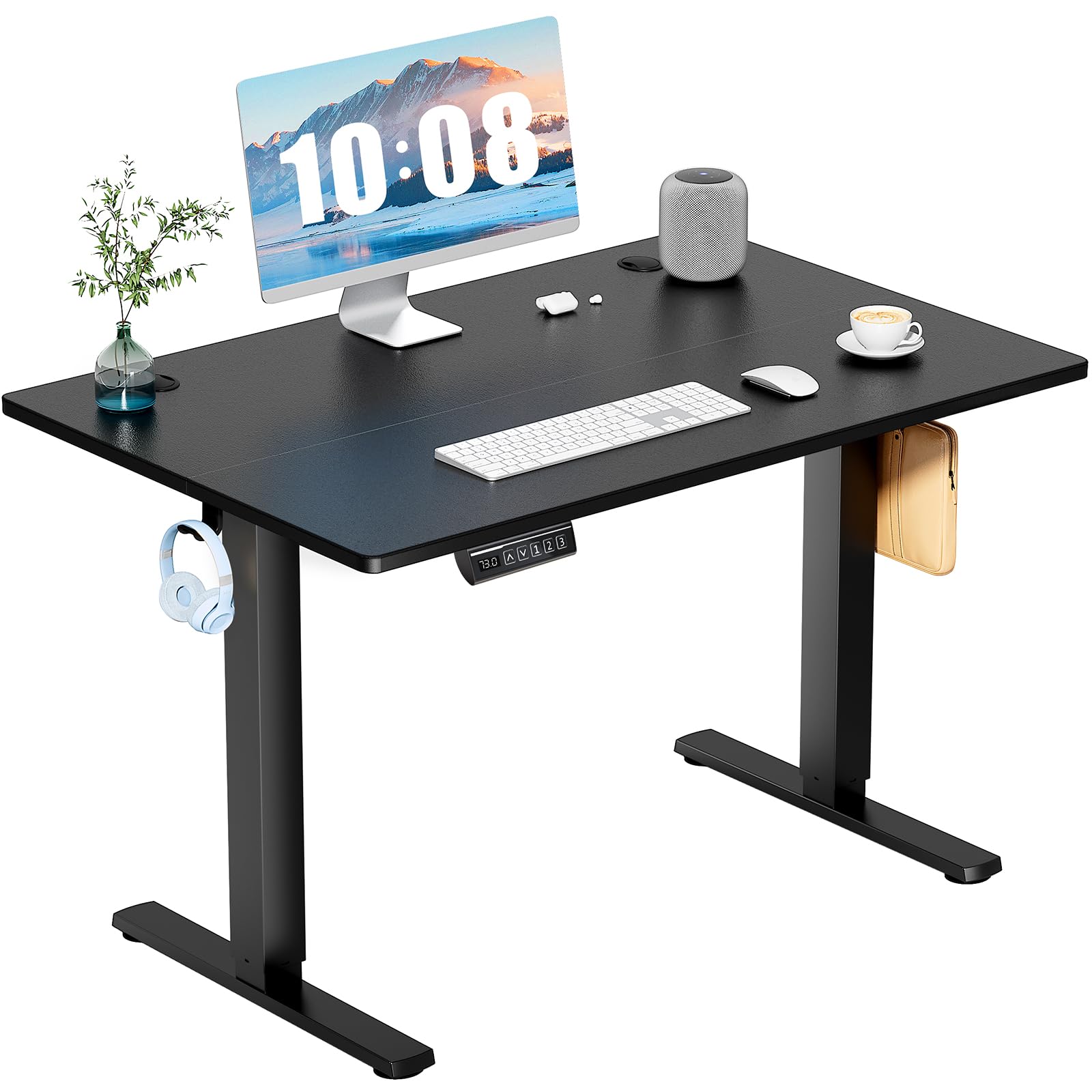
Figure 1: DUMOS 40-Inch Electric Standing Desk (Black)
2. Safety Information
- Ensure the desk is properly anchored to the floor to prevent tipping.
- Exercise caution when adjusting the desk height, especially when the desk is fully extended.
- Always follow the assembly instructions carefully to avoid injury.
- Do not exceed the maximum weight limit of 176 lbs (80 kg).
- Keep children and pets away from the desk during operation.
3. Setup and Assembly
The DUMOS Electric Standing Desk is designed for quick and tool-free assembly, typically completed in under 30 minutes. All necessary parts are pre-labeled and instructions are clear.
3.1 Unpacking
Carefully remove all components from the packaging. Verify that all parts listed in the packing list are present and undamaged. Keep packaging materials until assembly is complete.
3.2 Assembly Steps
- Attach the desk legs to the desktop using the provided hardware. Ensure all screws are tightened securely.
- Connect the motor and control panel cables according to the diagrams in the assembly guide.
- Install the headphone hooks on either side of the desk.
- Place the cable management grommets into the desktop holes.
- Plug the desk into a power outlet.

Figure 2: Example of assembly steps for the desk frame.
4. Operating Instructions
4.1 Height Adjustment
The desk features a quiet electric motor (under 55 dB) for smooth height adjustments. The height can be adjusted from 28.7 inches (73 cm) to 46.5 inches (118 cm).
- Use the Up (▲) and Down (▼) arrow buttons on the control panel to manually adjust the desk height.
- The LED display will show the current height.

Figure 3: Multi-Function Control Panel with LED display.
4.2 Memory Presets
The control panel allows you to save up to 3 preferred height settings for quick adjustments.
- Adjust the desk to your desired height using the Up/Down arrows.
- Press the S button (Set).
- Immediately press one of the number buttons (1, 2, or 3) to save the current height to that preset.
- To recall a saved height, simply press the corresponding number button.
4.3 Safety Features
- Anti-Collision Technology: The desk is equipped with anti-collision technology to prevent damage if an obstacle is detected during height adjustment.
- Child Lock: To activate the child lock, press and hold the Up and Down buttons together for 5 seconds. The screen will display 'LOC' and the buttons will be disabled. To deactivate, repeat the process.
4.4 Cable Management and Accessories
- Use the integrated cable management holes on the desktop to route and organize your cables.
- The desk includes sturdy hooks on the underside for hanging headphones or other accessories.

Figure 4: Cable management hole and headphone hook for organization.
5. Maintenance
5.1 Cleaning
Wipe the desk surfaces with a damp cloth. Avoid using harsh chemicals or abrasive cleaners that may damage the finish.
5.2 General Care
- Regularly check all screws and connections to ensure they remain tight.
- Do not place excessively hot or cold items directly on the desktop without protection.
- Avoid dragging heavy objects across the desktop to prevent scratches.
6. Troubleshooting
- Desk is wobbly: Ensure all assembly screws are fully tightened. Check that the desk is placed on a level surface.
- Motor not responding: Verify that the power cord is securely plugged into both the desk and the wall outlet. Check for any obstructions that might be preventing movement.
- Uneven height adjustment: If one side of the desk is not moving correctly, check the connections to the motor and ensure no cables are pinched. Refer to the assembly guide for motor synchronization steps if available.
- Error codes on display: Consult the full product manual or contact DUMOS customer support for specific error code interpretations.
7. Specifications
| Feature | Specification |
|---|---|
| Brand | DUMOS |
| Model Number | ADMS-ET40HS |
| Desktop Dimensions (D x W) | 23.6" x 40" (60 cm x 101.6 cm) |
| Height Adjustment Range | 28.7" - 46.5" (73 cm - 118 cm) |
| Weight Capacity | 176 lbs (80 kg) |
| Motor Noise Level | Under 55 dB |
| Material Type | Metal, Wood |
| Color | Black |
| Special Features | Adjustable Height, Electric, Ergonomic, Memory Presets, Anti-Collision, Child Lock |

Figure 5: Wide Height Range from 28.7" to 46.5".
8. Warranty and Support
DUMOS offers various protection plans for your product. Please refer to your purchase documentation for details on available 2-Year, 3-Year, or Complete Protect plans.
For further assistance, troubleshooting, or warranty claims, please contact DUMOS customer support through the retailer where the product was purchased or visit the official DUMOS website.


