
Important Safety Information and Reminders
- This automatic pet feeder is designed exclusively for dry pet food.
- To prevent food jams, ensure the dry food pellet size does not exceed 15mm.
- Do not insert fingers or any objects into the food outlet or attempt to touch the rotor mechanism.
- The main unit contains electronic components; do not submerge it in water. Submersion will cause damage.
- The feeder requires three D-type batteries for battery operation. Batteries are not included in the package.
- When powered solely by batteries, the device can operate for up to 3 months under normal usage conditions.
Package Contents
Please verify that all the following items are included in your package:
- Main Feeder Unit
- Lid
- Clip (for desiccant bag or securing lid)
- Placemat
- Food Bowl Stand
- Stainless Steel Food Bowl
- User Manual
- Power Adapter (if supplied, for AC power option)
Product Overview
The Trifuns P01 Automatic Pet Feeder is designed to provide scheduled meals for your pets, ensuring a consistent and healthy diet. It features a 4-liter food capacity, programmable meal times, and dual power options for reliable operation.
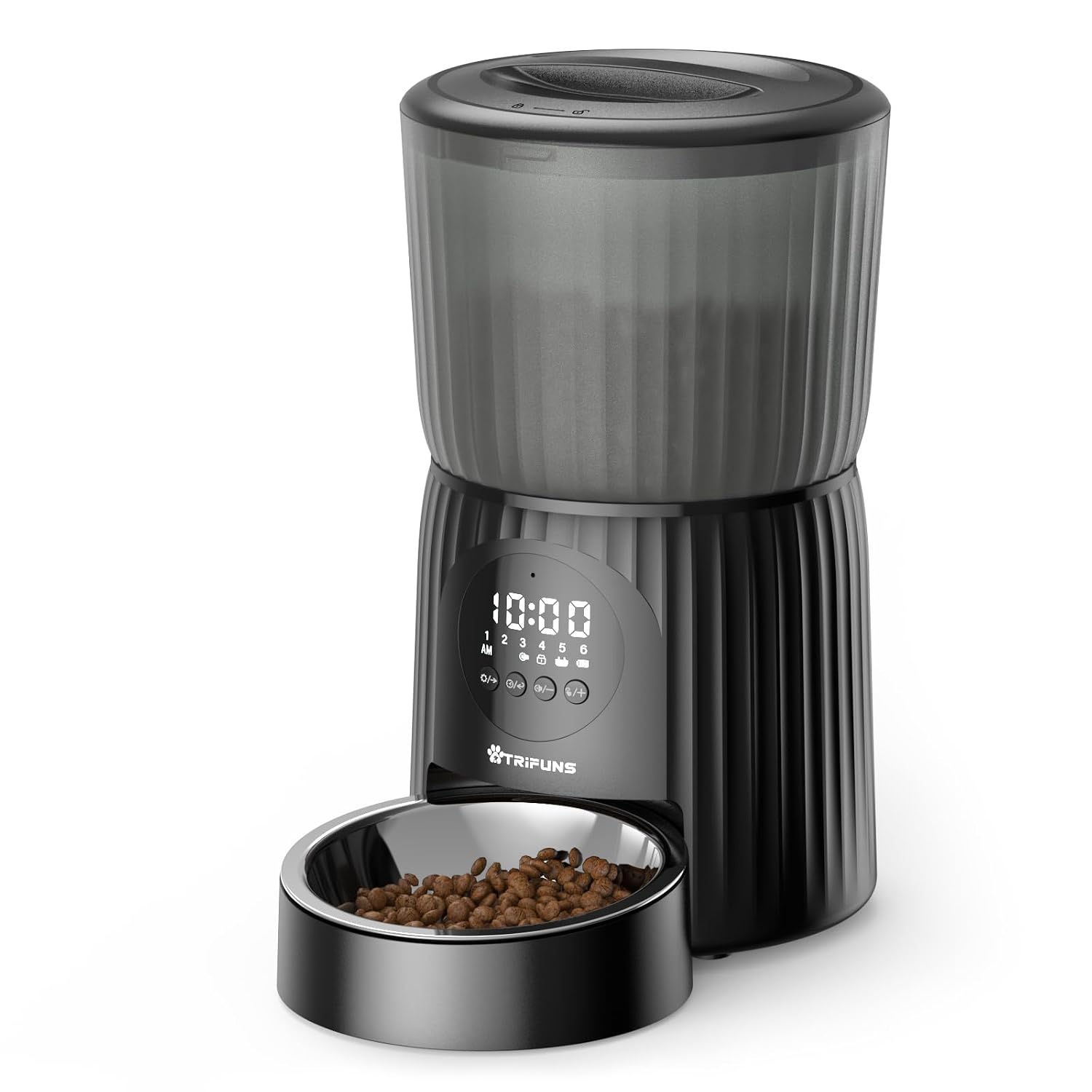
Figure 1: Trifuns P01 4L Automatic Pet Feeder. This image displays the complete feeder unit, featuring a translucent food reservoir, a digital control panel with buttons, and a stainless steel food bowl filled with dry pet food.
Key Features:
- 4L Capacity: Ample storage for dry pet food.
- 6 Meals Program: Schedule up to six meals per day.
- Dual Power Supply: Operates via power adapter or 3 D-type batteries.
- Slow Feeding: Helps prevent overeating and promotes healthy digestion.
- Freshness Desiccant Bag: Maintains food freshness.
- Portion Control: Dispense precise amounts of food per meal.
Setup Instructions
- Unpack and Assemble: Carefully remove all components from the packaging. Place the food bowl stand and stainless steel bowl in position at the base of the feeder.
- Power Supply:
- AC Power: Connect the power adapter (if included) to the feeder's power port and plug it into a standard wall outlet.
- Battery Power: Open the battery compartment (usually at the bottom) and insert three D-type batteries, ensuring correct polarity. Batteries provide backup power or primary power if AC is not used.
- Install Desiccant Bag: Locate the desiccant bag holder, typically under the lid. Insert the desiccant bag to absorb moisture and keep food fresh. Replace the desiccant bag periodically (e.g., monthly).
- Fill Food Reservoir: Open the lid and pour dry pet food into the reservoir. Ensure the food pellet size is between 2mm and 15mm to prevent dispensing issues. Do not overfill.
- Secure Lid: Close the lid firmly to maintain food freshness and prevent pets from accessing the food prematurely.
Operating Instructions
Setting the Current Time:
- Press and hold the "SET" button (or equivalent) until the hour display flashes.
- Use the "+" and "-" buttons to adjust the hour. Pay attention to AM/PM indicators.
- Press "SET" again to confirm the hour, then use "+" and "-" to adjust the minutes.
- Press "SET" one more time to save the current time.
Programming Meal Times and Portions:
The feeder allows programming up to 6 meals per day.
- Press the "MEAL" button (or equivalent) to enter meal programming mode. The display will show "Meal 1" or similar.
- Use the "+" and "-" buttons to set the desired feeding time for Meal 1.
- Press "MEAL" again to move to portion setting for Meal 1. Use "+" and "-" to select the number of portions to dispense. (Refer to your specific model's portion size guide for approximate weight per portion).
- Repeat steps 2 and 3 for additional meals (Meal 2 through Meal 6) as needed. If a meal is not set, it will not dispense food.
- After setting all desired meals, press and hold the "MEAL" button (or allow it to time out) to exit programming mode.
Manual Feeding:
To dispense food instantly, press the "MANUAL FEED" button (or equivalent). Each press will dispense one portion. This can be useful for extra treats or to test the dispenser.
Voice Recording (if applicable):
Some models allow recording a short voice message to play during meal times. Consult your feeder's specific buttons for "REC" or "PLAY" to record and enable this feature.
Maintenance and Cleaning
Regular cleaning ensures hygiene and optimal performance of your pet feeder.
- Disconnect Power: Before cleaning, always unplug the power adapter and remove batteries.
- Disassemble: Remove the food bowl, stand, and lid. Empty any remaining food from the reservoir.
- Clean Removable Parts: The stainless steel food bowl, lid, and stand can be hand washed with mild soap and water. Rinse thoroughly and dry completely before reassembly.
- Clean Main Unit: Wipe the exterior of the main feeder unit with a damp cloth. Do not submerge the main unit in water. Use a dry cloth to clean the food outlet and internal dispensing mechanism.
- Desiccant Bag: Replace the desiccant bag every 2-4 weeks, or as needed, to maintain food freshness.
- Reassemble: Once all parts are clean and dry, reassemble the feeder. Ensure the lid is securely closed.
Product Care Instructions: Hand Wash Only for removable components. Keep dry before use.
Troubleshooting
| Problem | Possible Cause | Solution |
|---|---|---|
| Feeder not powering on. | No power from adapter; batteries depleted or incorrectly installed. | Check power adapter connection. Replace D-type batteries, ensuring correct polarity. |
| Food not dispensing. | Food jam; low food level; incorrect programming; food pellets too large. | Check food reservoir level. Clear any obstructions in the food outlet. Ensure food pellet size is within 2-15mm. Verify meal programming. |
| Incorrect meal times or portions. | Programming error. | Re-enter programming mode and verify all meal times and portion settings. |
| Food becoming stale quickly. | Lid not sealed; desiccant bag expired or missing. | Ensure the lid is securely closed. Replace the desiccant bag. |
| Display not working. | Power issue; unit malfunction. | Check power supply (adapter/batteries). If issue persists, contact customer support. |
Specifications
| Brand | trifuns |
| Model Number | P01 |
| Capacity | 4 litres |
| Target Species | Cat, Dog, Rabbit, Guinea Pig, Chinchilla |
| Material | Stainless Steel (for bowl), other materials for main unit |
| Colour | Black |
| Operation Mode | Automatic |
| Power Source | Battery Powered (3 x D-type batteries, not included), AC Adapter (if supplied) |
| Product Dimensions | 19.1L x 19.1W x 29.2H Centimeters |
| Item Weight | 1 kg 920 g |
| Recommended Uses | Dry Food, Indoor use, Kibble with diameter 2-15mm |
| Special Features | Ant Proof, Feeding Schedule, Nonslip, Portion Control, Programmable |
| Product Care | Hand Wash Only (removable parts) |
Warranty and Support
For warranty information or technical support, please refer to the contact details provided with your purchase or visit the official Trifuns website. Keep your purchase receipt as proof of purchase for any warranty claims.
