
1. Introduction
Thank you for choosing the Conentool 21V Cordless Impact Drill/Driver Kit. This tool is designed for various drilling and screwdriving tasks in wood, metal, plastics, and masonry. Please read this manual carefully before operating the tool to ensure safe and efficient use. Keep this manual for future reference.

Image 1.1: The Conentool 21V Cordless Impact Drill/Driver Kit, including the drill, two 2500mAh batteries, charger, and a variety of drill bits and accessories in a carrying case.
2. General Safety Instructions
WARNING: Read all safety warnings, instructions, illustrations, and specifications provided with this power tool. Failure to follow all instructions listed below may result in electric shock, fire, and/or serious injury.
2.1 Work Area Safety
- Keep the work area clean and well-lit. Cluttered or dark areas invite accidents.
- Do not operate power tools in explosive atmospheres, such as in the presence of flammable liquids, gases, or dust. Power tools create sparks which may ignite the dust or fumes.
- Keep children and bystanders away while operating a power tool. Distractions can cause you to lose control.
2.2 Electrical Safety
- Power tool plugs must match the outlet. Never modify the plug in any way.
- Avoid body contact with earthed or grounded surfaces, such as pipes, radiators, ranges, and refrigerators. There is an increased risk of electric shock if your body is earthed or grounded.
- Do not expose power tools to rain or wet conditions. Water entering a power tool will increase the risk of electric shock.
2.3 Personal Safety
- Always wear eye protection. Use safety glasses, goggles, or a face shield.
- Wear hearing protection when operating the tool for extended periods.
- Dress properly. Do not wear loose clothing or jewelry. Keep your hair and clothing away from moving parts.
- Stay alert, watch what you are doing, and use common sense when operating a power tool.
3. Package Contents
Verify that all items listed below are included in your package. If any items are missing or damaged, please contact customer support.
- 1 x Conentool 21V Cordless Impact Drill/Driver
- 2 x 2500mAh Lithium-ion Batteries
- 1 x Battery Charger
- 1 x Flexible Shaft Extension
- Various Drill Bits (for wood, metal, masonry)
- Various Screwdriver Bits
- Socket Adapters
- Carrying Case
- User Manual

Image 3.1: A complete overview of the kit contents, including the drill, two batteries, charger, flexible shaft, various drill bits, screwdriver bits, and socket adapters, all neatly arranged.
4. Product Overview
Familiarize yourself with the main components of your drill/driver:
- Chuck: Holds drill bits and screwdriver bits.
- Torque Adjustment Ring: Selects the desired torque setting.
- Mode Selector Ring: Switches between screwdriving, drilling, and impact drilling modes.
- Speed Selector Switch: Changes between high and low-speed gears.
- Trigger Switch: Activates the tool and controls speed (variable speed).
- Forward/Reverse Selector: Changes the rotation direction.
- LED Work Light: Illuminates the work area.
- Battery Pack: Provides power to the tool.
- Battery Release Button: For removing the battery.
- Handle: Ergonomic grip for comfortable use.

Image 4.1: An internal view highlighting the brushless motor, which provides increased power, efficiency, and a quieter operation with no sparks.
5. Setup
5.1 Charging the Battery
The battery pack is not fully charged at the time of purchase. It is recommended to fully charge the battery before first use.
- Connect the charger to a standard power outlet.
- Slide the battery pack onto the charger base. Ensure it clicks into place.
- The charger indicator light will show the charging status. A red light typically indicates charging, and a green light indicates a full charge.
- Once fully charged, disconnect the charger from the power outlet and remove the battery.

Image 5.1: The battery charger connected to a wall outlet, with a battery pack inserted for charging. The red light indicates charging, and the green light indicates a completed charge.
5.2 Installing and Removing the Battery
- To Install: Align the battery pack with the base of the tool handle and slide it in until it clicks securely into place.
- To Remove: Press the battery release button (usually located at the front of the battery) and slide the battery pack out of the tool.

Image 5.2: A cutaway view of the 2500mAh battery pack, illustrating its internal lithium-ion cells and power management system, designed for up to 90 minutes of use per battery.
5.3 Installing and Removing Drill/Screwdriver Bits
- To Install: Rotate the chuck counter-clockwise to open the jaws. Insert the desired bit into the chuck as far as it will go. Rotate the chuck clockwise to tighten the jaws firmly around the bit.
- To Remove: Rotate the chuck counter-clockwise to loosen the jaws and pull the bit out.
Ensure the bit is securely fastened to prevent it from slipping during operation.
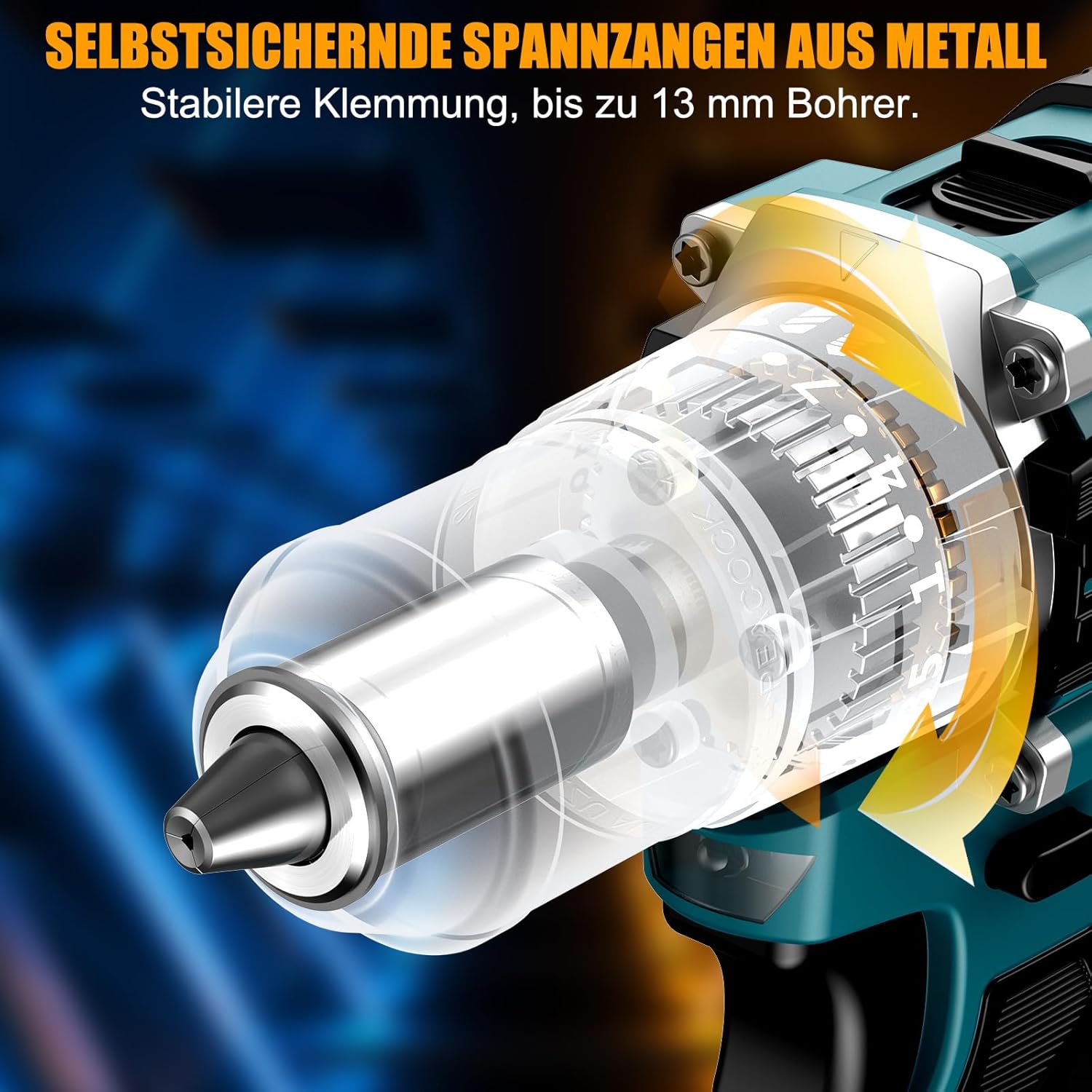
Image 5.3: A detailed view of the self-locking metal chuck, demonstrating its stable clamping mechanism capable of holding drill bits up to 13mm securely.
6. Operating Instructions
6.1 Powering On/Off and Speed Control
- To turn the tool ON, press the trigger switch. The speed is variable; press the trigger further for higher speed.
- To turn the tool OFF, release the trigger switch.
- The integrated LED work light will illuminate when the trigger is pressed, providing visibility in dimly lit areas.
6.2 Forward/Reverse Rotation
The forward/reverse selector switch is located above the trigger. Push it to the left for forward rotation (for screwdriving and drilling) and to the right for reverse rotation (for removing screws or freeing jammed bits). Ensure the tool is stopped before changing direction.
6.3 Speed Gear Selection
The drill features a 2-speed gear selector switch on top of the tool:
- Gear 1 (Low Speed, 0-650 RPM): Ideal for high-torque applications like driving large screws or drilling large holes.
- Gear 2 (High Speed, 0-1850 RPM): Suitable for fast drilling in softer materials and smaller diameter holes.
Always select the appropriate gear for the task. Change gears only when the tool is completely stopped.
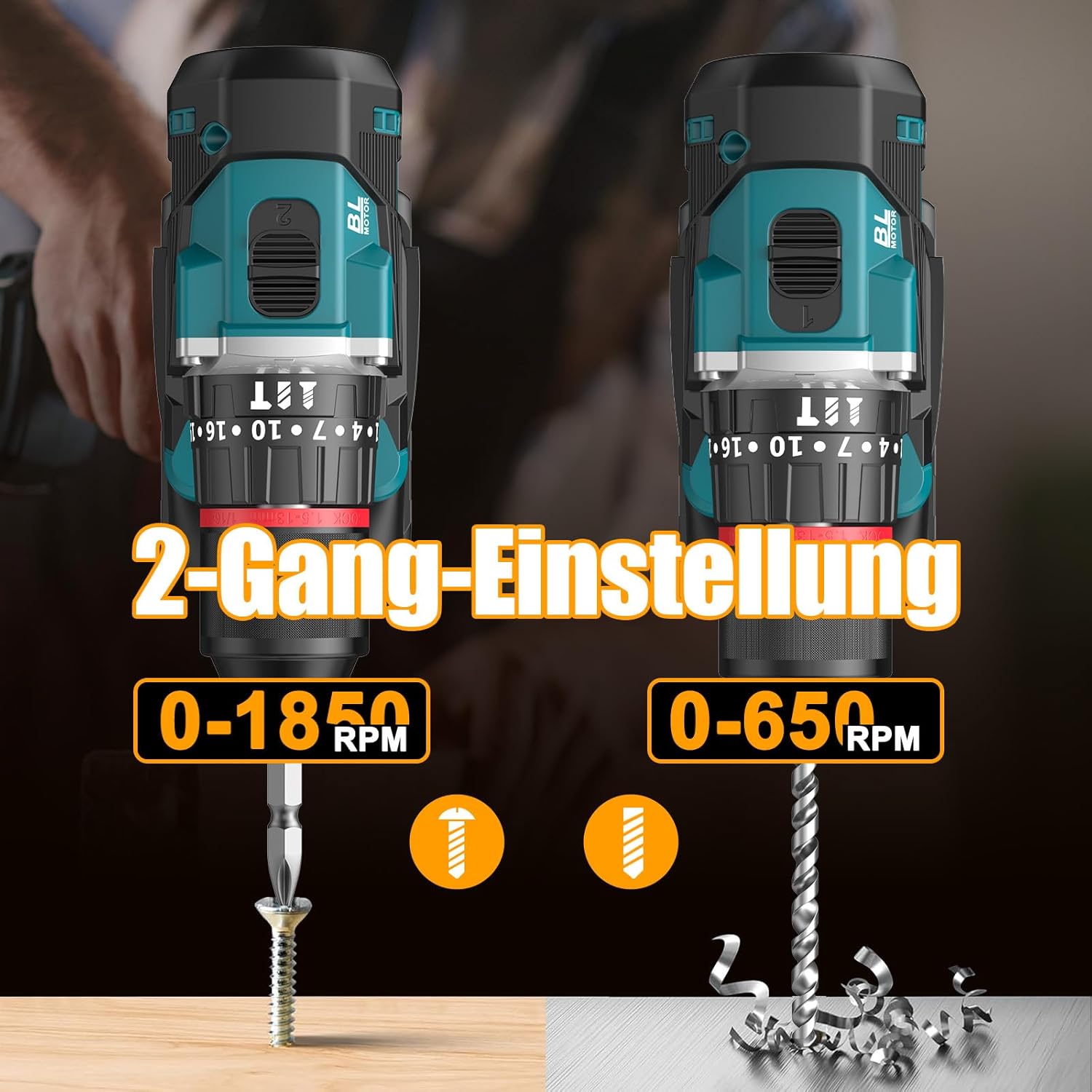
Image 6.1: An illustration demonstrating the two-speed gear settings: Gear 1 (0-650 RPM) for screwdriving and Gear 2 (0-1850 RPM) for drilling, allowing for optimal performance based on the application.
6.4 Torque Adjustment and Mode Selection
The torque adjustment ring allows you to set the desired torque for screwdriving applications, preventing overtightening or stripping screws. The mode selector ring allows you to switch between different operating modes.
- Screwdriving Mode (Torque Settings 1-35): Use these settings to match the torque to the screw size and material. Lower numbers for smaller screws/softer materials, higher numbers for larger screws/harder materials.
- Drilling Mode (Drill Bit Icon): For general drilling without impact. The clutch is disengaged, providing maximum torque.
- Impact Drilling Mode (Hammer Icon): For drilling into masonry or concrete, providing a hammering action in addition to rotation.
The drill offers 35+3 settings, including 35 torque settings for screwdriving and 3 modes (screwdriving, drilling, impact drilling).

Image 6.2: A visual representation of the 35+3 torque and mode settings, indicating precise power control and a maximum torque of 55 N.m, suitable for various materials like wood, brick, plastic, and metal.
7. Maintenance
7.1 Cleaning
- Always disconnect the battery pack before performing any cleaning or maintenance.
- Keep the ventilation openings of the tool clean to prevent overheating.
- Use a soft, damp cloth to clean the tool casing. Do not use harsh chemicals or abrasive cleaners.
7.2 Storage
- Store the tool and batteries in a cool, dry place, away from direct sunlight and moisture.
- Store the tool in its carrying case to protect it from dust and damage.
- Keep out of reach of children.

Image 7.1: A person carrying the Conentool drill kit in its durable black carrying case, designed for convenient storage and transport of the tool and its accessories.
7.3 Battery Care
- Do not store batteries in a discharged state. Recharge them regularly, especially if not used for extended periods.
- Avoid exposing batteries to extreme temperatures.
- Do not attempt to disassemble or modify the battery pack.
8. Troubleshooting
| Problem | Possible Cause | Solution |
|---|---|---|
| Tool does not start | Battery not charged or improperly installed. | Ensure battery is fully charged and correctly inserted. |
| Reduced power or speed | Battery charge is low. | Recharge the battery. |
| Bit slips in chuck | Chuck not tightened sufficiently. | Tighten the chuck firmly around the bit. Ensure the bit shank is clean. |
| Overheating | Blocked ventilation slots; continuous heavy use. | Clean ventilation slots. Allow tool to cool down during prolonged use. |
9. Specifications
| Feature | Specification |
|---|---|
| Model Number | ebvc-sd-de |
| Voltage | 21 Volts |
| Battery Type | Lithium-ion |
| Battery Capacity | 2500 mAh (each) |
| Max Torque | 55 N.m |
| Torque Settings | 35 + 3 Modes (Screwdriving, Drilling, Impact Drilling) |
| No-Load Speed (Gear 1) | 0-650 RPM |
| No-Load Speed (Gear 2) | 0-1850 RPM |
| Chuck Size | 13 mm (3/8 inch) Keyless |
| Product Dimensions | 35 x 31 x 10 cm |
| Weight (with battery) | 1.5 Kilograms |
10. Warranty and Support
Conentool products are manufactured to high-quality standards. In the unlikely event of a defect due to material or manufacturing fault, please contact your retailer or Conentool customer service. Please retain your proof of purchase for warranty claims.
For further assistance, technical support, or to inquire about spare parts, please refer to the contact information provided with your purchase or visit the official Conentool website.