
LEKATO PD4
LEKATO Wireless Page Turner Pedal User Manual
Model: PD4
Introduction
The LEKATO Wireless Page Turner Pedal is designed to provide musicians and readers with a hands-free solution for turning pages of digital sheet music, lyrics, or documents on various devices. Its compact and silent design ensures a seamless experience during performances, practice, or presentations. This manual provides comprehensive instructions for setup, operation, maintenance, and troubleshooting to help you get the most out of your device.
Product Overview

Image: The LEKATO Wireless Page Turner Pedal, showcasing its two foot pedals, control buttons, and USB charging port. A tablet with sheet music is visible in the background, illustrating its primary use.
The LEKATO Wireless Page Turner Pedal features a robust and compact design, making it highly portable. It connects wirelessly via Bluetooth to compatible devices, offering multiple page-turning modes to suit various applications.
Key Features:
- Bluetooth Connection: Fast and stable wireless Bluetooth connection, eliminating the need for cables. Compatible with mobile phones, tablets, laptops, PCs, iPads, and Macbooks.
- Seven Turning Modes & Repeat Button: Supports various actions including page up & down, left and right arrow, up & down arrow, left and right mouse button, space bar and enter key, swipe left and right, swipe up and down, and changing songs.
- Wide Compatibility: Works with Windows, macOS, iOS, and Android operating systems. Supports popular apps like OnSong, piaScore, iBooks, Goodnotes, Apple Books, ForScore, and Music Reader.
- Long Working Time: Built-in rechargeable battery provides up to 48 hours of continuous use on a full charge, charged via a Type-C interface.
- Hands-Free Operation: Allows users to read hands-free on tablets, phones, and PCs, preventing interruptions during music practice or performances.
- Compact and Portable: With dimensions of 4.3" x 2.16" x 1.1" (11 cm x 5.5 cm x 2.8 cm) and a weight of 125g, it is highly space-saving and ideal for travel or outdoor performances.

Image: A detailed view of the LEKATO pedal with its compact dimensions labeled, highlighting its portability.
Setup
Charging the Device:
Before first use, ensure the pedal is fully charged. Use the provided Type-C charging cable to connect the pedal to a USB power source (e.g., computer USB port, USB wall adapter).

Image: The page turner pedal connected to a USB Type-C charging cable, illustrating the charging process and highlighting its long battery life.
- A red indicator light will illuminate during charging.
- The light will turn off or change color (depending on model) when fully charged.
- A full charge provides approximately 48 hours of continuous use.
Bluetooth Pairing:
Follow these steps to pair your LEKATO Page Turner Pedal with your device:
Turn on the Pedal: Locate the ON/OFF switch on the side of the pedal and slide it to the "ON" position. The blue Bluetooth indicator light will start blinking, indicating it's in pairing mode.
Enable Bluetooth on Your Device: Go to the "Settings" menu on your mobile phone, tablet, or computer, and ensure Bluetooth is turned on.

Image: Step 1 of Bluetooth pairing, showing how to enable Bluetooth in device settings.
Search for Devices: In the Bluetooth settings, your device will scan for available Bluetooth devices. Look for "TurnerPro" in the list.
Connect: Tap on "TurnerPro" to initiate the pairing process. Once successfully paired, the Bluetooth indicator light on the pedal will stop blinking and remain solid blue. Your device will show "Connected".

Image: Step 2 of Bluetooth pairing, showing the "TurnerPro" device listed as connected in Bluetooth settings.
Reconnecting to a New Device (if previously paired): If you wish to connect to a new device after it has been paired with another, you must first "Forget This Device" from the original device's Bluetooth settings. Then, proceed with steps 1-4 on the new device.

Image: Instructions for disconnecting or forgetting the device from original settings to pair with a new device.
Operating Instructions
The LEKATO Page Turner Pedal offers multiple modes to simulate different key presses or gestures, providing versatility for various applications.
Page Turning Modes:
The pedal has 7 distinct page-turning modes, plus a repeat function. You can switch between modes by tapping the central "Select Mode" button. The corresponding indicator light will illuminate to show the active mode.
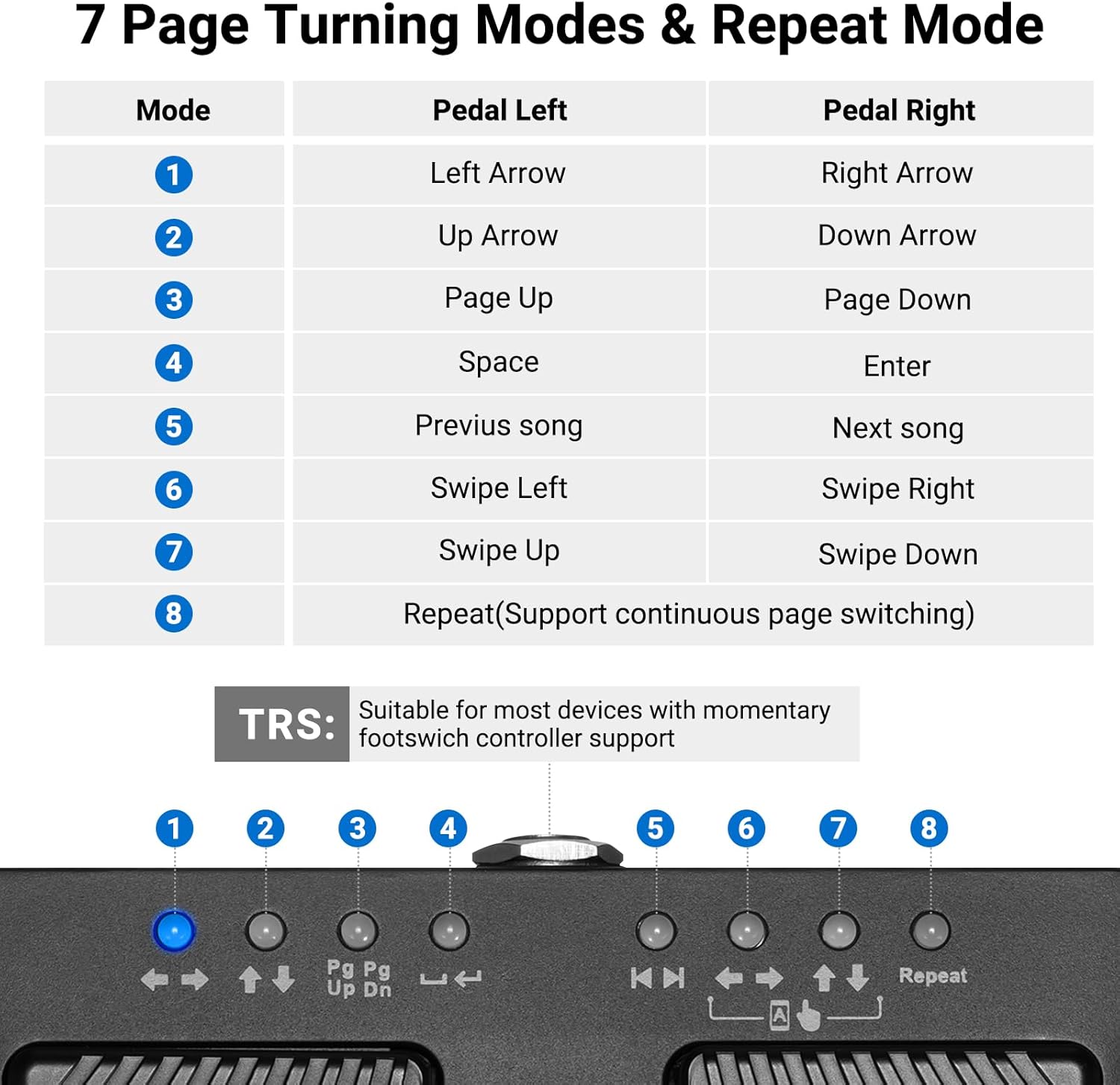
Image: A visual guide to the 7 page-turning modes and the repeat function, detailing the action performed by the left and right pedals for each mode.
| Mode | Pedal Left Action | Pedal Right Action |
|---|---|---|
| 1 | Left Arrow | Right Arrow |
| 2 | Up Arrow | Down Arrow |
| 3 | Page Up | Page Down |
| 4 | Space | Enter |
| 5 | Previous Song | Next Song |
| 6 | Swipe Left | Swipe Right |
| 7 | Swipe Up | Swipe Down |
| 8 | Repeat (Supports continuous page switching) | |
To activate the repeat function (Mode 8), hold down the central "Select Mode" button. This allows for continuous page switching without repeatedly pressing the pedal.
The pedal is also suitable for devices with momentary footswitch controller support via its TRS output.

Image: A musician using the LEKATO pedal while playing guitar, demonstrating hands-free operation during a performance or practice session.
Compatibility
The LEKATO Wireless Page Turner Pedal is designed for broad compatibility across various operating systems and applications, ensuring a seamless experience for most users.
- Operating Systems: Fully compatible with Windows, macOS, iOS (iPad, iPhone), and Android.
- Supported Devices: Works with mobile phones, tablets, laptops, and desktop PCs.
- Applications: Supports most popular music reading and document viewing applications, including but not limited to:
- OnSong
- piaScore
- iBooks
- Goodnotes
- Apple Books
- ForScore
- Music Reader
- Adobe Acrobat (for PDF documents)
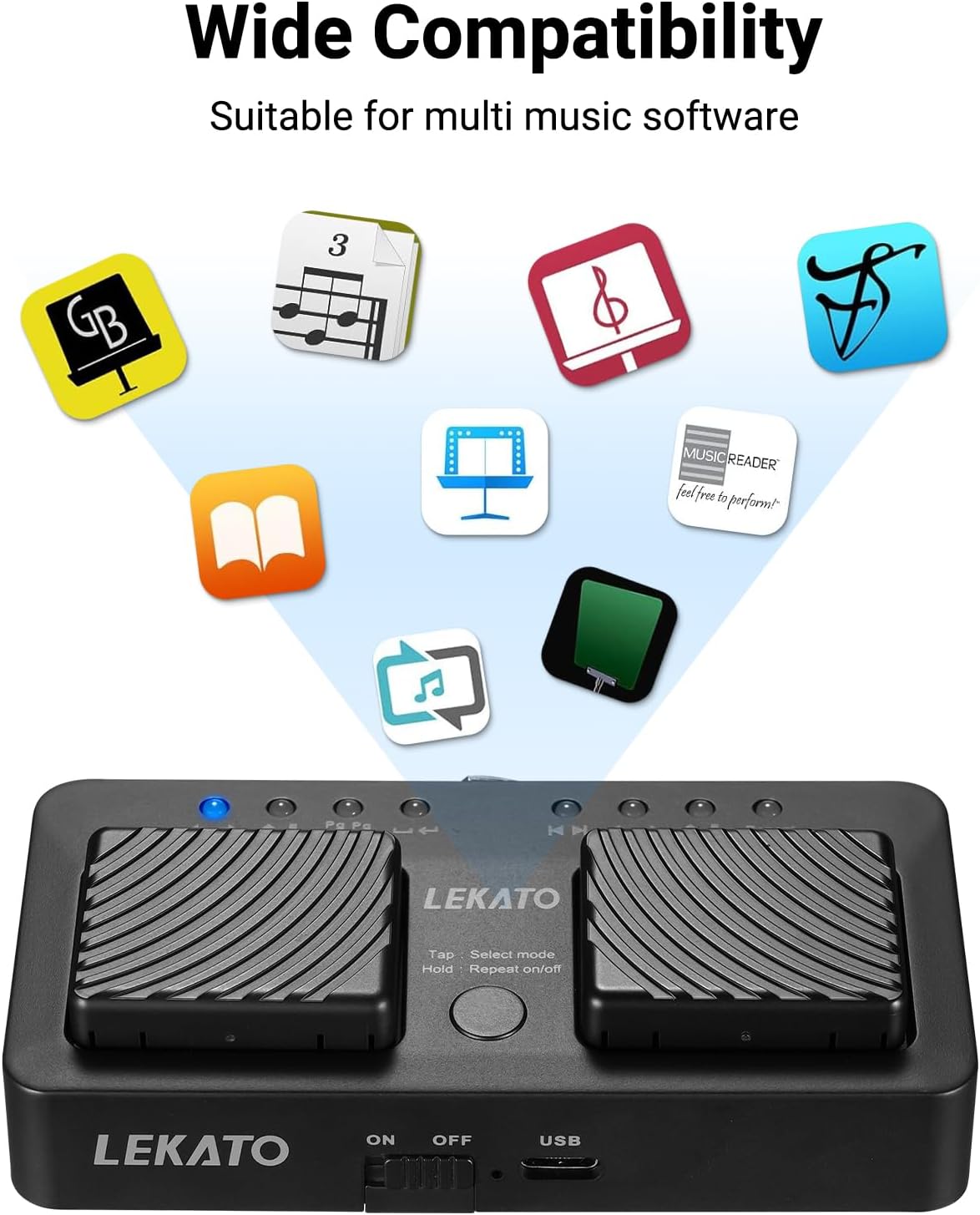
Image: The page turner pedal surrounded by icons representing various compatible music software and operating systems, illustrating its wide range of usability.
Maintenance
To ensure the longevity and optimal performance of your LEKATO Wireless Page Turner Pedal, follow these simple maintenance guidelines:
- Cleaning: Wipe the pedal with a soft, dry cloth. For stubborn dirt, a slightly damp cloth can be used, but ensure no moisture enters the device. Do not use harsh chemicals or abrasive cleaners.
- Storage: Store the pedal in a cool, dry place away from direct sunlight and extreme temperatures. When not in use for extended periods, turn off the device to conserve battery life.
- Battery Care: To maintain battery health, avoid fully discharging the battery frequently. Recharge the pedal when the battery is low. If storing for a long time, charge it to about 50% every few months.
- Handling: Avoid dropping the pedal or subjecting it to strong impacts, as this can damage internal components.
Troubleshooting
If you encounter issues with your LEKATO Wireless Page Turner Pedal, refer to the following common problems and their solutions:
| Problem | Solution |
|---|---|
| Pedal does not turn on. | Ensure the ON/OFF switch is in the "ON" position. Check battery level and charge the pedal if necessary. |
| Cannot pair with device. |
|
| Pedal connected but not responding. |
|
| Page turning is inconsistent or delayed. |
|
| Battery drains quickly. |
|
Specifications
| Feature | Detail |
|---|---|
| Model | PD4 (Manufacturer Reference: 2909) |
| Connectivity | Bluetooth |
| Dimensions (L x W x H) | 11 cm x 5.5 cm x 2.8 cm (4.3" x 2.16" x 1.1") |
| Item Weight | 125 g (0.27 lbs) |
| Battery Type | 1 Lithium Ion battery (included) |
| Battery Life | Up to 48 hours continuous use |
| Charging Interface | Type-C USB |
| Power Source | Battery Powered |
| Voltage | 9 Volts |
| Controls Type | Button |
| Country of Origin | China |
| First Available Date | 25 October 2023 |
Warranty and Support
LEKATO products are manufactured with high-quality standards. For any product-related inquiries, technical support, or warranty claims, please contact LEKATO customer service. Please refer to your purchase documentation for specific warranty terms and conditions.
Contact Information:
- For support, please visit the official LEKATO website or refer to the contact details provided with your product packaging.
- Email: support@lekatotech.com
Related Documents - PD4
 |
LEKATO WT-1 Wireless Page Turner Pedal User Manual User manual for the LEKATO WT-1 Wireless Page Turner Pedal, detailing its specifications, features, connection methods, charging instructions, recommended apps, and maintenance. |
 |
LEKATO WT-1 Wireless Page Turner Pedal User Manual User manual for the LEKATO WT-1 wireless page turner pedal. Provides detailed information on specifications, controls, Bluetooth connectivity, charging, maintenance, and app compatibility for musicians. |
 |
LEKATO WT-1 Kabelloses Seitenumblätter-Pedal Benutzerhandbuch Umfassendes Benutzerhandbuch für das LEKATO WT-1 kabellose Seitenumblätter-Pedal, das detaillierte Anleitungen zur Einrichtung, Bedienung, Spezifikationen und Wartung bietet. |
 |
LEKATO MINI LOOPER User Manual - Features, Instructions & Specifications Comprehensive user manual for the LEKATO MINI LOOPER, detailing its features, control panel instructions, operation guide, and technical specifications. Learn how to record, playback, and manage audio loops. |
 |
LEKATO Loop Station LP-20 Version Update Instructions Instructions for updating the LEKATO Loop Station LP-20, including information on USB interface upgrades and wireless connection of external pedals. |
 |
LEKATO Tank-B Bass Multi-Effects Pedal User Manual User manual for the LEKATO Tank-B Bass Multi-Effects Pedal, covering features, operation, connections, presets, and specifications for bass guitarists. |