
Introduction
Thank you for choosing the Furmax Electric Standing Desk. This manual provides essential information for the proper setup, operation, and maintenance of your new desk. Designed to promote a healthier working environment, this height-adjustable desk allows you to seamlessly switch between sitting and standing positions, reducing physical strain and enhancing focus.
The desk features a robust metal frame, a durable wood desktop, and an electric lift system for smooth and quiet height adjustments. With thoughtful additions like removable casters, cable management grommets, and accessory hooks, the Furmax Standing Desk is built for convenience and efficiency in any home or office setting.
Safety Information
For your safety and to ensure the longevity of your Furmax Electric Standing Desk, please adhere to the following guidelines:
- Ensure the desk is not loaded with more than 145 pounds. Exceeding this weight capacity may cause damage to the motor or frame.
- Verify the desk's stability when fully extended. Avoid placing heavy or unstable objects near the edges.
- Follow all electrical safety guidelines. Ensure the power cord is not pinched or damaged and is connected to a grounded outlet.
- Use the desk responsibly for working purposes only. Avoid climbing on the desk or using it for unintended activities.
- Keep children and pets away from the desk during operation to prevent accidents.
Package Contents
Before assembly, please ensure all components are present:
- Desktop (two pieces)
- Desk Legs (2)
- Control Panel
- Power Adapter
- Removable Casters (4)
- Headphone Hook
- Cup Holder
- Assembly Hardware (screws, tools)
Setup & Assembly
The Furmax Electric Standing Desk is designed for straightforward assembly. Follow the detailed instructions provided in the included assembly guide. Typically, assembly involves attaching the two desktop pieces, securing the desk legs, connecting the control panel, and plugging in the power adapter.
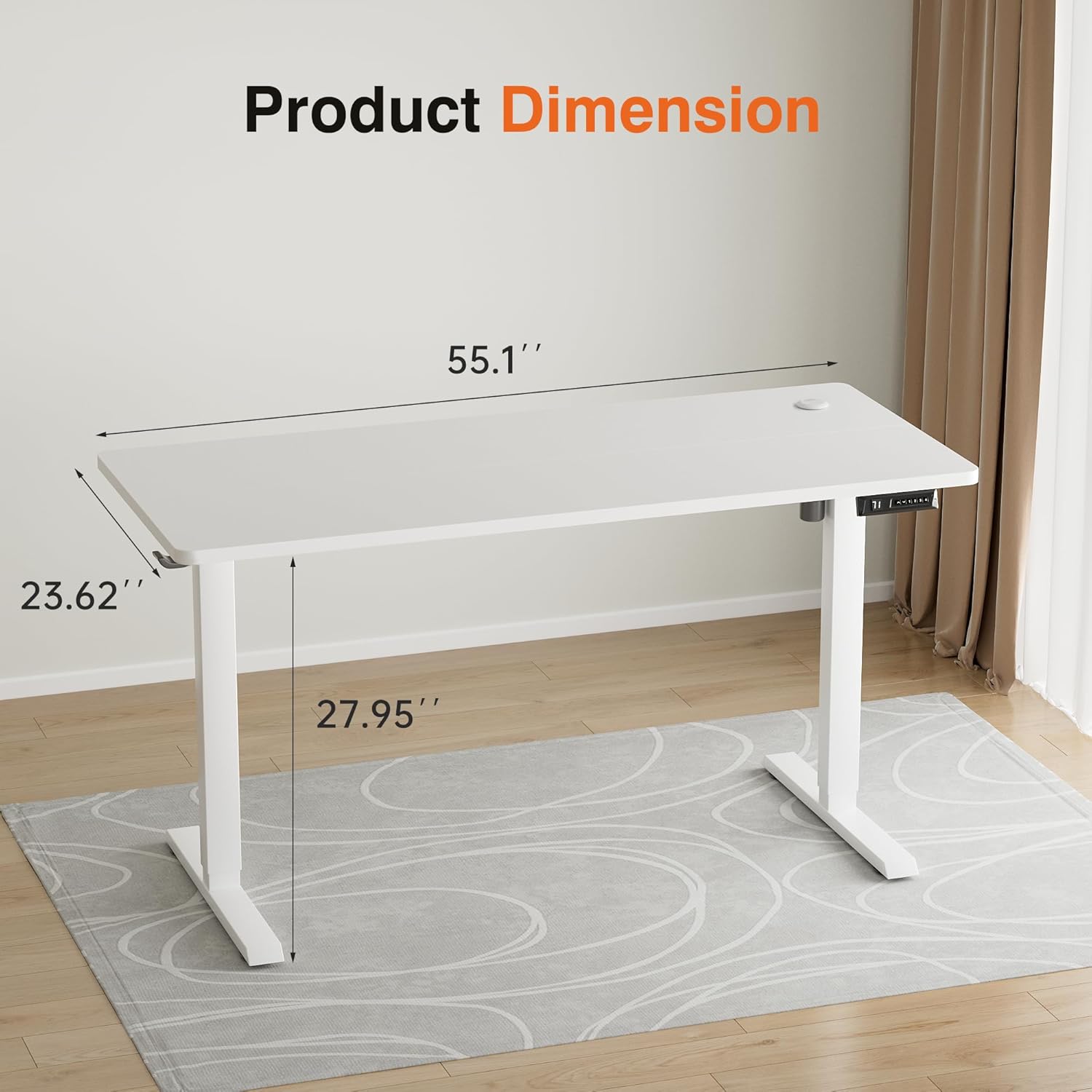
Figure 1: Product Dimensions and Components Overview
Users have noted the assembly process is very easy to follow, with clear instructions. The tabletop is comprised of two pieces that are securely joined during assembly.
Operating Instructions
Height Adjustment
The desk's height can be adjusted electrically using the control panel located on the underside of the desktop. The adjustable height range is from 27.95 inches to 46.85 inches.
- To Raise: Press and hold the Up Arrow button on the control panel. The desk will smoothly ascend.
- To Lower: Press and hold the Down Arrow button. The desk will smoothly descend.

Figure 2: Height Adjustment Range
Memory Presets
The control panel features memory buttons (1, 2, 3, 4) allowing you to save and quickly recall your preferred sitting and standing heights.
- To Set a Memory Height: Adjust the desk to your desired height using the Up/Down arrows. Once at the desired height, press the S (Set) button, then immediately press one of the number buttons (1, 2, 3, or 4) to save the current height to that preset.
- To Recall a Memory Height: Simply press the corresponding number button (1, 2, 3, or 4). The desk will automatically move to the saved height.

Figure 3: Control Panel with Memory Settings
Key Features
- Healthy Working Style: Designed to alleviate fatigue and improve concentration by allowing users to switch between sitting and standing positions.
- Durable Quiet Motor: The motor operates at a low noise level (less than 55 dB) and adjusts the height at a speed of 1 inch per second.
- Memory Electric Lift: Easily control and save preferred heights with the intuitive control panel and four memory presets.
- Sturdy Desk Legs: Features a box frame structure and a wide T-shaped foot design for excellent stability, even at maximum height.
- Removable Casters: Equipped with additional detachable casters for easy mobility. These casters can be locked for stable daily use.
- Cable Grommets: Integrated cable grommets on the desktop help manage and organize wires, keeping your workspace tidy.
- Headphone Hook & Cup Holder: Conveniently store your headphones and beverages with the included accessories.

Figure 4: Removable Casters, Cable Grommets, and Desk Hook
Maintenance
To keep your Furmax Electric Standing Desk in optimal condition, follow these simple maintenance tips:
- Cleaning: Wipe the desktop and frame with a soft, damp cloth. Avoid using harsh chemicals or abrasive cleaners that could damage the finish.
- Cable Management: Periodically check and organize cables to prevent tangling or damage, especially when adjusting desk height.
- Motor Care: The motor is designed for durability. Avoid overloading the desk beyond its specified weight capacity to prevent strain on the motor.
- Caster Maintenance: If using the casters, ensure they are clean and free of debris to allow for smooth movement. Lock them when the desk is in a stationary position.
Troubleshooting
If you encounter any issues with your Furmax Electric Standing Desk, please refer to the following common troubleshooting tips:
- Desk Not Moving: Check if the power cord is securely plugged into both the desk and a working electrical outlet. Ensure no obstructions are blocking the desk's movement.
- Unresponsive Control Panel: Unplug the desk from the power outlet for 10-15 seconds, then plug it back in to reset the system.
- Uneven Height: Perform a reset procedure (refer to your assembly guide for specific steps, often involves holding a reset button).
- Unusual Noises: While the motor is quiet, minor operational sounds are normal. If you hear loud grinding or unusual noises, discontinue use and contact customer support.
For persistent issues not resolved by these steps, please contact Furmax customer support for assistance.
Product Specifications
| Specification | Detail |
|---|---|
| Brand | Furmax |
| Model Number | HAD006042 |
| Desktop Dimensions | 55"(L) x 24"(W) |
| Adjustable Height Range | 27.95 inches to 46.85 inches |
| Weight Capacity | 145 Pounds |
| Material | Metal Frame, Wood Desktop |
| Color | White |
| Special Features | Adjustable Height, Electric, Removable Casters, Memory Presets, Headphone Hook, Cup Holder |
| Assembly Required | Yes |
Warranty Information
The Furmax Electric Standing Desk comes with a Limited Warranty. For specific details regarding warranty coverage, terms, and conditions, please refer to the warranty card included with your product packaging or contact Furmax customer support directly. Please retain your proof of purchase for any warranty claims.


