
aonus A7
aonus A7 480W Cordless Vacuum Cleaner User Manual
Model: A7
1. Product Overview
The aonus A7 480W Cordless Vacuum Cleaner is designed for efficient and versatile cleaning of various surfaces, including carpets and hard floors. It features a powerful brushless motor, intelligent dust detection, and a user-friendly touchscreen display.

Image: The aonus A7 vacuum cleaner showcasing its main unit, extension wand, floor brush, and various attachments, along with a detailed view of its intelligent touchscreen display.
2. Safety Instructions
Please read all safety instructions carefully before using the appliance. Failure to follow these instructions may result in electric shock, fire, or serious injury.
- Do not use the vacuum cleaner outdoors or on wet surfaces.
- Do not allow children to operate the vacuum cleaner. Close supervision is necessary when used near children.
- Do not pick up flammable or combustible materials, such as gasoline, or use in areas where they may be present.
- Do not pick up anything that is burning or smoking, such as cigarettes, matches, or hot ashes.
- Ensure the filter is properly installed before use.
- Use only as described in this manual. Use only manufacturer's recommended attachments.
- Turn off the appliance before making any adjustments, changing accessories, or storing the vacuum cleaner.
3. Package Contents
Verify that all components are present in the package:
- Main Vacuum Unit
- Extension Wand
- Floor Brush with Anti-Tangle Roller
- Long Flat Nozzle
- 2-in-1 Brush
- Wall Charger
- Wall Mount
- User Manual

Image: All components of the aonus A7 vacuum cleaner, including the main unit, various attachments, wall mount, and charger, laid out with the product packaging.
4. Assembly and Setup
4.1 Assembly
- Insert the extension wand into the main vacuum unit until it clicks into place.
- Attach the floor brush to the other end of the extension wand, ensuring it locks securely.
- For handheld use, attach desired accessories (long flat nozzle or 2-in-1 brush) directly to the main vacuum unit.
4.2 Charging the Battery
Before first use, fully charge the vacuum cleaner's battery. The battery can be charged while attached to the main unit or separately.
- Connect the wall charger to a power outlet and to the charging port on the main vacuum unit or the wall mount.
- The touchscreen display will indicate the charging status. A full charge typically takes approximately 4-5 hours.

Image: The aonus A7 vacuum cleaner mounted on its wall charging station, illustrating the charging process and battery capacity details.
5. Operating Instructions
5.1 Power On/Off and Mode Selection
- Press the power button on the handle to turn the vacuum cleaner on or off.
- Use the touchscreen display to switch between different suction modes (e.g., Eco, Standard, Max) or activate the Automatic Mode.

Image: Close-up view of the aonus A7's all-in-one LED touchscreen, displaying battery level, current mode, and warnings for blockages.
5.2 Automatic Dust Detection
In Automatic Mode, the intelligent dust sensor automatically adjusts the suction power based on the amount and size of dust detected on the surface, optimizing cleaning efficiency and battery life.

Image: Illustration of the aonus A7's automatic mode, showing how the vacuum adjusts suction power (20KPa, 30KPa, 40KPa) based on the detected dust level on the floor.
5.3 Using Different Attachments
The aonus A7 comes with various attachments for different cleaning needs:
- Floor Brush: Ideal for both hard floors and carpets, featuring an anti-tangle roller and LED lights to illuminate dust.
- Long Flat Nozzle: Perfect for reaching narrow gaps, corners, and tight spaces.
- 2-in-1 Brush: Suitable for cleaning upholstery, keyboards, car interiors, and delicate surfaces.

Image: A collage demonstrating the versatility of the aonus A7, showing it used with the extension wand for high areas, as a floor vacuum, and with handheld attachments for furniture and electronics.
6. Maintenance
6.1 Emptying the Dustbin
Empty the dustbin regularly to maintain optimal suction power. The dustbin features a one-click release mechanism.
- Hold the main unit over a trash can.
- Press the dustbin release button to open the bottom flap and empty the contents.
- Close the flap securely after emptying.

Image: A hand demonstrating the one-click dust removal feature of the aonus A7, showing the dustbin being emptied directly into a trash can.
6.2 Cleaning Filters
The aonus A7 features a multi-stage filtration system, including a HEPA filter, for 99.9% filtration efficiency. Regular cleaning of filters is crucial for performance.
- Twist and pull to remove the dustbin from the main unit.
- Remove the internal filters (cyclone, steel mesh, HEPA, and foam filters).
- Tap off loose dust. For washable filters, rinse under cold running water until the water runs clear.
- Allow all filter components to air dry completely for at least 24 hours before reassembling. Do not use a dryer or direct heat.
- Reassemble the filters and dustbin in reverse order.
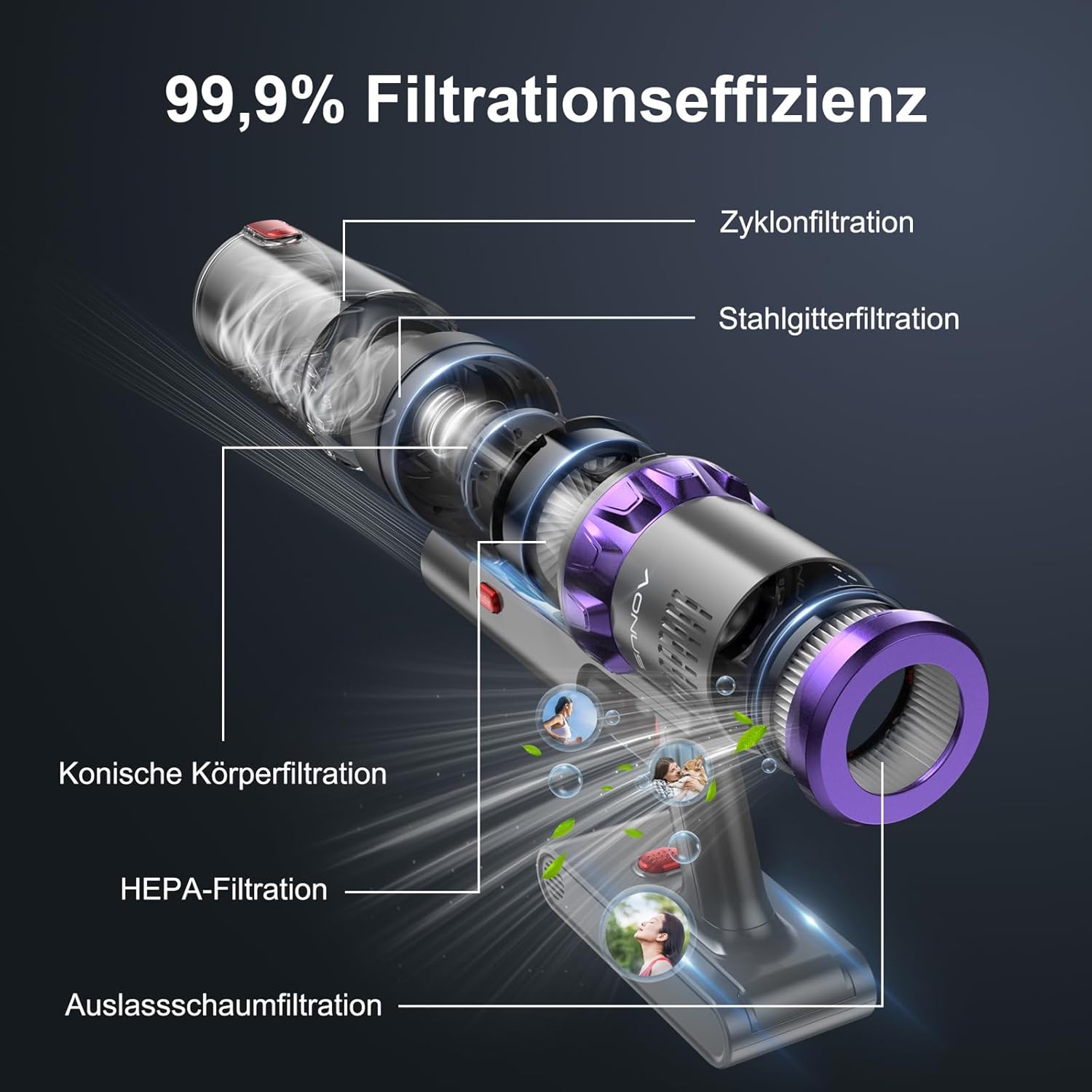
Image: An exploded view of the aonus A7's multi-stage filtration system, highlighting the cyclone, steel mesh, conical, HEPA, and outlet foam filters, designed for 99.9% filtration efficiency.
6.3 Cleaning the Brush Roll
Periodically check the brush roll for tangled hair or debris. While the brush roll is designed to be anti-tangle, occasional cleaning may be necessary.
- Turn off the vacuum cleaner and detach the floor brush.
- Locate the brush roll release mechanism (may require unscrewing a few screws as mentioned in a review, but the image doesn't show this, so I'll keep it general).
- Remove the brush roll and carefully cut away any tangled hair or fibers using scissors.
- Clean any debris from the brush roll housing.
- Reinsert the brush roll and secure it.

Image: The innovative floor brush of the aonus A7, designed to prevent hair tangles, shown cleaning a floor with debris, alongside a small dog.
7. Troubleshooting
| Problem | Possible Cause | Solution |
|---|---|---|
| Vacuum not turning on | Battery is low or depleted. | Charge the battery fully. |
| Low suction power | Dustbin is full; Filters are clogged; Brush roll is tangled or blocked. | Empty the dustbin; Clean or replace filters; Clean the brush roll. |
| Brush roll not spinning | Brush roll is blocked by debris or hair. | Turn off the vacuum and remove any obstructions from the brush roll. |
| Unusual noise | Obstruction in the air path or brush roll. | Check for and remove any blockages in the nozzle, wand, or brush head. |
| Battery not charging | Charger not properly connected; Faulty charger or battery. | Ensure charger is securely plugged in; Contact customer support if issue persists. |
8. Specifications
| Feature | Detail |
|---|---|
| Brand | aonus |
| Model Number | A7 |
| Motor Power | 480W Brushless Motor |
| Suction Power | Up to 40KPa |
| Runtime | Up to 60 minutes (in Mode 1) |
| Battery Capacity | 7*2500mAh High-Capacity Batteries |
| Filtration System | Multi-filtration with HEPA filter (99.9% efficiency) |
| Special Features | Intelligent Touchscreen, Automatic Dust Detection, Anti-Tangle Brush Roll, Cordless |
| Product Dimensions | 29 x 19 x 40 cm |
| Item Weight | 3.67 Kilograms |
9. Warranty and Support
aonus products are manufactured to the highest quality standards. For warranty information, technical support, or any questions regarding your aonus A7 Cordless Vacuum Cleaner, please refer to the warranty card included in your package or contact aonus customer service directly.
You can often find contact information on the official aonus website or through the retailer where you purchased the product.
Related documentsA7


Ask a question about this manual
Ask about setup, troubleshooting, compatibility, parts, safety, or missing instructions. Manuals+ will review the question and use this page’s manual context to help answer it.