
TILSWALL W402
Tilswall 8V Cordless Rotary Tool Kit User Manual
Model: W402
Introduction
Thank you for choosing the Tilswall 8V Cordless Rotary Tool Kit. This versatile tool is designed for a wide range of applications including sanding, polishing, drilling, cutting, carving, and general DIY projects. With its powerful 8V motor, 5-speed settings, and comprehensive 105-piece accessory kit, it offers robust performance and flexibility for various tasks. This manual provides essential information for safe operation, maintenance, and troubleshooting to ensure optimal performance and longevity of your tool.
Safety Information
Always observe basic safety precautions when using electrical tools to reduce the risk of fire, electric shock, and personal injury.
- Read all instructions: Familiarize yourself with the tool's operation and safety guidelines before use.
- Wear appropriate personal protective equipment (PPE): Always wear safety glasses or goggles. Consider gloves, dust masks, and hearing protection depending on the application.
- Secure workpiece: Always clamp or otherwise secure the workpiece to prevent movement during operation.
- Avoid accidental starting: Ensure the switch is in the off position before connecting to a power source or picking up the tool.
- Maintain a clean work area: Cluttered areas and benches invite injuries.
- Do not overreach: Keep proper footing and balance at all times.
- Disconnect power: Always disconnect the tool from its power source before making any adjustments, changing accessories, or storing the tool.
- Store idle tools: When not in use, tools should be stored in a dry, high, or locked-up place, out of reach of children.
- Use the right tool: Do not force small tools or attachments to do the job of a heavy-duty tool.
- Check for damaged parts: Before further use of the tool, a guard or other part that is damaged should be carefully checked to determine that it will operate properly and perform its intended function.
- Battery Safety: Use only the specified charging cable. Do not expose the battery to extreme temperatures or disassemble it.
Package Contents
Upon opening your Tilswall 8V Cordless Rotary Tool Kit, please verify that all items listed below are present and in good condition:
- Tilswall 8V Cordless Rotary Tool (1 unit)
- Rotary Tool Accessories (105 pieces)
- Type-C Charging Cable (1 unit)
- User Manual (1 unit)

Image: The Tilswall 8V Cordless Rotary Tool, showing the main unit, Type-C charging cables, and the extensive 105-piece accessory kit including various sanding bands, cutting discs, polishing wheels, drill bits, and carving bits.
Product Overview
The Tilswall 8V Cordless Rotary Tool is engineered for precision and power in a compact design. Key features include:
High-Power 8V Motor
Equipped with a robust 8V motor, this rotary tool delivers significant torque, making it effective for processing materials such as metal, stone, and glass. It provides 100% more power than standard 4V tools, ensuring efficient completion of various tasks.

Image: An internal view of the Tilswall rotary tool highlighting its 8V high-power motor, shown actively cutting a metal piece with sparks, demonstrating its robust performance.
Long-lasting 2200mAh Battery
The tool features a 2200mAh battery, providing prolonged usage and stable power output. This ensures consistent performance for extended periods, reducing the need for frequent recharging and enhancing convenience.

Image: The Tilswall rotary tool depicted with a graphic illustrating its 2200mAh battery capacity and an estimated 60 minutes of continuous operation, emphasizing its long-lasting power.
Versatile 105-Piece Accessory Kit
Included with the rotary tool is a comprehensive 105-piece accessory kit. This kit supports a wide array of applications, including engraving, cutting, drilling, grinding, sanding, and polishing. All accessories are designed for compatibility with most rotary tools available on the market, allowing for easy replacements or additional options.

Image: A collage demonstrating the Tilswall rotary tool performing various tasks: carving wood, cutting metal, drilling into wood, grinding a gemstone, sanding a wooden surface, and polishing a finished piece, showcasing its versatility.
Lightweight and Comfortable Design
Weighing only 0.55 pounds and measuring 8.27 inches, the Tilswall 8V Rotary Tool is designed for a comfortable grip. Its soft-grip handle minimizes hand fatigue during prolonged use, providing an optimal balance between power and ease of handling compared to heavier 12V tools or less powerful 4V tools.
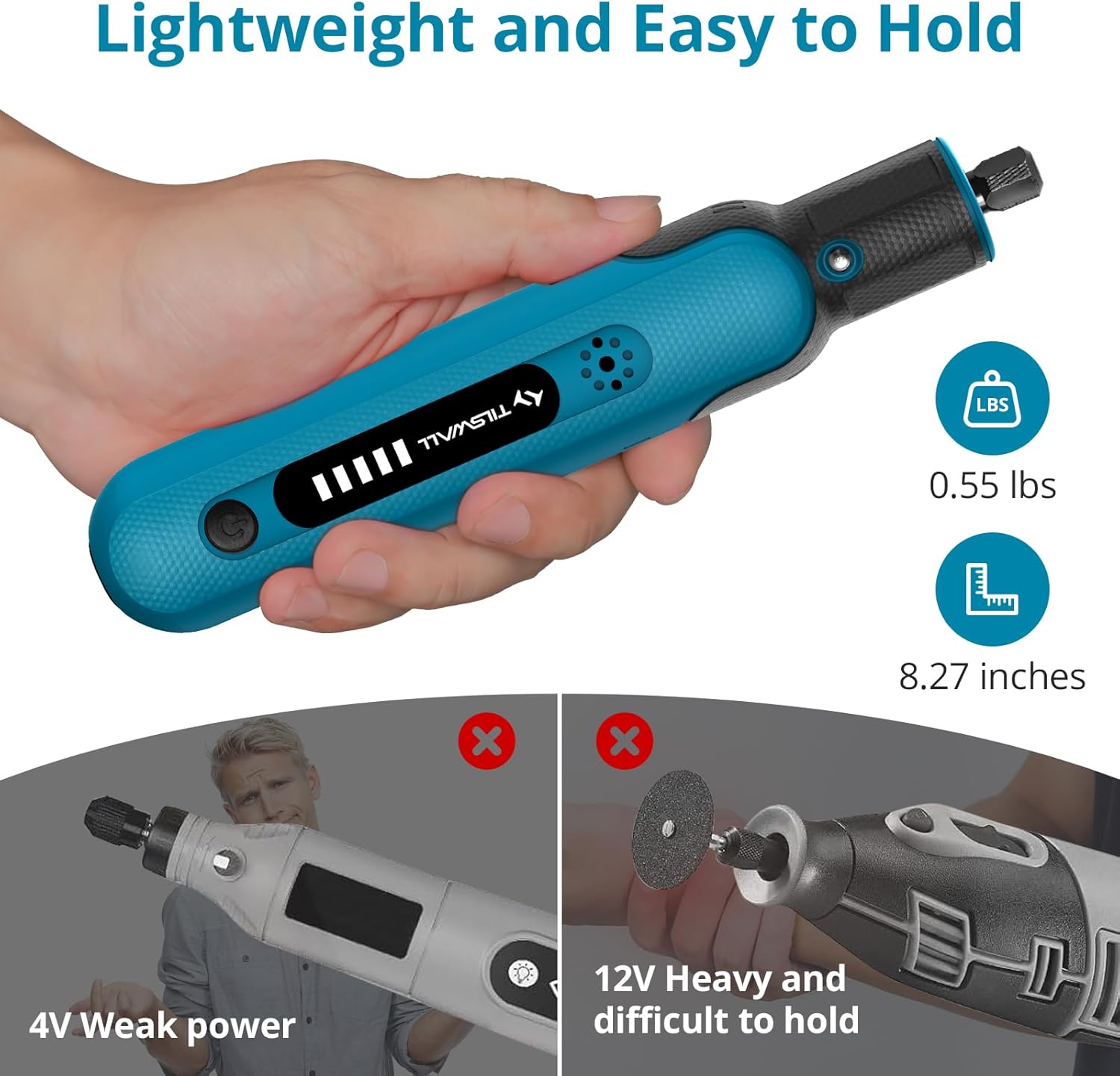
Image: A hand holding the Tilswall rotary tool, illustrating its lightweight design (0.55 lbs) and compact size (8.27 inches). The image also includes comparative visuals showing why it's preferred over weaker 4V tools and heavier 12V tools.
Adjustable 5-Speed Settings
The tool features a 5-speed design, allowing for precise control with speeds ranging from 5000 RPM to a maximum of 25000 RPM. This flexibility enables users to tailor the speed to specific DIY tasks and materials, ensuring detailed and accurate work.

Image: The Tilswall rotary tool with an illuminated speed indicator, showing five adjustable speed settings ranging from 5000 RPM to 25000 RPM, allowing for precise control during operation.
Automatic Motor Protection
For enhanced safety and tool longevity, the rotary tool includes an automatic protection feature. This system activates if the motor experiences a blockage, preventing potential damage to the tool and ensuring user safety. Once the obstruction is cleared, the tool automatically resumes operation without requiring a manual restart.

Image: The Tilswall rotary tool being used to drill into wood, accompanied by graphics explaining its automatic power-off protection feature that activates upon motor stall and automatically resumes operation once the stall is cleared.
Setup
- Initial Charge: Before first use, fully charge the rotary tool using the provided Type-C charging cable. Connect the cable to the tool's charging port and a compatible USB power adapter (not included). The battery indicator lights will show charging progress.
- Selecting an Accessory: Choose the appropriate accessory (e.g., sanding band, cutting disc, drill bit) for your task from the 105-piece kit.
- Attaching Accessories:
- Press and hold the spindle lock button located near the chuck.
- Unscrew the collet nut counter-clockwise.
- Insert the shank of the desired accessory into the collet. Ensure the accessory is fully seated.
- While still holding the spindle lock button, tighten the collet nut clockwise until the accessory is securely held. Do not overtighten.
- Release the spindle lock button.
- Workpiece Preparation: Ensure your workpiece is clean, dry, and securely fastened to prevent movement during operation.
Operating Instructions
- Power On/Off: Press the power button to turn the tool on. Press it again to turn it off.
- Adjusting Speed: The tool features 5-speed settings. Press the speed adjustment button (usually indicated by a plus/minus or mode icon) to cycle through the available speeds (5000 RPM to 25000 RPM). Select a speed appropriate for your material and application. Lower speeds are suitable for polishing and delicate work, while higher speeds are for cutting and grinding.
- Starting Operation: Hold the tool firmly with both hands if necessary, maintaining a comfortable and stable grip. Bring the accessory into contact with the workpiece gently.
- Application Techniques:
- Sanding/Grinding: Apply light, even pressure and move the tool consistently across the surface.
- Cutting: Use a steady, controlled motion. Do not force the tool, let the accessory do the work.
- Drilling: Start with a pilot hole if needed. Apply steady, downward pressure.
- Carving/Engraving: Use light pressure and precise movements for detailed work.
- Automatic Protection: If the motor stalls due to excessive pressure or obstruction, the tool's automatic protection will activate, temporarily stopping operation. Remove the obstruction or reduce pressure, and the tool will resume.
- Finishing: Once your task is complete, turn off the tool and allow the accessory to stop rotating completely before setting the tool down.
Maintenance
Regular maintenance ensures the longevity and optimal performance of your Tilswall rotary tool.
- Cleaning: After each use, disconnect the tool from the charging cable. Use a soft, dry cloth to wipe down the tool's exterior. Use a small brush or compressed air to clear dust and debris from the ventilation openings and the chuck area. Do not use harsh chemicals or abrasive cleaners.
- Accessory Care: Clean accessories after use. Store them in their designated compartments to prevent damage and loss. Replace worn or damaged accessories promptly.
- Battery Care: Store the tool in a cool, dry place. For long-term storage, ensure the battery is partially charged (around 50%). Avoid fully discharging the battery for extended periods.
- Storage: Store the rotary tool and its accessories in a clean, dry, and secure location, out of reach of children and away from direct sunlight or extreme temperatures.
Troubleshooting
| Problem | Possible Cause | Solution |
|---|---|---|
| Tool does not turn on. | Battery is discharged. | Charge the tool fully using the provided Type-C cable. |
| Tool stops during operation. | Motor overload protection activated. | Reduce pressure on the workpiece or clear any obstruction. The tool should resume automatically. |
| Accessory wobbles or falls out. | Collet nut not tightened sufficiently or accessory shank is dirty/damaged. | Ensure the collet nut is securely tightened. Clean the accessory shank. Replace damaged accessories. |
| Reduced performance/power. | Low battery charge; Worn or incorrect accessory. | Recharge the battery. Replace worn accessories. Ensure the correct accessory is used for the task. |
Specifications
| Feature | Detail |
|---|---|
| Brand | TILSWALL |
| Model Number | W402 |
| Voltage | 8 Volts |
| Power Source | Battery Powered |
| Battery Type | Lithium Ion (1 included) |
| Maximum Rotational Speed | 25000 RPM |
| Minimum Speed | 5000 RPM |
| Item Weight | 0.55 Pounds (8.8 ounces) |
| Dimensions (Package) | 9.69 x 6.1 x 1.65 inches |
| Included Components | Rotary Tool, 105 Accessories, Type-C Charging Cable, User Manual |
| Recommended Uses | Engraving, Cutting, Grinding, Polishing, Sanding, Carving, Drilling |
Warranty and Support
For warranty information, technical support, or any inquiries regarding your Tilswall 8V Cordless Rotary Tool Kit, please refer to the contact information provided on the product packaging or visit the official TILSWALL website. Keep your purchase receipt as proof of purchase for any warranty claims.
For further assistance, you may also visit the TILSWALL Store on Amazon.
Related documentsW402

Ask a question about this manual
Ask about setup, troubleshooting, compatibility, parts, safety, or missing instructions. Manuals+ will review the question and use this page’s manual context to help answer it.