
1. Introduction
Thank you for choosing the Propulsion Life ZQ03251EU 3D Animated DJ Disco Projector. This device is designed to create dynamic and engaging light shows for various events, including parties, live shows, weddings, and bars. It features a high-speed optical scanner for 3D animated effects, multiple operating modes, and vibrant RGB beam projections. Please read this manual thoroughly before operation to ensure safe and optimal performance.

Image 1.1: The Propulsion Life ZQ03251EU Disco Projector showcasing a variety of animated light patterns.
2. Safety Instructions
To prevent damage and ensure safe operation, observe the following safety guidelines:
- This product is intended for indoor use only and has an IP20 protection rating.
- Operate the device in dry environments. Avoid use in humid, overheated, or dusty conditions.
- Ensure adequate heat dissipation around the product. Keep it away from flammable objects or liquids.
- Do not expose the output optics (aperture) to cleaning chemicals.
- Avoid direct eye exposure to the light beams.
- Always disconnect power before cleaning or servicing.
3. Package Contents
Verify that all items are present in the package:
- 1 x Party Light Unit
- 1 x Power Cord
- 1 x Remote Control (1 CR2 battery included)
- 1 x User Manual

Image 3.1: All components included with the Propulsion Life ZQ03251EU Disco Projector.
4. Setup
4.1 Mounting
The projector can be installed on a ceiling or wall using the included mounting bracket. Ensure the mounting surface is stable and can support the weight of the device. Adjust the bracket to achieve the desired projection angle.
4.2 Power Connection
Connect the provided power cord to the projector's power input and then to a standard electrical outlet (110V to 220V-250V, 50/60Hz). The device will power on automatically.
4.3 Control Panel Overview
The rear panel of the projector features an LCD display, DMX input/output ports, and control buttons for menu navigation.
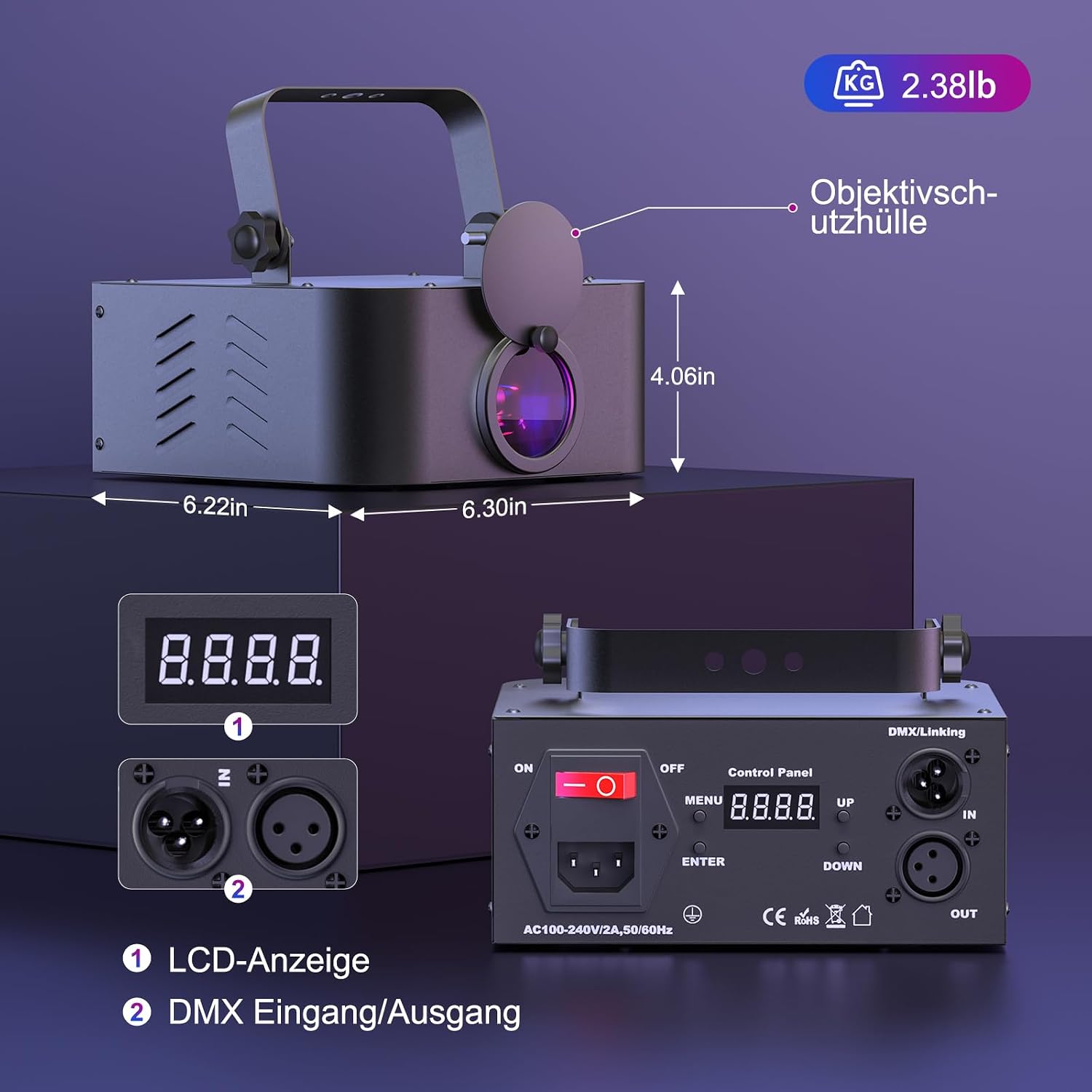
Image 4.1: Control panel and dimensions of the disco projector.
- LCD Display: Shows current mode and settings.
- DMX Input/Output: For connecting to a DMX controller or linking multiple units.
- MENU Button: Accesses the main menu.
- UP/DOWN Buttons: Navigate through menu options and adjust values.
- ENTER Button: Confirms selections.
5. Operating Modes
The projector offers several operating modes, selectable via the control panel or remote control:
5.1 Automatic Mode (AUTO-BEAM / AUTO-ANIMATION)
In this mode, the projector cycles through its built-in patterns and beam effects automatically, providing a continuous light show without external input.
5.2 Sound Activation Mode
The light patterns and beam effects will change and synchronize with the rhythm of the music or ambient sound. Sensitivity can be adjusted for optimal response.

Image 5.1: The projector operating in sound-activated mode, responding to music.
5.3 DMX Mode
Connect the projector to a DMX controller to gain precise control over its functions. The device supports 6-channel (6CH) and 34-channel (34CH) DMX modes, allowing for detailed adjustments of movement, rotation, zoom, pattern selection, and speed.
5.4 Master/Slave Mode
Link multiple ZQ03251EU units together. Set one unit as the 'Master' and others as 'Slave' units. The slave units will then mirror the master unit's operation, creating a synchronized light show across multiple projectors.
5.5 PC Control
The projector supports PC control for advanced programming and customization of light effects. Refer to specific software documentation for detailed instructions.
6. Features
- 3D Animated Effects: Utilizes a high-speed optical scanner to project intricate 3D animated images, hundreds of beam displays, and graphic patterns.
- RGB Beam Effects: Combines green, red, and blue beams to create vibrant and colorful patterns and lines.
- Adjustable Pattern Size: The size of the projected patterns can be adjusted to suit different venue sizes and preferences.
- Remote Control: Includes a remote control for convenient operation and mode selection.
- Cooling System: An integrated fan extends the lifespan of the disco light by maintaining optimal operating temperatures. The expected lifespan under normal conditions is 5,000 to 10,000 hours.

Image 6.1: Demonstrating the adjustable pattern size feature.

Image 6.2: A selection of the many patterns and effects available.
7. Maintenance
7.1 Cleaning
Regularly clean the projector's exterior with a soft, dry cloth. Ensure the lens is free of dust and smudges for clear projection. Do not use harsh chemicals or abrasive materials.
7.2 Storage
When not in use, store the projector in a cool, dry place, away from direct sunlight and extreme temperatures. Use the original packaging or a protective case to prevent damage.
8. Troubleshooting
- No Power: Check the power cord connection and ensure the outlet is functional.
- No Light Output: Verify the operating mode. If in DMX mode, ensure the DMX controller is sending signals correctly.
- Patterns Not Moving/Changing: In sound activation mode, ensure there is sufficient audio input. In DMX mode, check DMX signal and channel settings.
- Remote Control Not Working: Check the CR2 battery in the remote control and ensure there are no obstructions between the remote and the projector's IR receiver.
9. Specifications
| Feature | Specification |
|---|---|
| Brand | propulsion Life |
| Model Number | ZQ03251EU |
| Product Dimensions | 22.5 x 21 x 13.5 cm; 1.5 kg |
| Power Supply | Dual voltage 110V to 220V-250V, 50/60Hz |
| Wattage | 20W |
| Light Effect | Animation effect |
| Play Modes | Sound Activation, AUTO-BEAM, Auto Animation, DMX, Master/Slave, PC Control |
| DMX Channels | 6CH / 34CH |
| Pattern Size Adjustment | Range 30-100 |
| Scanner | Optical high-speed scanner, wide-angle scanner |
| Lifespan | 5,000 to 10,000 hours (under normal operating conditions) |
| Power Cord Length | 177 cm |
| Batteries Required | 1 CR2 battery (included for remote) |
| Color | RGB |
| Beam Angle | 15 Degrees |
| Installation Type | Ceiling or Wall Mount |
For detailed energy efficiency information, please refer to the EPREL database: https://eprel.ec.europa.eu/qr/2332798

Image 9.1: Energy label for a similar model (ZQ03058EU).
10. Warranty and Support
For warranty information or technical support, please contact Propulsion Life customer service through your retailer or the official brand website. Keep your purchase receipt as proof of purchase.