
1. Important Safety Instructions
Please read and understand all safety instructions before operating this product. Failure to follow these instructions may result in electric shock, fire, or serious injury.
- Do not expose the unit to water, rain, or moisture.
- Do not use or store the unit near fire or in high-temperature environments.
- Do not disassemble, repair, or modify the unit.
- Keep the unit away from children and pets.
- Ensure proper ventilation during use and charging to prevent overheating.
- Use only recommended accessories and charging cables.
- Avoid dropping or subjecting the unit to strong impacts.
- Do not insert foreign objects into the ports or vents.
2. Product Overview
The ALLWEI LiFePO4 Portable Power Station 1200W is a versatile power solution designed for various applications, from outdoor adventures to emergency home backup. It features a durable LiFePO4 battery and multiple output ports.
Included Components:
- 1x ALLWEI 1200W LiFePO4 Portable Power Station
- 1x AC Charging Cable
- 1x Car Cigarette Cable
- 1x Solar Cable
- 1x User Manual
Ports and Controls:
The power station is equipped with a clear display and various ports for different devices.
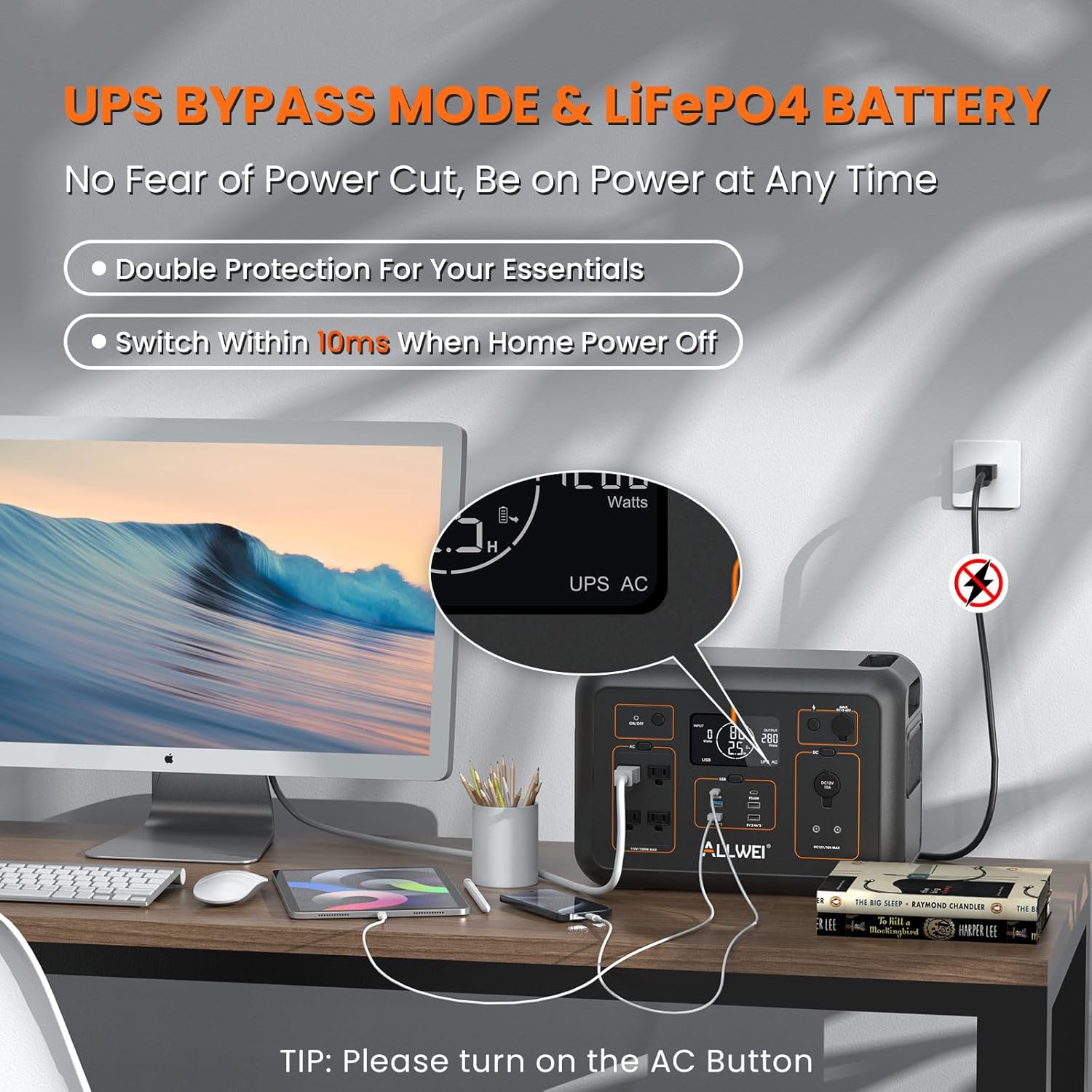
Figure 1: Front panel of the ALLWEI 1200W Portable Power Station, highlighting AC outlets, USB ports, DC ports, and the digital display.
- AC Outlets (4x 110V/1200W, Surge 2400W): For powering standard household appliances.
- USB-C Ports (2x 60W): For fast charging compatible USB-C devices.
- USB-A Ports (2x 18W, 2x 5V 2.4A): For charging various USB-powered devices.
- DC5521 Ports (2x): For connecting DC-powered devices.
- Car Lighter Socket (1x): For 12V car accessories.
- Digital Display: Shows battery level, input/output wattage, and estimated remaining runtime.
- LED Light: Integrated LED light with multiple modes for illumination.
3. Charging the Power Station
The ALLWEI 1200W Power Station offers multiple charging methods to ensure you always have power when you need it.
AC Wall Charging:
Use the provided AC Charging Cable to plug the power station into a standard wall outlet. The unit supports Quick, Normal, and Silent charging modes.
- Quick Charging Mode (Q Mode): 0-80% in approximately 60 minutes, full charge in 1.5 hours.
- Normal Charging Mode: Full charge in 4-5 hours.
- Silent Charging Mode: Full charge in 7-8 hours.

Figure 2: The power station connected to an AC wall outlet for rapid charging, showing different charging speed options.
Solar Charging:
Connect compatible solar panels (12V-60V, 10A Max, up to 400W) using the provided Solar Cable. The integrated MPPT controller optimizes solar input for efficient charging.
- 200W Solar Panel: Approximately 6.6-7.6 hours for full charge (in full sun).
- 400W Solar Panel: Approximately 3.3-4.3 hours for full charge (in full sun).
Car Charging:
Use the Car Cigarette Cable to charge the power station from your vehicle's 12V or 24V cigarette lighter socket.
- 12V Car Charging: Approximately 7-8 hours.
- 24V Car Charging: Approximately 3.5-4.5 hours.

Figure 3: The power station connected to solar panels and a car for charging, illustrating the flexibility of power input sources.
4. Operating the Power Station
Power On/Off:
Press and hold the main power button to turn the unit on or off. The digital display will illuminate upon activation.
Activating Outputs:
Individual output sections (AC, DC, USB) have dedicated buttons. Press the respective button to activate or deactivate the desired output ports. The digital display will show the active outputs and their current wattage.
Digital Display:
The display provides real-time information:
- Battery Level: Indicates the remaining battery charge.
- Input Wattage: Shows the power being drawn during charging.
- Output Wattage: Displays the power consumed by connected devices.
- Remaining Runtime: Estimates how long the unit can power current loads based on battery level.
LED Light:
The integrated LED light has 4 modes (e.g., steady, SOS). Press the LED button to cycle through the modes or turn it off.

Figure 4: The power station in use, providing power to multiple devices simultaneously, demonstrating its versatility.
5. UPS Functionality
The ALLWEI 1200W Power Station features an Uninterruptible Power Supply (UPS) mode with a rapid 10ms switchover time. This ensures that essential appliances connected to the AC outlets continue to receive power without interruption during a wall outlet power failure.
When the power station is connected to a wall outlet and devices are plugged into its AC outputs, it acts as a pass-through. If the wall power is interrupted, the unit automatically switches to battery power within 10 milliseconds, preventing downtime for sensitive electronics like CPAP machines, fish tank pumps, or mini-fridges.

Figure 5: Visual representation of the UPS function, demonstrating seamless power transition during an outage.
6. Maintenance and Storage
Proper maintenance ensures the longevity and optimal performance of your ALLWEI Power Station.
- Long-Term Storage: If not using the unit for extended periods, power it off and disconnect the AC adapter from the outlet. Charge the unit to 80% capacity every 3-6 months for optimal battery health.
- Operating Temperature: Store and operate the unit within the recommended temperature range (refer to specifications).
- Cleaning: Use a dry, soft cloth to clean the unit. Do not use liquid cleaners.
- Overload Protection: Charge your devices within the 1200 watts limit. The battery will automatically turn off due to over-load protection if exceeded.
7. Troubleshooting
If you encounter issues with your power station, refer to the following common solutions:
| Problem | Possible Cause | Solution |
|---|---|---|
| Unit does not turn on | Low battery; Power button not pressed correctly | Charge the unit; Press and hold the power button for 3 seconds. |
| No output from ports | Output section not activated; Overload protection triggered | Press the respective AC/DC/USB button; Disconnect device, restart unit, and connect devices within power limits. |
| Slow charging | Using Normal/Silent mode; Inefficient solar input | Switch to Quick Charging Mode; Ensure solar panels are in direct sunlight and correctly angled. |
| Display not working | Display turned off; Unit off | Press the Display button; Turn on the main power. |
8. Specifications
| Feature | Detail |
|---|---|
| Brand | ALLWEI |
| Model Name | 1200W LiFePO4 Portable Power Station (SGR-PPS1200-3) |
| Wattage | 1200 watts (Output) |
| Surge Wattage | 2400 watts |
| Battery Capacity | 1008Wh |
| Battery Type | LiFePO4 (Lithium Iron Phosphate) |
| Lifespan | Over 3,500 charge cycles to 70%+ capacity (approx. 10 years) |
| Power Source | Battery Powered, Solar Powered |
| AC Output | 4x 110V/1200W (Surge 2400W) |
| USB-C Output | 2x 60W |
| USB-A Output | 2x 18W, 2x 5V 2.4A |
| DC Output | 2x DC5521, 1x Car Lighter (DC12V 10A) |
| AC Charging Time | 1.5 hours (Quick Mode) |
| Solar Input | DC 12V-60V, 10A Max (Up to 400W) |
| UPS Switchover Time | Less than 10ms |
| Item Weight | 28 Pounds |
| Product Dimensions | 14.9"L x 8.6"W x 10.2"H |
| Material | ABS, Polycarbonate |
| Certifications | CE/FCC Certified, ETL Certified Safety |
9. Warranty and Support
ALLWEI provides a 5-Year Premium Warranty for this product, exceeding the industry standard of 2 years. This warranty covers defects in materials and workmanship under normal use.
For assistance, please reach out to us at: support@allweipower.com
We also offer a 30-Day No-Hassle Return policy.


