
ALLPOWERS AP-SS-010-US
ALLPOWERS R1500 LITE Portable Power Station User Manual
Model: AP-SS-010-US
Product Overview
The ALLPOWERS R1500 LITE is a portable power station designed for versatile power needs, offering a 1056Wh LiFePO4 battery backup. It features multiple output ports, fast charging capabilities, and an uninterruptible power supply (UPS) function, making it suitable for camping, RV travel, home backup, and outdoor use.
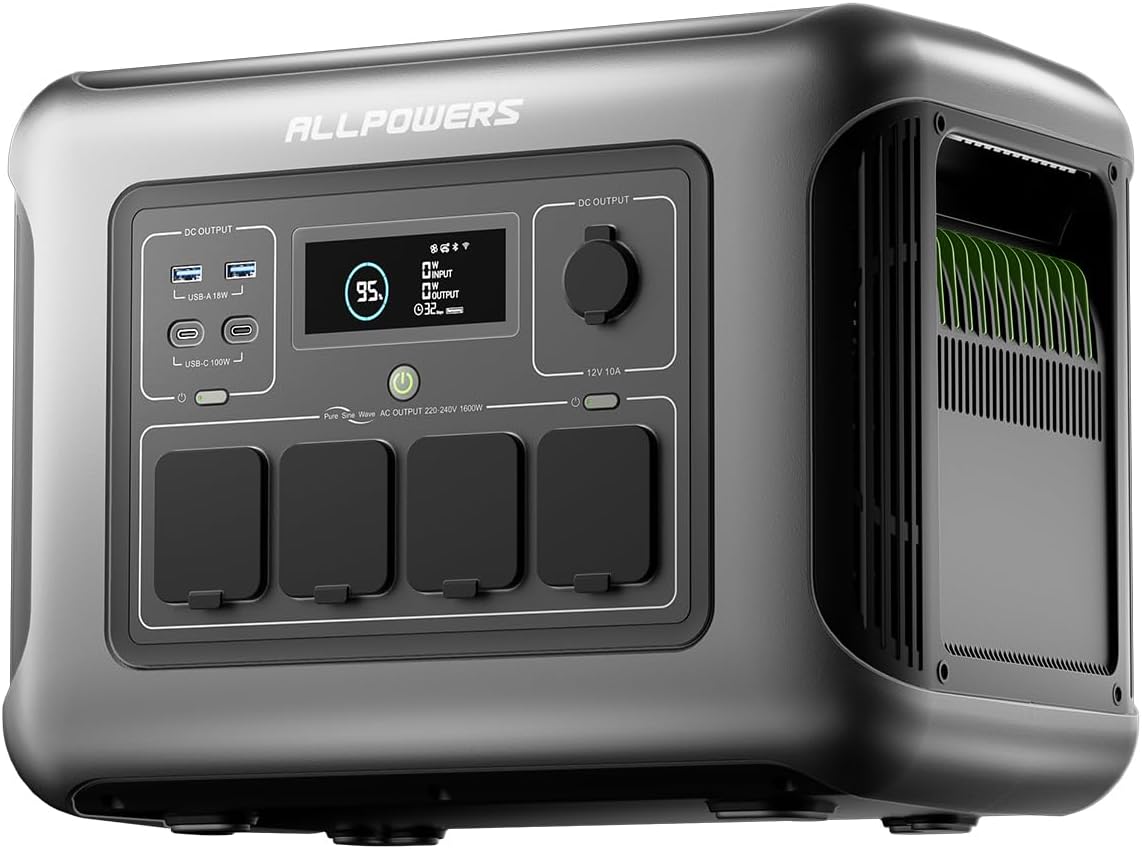
Figure 1: Front view of the ALLPOWERS R1500 LITE Portable Power Station, showing its display and various output ports.
Specifications
| Feature | Detail |
|---|---|
| Brand | ALLPOWERS |
| Model | AP-SS-010-US |
| Battery Capacity | 1056Wh LiFePO4 |
| AC Output | 4 x 110V 1600W (3200W peak) Pure Sine Wave |
| USB-C Output | 2 x 100W |
| USB-A Output | 2 x 18W |
| Car Cigarette Lighter Output | 1 x 12V/10A |
| Max AC Input | 1200W (0-80% in 40 minutes) |
| Max Solar Input | 650W |
| UPS Function | 15ms switching time |
| Noise Level | Below 35 dB (Mute charging mode) |
| Lifespan | >3500 cycles to 80% capacity, >6500 cycles to 50% capacity |
| Dimensions | 12.28"L x 10.43"W x 16.25"H |
| Weight | 36.8 Pounds |
Setup
Before first use, ensure the ALLPOWERS R1500 LITE is fully charged. Use the provided AC charging cable to connect the power station to a standard wall outlet. The LCD display will indicate the charging status.

Figure 2: The ALLPOWERS R1500 LITE being charged via a wall outlet, illustrating the fast charging capability.
Connecting Solar Panels (Optional)
The R1500 LITE supports up to 650W solar input. Connect compatible solar panels to the designated solar input port on the unit. Ensure panels are placed in direct sunlight for optimal charging efficiency.

Figure 3: The ALLPOWERS R1500 LITE connected to solar panels for charging in an outdoor setting.
Operating Instructions
Powering Devices
To power AC devices, open the protective covers for the AC outlets and plug in your devices. Press the AC output button to activate the ports. For USB and 12V DC devices, simply plug them into the corresponding ports. The LCD display will show the current output wattage and estimated remaining runtime.

Figure 4: The ALLPOWERS R1500 LITE powering multiple devices simultaneously, including a phone, laptop, drone, and speaker.
UPS Function
The R1500 LITE features an Uninterruptible Power Supply (UPS) function. Connect critical devices like computers or medical equipment to the AC outlets. In case of a power outage, the unit will automatically switch to battery power within 15ms, ensuring continuous operation and preventing data loss or disruption.
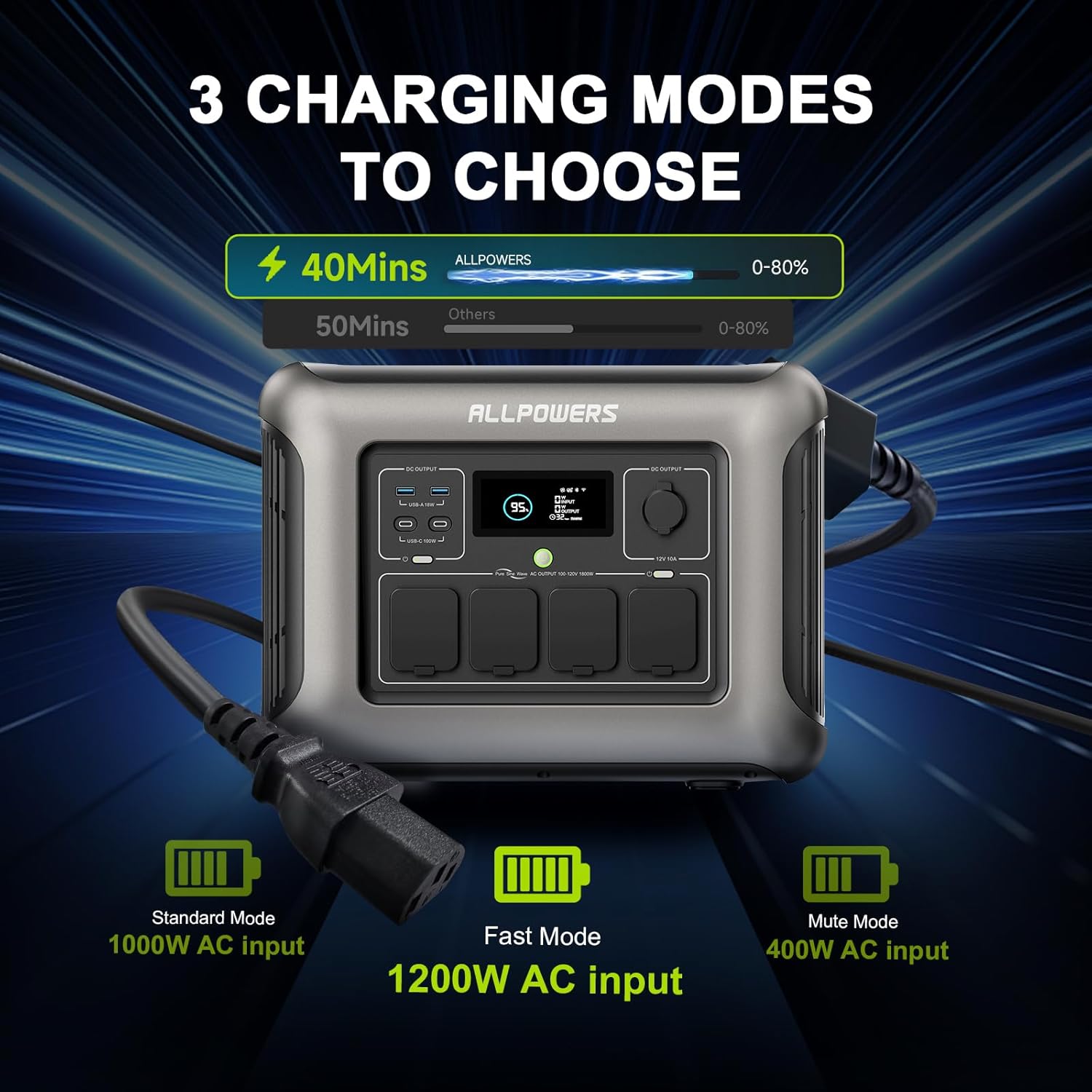
Figure 5: The ALLPOWERS R1500 LITE providing continuous power to an aquarium using its UPS function.
App Control
Download the ALLPOWERS App from your device's app store. Connect the power station via Bluetooth or Wi-Fi to monitor power status, customize AC charging speed, and control AC/DC output remotely. The app provides real-time data on input/output wattage and remaining battery life.

Figure 6: The ALLPOWERS R1500 LITE being controlled via the mobile application, showing various monitoring and control options.
Maintenance
Keep the unit clean and free from dust. Store in a cool, dry place away from direct sunlight and extreme temperatures. Avoid exposing the unit to water or high humidity. For long-term storage, charge the battery to 50-80% every 3-6 months to maintain battery health.
Troubleshooting
Unit Not Turning On
- Ensure the battery is charged. Connect to an AC outlet or solar panels.
- Press and hold the main power button for 3-5 seconds.
No Output from Ports
- Verify that the specific output ports (AC, DC, USB) are activated via their respective buttons.
- Check the LCD display for any error codes or overload indicators.
- Ensure the device being powered does not exceed the port's maximum wattage.
Slow Charging
- For AC charging, ensure you are using the provided power cable and a stable power source.
- For solar charging, verify that solar panels are clean, unobstructed, and positioned for maximum sunlight exposure.
- Check the app settings to ensure the charging mode is not set to "Mute charging mode" which limits input wattage.
Warranty and Support
The ALLPOWERS R1500 LITE Portable Power Station comes with a 6-year warranty. For technical support, warranty claims, or further assistance, please refer to the contact information provided in the included User Manual or visit the official ALLPOWERS website.
For additional resources and product videos, please visit the ALLPOWERS store on Amazon: ALLPOWERS Store
Product Videos
ALLPOWERS R1500 Portable Power Station Overview
This video provides a comprehensive overview of the ALLPOWERS R1500 Portable Power Station, detailing its features, ports, and general functionality. It highlights the unit's quiet operation and various charging options.
ALLPOWERS R1500 Power Station - Home Backup Use Case
This video demonstrates the ALLPOWERS R1500's effectiveness as a home backup solution, specifically showing its ability to power a refrigerator during an outage. It emphasizes the convenience of an indoor-operable power station compared to traditional gas generators.
ALLPOWERS R1500 Power Station - Powering Tools
This video showcases the ALLPOWERS R1500's capability to power various tools, including a drill press and a circular saw. It highlights the unit's utility for remote work sites or situations where traditional power outlets are unavailable.
ALLPOWERS R1500 Power Station - Charging Capabilities
This video details the various charging capabilities of the ALLPOWERS R1500, including its USB-A, USB-C, and wireless charging pads. It demonstrates how the unit's display provides real-time information on power input and output for connected devices.
Related documentsAP-SS-010-US


Ask a question about this manual
Ask about setup, troubleshooting, compatibility, parts, safety, or missing instructions. Manuals+ will review the question and use this page’s manual context to help answer it.