
Introduction
Thank you for choosing the DAYI D-25 Digital Electronic Safe Box. This manual provides essential information for the proper setup, operation, and maintenance of your new safe. Please read it thoroughly before use to ensure optimal security and functionality.

Image: The DAYI D-25 Safe Box, showcasing its interior capacity and included fireproof bag.
Setup
1. Unboxing and Initial Access
Upon receiving your safe, carefully remove it from its packaging. The safe is initially locked. To open it for the first time:
- Locate the emergency keyhole cover on the digital keypad.
- Gently pry open the cover.
- Insert one of the provided backup keys into the keyhole and turn it counter-clockwise until it stops.
- While holding the key, rotate the knob on the keypad clockwise to open the safe door.
2. Battery Installation
The safe requires 4 AA batteries (not included) for the electronic keypad. Do not use rechargeable batteries or mix old and new batteries.
- With the safe door open, locate the battery compartment on the inside of the door.
- Open the battery cover.
- Insert 4 AA batteries, ensuring correct polarity (+/-).
- Close the battery cover securely.

Image: Steps for initial key access and battery installation.
3. Setting the User Passcode
It is highly recommended to set your personal passcode immediately after battery installation. The default passcode is "123456".
- With the safe door open, press the green setting button located on the inside edge of the door.
- The yellow indicator light on the keypad will illuminate.
- Enter your desired 3-8 digit passcode on the keypad.
- Confirm your passcode by pressing the "#" key. The green light will flash, indicating successful programming.
- IMPORTANT: Test your new passcode several times with the door open before closing it to ensure it works correctly.
4. Mounting the Safe
The DAYI D-25 safe can be securely mounted to a wall or floor using the provided hardware to prevent unauthorized removal.
- Choose a suitable location for mounting. Ensure the surface is sturdy enough to support the safe's weight and contents.
- Mark the desired drilling points through the pre-drilled holes on the back or bottom of the safe.
- Drill pilot holes into the wall or floor using an appropriate drill bit.
- Align the safe with the drilled holes and secure it using the provided anchoring bolts.

Image: Illustration of the wall mounting process for enhanced security.
Setup Videos
Video: "How to set up your safe box? - DAYI Basic" - A step-by-step guide on preparing your DAYI safe box for first-time use, including battery installation and initial passcode setup.
Video: "How to set up your digital safe?" - Detailed instructions on configuring the digital keypad and setting your personal access code.
Operating Your Safe
1. Unlocking with Passcode
- Enter your programmed 3-8 digit passcode.
- Press the "#" key. The green indicator light will illuminate.
- Rotate the knob clockwise within 5 seconds to open the door.
2. Unlocking with Backup Key
In case of forgotten passcode or battery failure, use the backup key:
- Open the emergency keyhole cover.
- Insert the backup key and turn it counter-clockwise until it stops.
- Rotate the knob clockwise to open the door.
3. Emergency Power Supply
If the internal batteries are depleted and you do not have the backup key readily available, you can use an external USB-C power bank (not included) or the provided emergency battery box (requires 4 AA batteries) to power the keypad:
- Plug the USB-C cable from a power bank into the USB-C port on the keypad, or connect the emergency battery box to the port.
- The keypad will power on. Enter your passcode and press "#".
- Rotate the knob clockwise to open the door.
4. Dual Alarm System
The safe is equipped with a dual alarm system for enhanced security:
- If an incorrect passcode is entered three consecutive times, a loud 70-decibel alarm will sound.
- Any forceful breach or tampering with the safe will also trigger the alarm.
- To silence the alarm, enter the correct passcode or use the backup key.

Image: The dual alert system activates upon unauthorized access or forceful breach.
5. Interior Features
- Removable Shelf: The safe includes a removable shelf for versatile interior organization. Adjust or remove it to accommodate items of various sizes.
- LED Interior Lighting: An integrated LED sensor light illuminates the interior when the door is opened, providing effortless access to your belongings even in low-light conditions.
- Soft Interior Lining: The interior is lined with a custom carpet to protect delicate valuables from scratches and damage during storage.
- Key Hooks: Built-in hooks on the inside of the door provide convenient storage for keys or small items.
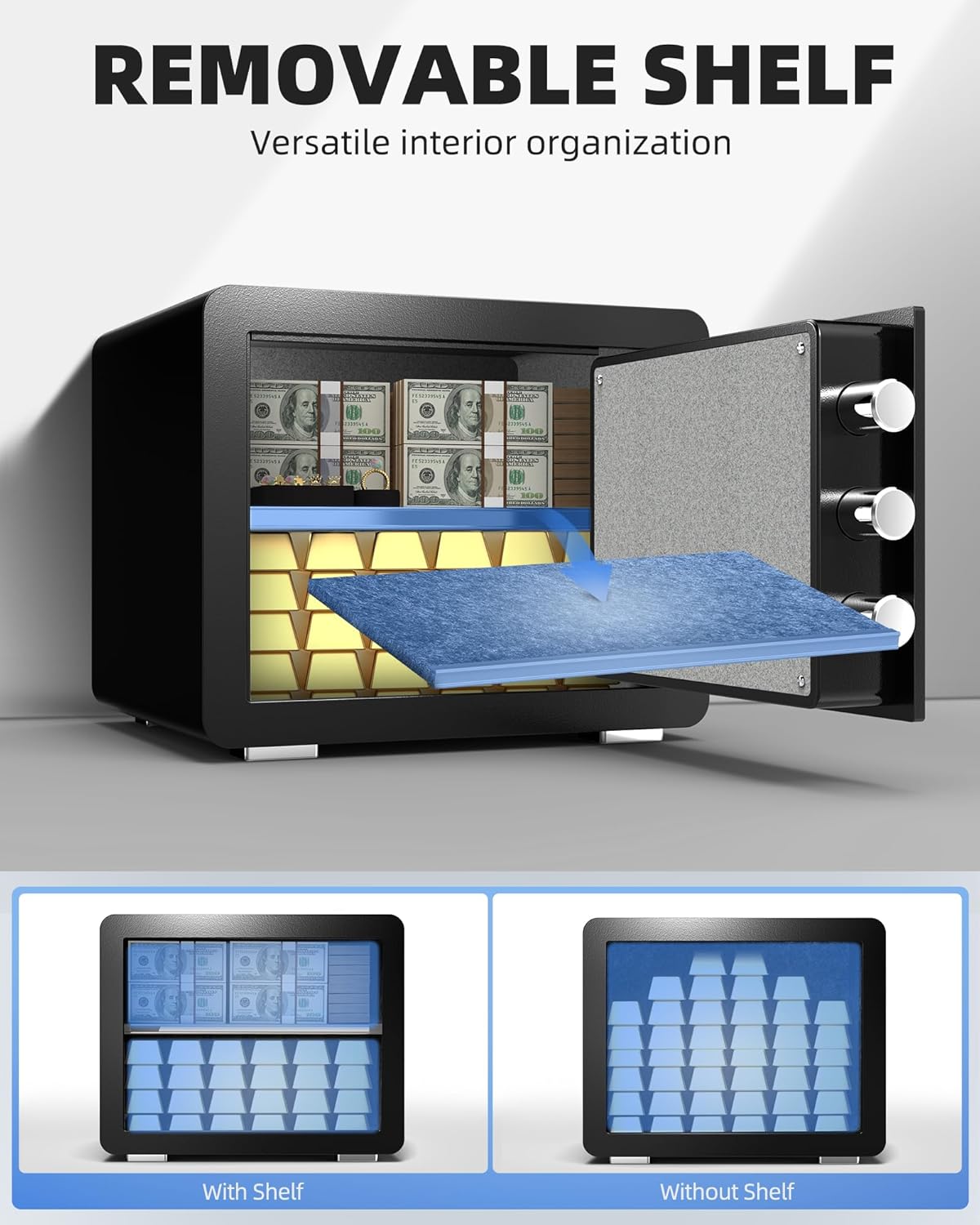
Image: The removable shelf allows for flexible interior organization.
Maintenance
- Battery Replacement: Replace the AA batteries in the keypad approximately once a year, or when the low battery indicator appears. Always use new, non-rechargeable batteries.
- Cleaning: Clean the exterior of the safe with a soft, damp cloth. Avoid using abrasive cleaners or solvents that could damage the finish.
- Key Storage: Store backup keys in a secure location away from the safe. Do not store them inside the safe.
Troubleshooting
- Keypad Not Responding: Check if the batteries are correctly installed and have sufficient power. Use the emergency power supply or backup key if batteries are dead.
- Alarm Sounds Unexpectedly: Ensure no one has attempted to enter an incorrect passcode multiple times or forcefully tamper with the safe. Enter the correct passcode or use the backup key to disarm.
- Door Will Not Open: Verify that the correct passcode is entered and the knob is rotated clockwise within 5 seconds. If the electronic system fails, use the backup key.
Specifications
| Feature | Detail |
|---|---|
| Brand | DAYI |
| Model Number | D-25 |
| Product Dimensions | 9.9"D x 13.8"W x 9.9"H |
| Capacity | 0.8 Cubic Feet |
| Lock Type | Electronic Combination Lock, Key |
| Material | Alloy Steel |
| Special Features | Alarm System, Anti-Theft, Combination Lock, Removable Shelf, Sensor Light |
| Mounting Type | Wall Mount |
| Item Weight | 18.5 Pounds |
| Water Resistance Level | Waterproof (with included bag) |
| Batteries Required | 4 x AA (not included) |

Image: Product dimensions and included accessories.
Warranty and Support
For warranty information or technical support, please refer to the contact details provided with your purchase documentation or visit the official DAYI website. Keep your purchase receipt as proof of purchase.


